
Spring School Census
Please find information relating to the Spring School Census 2023 below: –
- Census day 19/01/2023
- Attendance collected from 01/09/2022 to 31/12/2022
- Exclusions collected from 18/04/2022 to 31/12/2022
- Alternative Provision Placements collected from 06/10/2022 to 19/01/2023
- Funding and Monitoring collected from 01/08/2022 to 19/01/2023
- Learner Support collected from 01/08/2022 to 19/01/2023
- Free School Meal Eligibility collected from 07/10/2022 to 19/01/2023.
New items collected for the first time in the school census:
- School Time – this is voluntary this census, but will be mandatory in Spring 2024 (this is not applicable to Nursery School)
- Two new Alternative Provision data items – Companies House Number and Alternative Provision Postcode.
- Young Carer – 3 options available; – not declared, identified by Parent or guardian, or identified by school
We will be sending out guidance in January’s newsletter but please check the links in your MIS data for further details and the training links for upcoming courses.
Customer Portal and Ticket Logging Updates
1. Have you noticed our new feedback option on the closure email you receive when your help desk ticket is closed?

We really value your feedback for the service you receive from us and will use it for continuous improvements to our help desk. Please take a moment to click on one of the faces on your email to let us know how well you think we dealt with your ticket. You will also be given the option of leaving a comment if you wish.
2. Areas of Interest
Please take a look at the Ares of Interest section when you next log into the Customer Portal. Setting your preferences in here ensures that any communications we send out to schools are reaching the most appropriate staff members. This is especially important if you are working in Exams or the Statutory Census returns. Please select all areas that are of interest to ensure that you don’t miss any important updates from us.
Summer 2023 Exams Basedata
Base data was released on Wednesday 23rd November by the Awarding Bodies and is now available for all MIS platforms.
Reminder: Release of GCSE Results for November 2022 Series of Exams
- Restricted release of results to centres ONLY – 11th January 2023
- Release of results to candidates – 12th January 2023
Webinar Week - Recordings and Feedback
Thank you to all who joined our Best Practice in MIS webinars that took place in October and November.
If you were unable to attend on the day, all webinars were recorded and are available to view on our customer portal:
https://my.www.schoolicts.co.uk/portal/kb
We had record numbers of delegates attending these FREE sessions and would love to hear your feedback on them! We’d be grateful if you could please spare a minute to complete our feedback form via the following link: –
https://www.schoolicts.co.uk/feedbackwebinarweek-november2022

New Features and Autumn Release
SIMS Interventions
SIMS Interventions enables schools to enrol pupil/students who are not achieving as expected on a course of intervention measures. It is possible to allocate additional resources, monitor the use of these resources and gauge how these resources affect Key Performance Indicators, as well as record the cost of the resources. This enables schools to track the cost of intervention measures against overall effectiveness and the resulting pupil/student outcomes.
Additional Panel for Intervention Attendance
Focus | Interventions| Run Intervention
An extra panel has been provided for Intervention Attendance which enables you to record the pupil/students who attended and participated in each scheduled Intervention session.
Improvements and Amendments to Interventions
Several enhancements have been introduced to improve Intervention functionality.
Focus | Interventions | Plan Interventions
- Additional values can now be added to the Intervention Area lookup (via Tools | Lookups | Maintain).
Focus | Interventions | Run Intervention
- Filter by Academic Year in Run Interventions
- Remove Academic Year restriction on Run Interventions.
Reports | Interventions | Student Intervention Report
- Intervention Notes can be included in the Student Intervention Report.
Additional Fields Provided for Child in Need
Focus | Student | Student Details
An additional section has been provided in the Welfare panel, enabling schools to record the details of a Child in Need.
Enhancements to Maintain Detentions
Focus | Behaviour Management | Maintain Detentions
On saving the pupil/students who have been added to a detention, a confirmation message is now displayed indicating that related behaviour incidents will be created for each of the pupil/students if you proceed.
Personal Pronouns – Enhancements to Student Teacher View
Focus | Student | Student Teacher View
A suffix of the pupil/student’s chosen personal pronoun is displayed in bold text at the top of their Student Details page.
Personal Pronouns – Button to Add Pronouns to the SIMS Dictionary
Tools | Setups | Pronoun Setup An additional button has been provided that enables you to add the saved pronouns to the SIMS Dictionary. This ensures that subsequent use of personal pronouns does not result in the pronouns being highlighted as spelling mistakes or unrecognised words in Assessment and Profiles reports.
SIMS Homepage
Additional ESS Newsfeed Widget
Focus | Homepage
A new widget has been provided that ensures all school users can view and access specific information about SIMS, especially our NextGen products. This is based on relevant newsfeeds that are posted to Service Now within the last 90 days. This widget is available for all SIMS users and is set to active, by default.
Spring School Census
To generate the Spring census, you will need to be on Autumn Release version 7.208 and the latest fileset in the 2300 series.
- Census day 19/01/2023
- Attendance collected from 01/09/2022 to 31/12/2022
- Exclusions collected from 18/04/2022 to 31/12/2022
- Alternative Provision Placements collected from 06/10/2022 to 19/01/2023
- Funding and Monitoring collected from 01/08/2022 to 19/01/2023
- Learner Support collected from 01/08/2022 to 19/01/2023
Free School Meal Eligibility collected from 07/10/2022 to 19/01/2023.
New items collected for the first time in the school census:
- School Time – this is voluntary this census, but will be mandatory in Spring 2024 (this is not applicable to Nursery School)
- Two new Alternative Provision data items – Companies House Number and Alternative Provision Postcode
- Young Carer – 3 options available; – not declared, identified by Parent or guardian, or identified by school
SIMS Upgrade
Form to complete
We are currently working on streamlining our SIMS Upgrade processes to make it easier for our schools and to help minimise issues occurring after the upgrade has been run.
With this in mind, we are asking if you could please complete a short form to assist us. We will use the responses to ensure we are able to update the relevant people at the time of any upgrade, and that the process is suitable for each school where possible.
To access the form please use the following link: https://forms.office.com/r/W3LU1GSfJw

New and Improved - Custom Report Writer
Arbor have improved their Summative Baseline and Year Target assessment columns by removing unneeded fields in the slide over, pre-filling the academic year, and automatically selecting the display grade when an assessment is selected.
The Detention Type(s) column has been renamed to Detention Type(s) Issued, to reflect that this column is actually for reporting on when the detentions were issued.
Emergency alerts -Arbor have increased the background priority for Emergency Alert emails so they will be sent out as soon as possible.
Attendance – Improved attendance calculations to minimise missing marks when you run interventions. If an attendance record starts prior to a Timetable Period but ends during the period, Arbor consider that attendance mark to calculate that Timetable Period’s best mark.
Bulk action – New bulk actions to the Update GCSE Attainment for Funding page so you can more easily update the individual Maths and English grades and information.
Arbor Exams and In House Exams - Best Practice FREE Webinar Recordings
Arbor Exams and In House Exams Best Practice free webinar recordings
We recently hosted some free webinars for Arbor Exams and In House Exams which you can watch back on our Customer Portal, these can be found by clicking on the title below:
Spring Census - 19th January
Census day 19/01/2023
- Attendance collected from 01/09/2022 to 31/12/2022
- Exclusions collected from 18/04/2022 to 31/12/2022
- Alternative Provision Placements collected from 06/10/2022 to 19/01/2023
- Funding and Monitoring collected from 01/08/2022 to 19/01/2023
- Learner Support collected from 01/08/2022 to 19/01/2023
- Free School Meal Eligibility collected from 07/10/2022 to 19/01/2023.
New items collected for the first time in the school census:
· School Time – this is voluntary this census, but will be mandatory in Spring 2024 (this is not applicable to Nursery School).
· Two new Alternative Provision data items – Companies House Number and Alternative Provision Postcode.
· Young Carer – 3 options available; – not declared, identified by Parent or guardian, or identified by school
Please see links below for guidance on creating and validating your census return in Arbor:
https://support.arbor-education.com/hc/en-us/articles/360016258117-Preparing-for-the-school-census

Creating a New Report
To create a new report, use the New Report button at the top:

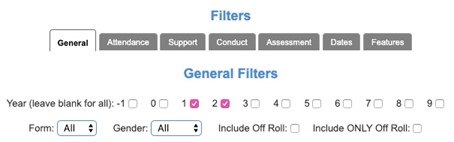
This will take you to a screen filled with options to design your report. These options are split into two types. On the left are filters, these will determine which students are pulled through to the report. For example, if you only want to report on KS1 students who have attendance below 90% you would select the following filters:
Then for attendance click the attendance filter tab:
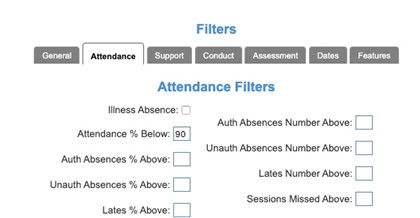
Your selected filters will show at the bottom on the left so you can check that you have selected everything you require or remove any filters not needed.
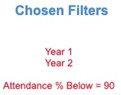
If you wish to run the report for the whole school, you do not need to select any year groups under filters.
There are many options under the tabs in filters one filters tab to be aware of is the features tab. The options under this tab allow you to filter by a variety of groups including dynamic, static and family groups.
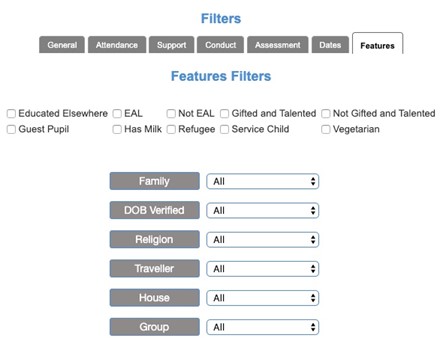
Once you are happy you have selected all the filters to pull through the required students you can select what information you wish to show on the report. This is done on the right using the options under display columns.
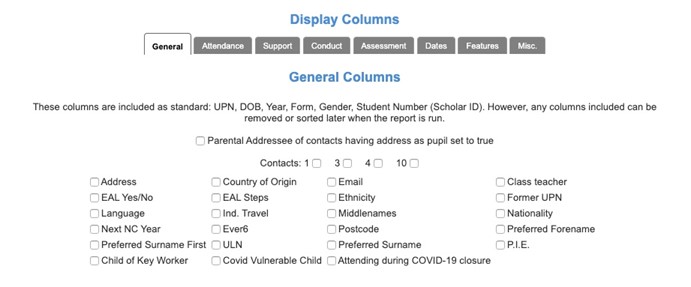
As standard the report will show UPN, first name, surname, DOB, year, form and scholar ID (student ID). Note if you do not require any of these columns these can be removed once the report has been run.
As with the filters you can click through the different display column tabs to select the items you need on your report. For example, if you need the attendance percentage to show you would select this under the attendance tab of the display column options:

Again, your chosen display columns will show at the bottom on the right so that you have sight of what information will pull through to your report.
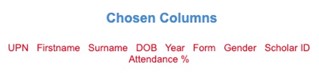
Once you are satisfied with the report you have designed you can click Run Report at the bottom to produce the report as a one off.
Or you can use save the report to use again. To do this type a report name and click Save Report.

When you have run your report you can sort the report by clicking on the column title, for example if you wanted to sort it by surname you would click the surname header. You may also notice a little bin on the column header you can click this to remove and columns you don’t need.
There is also the functionality to filter the run report further. Underneath the column headers there are white text boxes; you can type in these boxes to filter. For example, if you only want to look at female students you can type F in the box under the gender header and type enter on your keyboard:

Now that you have the report just as you need it you can download the report using the icons in the top right.
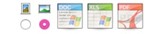
The first two options are for selecting to download the report in portrait or landscape. Once this has been selected you can click the icon; word, excel or PDF for which file type you need.
Any reports that you customise can be saved and managed in folders in the same area.
School Census 19th January 2023
Census day 19/01/2023
- Attendance collected from 01/09/2022 to 31/12/2022
- Exclusions collected from 18/04/2022 to 31/12/2022
- Alternative Provision Placements collected from 06/10/2022 to 19/01/2023
- Funding and Monitoring collected from 01/08/2022 to 19/01/2023
- Learner Support collected from 01/08/2022 to 19/01/2023
- Free School Meal Eligibility collected from 07/10/2022 to 19/01/2023.
New items collected for the first time in the school census:
- School Time – this is voluntary this census, but will be mandatory in Spring 2024 (this is not applicable to Nursery School)
- Two new Alternative Provision data items – Companies House Number and Alternative Provision Postcode
- Young Carer – 3 options available; – not declared, identified by Parent or guardian, or identified by school
Please see below the link to ScholarPack guidance on creating the return below:
https://support.scholarpack.com/hc/en-gb/categories/6079131370013-Census-all-guidance

SIMS and Arbor Training Courses
Training courses for the 2022/2023 academic year are now live! Please note that we have limited spaces available on our online training courses. This is to ensure trainers can deliver courses to the highest standard, and to make sure delegates get the most from their course. Popular courses do get booked up early so if there is one you have your eye on, book now!
We have a comprehensive schedule of online ’live’ SIMS and Arbor training courses along with Distance Learning courses, which you can complete in your own time, to help you develop your knowledge of SIMS and Arbor and get the most out of your MIS (Management Information System).
Booking is now open please visit https://www.schoolicts.co.uk/online-training/
Upcoming courses : –
Arbor
- Arbor Parental Engagement and Communications – 06/12/22
- Arbor Spring Census – 17/01/23
- Arbor Behaviour User and Reporting – 24/01/23
- Arbor Examinations – 30/01/23
SIMS
- Primary Spring Census – 10/01/23
- Secondary Spring Census – 11/01/23
- Primary New Office User – 24/01/23
- Exam Organiser – 25/01/23
NEW Virtual Data Manager Team

School ICT has launched a NEW School Genie – Data Genie – which is our team of Virtual Data Managers (VDM).
When maintaining your schools data is not possible, our Virtual Data Genie team enables you to maintain, enhance or completely outsource your schools data management, ensuring best practice and continuity of your schools data, at all times. Whether it be a one off to support with a particular time of year such as census or exams, for a short to medium term period like maternity or sickness cover, or if you’re perhaps struggling to recruit – to fully outsource your schools Data Management, we can provide a solution.
Why choose a Data Genie service?
- Expertise: We only employ highly experienced and qualified Data Managers.
- Peace of mind: Always someone available, should your dedicated VDM be absent, there will be no loss of continuity of your service.
- Value for money: Save your school money. Payment options available.
- Free School Genie reports*: Worth £295. *When purchasing the Outsource Service
- Access to the School ICT Customer Portal: Valuable resources to help your school save time and money.
Data Genie service options:
- Maintain: Ensuring continuity of your Data Manager service.
- Enhance: Providing you with extra support at key times of the academic year such as Census or Tables Checking.
- Outsource: Our full Virtual Data Management Service – a dedicated VDM with the backing of an expert MIS team.
For further information, including customer testimonials, please visit: Data Genie or call: 0345 222 6802 – option 3 or e-mail: enquiries@schoolicts.co.uk.


Census, Exams, End of Year… could you do with an extra pair of hands at key times of the academic year?
Working alongside School ICT, School ICT Resourcing place both permanent and temporary specialist support staff into schools.
Candidates are available from a days placement through to a whole school year. All candidates have completed the safer school recruitment process, and have enhanced DBS clearance.
For further information please call: 0113 372 0039 or visit: www.schoolictresourcing.co.uk
Due to retire? If yourself or any colleagues are retiring soon, and would consider working on a temporary or ad-hoc basis, please contact Helen who would love the opportunity to speak with you about the potential of adding you to our candidate list.