

School Workforce Census Reminder
School Workforce Census – 3rd November 2022.
Full DfE guidance on submitting the return can be found via https://www.gov.uk/guidance/school-workforce-census
Please click on the sections below for assistance in completing this return in your MIS system.
Webinar Week is back!
Our Autumn Term Best in Class MIS webinars are running from the 1st – 16th November
We are pleased to announce that in addition to the webinars run by the support team here at School ICT we also have two additional events from the software suppliers and would like to draw your attention to the following:-
- 07/11/22 11am – An introduction to Arbor – Join this 45-minute demo led by Charlie Preston, Senior Partnership Manager at Arbor and discover what Arbor can do
- 10/11/22 10am – SIMS Next Generation update we will be hosting Alex James and Arfan Ismail from ESS to update you on Next Generation of SIMS
Don’t forget to book onto these events and more via https://www.schoolicts.co.uk/latest-events/
Did you know - we support SIMS, Arbor, Bromcom and ScholarPack MIS?
We can also advise and support you with moving MIS – please get in touch for more information: – enquiries@schoolicts.co.uk




School Workforce Census
We wanted to advise schools that the current Fileset for the school workforce census is Fileset 2205
We wanted to bring your attention to the following important update on the School Workforce Census. If the School Workforce Census is not your responsibility, then please forward this email to the relevant person in school. All Census documentation can be found on our customer portal: https://my.www.schoolicts.co.uk/
Key Dates for the School Workforce Census
Census date: 03/11/2022
Continuous contracts collected from 01/09/2021to 03/11/2022
Absences collected from 01/09/2021 to 31/08/2022
For schools that submit data to COLLECT the deadline is 2nd December 2022, local authority schools will need to check with their LA for their return deadlines.
Updates to the School Workforce Census for 2022
4250 – Graduate Teacher Programme set to Inactive
Maintain Lookups | Staff | QTS Route To enable the applicable QTS Route codes to be collected in the School Workforce Census, the following lookup has been set to inactive for staff: GTPR – Graduate Teacher Programme. DfE have now advised that although this will error in SIMS when you validate the return it will be removed when uploading to COLLECT.
Known Issues
The following are known issues in the workforce census. Fileset 2205 will resolve these issues
- 4515
- 4540
Issue
The calculation and recalculation of Base Pay for the Base Pay panel correctly takes account of relevant fix term contracts by only excluding those with an end date before the census reference. However, the calculation of Base Pay for Create & Validate incorrectly excludes all relevant fixed term contracts, including those with an end date on or after the census reference date.
Solution
Import of Fileset 2205 deals with the issue by bring the calculation of Base Pay for Create & Validate in line with the calculation of Base Pay for the Base Pay penel.
Our advice is that any schools that has relevant fixed term contracts with an end date after the census reference date should import Fileset 2205.
We recommend the following process
-
- Import Fileset 2205
- Restart SIMS
- Recalculate all the panels, or just the tables in the Base Pay panel if it is available
- Rerun Create & Validate
Common issues
We would also like to take the opportunity to list some of the common issues’ schools may encounter
4100Q – Teacher with Teacher Number missing. Ensure that the Teacher Number is entered in the ‘Employment’ tab if they are selected as Teaching Staff.
4470Q – Qualified Status inconsistent with Pay Range type. Ensure that the QT/QTLS/YET Status box is selected in the ‘Professional’ Tab if the staff member is a Teacher.
6550Q – SENCO. The SENCO in school will need to have an additional role added to their contract, for example if a Classroom Teacher was the SENCO, their contract would contain 2 roles – one for Classroom Teacher and one for SENCO.
Note on staff working in multiple schools e.g., MATs
Teachers who work in multiple schools, even if the schools are part of a Multi Academy Trust, will need to be recorded separately in each of the schools.
Each school will need to record the name, teacher number, QTS, QTLS and EYTS of the staff and to separately record the hours worked by staff in each school. This data must be recorded for each
school to ensure that staff are not being double counted and to ensure that an accurate record is made of staffing and hours worked in each school.
DfE Guidance
We strongly advise downloading the DfE guidance for clarification on who should and who should not be included in the census. This can be downloaded from the below link.
Free Overview Webinars
A recording of the free overview webinar on the 1st November 2022: will be made available to view via the customer portal by close of play 1st November.
Training: –
Personnel Course– to accurately record and update staff information https://learning.www.schoolicts.co.uk/p/sims-personnel-user
NOVA T6 Training
Calling all NOVA users, we will be running the Curriculum Management using Nova T on the 8th/9th & 15/16th November.
The course will cover: –
- enter and edit basic timetable data such as the cycle, teachers, rooms and subjects
- create, modify and cost a curriculum plan
- attach resources such as teachers, rooms and facilities to classes
- deal with the issue of part-time staff
- run feasibility checks on the structure
- schedule blocks and classes both manually and automatically
- room the timetable
- modify certain parameters known as tools
- generate a range of reports
- edit and print the evolving timetable
- transfer the timetable to SIMS.
Booking is available via https://www.schoolicts.co.uk/events/nova-t-online/?occurrence=2022-11-08&time=1667899800
Interested but can’t make those dates? We will be running it again in January, but we also offer a Distance learning course to enable you to study at your own time and pace. Full details can be found via https://learning.www.schoolicts.co.uk/
Important information for users of Education Pay360
ESS have discovered an issue affecting parent customers who make payments via Pay 360.
Description of Issue: –
When a parent tries to make a payment on Pay360 Education Payments they are met with a payment processing message:
Thank you – your order has been placed and your payment is in progress.
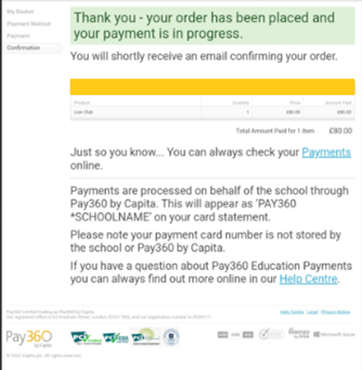
ESS have confirmed that once this payment message is received, no actual transactions are completed.
After completing investigations into this issue, a conclusion has been reached that the payment has failed. (Investigations completed October 2022)
Money will not leave the parent/payer bank account and the school records will not reflect the payment.
The error message will be updated in a future change, to display the failed payment message rather than the current message. We will advise once this change is completed.
Resolution
School should advise Parents/payers who receive this message that they should try and make the payment again, ‘Try again later’ or ‘Use a different card’.
We will advise again once the software has been updated.
Did you know you can open multiple instances of SIMS at the same time?
SIMS can be opened multiple times at once which can be very handy and not many people are aware of this. This is done by editing the properties of the SIMS shortcut.

Where target= C:\Program Files (x86)\SIMS\SIMS .net\Pulsar.exe” /MULTIINSTANCE
SIMS Autumn Release
SIMS Autumn Release 7.208
Coming in the next release of SIMS
Provision of Additional Aspects for Key Stage 4
Secondary schools in England can import additional KS4 resources to enable the accurate generation of PI values in the SIMS School Report. The additional resources are based on the DfE list of qualifications, which count towards performance tables for schools. All points used (with the exception of 9:1 reformed GCSEs) are based on a single GCSE equivalence.
The KS4 Assessment Mapping Tool provides generic (non-board specific) GCSE and AS subject aspects. It is possible that the specific qualification being taught in a school is not one from a board, or of a subject that is included in the various EBacc and Performance Table measures lists supplied by the DfE for a given year. Therefore, schools should consider this when mapping aspects and results, especially for the purpose of running the SIMS School Report, because this could produce results that conflict with those produced by Examinations Organiser.
Please note that if you have previously mapped results to a related aspect because the aspect you required was not available, you must retrospectively remove these mappings and results before mapping the results to the correct aspect.
The KS4 resources are available in the AMPA\England Secondary (and Middle Deemed Secondary)\Assessment Manager folder after importing the following files:
Assessment Mapping Tool Secondary.xml
KS4 Assessment Mapping Tool Aspect.xml
KS4 Assessment Mapping Tool Resultsets.xml

School Workforce Census
We have created a handy helpsheet to help you prepare for the school work force census. This can be accessed via the customer portal here: School Workforce census helpsheet
Key Dates for the School Workforce Census
Census date: 03/11/2022
Continuous contracts collected from 01/09/2021to 03/11/2022
Absences collected from 01/09/2021 to 31/08/2022
For schools that submit data to COLLECT the deadline is 2nd December 2022, local authority schools will need to check with their LA for their return deadlines.
Arbor Documentation available from the link below. Please note the document references 2021 as Arbor have not provided an up-to-date version this is still valid for the moment.
https://my.www.schoolicts.co.uk/portal/kb?id=17
Arbor also have an updated webpage on the SWC:
https://support.arbor-education.com/hc/en-us/articles/360002834237-2021-Workforce-Census-Guide#preparing-for-this-census-0-0
DfE Guidance
We strongly advise downloading the DfE guidance for clarification on who should and who should not be included in the census. This can be downloaded from the below link.
https://assets.publishing.service.gov.uk/government/uploads/system/uploads/attachment_data/file/1094039/School_workforce_census_2022_summary_specification.pdf
Check your data using the Data Quality Dashboard.
Before the Dry Run facility opens, you can start preparing for Census by heading over to your Data Quality Dashboard. You’ll find three key areas to help you check and prepare your data, which you should work through in this order: –
1. Merge or delete any duplicate staff profiles in the Suspected Duplicates section.
2. Add and update basic details in the Staff section.
3. Add in key Census information in the School Workforce Census section to add key Census information. Just click a cell to add the data!
4. Pay Scales: In Arbor, when looking at Pay scales, all scales may display differently and may no longer be separated by Service Term as these are not included in Arbor, such as NJC, Leadership etc. If you have migrated from another MIS, it is advisory to ensure that these are updated and correct. You may wish to rename the scales to ensure you are awarding correctly e.g. NJC scale 1 or Teachers Upper scale 1 etc. Please use the link below for further guidance on how to amend, update, create and complete Pay scales in Arbor: –https://support.arbor-education.com/hc/en-us/articles/203790902-Managing-and-Updating-Pay-Scales#deleting-a-pay-scale-0-5
5. Check your SENCo is set up – detailed guidance on how to do this can be found here:- https://support.arbor-education.com/hc/en-us/articles/360014107837-How-to-set-up-your-SENCo-for-the-Workforce-Census#step-2-check-your-senco-is-set-up-0-1
6. Staff Absence data – Make sure staff absences have been recorded: How can I see Staff Absence Statistics?
7. Qualification data – Record Staff qualifications (Qualification codes, Subject Codes and Class of Degree) from the Qualifications & Checks area on staff member’s profiles.
8. Date of last pay review – Use the Staff section part of the Check your data using the Data Quality Dashboard.
9. Vacancies – On census day, you need to add in the vacancies that are currently open at your school. All fields, including the Subject and Tenure fields, are being collected this year.
10. Third-party support staff headcount – On census day, you need to add in headcount numbers for occasional teaching staff and third-party support staff are both required. You can see how to add this in the Workforce Census guide.
11. Please see our guide on recording Additional Payments in Arbor https://my.www.schoolicts.co.uk/portal/kb?id=563
12. Note on staff working in multiple schools – Teachers who work in multiple schools, even if the schools are part of a Multi Academy Trust, will need to be recorded separately in each of the schools.
Each school will need to record the name, teacher number, QTS, QTLS and EYTS of the staff and to separately record the hours worked by staff in each school. This data must be recorded for each school to ensure that staff are not being double counted and to ensure that an accurate record is made of staffing and hours worked in each school.
Update on Payments
With regards to pay scales, we are aware that these have not yet been confirmed by the DfE. Once these have been confirmed, we would advise to add these in, and then submit the census as it looks at the payments as on the day.
Any additional payments such as TLRs are also included within the confirmed details with the pay scales. Again these should be added once the DfE has published them. When entering any additional payments into Arbor, these should be done so via the Additional Payments section of a contract and not by Allowances.
Unfortunately it is not possible to report on who has which payments marked as Allowances or Additional Payments so you would need to check each staff record.
The reason we advised to use Additional Payments is so your census will reflect what the payments are for, whether they be TLR’s or any other additional payments that the DfE list provide. This does include Other so you can add payments which may not fit anything else in the list such as First Aid. As the DfE provide this list, we would advise that anywhere possible where the DfE provide the options for information to be added, to do so using this list to ensure you are complying with the DfE requests.
FREE Webinar
If you have never completed the school workforce census, we would highly recommend attending training to ensure the accurate return of data as the census is a legal requirement. We can put on additional dates if there is demand. Please email helpdesk@Schoolicts.co.uk to place your interest in an additional training session.
Free overview webinar – 4th November 2022
https://www.schoolicts.co.uk/events/school-workforce-census-arbor-webinar/?occurrence=2022-11-04
Post 16 Census
You can now Generate a quick summary report of your Post-16 data to ensure you receive all your funding from the School Census: Autumn Census Post-16 Report
Known Issue
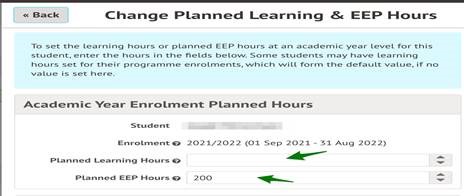
Some schools have reported to us that where students have either transferred or withdrawn from programmes, in either the current or previous academic year, the total hours are being calculated and amended in the Planned Learning and EEP Hours tables. This calculation of planned hours is shown in the downloadable Post 16 Census Report.
Following discussions with Arbor this is under investigation and they are in conversation with the DfE. They have advised effected schools to manually amend the student planned hours where necessary.
(1) Open the Learning & EEP Hours table and filter to the appropriate year group and academic year
(2) Open the Planned Learning Hours for the student
(3) Open the programme that the student transferred to or withdrew from
Click edit in the programme enrolment and enter a 0 into the planned hours as appropriate first or second year
New and improved!
- School events can be managed easily by heading to School > Timetable > School Events to use Arbor’s new event management pages. Use All School Events to see all your events and use the bulk actions to change the staff or location or Use Repeating School Events (List) to see events that happen more than once, and use the bulk actions to change the staff, the event type and whether cover is required.
- The Students > Demographics > Students with SEN page now includes the end date, so you can report on expired statuses, or see EHCP end dates.
- P16 Census You can now Generate a quick summary report of your Post-16 data to ensure you receive all your funding from the School Census: Autumn Census Post-16 Report
- Automatically set Outcome Grades from Exam Results for the ILR.
- When importing from Options, unique ID is now required, but name and ID matching is no longer case-sensitive.
- Arbor have improved background processing when you create, end or delete timetable slots.
- When students are deleted in bulk (such as via the Data Retention page), these are now staggered in the background. You might find when deleting large amounts of data, the process will be locked for a few minutes while this is done.
- Assessment – Only assignments from the current academic year will now be shown on the Parent and Student Portals.
Attendance update
- Arbor have reverted the description for the X code back to Not Required (non Compulsory School Age), as it’s no longer used for Covid-related absences.
- The DfE no longer requires schools to complete the weekly EdSet attendance form, but Arbor won’t be removing the Covid-19 Dashboard for now. If you want to continue to share your data, you can use do this via Wonde.
- The Students > Attendance > Absentees By Date page now includes U marks to enable you to follow up with those physically present but statistically absent marks.
A full list of Attendance codes and how they count towards statutory attendance can be found here
MAT MIS
- Charts – you can now compare your data to the previous academic year rather than 2 years prior.
- Arbor have removed the Region field from the Institutions page.
- You can now schedule Custom Report Writer report.

School Workforce Census
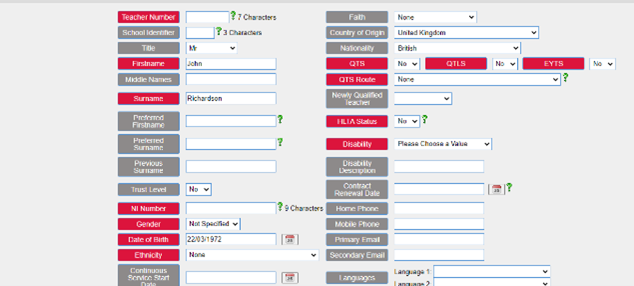
With the SWC fast approaching a reminder of where the relevant details are input for staff in ScholarPack. Search for the staff member using the top tight search box and select them to pull up their details.

Clicking on the cog to the right of their name in the top left of the screen allows you to input items such as their teacher number, NI number, QTS, QTS route and HLTA status, Gender, Ethncity and date of birth amongst others.

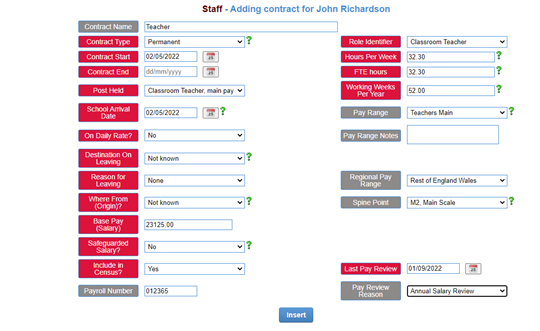
Clicking on the cog to the right of contract info in the centre section allows you to input details such as contract start/end date, post held, base salary, daily rate and FTE hours.
Absences can be viewed by academic year in the panel above the contracts by clicking into the relevant year.

Below the contract information panel there is also an extra details section where information such as qualifications and subjects taught can be stored. To open these sections, click on the cog to the right of the heading.
Full guidance on generating and completing the SWC return
Full guidance on generating and completing the SWC return can be found via: –

Best Practice in MIS Webinar Weeks 1st - 16th November
Webinar Weeks 1st – 16th November
We are running several free webinars over the next few days so please sign up for those you wish to attend. To book please click on the link below: –
https://www.schoolicts.co.uk/latest-events/
SIMS Webinars
- 09/11/22 – 9am SIMS Assessment Top Tips & Individual Report
- 09/11/22 – 11am SIMS Exams Best Practice
- 10/11/22 – 10am SIMS Update from ESS
- 11/11/22 – 9am SIMS Mock Exams Top Tips
- 11/11/22 – 2pm SIMS Options Online
Arbor Webinars
- 04/11/22 – 9am Arbor School workforce Census
- 07/11/22 – 11am An introduction to Arbor
- 07/11/22 – 2pm Arbor Shared Teaching/Payments Plus
- 09/11/22 – 2pm Arbor Reporting Top Tips
- 10/11/11 – 9.30am Arbor Exams Best Practice
- 11/11/22 – 11am Arbor In House Exams Top Tips
- 16/11/22 – 2pm Arbor Assessment Top Tips
Other webinars you may be interested in: –
- 02/11/22 – 1pm SIMS New Virtual Data Management Service- Data Genie
- 15/11/22 – 10am SIMS School Genie
- 16/11/22 – 1pm School ICT & Applica webinar
MIS Training courses for 2022/2023 are now live!
Training courses for the academic year 2022/2023 are now live! We have a comprehensive schedule of online ‘live’ SIMS training courses along with Distance Learning courses to help you develop your knowledge of SIMS and get the most out of your MIS (Management Information System).
Booking is now open please visit https://www.schoolicts.co.uk/online-training/
Upcoming Training courses
SIMS
- SIMS Curriculum Management Using NovaT – 4 days – 08-09/11/22 & 15-16/11/22
- SIMS Extended Reporting – 10/11/22
- FMS Advanced – 11/11/22
- SIMS Attendance Primary – 17/11/22
- Exam Organiser 2 days – 22/11/22 – this course is now sold out but please let us know if you are interested in attending this course and we will look to schedule another date
- SIMS SEN user – 24/11/22
- FMS School Fund – 25/11/22
Arbor
- Arbor Behaviour – User Training and Reporting – 08/11/22
- Arbor Attendance – 11/11/22
- Arbor New Office User – 23/11/22
- Arbor Staff and Basic Analysis – 23/11/22
- Arbor Finance – 01/12/22
- Arbor Parental Engagement and Communications – 06/12/22
- Arbor Basic Assessment Skills – 08/12/22
- Arbor Examinations – 13/12/22

Census, Exams, End of Year… could you do with an extra pair of hands at key times of the academic year?
Working alongside School ICT, School ICT Resourcing place both permanent and temporary specialist support staff into schools.
Candidates are available from a days placement through to a whole school year. All candidates have completed the safer school recruitment process, and have enhanced DBS clearance.
For further information please call: 0113 372 0039 or visit: www.schoolictresourcing.co.uk
Due to retire? If yourself or any colleagues are retiring soon, and would consider working on a temporary or ad-hoc basis, please contact Helen who would love the opportunity to speak with you about the potential of adding you to our candidate list.