This information is aimed at the technical department in school, and we would therefore be grateful if you would please forward this information on as required. If you have no technical staff, please call the Service Desk for assistance.
Where School ICT complete the upgrade on your behalf, please see below for how this will work.
The Autumn 2024 upgrade of SIMS, FMS and Discover is now available via SOLUS3.
Consolidated Database Patch for the SIMS Autumn Release 2024 (CDPau1 – patch no 30288) is also available and we recommend applying this.
To see a list of the new features the release notes are available from our customer portal link below:
https://my.www.schoolicts.co.uk/portal/kb?id=376
Primary Schools
The Autumn 2024 upgrade of SIMS, FMS and Discover is now available. This upgrade has some new features including:
- Authorised Absence Alerts on the SIMS Homepage
- Attendance Code Statutory Explanation Report
- Spring Census (incl. amended reports) – 16/01/25
- CES return for those schools who need to complete this return
- New ethnicity codes & descriptions added to support DfE code sets
- Family Links data available to use in General Student List
- Bulk Maintenance of Documents
- Additional Reasons for Leaving
Some schools will apply this in-house or via a third-party IT provider – please make the relevant person aware that this is now available. If School ICT are responsible for your upgrade, we will be rolling this out by taking a phased approach over the coming weeks. If you would like the upgrade applying on a specific date or day of the week, please let us know ASAP by replying to this email or giving the helpdesk a call. If you are unsure about who does your upgrades, please contact our helpdesk for clarification. Some schools may wish to have the upgrade applied over the Christmas break, for example.
To minimise disruption, the upgrade will be run on your SIMS database via SOLUS3 overnight . Once the workstations are switched on the morning after the upgrade has been run, you should get a screen opening that tells you that your workstation has been upgraded. If you don’t get this, and you see a SOLUS3 popup, you can click on the “Deploy Now” button:
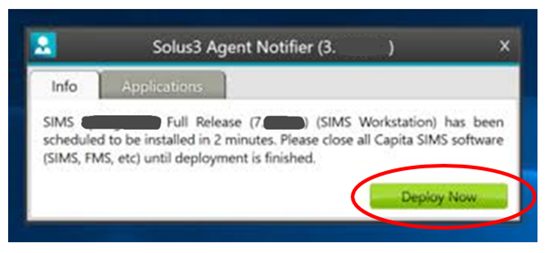
This will start the upgrade process immediately. If you do not do this, it will wait 2 minutes before continuing automatically. It is then a case of allowing the upgrade to run before opening SIMS/FMS, which should upgrade SIMS to 7.220 and FMS to 6.220. Once the upgrade is complete, if you get an ‘incompatible database’ error when trying to access SIMS or FMS, please contact us so that we can investigate and resolve the issue to prevent this happening in future. For those schools that do their own upgrade we would recommend stopping any third-party app services that link to SIMS before running the upgrade as we have found that these can cause issues.For any newly supported customers joining our service, if you have not already done so, please ensure that your school has informed ESS by email that School ICT Services are undertaking support on your behalf (this process is included in the welcome pack we provide to new customers). This will ensure that we are able to deploy patches and upgrades to your establishment centrally through our online ESS management console. If you are unsure whether you have done this, please call us and we can confirm whether this has been done on your behalf (or not, as the case may be).
If you have any questions, please don’t hesitate to contact us.
Secondary Schools
You are receiving this email as the designated central contact for your establishment.
This email is aimed at the technical department in school, and we would therefore be grateful if you would please forward this email on as required.
If you have no technical staff, please call the Service Desk for assistance.
We have authorised the Autumn 2024 Upgrade via SOLUS3 for all Secondary Schools. We have attached the release notes which includes a number of new features including:
- Authorised Absence Alerts on the SIMS Homepage
- Attendance Code Statutory Explanation Report
- Spring Census (incl. amended reports) – 16/01/25
- CES return for those schools who need to complete this return
- New ethnicity codes & descriptions added to support DfE code sets
- Family Links data available to use in General Student List
- Bulk Maintenance of Documents
- Additional Reasons for Leaving
The software authorised:-
SIMS (Autumn 2024) Full Release (7.220)
FMS (Autumn 2024) Full Release (6.220)
SIMS Discover (2024 Autumn)
The above list is available dependent upon the modules utilised by the school.
This is being released to your school’s Solus 3, if you cannot see the releases then please call the helpdesk. For any newly supported customers joining our service please ensure that your school has informed ESS that School ICT Services is undertaking support on your behalf (this process is included in the welcome pack we provide to new customers). This will ensure that we are able to deploy patches and upgrades to your establishment centrally through our online ESS management console. If you are unsure if you have done this, please give us a call and we can confirm for you.
As usual, prior to performing any upgrade, please ensure that you have a successful back-up of your SIMS system. We have found we receive a number of calls with issues where SIMS does not update or open on the SIMS server following an upgrade. Please ensure that if you have any third-party apps that link to SIMS these services are stopped prior to running the upgrade to ensure that SIMS updates on the SIMS server.
The most successful upgrade deployments occur when all relevant workstations are left switched on but logged out of SIMS. Ensuring that all users have logged out of SIMS prior to the upgrade taking place will help to reduce residual problems. If upgrading overnight, please be aware that workstations that are switched off may fail. If this occurs, please download the upgrade again and re-deploy.
If School ICT are undertaking the upgrade on behalf of the school, please call or email our helpdesk to arrange a convenient date and time, giving as much notice as possible to ensure we can meet any specific requirements. We usually advise for this to be scheduled when your IT support are onsite.
Should you need any support with the Autumn Upgrade, please contact the School ICT helpdesk on: 0345 2226802 or e-mail: helpdesk@schoolicts.co.uk
If this is not your area of responsibility can we please ask that this information is shared with the appropriate person within school – thank you.