Introducing the micro:bit
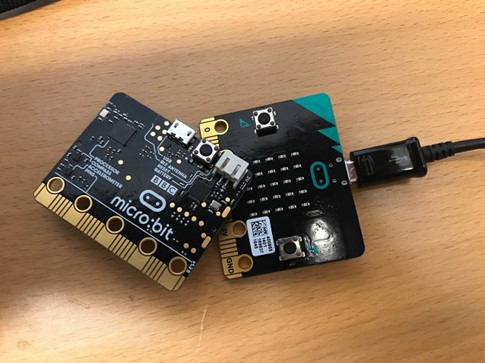
Have you seen that The Micro:bit Educational Foundation, BBC and Nominet have joined forces to enable every primary school in the UK to get 30 free micro:bits for next academic year? If not, then use this link here to register for your class set: https://microbit.org/thenextgen-registration/
So what is the micro:bit and why do I need them?
When introducing a class to a micro:bit for the first time, I always start by telling them it is a computer; a small computer, but still a computer just like the laptop, chromebook or tablet that they are using in their computing lessons is. Why? A micro:bit has the three key elements used to define a ‘computer’ or ‘digital device’. It has inputs, a process and outputs.
micro:bit have a wealth of resources on their website including this poster that points out all the inputs and outputs. You can get your free downloadable version here to print out and use in the classroom https://microbit.org/teach/classroom-resources/microbit-posters/qwerty

How do they work?
The great thing about micro:bits over some physical computing equipment, is that they work on any device. If your pupils have access to desktops, laptops or Chromebooks, then you can connect your micro:bit via the cable and use the online software https://makecode.microbit.org/ to program it. If your pupils have tablets, then you can connect your micro:bit via Bluetooth and create your code via the free micro:bit app.
How do I get started?
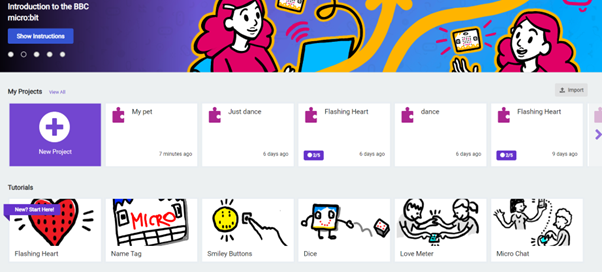
When you enter the micro:bit software either via the website https://makecode.microbit.org/ or by the app, you will see there is a micro:bit simulator on screen. This is a great resource as it allows children to test and debug their code before they download it onto their micro:bits. It also means even if you don’t have any micro:bits, you can still use the product. Makecode can be used with block based programming so the environment should be familiar to your pupils if they have used platforms such as Scratch before.
Pupils have the option to either ‘create a new project’ and have time to tinker to see what they can create or there are a range of ‘tutorials’ on the website that pupils can use as a starting point.
What years can I use it with?
The micro:bit is a versatile piece of kit that can be used across Key Stage Two, how you program the code would be how to use the micro:bit progressively. For example, in Year 3 the pupils could create a simple name badge using sequence, whereas in Year 6 the pupils could use variables to create a step counter.
Below is an example of a project that can be created when introducing children to selection. In this project, there are four examples of selection. Can you find them all? https://makecode.microbit.org/_AgpDsUdRgWju
So where do micro:bits fit into the curriculum?
Physical computing is not just part of the Computing National Curriculum for KS2, but it can also support with Science and Design and Technology
| Subject | KS2 National Curriculum Objectives |
| Computing | Pupils should be taught to:
•design, write and debug programs that accomplish specific goals, including controlling or simulating physical systems; solve problems by decomposing them into smaller parts •use sequence, selection, and repetition in programs; work with variables and various forms of input and output |
| Science | Pupils should be taught to:
•construct a simple series electrical circuit, identifying and naming its basic parts, including cells, wires, bulbs, switches and buzzers |
| Design and Technology | Pupils should be taught to:
•understand and use electrical systems in their products [for example, series circuits incorporating switches, bulbs, buzzers and motors] •apply their understanding of computing to program, monitor and control their products. |
How can I learn more?
There are lots of great free resources out there to support with implementing micro:bits into your computing curriculum such as the Year 6 Sensing Movement unit from Teach Computing or the Year 3 ⁄ 4 Litter Picker activities from Barefoot Computing. A self-led learning course from micro:bit is available here https://microbit.org/get-started/first-steps/introduction/ or your local computing hub will also be offering free hands on 90 minute workshops https://teachcomputing.org/courses/CP292/introduction-to-the-micro-bit-in-key-stage-2-short-course
So what are you waiting for, register for your free class kit and get exploring 🙂
If you’d like to find out more about how School ICT can support your school with consultancy, training, IT services or MIS support – please contact us on: 0345 222 6802 – option 4 or e-mail: enquiries@schoolicts.co.uk.