
To navigate to the most relevant section, please click the appropriate link below: -

Summer School Census - Thursday 15th May
This is a reminder that the deadline to return the data to the Department for Education (DfE) is Wednesday 11th June. Please check with your Local Authority as you may be required to submit the data earlier. The information on the SICTS and TIO customer portals will be updated as and when we receive updates. School ICT customers can also check the news section at https://www.schoolicts.co.uk/latest-news/
| Attendance collected from (All Schools) |
01/01/2025 |
20/04/2025 |
| Exclusions Collected from (All Schools) |
01/08/2025 |
20/04/2025 |
| AP Placements collected from (All Schools) |
16/01/2025 |
15/05/2025 |
| FAM Collected from (All Schools) |
01/08/2025 |
15/05/2025 |
| FSM Collected From (All Schools – only for on roll pupils) |
17/01/2025 |
15/05/2025 |
| Learner Support Collected from (secondary schools only) |
01/08/2024 |
15/05/2025 |
To see data items collected please click here
Available Resources We have updated the customer portals with the latest guidance.
School ICT customer portal https://my.www.schoolicts.co.uk/
turn IT on customer portal https://portal.turniton.co.uk/
Links to guidance on the portal are as below:
| School ICT Customer Links |
| SIMS :https://halo.transforming-learning.co.uk/portal/kb?id=883 |
| Arbor: https://halo.transforming-learning.co.uk/portal/kb?id=849 |
| Bromcom: https://halo.transforming-learning.co.uk/portal/kb?id=851 |
| Integris: https://halo.transforming-learning.co.uk/portal/kb?id=889 |
| ScholarPack: https://halo.transforming-learning.co.uk/portal/kb?id=852 |
Useful Links for further DfE guidance
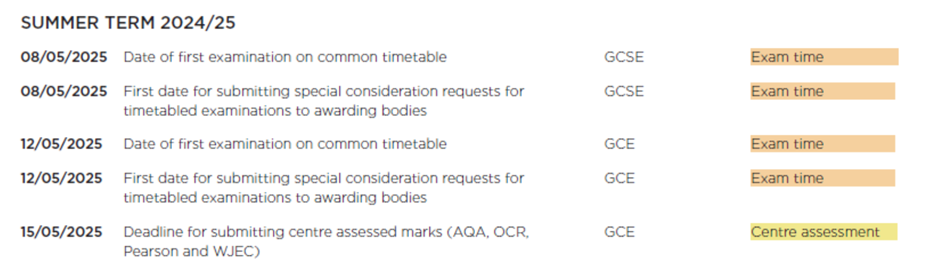
Exams - JCQ key dates for May
End of Year Procedures and Census - How can we assist you further this term?
End of Year
Allow us to alleviate some of the end-of-term pressures by handling your End of Year procedures.
We’ll manage:
- Assigning pupils to their new year groups
- Adding new staff
- Enrolling new starters
- Setting term dates
- Generating class lists, and more…
Census Service
Additionally, we provide a comprehensive Census service.
Our team will:
- Check your school data
- Generateyour census return
- Create and validate your census data
- Resolve any validation errors
- Produce both summary and detailed census reports
- Authorise your return
For a quote or to discuss further, please contact your team:
School ICT customers:
Contact: 0345 222 6802 Option 1, helpdesk@schoolicts.co.uk
Portal: https://my.www.schoolicts.co.uk/
turn IT on customers:
Contact: 01865 597620 Option 2, mis.support@turniton.co.uk
Portal: https://portal.turniton.co.uk
Data Management Services
Our Data Management service offers an excellent, cost effective, responsive, and efficient Data Management solution, delivered remotely by a team of highly experienced school data experts. Their dependable advice and guidance empowers schools, academies, and MATs to maximise their investment in their management information system (MIS) team. Whether it’s a long-term solution or short term for sickness cover or maternity please reach out to discuss your needs.
- Please click here for further information.
Contact Details
School ICT customers:
Contact: 0345 222 6802 Option 1, helpdesk@schoolicts.co.uk; Portal: https://my.www.schoolicts.co.uk/
turn IT on customers:
Contact: 01865 597620 Option 2, mis.support@turniton.co.uk; Portal: https://portal.turniton.co.uk
Our customer portals allow you to: –
- Log and track tickets
- Watch recordings of our range of webinars
- Search the Knowledge base for information, guidance and tips
- Keep up to date with the latest news
FREE Webinars
We are running a continued webinar series throughout the year. Please see below for upcoming webinars, click the hyperlinks to book: –
We're Hiring!
We’re currently recruiting for two experienced MIS Consultants to join our growing team. If you’d like to join a friendly company who prioritise our team as much as our customers, this could be the role for you!

Elevate your Teaching and Learning with Education Technology - Free resources from Vital York

We’re delighted to be able to share our partner company, Vital Yorks, latest newsletter with you, which includes some great information and resources on: –
- Keeping Children safe online
- New app – ‘Big Sister’
- Text to video tools
- Animated drawing|Meta
These may be useful to share with your computing lead.
To view the newsletter please click here: Elevate your teaching and learning with education technology

Online Training Courses and NEW Bitesize Training
Training courses for the academic year 2024/2025 are now live! We have a comprehensive schedule of online ‘live’ SIMS training courses along with Distance Learning courses to help you develop your knowledge of SIMS and get the most out of your MIS (Management Information System).
Booking is now open please visit https://www.schoolicts.co.uk/online-training/
ARBOR and SIMS BITESIZE TRAINING.
Tailored training to suit your needs, designed to give you maximum impact in minimal time.
Check out our brochure for further information and call us on 0345 2226802 or e-mail: info@schoolicts.co.uk to find out more or book a place.
Data Healthcheck Services
An MIS health check ensures you’re getting the most out of the investment in your MIS. The benefits of one of our comprehensive health checks include: –
- Raise awareness of functionality and any issues
- Keep you up to date with the latest developments in your MIS
- Housekeeping and tidying exercises
- Report with recommendations to ensure you’re fully maximising your MIS along with any training recommendations
- For on premise MIS a server health check is also included
Our health check service usually takes around half a day. Please contact us to find out more on: helpdesk@schoolicts.co.uk to find out more.
FMS Updates
Top tips/reminders
Final Close 2024-2025
Once your school have agreed all your final accounts do not forget to process Final Closure to complete Financial Year 2024-2025. This process can sometimes not have been completed in school until as late as June.
NOTE: The final closure is permanent! No financial transactions of any type can take place after the year has been finally closed. Only reports can be printed.
Recording the School Budget 2025-2026
Once the Budget has been approved and ratified it should be entered onto FMS and fixed in Financial Year 2025-2026.
Focus>Budget Management>Cost Centre Allocation >click on the ‘Fix the Budget’ Icon in the top right-hand corner of the screen under the question mark. This will result in an ‘Original Budget’ and any future budget changes will be reflected in the ‘Current Budget’ and ‘ Variance’.
helloData Product Overview - Your MIS Data Visualised

helloData Product Overview – your MIS data visualised
Tracking pupil achievements at an individual and group level is a crucial part of improving pupil outcomes and overall school improvement. Since the change in the curriculum, schools assess their pupils in a variety of ways depending on the subject, year and pupils’ ability. Different grades and expectations are commonplace, as is the way a school or trust prefers to analyse and present the data.
Simplifying assessment in Primary schools
This complexity of assessment tracking in schools can often be overwhelming and leads to unnecessary expenditure of time and money. At trust level it can involve a lot of work to collate the information from each school. At helloData, having spent years working in the assessment tracking field and with cutting-edge data analytics tools, we specialise in consulting with schools and trusts on how they want to assess, to ensure the setup in use is as efficient and informative as possible.
Combine the power of your MIS and helloData
We provide simple methods for entering data, utilising the MIS functionality found within Arbor, Integris and SIMS. We then automatically present the data back in a comprehensive set of ready-made dashboards using Power BI to visualise your data.

In-depth analytics and pupil data at a click of a button
Assessment data can often be seen as daunting and hard to decipher, it can also take the focus away from the individual learner. This is why we have made all helloData reports intuitive to use, interactive and, at a click of a button, view individual pupil data on one screen.
Accessible for all
School, Governor and Trust views are all provided, allowing leaders to choose how to visualise the data based on their own need.
We’d love to hear from you, Leave us a Message or Book a Live Demo here.

Click for the latest Arbor updates
ArborFest 2025!

School ICT will have a stand at ArborFest which is taking place this year on Wednesday 21st May at the Repertory Theatre in Birmingham. This year’s ArborFest is going to be their biggest in-person customer conference to date and is focusing on “The future of work in schools.”
There are two types of tickets. In-Person Tickets and Live Stream Tickets:
In person tickets for School Staff: These tickets are for schools using Arbor as their MIS. SLT and Office Staff will get the most from the programme.
In-Person Tickets for MAT Central Teams: These tickets are for MAT Leaders. Arbor are inviting both MATs using Arbor, and those who aren’t, to join them at their special MAT Stage.
Live Stream Tickets: These tickets are for schools and MATs who can’t make the live event. These tickets will give you access to watch the live stream of Arbor’s Main Stage.
There are limited tickets available so get yours now to avoid missing out! https://www.arborfest.arbor-education.com/tickets
Don’t forget to come and visit our School ICT stand to say hello if you are attending.
School Summer Census
The school Summer Census is on Thursday 15th May 2025. There is a wealth of resources to help support you when completing the census.
Written Guidance:
- Preparing for the school census – Click here.
- School Census Overview – Click here.
- School Census Preparation Checklist – Click here.
- School Census Guide – Click here
- All School Census Guides – Click here.
Webinars:
- Census Dry Run – Tuesday 6th May 2025. Click here to Register.
- Census Day – Thursday 15th May 2025. Click here to Register.
Changes to the School Census
- For full guidance from the DfE on changes to the census, click here.
- For further information detailing what data your school must return in the Autumn, Spring or Summer census, click here.
Useful Links for further DfE guidance
- School Census dates
- School Census changes
- Data items
- Generate and submit your return
- Find a school census code
- COLLECT user guide
- Spreadsheet of Data items for each census return
- Guide to summary report
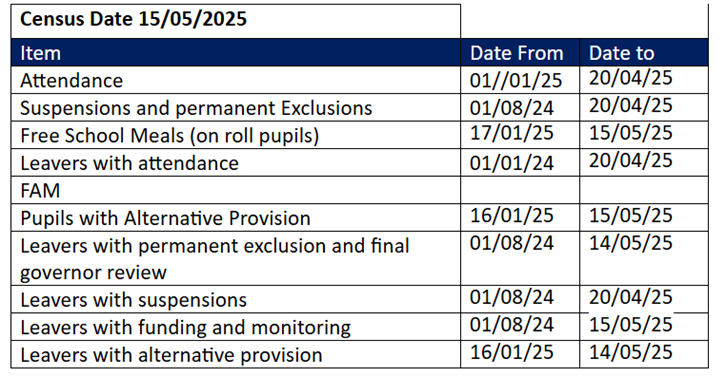
The following dates apply for the collection in this return
| Census Date Thursday 15th May 2025 | ||
| Item | Date From | Date to |
| Attendance | 01/01/25 | 20/04/25 |
| Suspensions and permanent Exclusions | 01/08/24 | 20/04/25 |
| Free School Meals (on roll pupils) | 17/01/25 | 15/05/25 |
| Leavers with attendance | 01/01/24 | 20/04/25 |
| FAM | ||
| Pupils with Alternative Provision | 16/01/25 | 15/05/25 |
| Leavers with permanent exclusion and final governor review | 01/08/24 | 14/05/25 |
| Leavers with suspensions | 01/08/24 | 20/04/25 |
| Leavers with funding and monitoring | 01/08/24 | 15/05/25 |
| Leavers with alternative provision | 16/01/25 | 14/05/25 |
This is a reminder that the deadline to return the data to the Department for Education (DfE) is Wednesday 12th June. Please check with your Local Authority as you may be required to submit the data earlier.
SICTS guidance can be found here: School ICT – User Portal – Arbor Summer Census 2025 Campaign News
New Features
- Arbor have created a brand-new template to make accessing your MIS data in Power BI even easier. The template includes dashboards for Attendance, Behaviour (Suspensions and Exclusions), Assessments, Staff Context, and Pupil Context. Learn more about the BI Connector and download the template from the Help Centre.
- To complement the DfE’s plan to reduce unauthorised absences, they have created a new page in the Absences section of Attendance to automatically show all students absent for 5 days in a 10-week rolling period. The new page shows whether or not a student has been issued a fine, and under which attendance mark. Head to Students > Attendance > Absentees > Attendance Fines.
- Following feedback from Attendance Officers, they have re-ordered the attendance marks on registers to put special characters at the end of the list.
- Arbor have significantly improved the loading speed of the Assignments > Overview by Course page.
- To avoid any potential errors when uploading Census files for post-16 schools, Arbor have added validation to the Partner UKPRN field to prevent schools from entering the wrong information.
- A new ‘All Email Addresses’ field has been added for students in the Custom Report Writer, so you can see Personal, Work or Other emails all in the same report.
- Three new BI Connector datasets have been added; Educational Institutions lets users do tracking of feeder or follow-on schools for their students. Alternative Provision Placements so you can now pull this into one place for reporting, great for trusts to identify issues across their schools. Work Placements – allows schools and trusts to track their provision in this area to support DfE recommendations to use quality work placements alongside study for better outcomes.
- You can now share Custom Report templates with your schools straight from the Custom Report Writer in MAT MIS. Plus, select which business roles should have access and/or edit rights.
New School Year Set Up
You can now start working of your New School Year set up in Arbor. Guidance can be found here:
- Managing Applicants and Admissions
- New School Year Setup guide
- New School year Setup Preparation Checklist
The following links can be used to help guide you through the set up:
Step 1 Academic Calendar: New School Year Setup Step 1 – Academic Calendar – Arbor Help Centre
Step 2 Off Roll Leavers: New School Year Setup Step 2 – Off-Roll Leavers – Arbor Help Centre
Step 3 Year Groups & Registration Forms: New School Year Setup Step 3 – Year Groups & Registration Forms – Arbor Help Centre
Step 4 Custom Groups: New School Year Setup Step 4 – Custom Groups – Arbor Help Centre
Step 5 Houses: New School Year Setup Step 5 – Houses – Arbor Help Centre
Step 6 Registers:
- Nurseries: New School Year Setup – Scheduling your Nursery registers – Arbor Help Centre
- Primaries: New School Year Setup Step 6 – Registers for Primaries – Arbor Help Centre
- Secondaries: New School Year Setup Step 6 – Registers for Secondaries – Arbor Help Centre
Step 7 Meals: New School Year Setup Step 7 – Meals – Arbor Help Centre
Step 8 Interventions: New School Year Setup Step 8 – Interventions – Arbor Help Centre
Step 9 Review the setup and other important tasks: New School Year Setup – Reviewing your setup and other important tasks – Arbor Help Centre
DfE Statutory Assessment
Watch Arbor’s recent DfE Assessments 2025 webinar – Click to watch here.
In line with DfE guidance, End of Key Stage 1 (KS1) Teacher Assessments are no longer required to be collected or reported. There are no changes in the DfE Assessment area in Arbor. If you won’t be administering KS1 assessments, do not set them up. All other assessments (KS2, Phonics, MTS and EYFSP) continue to be statutory and required.
Please read Arbor’s full guide Introduction to DfE statutory assessments in Arbor and key dates for detailed information on how to set up, record and return your school’s DfE Statutory Assessments. The guide also includes details of the key dates in the process:
EYFS
Reception
- EYFS Collection opens Monday 2nd June
- Deadline for submitting data Friday 11th July 2025,
- Final date to correct any errors Thursday 31st July 2025
KS1
Phonics Year 1 & Year 2 Re-checks
- Phonics Testing – Monday 9th June – Friday 13th June (variation week 16th June – 20th June)
- Threshold Mark for Phonics Release – Monday 23rd June. In Arbor, student outcomes will automatically appear on the marksheet based on the raw scores you’ve already put in, and you’ll be able to analyse your data. Phonics Screening Check
- Phonics Deadline for schools to submit HDF to PAG– Monday 30th June
- Contact your LA for their Deadline for submission of the school’s data
- Deadline for LA to submit phonics screening check to Collect – Friday 18th July
Teacher Assessment Year 2
- Testing Period – Monday 1st – Wednesday 31st May
- Teacher Assessment Deadline – Tuesday 27th June
- View results online – Tuesday July 8th
Information about KS1 assessments & KS1 Phonics screening check
KS2
Multiplication Check Year 4
- Multiplication Check Testing Period – Monday 2nd June – Friday 13th June
- HDF deadline – Friday 21st June
- Multiplication Check Results – Monday 24th June
Information about KS2 assessments & Multiplication Tables Check (MTC)
To import your results into Arbor: Generate a CTF file from the Primary Assessment Gateway to your computer
Import the file – click here to find out how
See MTC results on the Analysis pages.
Teacher Assessment Year 6
- Testing Period – Monday 12th May – Thursday 15th May
- Teacher Assessment Deadline – Friday 30th June
- Test Results available from Primary Assessment Gateway – Tuesday 9th July

Click for the latest Bromcom updates
Roadmap Updates
Latest Bromcom Roadmap – https://crmapps.bromcomcloud.com/customer/productroadmap
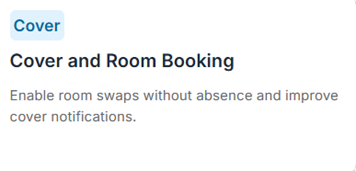
The planned update to cover room swapping set for Q1 for, which will allow ad hoc room swaps to take place without an absence/ closure being recorded in cover first, has now been put back to Q2.
Ideas portal.
Whilst this is normally locked behind a Bromcom support account, if users click the I icon they can generate a one-time passcode and sign up to the ideas portal (development ideas option).
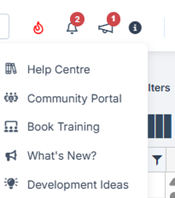
Clicking “development Ideas” will trigger an email with a passcode.
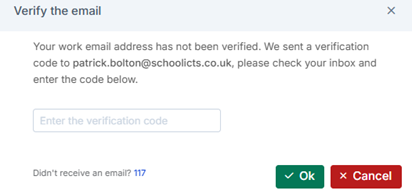
There are lots of good ideas being suggested which require 50 votes to be considered for implementation.
Census
There is a notice pop up when accessing the census module in Bromcom to state that until the update to the system has been applied, error lists are inaccurate. This usually affects attendance error codes but may not be limited to these.
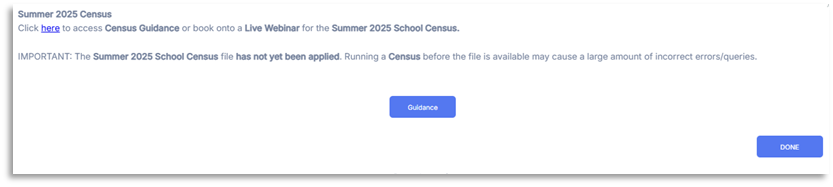
There is a guidance page available from Bromcom, and this will be updated with known error code issues click here
Changes to the School Census · For full guidance from the DfE on changes to the census, click here. ·
For further information detailing what data your school must return in the Autumn, Spring or Summer census, click here.
Useful Links for further DfE guidance
- School Census dates
- School Census changes
- Data items
- Generate and submit your return
- Find a school census code
- COLLECT user guide
- Spreadsheet of Data items for each census return
- Guide to summary report
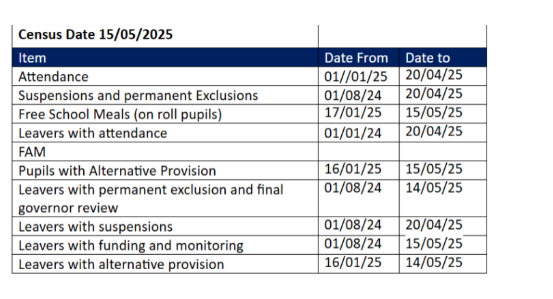
Census Date Thursday 15th May 2025
| Item | Date From | Date to |
| Attendance | 01/01/25 | 20/04/25 |
| Suspensions and permanent Exclusions | 01/08/24 | 20/04/25 |
| Free School Meals (on roll pupils) | 17/01/25 | 15/05/25 |
| Leavers with attendance | 01/01/24 | 20/04/25 |
| FAM | – | – |
| Pupils with Alternative Provision | 16/01/25 | 15/05/25 |
| Leavers with permanent exclusion and final
governor review |
01/08/24 | 14/05/25 |
| Leavers with suspensions | 01/08/24 | 20/04/25 |
| Leavers with funding and monitoring | 01/08/24 | 15/05/25 |
| Leavers with alternative provision | 16/01/25 | 14/05/25 |
This is a reminder that the deadline to return the data to the Department for Education (DfE) is Wednesday 12th June. Please check with your Local Authority as you may be required to submit the data earlier.
DfE Statutory Assessment from 23/24 onwards
In line with DfE guidance, End of Key Stage 1 (KS1) Teacher Assessments are no longer required to be collected or reported. All other assessments (KS2, Phonics, MTS and EYFSP) continue to be statutory and required.
Below are some links to existing Bromcom guidance: –
- https://docs.bromcom.com/primary-data-collections/
- https://docs.bromcom.com/knowledge-base/how-to-administer-the-key-stage-2-teacher-assessments/
- Early years assessment
- Phonics
EYFS
Reception
- EYFS Collection opens Monday 2nd June
- Deadline for submitting data Friday 11th July 2025,
- Final date to correct any errors Thursday 31st July 2025
KS1
Phonics Year 1 & Year 2 Re-checks
- Phonics Testing – Monday 9th June – Friday 13th June (variation week 16th June – 20th June)
- Threshold Mark for Phonics Release – Monday 23rd June.
- Phonics Deadline for schools to submit HDF to PAG– Monday 30th June
- Contact your LA for their Deadline for submission of the school’s data
- Deadline for LA to submit phonics screening check to Collect – Friday 18th July
Teacher Assessment Year 2
- Testing Period – Monday 1st – Wednesday 31st May
- Teacher Assessment Deadline – Tuesday 27th June
- View results online – Tuesday July 8th
KS2
Multiplication Check Year 4
- Multiplication Check Testing Period – Monday 2nd June – Friday 13th June
- HDF deadline – Friday 21st June
- Multiplication Check Results – Monday 24th June
Teacher Assessment Year 6
- Testing Period – Monday 12th May – Thursday 15th May
- Teacher Assessment Deadline – Friday 30th June
- Test Results available from Primary Assessment Gateway – Tuesday 9th July
Updates Coming Soon...
These dates are not always set in stone, and some may be moved if they do not pass testing, but the scheduled updates are listed below.
| Category | Feature | Planned Release Date |
| ADMIN | In Student Profile, the Parental Consent panel will be enhanced including a new Consent Status column displaying either Granted, Declined (new), Revoked or Pending (new) status. | 2nd May |
| ADMIN | Ability to upload documentation into the Support Events panel in the Student Details Profile page. | 2nd May |
| ADMIN | Config – Role-based Safeguarding Alerts Display Update | 17th April |
| BROMCOM AI | Improved Feedback Options for Bromcom AI. | 2nd May |
| DASHBOARDS | Attendance, Behaviour, and Other Summary intervals will be extended to 50 days. | 2nd May |
| DASHBOARDS | Safeguarding Dashboard: Additional Filters added to the Settings panel. | 2nd May |
| FINANCE | Card payment refunds in AP to auto cancel related invoices or credit notes. | 2nd May |
| MAT FINANCE | New site drop-down and sub-header in Staff Contracts list Salary Projections. | 2nd May |
| FINANCE | The Bank Reconciliation Report New ‘Bank’ parameter in the header. | 2nd May |
| FINANCE | Petty Cash Ledger Code Expenditure Report Updated CSV headers based on Listing Type. | 2nd May |
| MAT FINANCE | Income and Expenditure values will display as positive figures in Management Accounts. | 2nd May |
| FINANCE | The Automatic Reconciliation page will be converted to the new user interface. | 2nd May |
| FINANCE | A Centralised procedure will be implemented to manage Opening and Closing Balances. | 2nd May |
| MAT FINANCE | New Management Accounts by Cost Centre report | 2nd May |
| FINANCE & MAT FINANCE | Users will be able to copy Budget and Forecast scenarios in Budget Planning (SF). | 2nd May |
| FINANCE & MAT FINANCE | Payee details will now be enabled for Cheque-only suppliers without needing to tick BACS. | 2nd May |
| MCAS | Parent App: In the Exam module, parents can click through to the Exam Detail screen which will honour the configuration set up in the MIS. | 2nd May |
| OPTIONS | Clash Table: Ability to amend the Number of Groups. | 2nd May |
| OPTIONS | Options Setup: Ability to choose from the whole range of year groups for setup. | 2nd May |
| OPTIONS | Timetable Patterns: Enhancement to the display of Reserve subjects. | 2nd May |
| OPTIONS | Timetable Patterns: Ability to create new, copy, rename, delete and reset patterns. | 2nd May |
| STUDENT PORTAL | Content will be automatically translated based on the user’s language preference. | 2nd May |
| TIMETABLE | Conflicts: Introducing a Post 16 and Manually scheduled Conflict Analysis popup for staff with visibility of affected students. | 2nd May |
| TIMETABLE | Period count by Band added to the Curriculum Plan and Curriculum Plan Overview. | 2nd May |
| MAT Vision | MAT Vision users will be able to distribute Behaviour Pathways to schools, with categories displayed in the grid. | 2nd May |
| MAT Vision | The Behaviour Pathways page on the MIS will receive enhancements for improved usability. | 2nd May |
| VISION | Vision will update Statutory Age Calculations in the Attendance Dashboard for Schools in England. | 2nd May |
| VISION | The Attendance Dashboard to include leavers in attendance calculations for selected date ranges. | 2nd May |
| VISION | Vision Central Management will allow distribution of Ledger Groups and Ledger Codes. | 2nd May |
| VISION | A new Data Lock feature will be added to Ledger Groups and Codes in Vision Central Management. | 2nd May |
| VISION | Users will be able to distribute Ledger Groups and Codes via MIS Count in Central Management. | 2nd May |
Other Bromcom News...
- Navigate to Modules > Setup > Third Party Permissions and Logs
- Select ParentPay Account (or your syncing provider)
- Review the Requests section to check if access to certain tables has been requested but not granted (unticked boxes).
-
CollectionAssociates
-
CollectionExecutives
-
CollectionExecutivesRoleTypes
-
Collections
-
Emails
-
EmployeeContacts
-
Nationalities
-
People
-
PersonAddresses
-
PersonCommunications
-
PersonMedicalConditions
-
PreAdmissionStudents
-
Schools
-
Staff
-
StudentContacts
-
StudentEnrolments
-
StudentMealPatterns
-
StudentMeals
-
Students
-
SubjectClasses
-
Timetable
-
StudentAdditionalInformation (this one in particular has been a common cause)
- Options Setup: Fully operational and working as expected.
- Importing Pupil Choices: Successfully collects and processes data from parents and students according to the school’s defined rules.
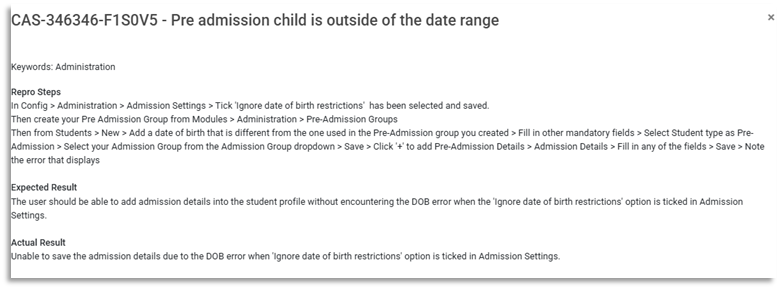
- Pattern Generator (Manual & Automatic): Some users are experiencing inconsistencies in the generated patterns. While it works correctly for some, others may see inaccurate results.
- Exporting Pupil Choices: Currently, choices are being exported in alphabetical order rather than in the original choice order.
- Continue Using for Setup: The module remains functional for setting up options and importing/exporting pupil choices.
- Pattern Generator Workaround: If the generated patterns are incorrect, Bromcom recommend:
- Exporting to Excel: This can serve as a temporary workaround, allowing users to manually adjust patterns as needed.

Click for the latest Integris updates
Summer Census
Accessing the Return
- Modules > Census > School Census
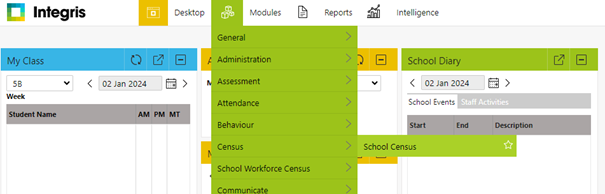
You can also access further information from the Integris site via https://help.integris-education.com/school-census-overview.
Known Issues
Please see the below link to all known issues with the return.
https://help.integris-education.com/common-and-known-errors-and-queries
Documentation to Aid with Completing the Return
We have uploaded our guidance notes to our customer portal. Please see the link below to access all the latest information.
- School ICTS customer portal https://my.www.schoolicts.co.uk/
- Turn IT on Customer Portal turn IT on Login
Data Items Included in this Return.
Full details of what is included in each return can be found via DfE spreadsheet.
Need further help?
Our Helpdesks are open from 08:00 until 17:00 so please do not hesitate to give us a call or log a ticket and we will help with your query.
| turn IT on
Portal: https://portal.turniton.co.uk/ Phone number: 01865 597620 – Option 2 Email: mis.support@turniton.co.uk |
School ICT
Portal: https://my.www.schoolicts.co.uk/ Phone number: 0345 222 6802 – Option 1 Email: helpdesk@schoolicts.co.uk |

Click for the latest ScholarPack updates
Summer Census 2025
ScholarPack Spring Census 15th May 2025
We would like to draw your attention to the following important school census information which is informed by current guidance from the DfE.
Any further updates will be shared via email. School ICT customers can also check the news section at https://www.schoolicts.co.uk/latest-news/ .
You can also access further information on the ScholarPack site via https://support.scholarpack.com/hc/en-gb/categories/6079131370013-Census
This is a reminder that the deadline to return the data to the Department for Education (DfE) is Wednesday 12th June. Please check with your Local Authority as you may be required to submit the data earlier.
Customer support
We will be available to take calls throughout the collection period so please do not hesitate to contact the help desk if you require support. Alternatively, please log into the customer portal and log a ticket, detailing what you would like assistance with.
School ICTS customer portal https://my.www.schoolicts.co.uk/
| Census Date Thursday 15th May 2025 | ||
| Item | Date From | Date to |
| Attendance | 01/01/25 | 20/04/25 |
| Suspensions and permanent Exclusions | 01/08/24 | 20/04/25 |
| Free School Meals ( on roll pupils) | 17/01/25 | 15/05/25 |
| Leavers with attendance | 01/01/24 | 20/04/25 |
| FAM | ||
| Pupils with Alternative Provision | 16/01/25 | 15/05/25 |
| Leavers with permanent exclusion and final governor review | 01/08/24 | 14/05/25 |
| Leavers with suspensions | 01/08/24 | 20/04/25 |
| Leavers with funding and monitoring | 01/08/24 | 15/05/25 |
| Leavers with alternative provision | 16/01/25 | 14/05/25 |
Documentation to Aid with Completing the Return
We have uploaded the latest ScholarPack guidance to our customer portals. You can also access their full census guidance and book onto the ScholarPack training webinars here.
Please see the links below to access the latest information. https://halo.transforming-learning.co.uk/portal/kb?id=852
Where to find Summer Census in ScholarPack?
The census module can be found via Admin > Census > Summer Census.
You will be shown sections for –
- Documentation – links to the DfE and ScholarPack Guidance
- Known Issues – Information will show here on anything flagged by the DfE or any specific error or queries to be aware of.
- Notes – Useful information needed on certain sections of this census. If the notes are in RED it means no data has been recorded for the required item.
- Specific Data Items – Information on all the specific data items required for this particular school census and a link to the area of ScholarPack where you can view / update the information.
- Standard Data Items – Information on all the standard data items required for this particular school census and a link to the area of ScholarPack where you can view / update the information.
Each blue button in the View/Edit column will take you to the area of ScholarPack where you can check or update your information.
Key Stage Returns
How Do I Enter Key Stage 1 Teacher Assessment Data?
In order to enter KS1 teacher assessment data please go to Admin > Students > Statutory Assessment
INFO
If you don’t have access to Admin and your school has it set up, please go via Workspace > Statutory Assessment instead. For guidance see: Update Settings so Teachers can enter Statutory Assessment Data

Then select End of Key Stage 1 from the dropdown.

Additional Guidance
DfE Guidance: key stage 1 assessment and reporting arrangements (ARA)
Export Statutory Assessment Data as a CTF
KS1 Teacher Assessments
- In this area on the left hand side you have the option to select the components you wish to mark against.
Info
To select multiple components, hold down the CTRL key or CMD key if you are on a MAC, then click on the components
The components in orange are the Teacher Assessments.
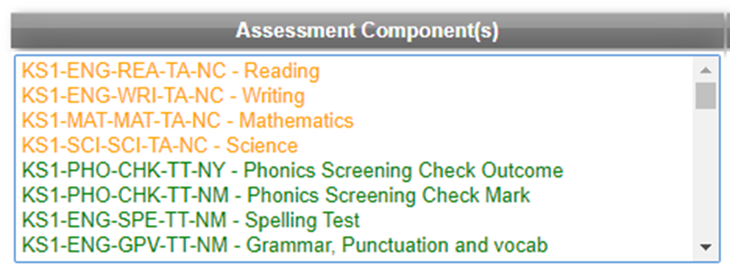
- Once the components are selected you can enter the result date and year you wish the marks to be assigned against.
Please be advised the ‘Result Year’ is the year the students took the test not the academic year.
For guidance on entering historic data please refer to:
Enter Historic Key Stage Statutory Assessment Data
- You then have some options for the Table Format you require:
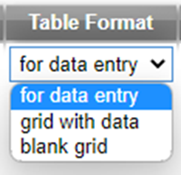
‘For data entry‘ allows you to enter the data.
‘Grid with data‘ shows the data entered already and you then have an option to print the results here if required.
‘Blank grid‘ can be used if you wish to print off the table and enter the data manually before entering it on the system.
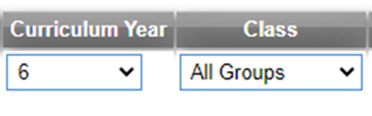
- Enter the curriculum year that the students are in – in most instances this will be Year 2.
If you have more than one form per year you can also choose to view this by class to enter the data separately for each group, if you don’t select this it will show the whole year group.
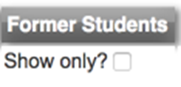
- Click the tick box to show only former students if you have any off roll students you need to enter data for, this will only show off roll students so you will need to untick this box and then click choose for the on roll students.
- Once you select “Choose” you will have a list of all students in the requested year group and you can start entering the data by clicking the drop down arrow and selecting a result (see below for the codes).
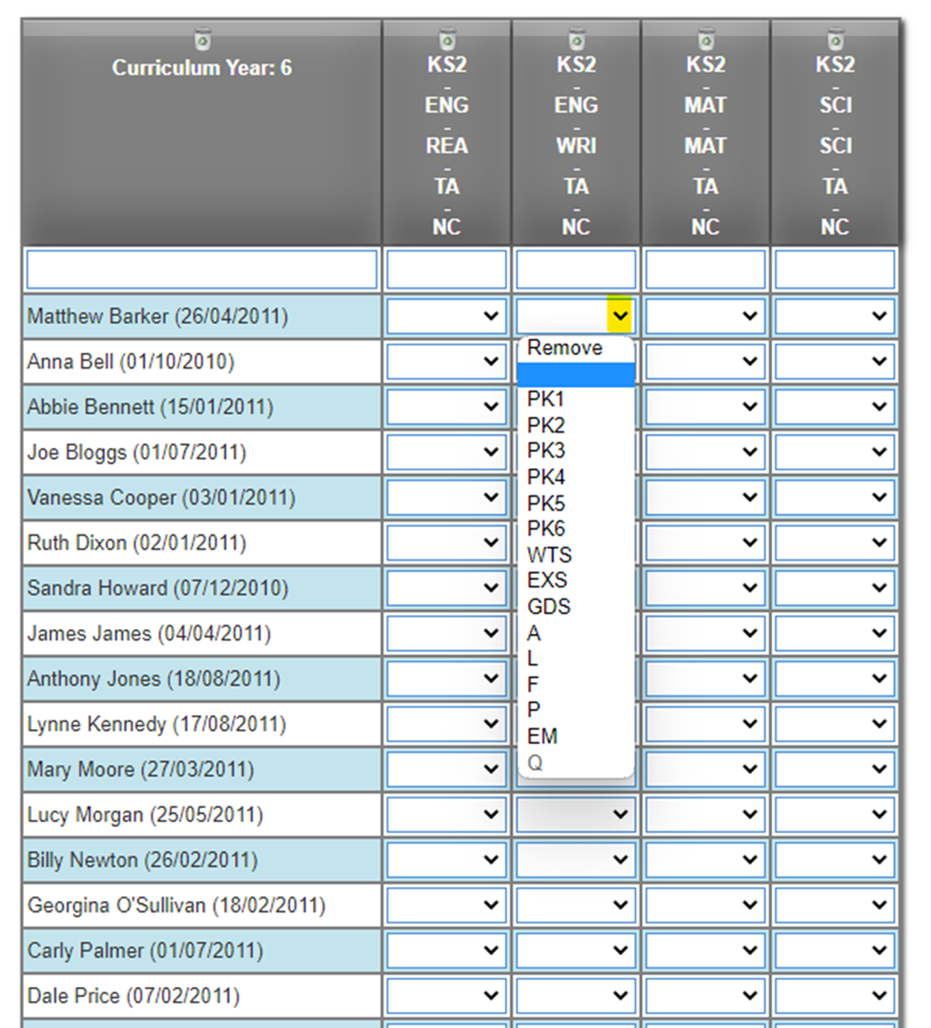
- When the data has been entered please ensure to click “Save” at the bottom of the page before navigating away.

Phonics
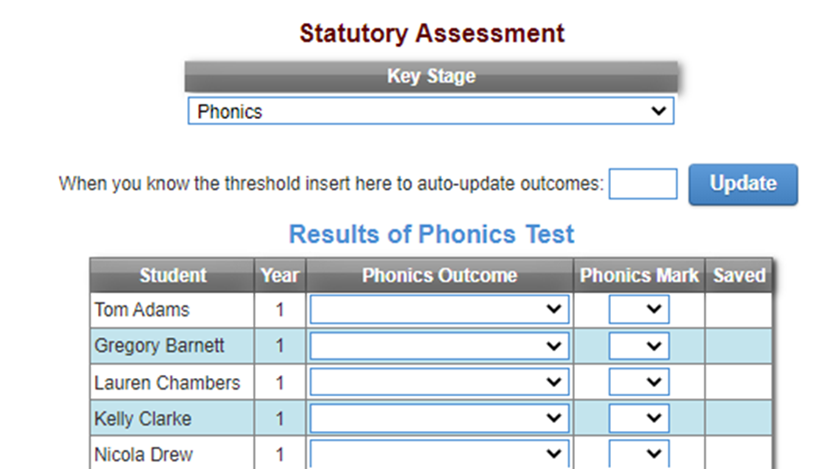
To enter phonics statutory assessment data please go to Admin > Students > Statutory Assessment > Phonics.
INFO
If you don’t have access to Admin and your school has it set up, please go via Workspace > Statutory Assessment instead. For guidance see: Update Settings so Teachers can enter Statutory Assessment Data
In this area a table will appear with all your Year 1 and Year 2 students. You will need to enter the marks for all students in Year 1.
It is only necessary to enter data here for those Year 2 students who are re-sitting the phonics test this academic year.
To enter the phonics mark click into the dropdown, select the mark you require (from 0-40) and you will see a green tick flash up to show that the mark is saved in the Saved column.
Please Note
The threshold mark will be made available to schools after the end of the test window on GOV.UK. Schools do not need to wait for the threshold mark to be published before submitting their data to the local authority.
Schools are only required to submit the mark (or outcome where the pupil has not taken the test) to local authorities, and local authorities will be required to submit this to the DfE.
The DfE will apply the threshold after the data has been submitted to local authorities.
The ‘Phonics Outcome’ field is to be populated with the following values only where a
pupil has not taken the test:
A – Absent
Q – Maladministration
D – Disapplied
L – Left
Outcomes Wa and Wt are not required. However, if these are included in a file returned
to the department the file will be accepted and the Phonics Outcome field removed.
If a pupil is absent during the check week, you can administer the check to them later. Any pupil who is absent from school for this entire period should be recorded as absent in the results data.
Key Stage 2 Assessment Data
In order to enter Key Stage 2 (KS2) teacher assessment data please go to Admin > Students > Statutory Assessment.
If you don’t have access to Admin and your school has it set up, please go via Workspace > Statutory Assessment instead. For guidance see: Update Settings so Teachers can enter Statutory Assessment Data
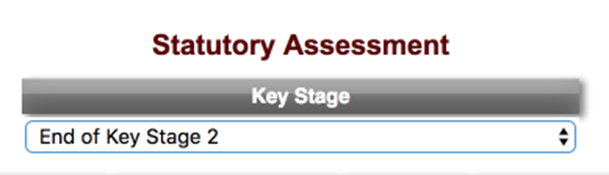
- Select End of Key Stage 2 from the Key Stage drop-down list.
Additional Guidance
DfE Guidance: key stage 2 assessment and reporting arrangements (ARA)
Multiplication Tables Check (MTC) for Year 4
KS2 Teacher Assessments
- In this area on the left hand side you have the option to select the components you wish to mark against.
Info
To select multiple components, hold down the CTRL key or CMD key if you are on a MAC, then click on the components
The components in orange are the Teacher Assessments.
Once the components are selected you can enter the result date and year you wish the marks to be assigned against.
Please be advised the ‘Result Year’ is the year the students took the test not the academic year.
For guidance on entering historic data please refer to:
Enter Historic Key Stage Statutory Assessment Data
- You then have some options for the Table Format you require. If you are entering data select ‘For data entry’ –
‘For data entry‘ allows you to enter the data.
‘Grid with data‘ shows the data entered already and you then have an option to print the results here if required.
‘Blank grid‘ can be used if you wish to print off the table and enter the data manually before entering it on the system.
- Enter the curriculum year that the students are in – in most cases this will be Year 6.
If you have more than one form per year you can also choose to view this by class to enter the data separately for each group, if you don’t select this it will show the whole year group.
- Click the tick box to show only former students if you have any off roll students you need to enter data for, this will only show off roll students so you will need to untick this box and then click choose for the on roll students.
- Once you select “Choose” you will have a list of all students in the requested year group and you can start entering the data by clicking the drop down arrow and selecting a result (see below for the codes).
- When the data has been entered please ensure to click “Save” at the bottom of the page before navigating away.

Click for the latest SIMS updates
Summer School Census 2025 – 15th May
Checking you are ready to complete the School Summer Census in SIMS.

Requirements: You must be using SIMS.net version 7.222 upgrade with the latest fileset in the 3000 series. This must be fileset 3002 or higher. Without the latest fileset your Census will NOT be accurate. Please check our website for the latest news before starting your census. NOTE: The Fileset ID is displayed in the browser header when opening via Routines/Statutory Returns. Fileset 3002 is available.
Consolidated Workstation Patch 2 (CWsp2) will also need to be applied. This will resolve the issue where the attendance panel is only reflecting the position for missing marks when the panel was first calculated, with any change found for missing marks in a subsequent recalculation not being taken into account by the Attendance panel display.
Please note this is not yet available however we will release to all schools as soon as it is.
Please see the latest updates on our campaign newsfeed:
Explore the benefits of SIMS Next Gen - the powerful cloud-based interface!
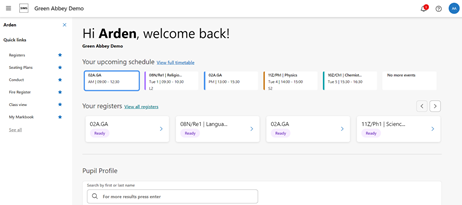
Why use SIMS Next Gen?
SIMS Next Gen is designed to make school management simpler and more accessible from any device. By synchronizing seamlessly with your existing SIMS database, it provides all the features you love in SIMS 7, along with added flexibility. Teachers can take registers remotely, access markbooks, and much more, all while maintaining the core functionality of SIMS 7. For answers to some frequently asked questions please click here: FAQ guide here.
Sign Up at No Additional Cost
Your current SIMS license includes SIMS Next Gen, so there’s no extra cost to get started! Simply log in with your SIMS ID for secure, single sign-on access, and you’re ready to go. If you’re interested in taking advantage of SIMS Next Gen, just respond to this email or reach out to us at helpdesk@schoolicts.co.uk.
Explore New Features and Roadmap Updates
SIMS Next Gen is continually evolving, with regular updates and new features designed to enhance school operations. Upcoming additions include Seating Plans, Fire Registers, and Teachers’ Homepages.
- Stay Updated with the SIMS Next Gen Roadmap: Check out our feature roadmap to see what’s coming next and keep up with our latest enhancements.
- Access Resources Anytime: For support materials, how-to guides, and more, visit our SIMS Next Gen Resource Hub.
What's New in SIMS Next Gen?
For All School Staff:
Pupil Timetables – now just one click away
Whether it’s a student at reception who’s lost their timetable, a Head of Year trying to pass on an urgent message, or a safeguarding lead checking where a student should be – you often need to locate students fast.
With SIMS Next Gen, you can view a student’s timetable instantly, with one click from:
- Pupil Profile
- Class View (via the mini-Pupil Profile)
- A quick link on the homepage
Pupil Timetables shows everything you need at a glance – subject, period, start and end time, teacher name, and room number – saving valuable time and avoiding disruption.
For Teachers:
Class View – new features added
View Pupil Pronouns
See pupils’ pronouns when opening their profile from within Class View – supporting respectful and inclusive teaching.
Session Warning
Get an instant alert if you try to take a register outside the correct session time – improving accuracy, safeguarding, and compliance.
Customisable Indicators
Choose to display attendance percentages and/or conduct points on pupil cards and set your own date range – helping you spot trends in engagement and behaviour.
Print Class View
Export and print your Class View layout as a PDF:
- Share with cover teachers who don’t have access to the system
- Or print a version without indicators to help pupils quickly find their seats
View the SEND Log
See pinned SEND notes directly in Class View, giving you the key information you need to support individual pupils.
Class View in Welsh
Class View is now fully translated into Welsh, helping Welsh-speaking teachers use the system confidently in their preferred language.
Seating Plans – new features added
Room Layouts: Add Windows and Doors
Mark where windows and doors are on your room layout – giving you a more accurate view of the classroom and helping you plan seating more effectively.
Pupil Seating Plan Notes
Keep key information front and centre by pinning important notes to the top of a student’s Seating Plan notes list.
Tag another pupil in a note using @, making it clear who else is referenced. Ideal for tracking group dynamics, peer support arrangements, or potential behaviour concerns.
For Office Staff:
Staff Profile – new features added
The Staff Profile has been expanded to help you manage cover and subject allocations more efficiently.
In the Classroom Information section, you can now:
- View and edit coverable subjects
- Set staff cover options and tiers
For Teachers and Office Staff:
Home Life – now in the Pupil Profile
The new Home Life section provides valuable insight into a pupil’s life beyond the classroom, supporting safeguarding and pastoral care.
View details including:
- Linked pupils (shared parents or home address)
- Transport information
- Post-16 employment
- Safeguarding indicators: Child in Need, Child Protection Plan & Young Carer.
This information helps staff understand a pupil’s circumstances and tailor support appropriately. Transport and post-16 details can be updated via the Admin Console.
Consents now in the Pupil Profile
Building on what’s available in SIMS 7, the new Consents page adds valuable detail and flexibility, including:
- New status options: Pending and No to track consent requests more effectively
- Additional comments to capture context
- Response provided by so it’s clear who gave permission
- Date of response for a complete audit trail
- Youth Support Services Agreement
- A new fixed consent for opting out of processing by AI tools
Create, edit, delete, activate, or deactivate can be managed in the Admin Console.
Useful links
Exciting update relating to SNG and Conduct writeback
Based on feedback from schools and SSUs a decision has been taken to rework Conduct events (negative and positive) so that it synchronises with SIMS 7 i.e. SIMS Next Gen Conduct events will writeback to SIMS 7. The development is taking place now and will be complete and LIVE for the start of the academic year.
Another development we are pleased to confirm is that report Cards and Detentions (which will also synchronise with SIMS 7) will be available at the start of the academic year.
It is likely that Conduct Events will be taken offline whilst this process takes place and more detailed communications on this will follow.