Welcome to our June newsletter.
You will notice in this edition that the layout has changed slightly.
As we now provide support on multiple MIS platforms, we have grouped information into sections with ‘General Information’ providing updates relevant to all users, followed by separate sections for ‘SIMS’, ‘Arbor’ and ‘ScholarPack’ which we hope will help guide you to the most relevant information for your establishment.

Which option should I choose when calling the School ICT Helpdesk?
As you will be aware, our options have recently changed, when you call the Helpdesk on 0345 222 6802 you are now presented with the following options:
Option 1 – MIS Support – MIS stands for Management Information System. Use this option if you need help with anything relating to the functionality and use of the modules in SIMS, Arbor, or ScholarPack also for SIMS upgrades and related issues, SIMS Migrations, etc.
Option 2 – School Genies and Power BI – use this option if you would like assistance with these packages, wish to know more about them, or would just like more information on what they have to offer.
Option 3 – Technical – use this option if School ICT Services Manage your IT services in school e.g. if your server or network is down, PC’s not working, Printers not printing, White Boards not functioning, etc.
Option 4 – General Enquiries – use option 4 if you have a general enquiry e.g. Training courses, sales, finance, and SLA enquiries.
Final Reminder - School Census Summer 2022
Please remember, for those schools submitting to the DfE the deadline is next Wednesday – the 15th of June 2022.
DfE advice on official leaving dates for Year 11 students, Summer 2022
The official school leaving date is the last Friday in June in the school year when a student reaches the age of 16. Where a Year 11 student has applied and been accepted into the school 6th form, they must remain on roll until the end of term. Code X can be used for the period after the last Friday in June to the end of term.
Exam Results - Summer 2022
Just a reminder on the JCQ (Joint Council for Qualifications) (Joint Council for Qualifications) key dates for the exam results for Summer 2022 this is the link to the full document on the JCQ Website – all dates below are correct at the time of publishing this Newsletter – please check the JCQ website for the most up-to-date information:
https://www.jcq.org.uk/wp-content/uploads/2021/10/Key_Dates_2022_Final-%E2%80%93-Oct2021.pdf
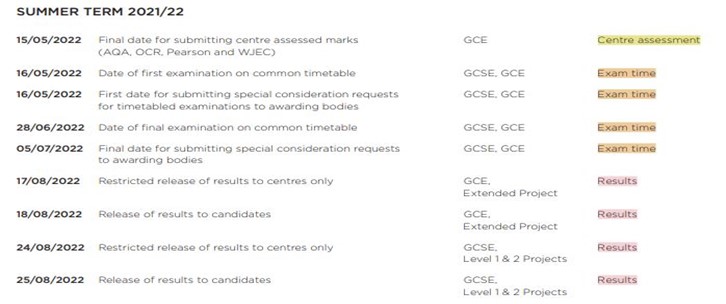
Our Exam specialists will be on hand to assist you with any issues on results days. An exam results campaign will be sent out in July with more details of the arrangements for the results days in August. If you have not got a Customer Portal Account, please let us know by contacting the Helpdesk on 0345 222 6802 and request that we set one up for you. Once you have an account you can update your areas of interest, this will ensure that you get any of the email campaigns we send out related to those areas. You will also be able to log a ticket out of hours for results days on the Customer Portal too.
SIMS – Exam Results
There are two online training courses available for SIMS – Managing Results Day: details of what is covered in this course can be found here (you can also book a place here too): https://www.schoolicts.co.uk/online-training/
Tuesday 5th July – Full-Day 09:30 to 15:30 SLA customers = £115 per person (only a few places left)
Tuesday 19th July – Full-Day 09:30 to 15:30 SLA customers = £115 per person
Arbor – Exam Results
There are several articles on the Help Centre to guide you through the process. You can find the information here: https://support.arbor-education.com/hc/en-us/sections/360001895934-Examinations-results-and-analysis

SIMS Key Stage information
Updated guidance is now available on the customer portal my.www.schoolicts.co.uk via Knowledge base/SIMS/ SIMS Key stage.
SIMS End of Year
It is time to start preparing for the current academic year-end and for the new 2022 / 2023 school year to begin!
It is essential that the new academic year is created with the correct pastoral structure and that the pastoral promotion routines have been run before the old year ends.
Please see the free resources available to download from our customer portal my.www.schoolicts.co.uk or sign up for one of our training courses. We highly recommend attending training in particular if you have never completed the end of year before as this is a detailed process with many steps.
We can also offer a consultancy support service where we will work with you to complete the process on your behalf, saving you valuable time in school. This service is priced on a school by school basis depending on how much, or how little, support is needed. Please drop us an email if you would like to find out more: helpdesk@Schoolicts.co.uk
Distance learning is available: –
Homepage | School ICT (www.schoolicts.co.uk)
Consultant lead online training is available: –
SIMS Spring 2022 updates and new features
- Admission Transfer File – via Routines/ Admission /Import ATF. Enhancements to the ATF routine you can now select whether to import contacts or not.
- Code Over a Date Range – Subcodes -Applicable to schools in England only (except Nursery schools) Focus | Attendance | Enter a Code over a Date Range It is now possible to select attendance subcodes when entering codes over a date range. This routine applies to sessions only. Subcodes available for the I code:
– I01-Illness
– I02-Confirmed case of Covid-19
- Enhancements to the Course Classifications Search Facility – Tools | Academic Management | Course Manager | Maintain Course Classification. When searching for a course name, the Description field on the Course Classification dialog now enables up to 163 characters to be entered.
- Automatic Calculation of Withdrawal Reason in Programmes of Study Applicable to schools in England only Tools | Academic Management | Course Manager | Post-16 Programmes of Study. When calculating programmes of study, if a student is withdrawn from all of their learning aims, then the Status is set to Withdrawn on the Maintain Post-16 Programmes of Study page. Additionally, if all of a student’s learning aims share the same withdrawal reason, then the Reason column is populated with this withdrawal reason. Otherwise, this column will remain blank.
- Downloading Pupil/Student Linked Documents to Support Subject Access Requests Tools | Housekeeping | Document Management Server | Maintain Bulk Documents To assist with Subject Access requests for pupil/student data, the linked documents outlined in the Person Data Output (PDO) can now be downloaded in bulk. Once downloaded, the linked documents can be delivered to the person making the Subject Access Request. For more information on this enhancement, please watch our Product Demo video (https://youtu.be/UwIKi5VsJ6o) on our YouTube channel (https://www.youtube.com/c/ESSSIMS).
Changes to FMS and Gmail configuration for BACS Remittances and Purchase Orders following deprecation of 'Less Secure Apps'
Changes to FMS and Gmail configuration for BACS Remittances and Purchase Orders following deprecation of ‘Less Secure Apps’
As of 30th May 2022, Google is no longer supporting “Less Secure App Access” which is required to send FMS emails using Gmail.
To continue using Gmail for FMS emails following this you will need to enable 2 Factor Authentication and generate an app-specific password within your Google account settings.
Firstly, enable 2FA on your Google account as outlined by Google support – https://support.google.com/accounts/answer/185839
Once you have enabled 2FA on your Google account you will need to configure an app password to use with FMS – https://security.google.com/settings/security/apppasswords
You will need to make a note of the app password should you need it again in the future. Usually 16 digits.
In FMS Tools | Establishment Details – 5: Email Setup configure your email servers with the new app-generated password.
We have also provided instructions in a helpful pdf which you can open here.
SIMS Online and Distance Learning Courses
The following Online Training Courses are currently available:
- Secondary New Office User – Full Day – Thursday 9th June
- Preparing for a New School Year – Primary – Full Day – Tuesday 14th June
- Preparing for a New School Year – Secondary – Full Day – Wednesday 15th June
- Standard Reporting – Full Day – Thursday 16th June
- Personnel – Half Day – Thursday 16th June
- Primary New Office User – Full Day – Monday 20th June
- Behaviour Management – Full Day – Wednesday 22nd June
- FMS School Fund – Half Day – Friday 24th June
- Attendance Primary – Half Day – Wednesday 29th June
- Course Manager – Full Day – *Perfect for schools wanting to get ready for the post 16 census* – Friday 1st July
- Managing Results Day – Full Day – Tuesday 5th July
- Extended Reporting – Full Day – Thursday 7th July
Using the link below you can check what is covered on each course and what, if any, the course pre-requisites are.
You can check the full list of upcoming courses here: https://www.schoolicts.co.uk/online-training/
You can check out the SIMS Distance Learning courses we offer here: https://learning.www.schoolicts.co.uk/
Some examples are:
- SIMS Housekeeping (Short Course) which is FREE to download
- SIMS Cover
- SIMS Domestic Examinations
- SIMS Curriculum Management using NOVA-T
- SIMS Mailmerge
And lots more to choose from!

Arbor Key Stage Information
Arbor Key stage returns
Go to Students > Assessments > DfE Assessments.
If the template has already been added, you’ll see it under the academic year drop-down menu.
If it hasn’t yet been added, click the green Load Assessment Template button in the top-right of the page.

Full guidance can be found here: –
Arbor End of Year
Please follow the appropriate links for guidance in the following areas: –
Preparation guidance: – https://support.arbor-education.com/hc/en-us/articles/360019450358-New-School-Year-Setup-Preparation-Checklist
Primary and Nursery guidance: – https://support.arbor-education.com/hc/en-us/articles/360005455573-New-School-Year-Setup-Guide-for-Primaries-and-Primary-Specials
Webinar recordings for further guidance can be found via the following links: –
- Primary – Steps 1-5: https://www.youtube.com/watch?v=lo59_1WZ0iY
- Secondary – Steps 1-5: https://www.youtube.com/watch?v=ScGV1roWxTM
Further training is available for steps 6-8 please register using the link below: –
We also offer consultancy support, where we will work with you to complete the process on your behalf, saving you valuable time in school. We price this service depending on your needs so please drop us an email if you are interested in finding out more: – helpdesk@schoolicts.co.uk
Arbor – Did you know - We now have various Custom Reports available on our Customer Portal? We also have a Distance Learning course for Standard Reporting!
We have created and uploaded several Custom Reports for you to download to your Arbor site – you can find them by visiting this link: https://my.www.schoolicts.co.uk/portal/kb choose Arbor from the options on the left-hand side, then select Arbor Reporting to see the downloadable reports. Once you select a report you would like, you can then download this to your PC.
Please see this Help centre article on how to export and import reports within Arbor: https://support.arbor-education.com/hc/en-us/articles/360003973577-Importing-a-Custom-Report-Writer-template-or-exporting-a-template-to-send-to-another-school
Or give the Helpdesk a call if you require any assistance on: 0345 222 6802 – Option 1.
You can find the Distance Learning Course for Arbor Standard Reporting here: https://learning.www.schoolicts.co.uk/courses
We have created and uploaded several Custom Reports for you to download to your Arbor site – you can find them by visiting this link: https://my.www.schoolicts.co.uk/portal/kb choose Arbor from the options on the left-hand side, then select Arbor Reporting to see the downloadable reports. Once you select a report you would like, you can then download this to your PC.
Please see this Help centre article on how to export and import reports within Arbor: https://support.arbor-education.com/hc/en-us/articles/360003973577-Importing-a-Custom-Report-Writer-template-or-exporting-a-template-to-send-to-another-school
Or give the Helpdesk a call if you require any assistance on: 0345 222 6802 – Option 1.
You can find the Distance Learning Course for Arbor Standard Reporting here: https://learning.www.schoolicts.co.uk/courses
Arbor – Did you know - You can access past webinar recordings and book upcoming webinars via the Help centre?
By visiting the Help centre from your homepage in Arbor you can view past webinar recordings and book a place for upcoming FREE webinars for your area(s) of interest: https://support.arbor-education.com/hc/en-us/sections/360005706298-Free-on-demand-and-upcoming-webinars
Arbor Updates
Payments Plus – Launched 12th May 2022
Payments Plus is Arbor’s new easy to use end-to-end payments system, giving schools the functionality, they need to become fully cashless. It lets schools manage meal choices, create their school shop and take payments all from within Arbor as an extension to our current payment’s module.
School Shop
School Shop School Shop allows you to set up items for sale at your school such as tickets, tuck shop purchases and uniforms, as well as allowing you to add payments manually, reconcile payments and mark items as issued. Items added to the shop can be enabled to show on the Parent Portal and Arbor App for easy cashless purchases online.
School Shop is available for schools with the Payments Plus package – to see how to upgrade or get started, look here: Arbor School Shop
Census and Attendance reporting on MAT (Multi Academy Trust) MIS
It is now easy to help you support your schools in completing their census.
Use the new Census Audit page on the MAT MIS to:
See how many schools are running the Workforce, CES (Catholic Education Service) and School Censuses
Track which schools have Not Generated, Generated and Submitted their Censuses
Jump right into the census on the school’s MIS site
Arbor have also updated the remaining attendance KPIs to show more contextual data. Go to the homepage or Analytics > Attendance to drill down into your data and take further actions with students, such as sending communications in bulk.
Exams News
- You can switch on Access Arrangement Reasons on exam registers by going to Students > Examinations > Administration > Centre Setup
- The Reject EDI file button has been removed so it can no longer be clicked accidentally. If you need to reject an EDI file, you will have to contact Arbor.
General News
- New icons in Global Search results help you easily find what you are looking for and choose the right user when they have similar names.
- The 5-day calendar now correctly displays the week cycle name for every week that has at least one school day, even if Monday is an Inset day or bank holiday.
- We have added new ‘Recorded by’ and ‘Recorded on’ fields that can be used in these Custom Report Writer base reports: Child Protection notes, Academic notes, In Care notes, Pastoral notes, Safeguarding notes, SEN notes.
- Members of staff can now add and edit their own Next of Kin records (including email and phone number) from My Items > My Account.
- The old EYFS marksheet has been removed as it could only be used with the old framework. You can access the latest version via School > Programmes > Courses > Reception > Assessment > Full Marksheet.
- The delete bin buttons in tables on the TimeTabler import and New School Year Setup pages have been removed.
- In line with the DfE’s recently updated guidance for recording attendance, Arbor have added ‘inactive’ to the X01-X09 attendance codes so you can easily see they are no longer valid, though they are still available to select for correcting past attendance. However, you can continue to use the I01 and I02 codes if you wish.
Top Tip
Do you need a quick way to produce a list of all students with 100% attendance for a date range to reward them?
Go to Students > Attendance > Absentees > Persistent Absentees, change the filter so that Minimum (%) and Maximum (%) are both set to 0 and click on Apply. You can also download this report into various formats including Excel.
Coming soon…
Timetabling
Soon you will be able to import from Arbor into TimeTabler, rather than needing to keep both systems up to date with tweaks to rooms or staffing. Arbor are also working on the ability to exclude students from certain lessons and to import options.
Assessments
Arbor are adding new summative assessments that automatically calculate ‘a SUM total’ and simplify the process of adding assessments to next year.

ScholarPack Key Stage information
The updated guidance is now available via: – https://support.scholarpack.com/hc/en-gb/articles/360004084551-Statutory-Assessment-2021-22-FAQs#are-there-any-changes-to-statutory-assessments-in-2021-22–0-0
ScholarPack End of Year
Please see the link below for guidance on this – NB Please be aware you cannot complete the Year-End process until the last day of the summer term and after the PM register, however, there are aspects of the Year-End that you can start before the last day of the summer term.
There are 6 essential steps (1-6 listed below), which will need to be completed, and a 7th step (number 7 listed below) which is optional. The process is a linear function, and the elements should be carried out in the order indicated by the timeline. You cannot go back to a previous step once you have passed it.
To start your Year-End procedures, you can use the icon via Admin > Year-End.
https://support.scholarpack.com/hc/en-gb/articles/203281691-Year-End-Guide
We also offer consultancy support to work with you to complete the process on your behalf to save valuable time in school. Please drop us an email if you are interested at helpdesk@schoolicts.co.uk

School ICT Resourcing can fulfil all your temporary or permanent recruitment of non-teaching staff
School ICT Resourcing can source temporary or permanent non-teaching staff for your school. Whether short term or for a longer period, we can work with you to find a suitable placement.
If yourself or any colleagues are retiring soon, but would consider working on a temporary or ad-hoc basis, please contact Helen who would love the opportunity to speak with you about the potential of adding you to our candidate list.
For further information please call: 01132878020 or visit: https://www.schoolictresourcing.co.uk/