
Contents - to help you navigate to the most relevant section, please click the appropriate link below: -

General Updates
School ICT Nominated for Business of the Year!
We are thrilled to announce that School ICT has been nominated for the Large Business of the Year (51+ employees) award at the Connect Yorkshire Business Awards! It’s a great achievement to have been nominated, and winning would be a first for us.
How to Vote: Every vote count, and it could be just what we need to secure the award. Voting deadline is Friday 8th November, it takes less then 1 minute and you don’t need an account to vote.
ESS SIMS - School ICT and turn IT on Continue Partnership with New Multi-Year Agreement
We are excited to announce the extension of our partnership with ESS as an official SIMS Support Unit (SSU), effective from April 2025. This new multi-year agreement reinforces our shared commitment to supporting schools and educational institutions across the country.
As trusted SIMS Support Units, both School ICT and Turn IT On will continue to collaborate closely with ESS to provide expert guidance and technical support for schools using SIMS7 and FMS6 software. Our aim is to enhance the efficiency and performance of these legacy systems while also helping our customers transition smoothly to ESS’s new SIMS & Finance Next Gen cloud services.
School Workforce Census - Key Dates
- Census date: 07/11/2024
- Continuous contracts collected from 01/09/2023 to 07/11/2024
- Absences collected from 01/09/2023 to 31/08/2024
For schools that submit data to COLLECT the deadline is 6th December 2024, local authority schools will need to check with their LA for their return deadlines.
Guidance on information needed on staff with closed contracts has been strengthened
We strongly advise downloading the DfE guidance for clarification on who should and who should not be included in the census. This can be downloaded from the below link.
https://www.gov.uk/education/school-workforce-censuses
Read our full guidance here for all MIS:
https://www.schoolicts.co.uk/school-workforce-census-guidance-october-2024/
Known issue:
4565Q – Where <Post> = (‘OSP’ or ‘TAS’) AND <ContractType> =’PRM’ or ‘FXT’ or ‘TMP’, then Base Pay, totalled across contract node should be less than £55,000.
This query has been updated in the spec/validations to £55,000, however the XSLT is still showing as £50,000 – so any salary between £50,000 and £55,000 is currently triggering the query when it shouldn’t be.
This validation rule will trigger correctly when the file is loaded into COLLECT. We will not be issuing a correction to the XSLT at this late stage.
Meet the Team

Meet Ruth Rogers, our MIS Manager at School ICT. With 13 years’ experience as a School Data Manager and a journey that started with us 5 years ago as a Senior Consultant and Arbor Lead, Ruth is now a crucial member of our senior leadership team.
Ruth’s unwavering passion is ensuring that schools maximise their MIS Systems’ potential. Her mission is to empower schools, giving them the confidence to use their new and existing MIS Systems to help staff and teachers support students in thriving and achieving their full potential.
Reach out to our dedicated team at 03452 226802 or helpdesk@schoolicts.co.uk. Let us help you make the most of your MIS Systems!
Webinars
We are running a continued webinar series throughout the year. Please click here to see the upcoming webinars, and to book places.
What’s the difference between a webinar and training?
- Webinar: Free short session aimed to inform, raise awareness and update you
- Training: Indepth session often ½ day + taking you step by step through an area or process
Data Management Services
Our Data Management service offers an excellent, cost effective, responsive and efficient Data Management solution delivered remotely by a team of highly experienced school data experts. Their dependable advice and guidance empowers schools, academies, and MATs to maximise their investment in their management information system (MIS) team. Whether it’s a long-term solution or short-term cover for sickness or maternity, please reach out.
- Please click here for further information
We're Hiring! - Remote Data Manager Vacancy
Due to increasing demand for our Remote Data Management services we’re looking to expand our team…could this be the perfect role for you? To apply for the role or find out more visit:
Training
Training courses for the academic year 2024/2025 are live! We have a comprehensive schedule of online ‘live’ training courses along with Distance Learning courses (My.www.schoolicts.co.uk) to help you develop your knowledge of SIMS and get the most out of your MIS (Management Information System).
To view courses and book a place, please visit https://www.schoolicts.co.uk/online-training/
| FSM Advanced | Wednesday 13th November (Half Day) | https://www.schoolicts.co.uk/events/fms-advanced/?occurrence=2024-11-13&time=1731490200 |
| Arbor Attendance | Wednesday 13th November (Half Day) | Arbor Attendance – School ICT |
| SIMS Standard Reporting | Thursday 14th November (Full Day) | https://www.schoolicts.co.uk/events/standard-reporting-online/?occurrence=2024-11-14&time=1731576600 |
| Arbor Payments, Meals and Shop | Thursday 14th November (Half Day) | Arbor Payments, Meals And Shop – School ICT |
| Arbor Standard Reporting | Friday 15th November (Half Day) | Arbor Standard Reporting – School ICT |
| Arbor Parent Engagement and Communications | Monday 25th November (Half Day) | Arbor Parental Engagement And Communications – School ICT |
| SIMS Curriculum Management using NovaT | Tuesday 26th November (4 Days) | https://www.schoolicts.co.uk/events/nova-t-online/?occurrence=2024-11-26&time=1732613400 |
| SIMS Monitoring Attendance | Thursday 28th November (Half Day) | SIMS Monitoring Attendance – School ICT |
| SIMS Data Cleansing Consultancy | Tuesday 3rd December (Half Day) | SIMS Data Cleansing Consultancy – School ICT |
| SIMS Lesson Monitor | Thursday 5th December (Half Day) | SIMS Lesson Monitor – School ICT |
| Arbor Assessment User | Tuesday 10th December (Full Day) | Arbor Assessment User – School ICT |
| SIMS Data Cleansing Consultancy | Thursday 12th December (Half Day) | SIMS Data Cleansing Consultancy – School ICT |
Can’t see the course you need? Please don’t hesitate to get in touch to discuss your requirements – we can offer bespoke training and Consultancy services if the course you’re looking for isn’t scheduled. Please call us on: 03452226802 or e-mail: helpdesk@schoolicts.co.uk
Data Health Check Service
An MIS Data health check ensures you’re getting the most out of the investment in your MIS. The benefits of one of our comprehensive health checks include: –
- Raise awareness of functionality and any issues
- Keep you up to date with the latest developments in your MIS
- Housekeeping and tidying exercises
- Report with recommendations to ensure you’re fully maximising your MIS along with any training recommendations
- For on premise MIS a server health check is also included
Our health check service usually takes around half a day. Please contact us to find out more on: helpdesk@schoolicts.co.uk to find out more.
Invitation to Try Our New Live Chat Feature!

SIMS Updates
School Workforce Census
For continued support School ICT and turn IT on customers please click on the links below for the Quick Guide to the SWC 2024 available from the Customer Portal: –
Current fileset: 2805
Data Items Collected in the Return
The following staff member data items are collected:
- Staff details
- Contract details (including the employment start date for the period of employment that applies to each contract)
- Service Agreement details for agency teachers (including the employment start date for the period of employment that applies to each service agreement)
- Payment details for categories of staff
- Additional payment data is collected for non-teaching school leaders as well as teachers and teaching assistants. Additional payment data for other support staff is no longer required
- Absence details for teachers and teaching assistants in regular service, working for schools through a contract (not an agency agreement)
- Curriculum details for teachers and teaching assistants in the timetable cycle in which the census falls (Secondary and All-Through schools only)
- Qualification details for (NQF Level 4+) Post A Level.
Qualification data is collected for teachers, teaching assistants and non-teaching school leaders. Qualification data is no longer required for other support staff.
The following school level data items are collected:
- Vacancies
- Occasional teachers
- Third party staff count
The return collects staff data for both teachers and support staff.
- Teachers and Support Staff with contracts:
who are employed by the school via a current contract that has lasted for 28 days or more on census day
or
who are have been employed by the school via a contract for 28 days or more during the collection period
or
who are have been employed by the school via a permanent contract or via a contract with a contract end date at least 27 days after the contract start date
- Teachers with service agreements (agency teachers):
who are employed by the school via a current service agreement with a third party on census day
or
who have been employed by the school via a service agreement for 28 days or more during the collection period
Note on Newly Qualified Teachers
From September 2021, statutory induction changed for new teachers and all early career teachers undergoing statutory induction starting from September 2021 are entitled to 2 years of high-quality professional support based on the ECF. State funded schools offering statutory induction will receive additional funding to deliver the new ECF.
Funding for the second year of induction will depend on data submitted in the SWC, so special care should be taken that data entered in this field is correct.
Note on School Business Professional and Leadership Non-Teaching
Schools are required to indicate those members of their staff who are School Business Professionals.
‘School Business Professional’ refers to staff and is expected to include staff with the roles of ‘Bursar’, ‘Business Manager’, ’Finance Officer’, ’Office Manager’, ‘Premises Manager’ or ‘ICT Network Manager’.
Note on staff working in multiple schools
Teachers who work in multiple schools, even if the schools are part of a Multi Academy Trust, will need to be recorded separately in each of the schools.
Each school will need to record the name, teacher number, QTS, QTLS and EYTS of the staff and to separately record the hours worked by staff in each school. This data must be recorded for each school to ensure that staff are not being double counted and to ensure that an accurate record is made of staffing and hours worked in each school
Staff record reminder
When completing these fields for the SWC, please ensure that you use the box highlighted in Yellow and NOT the box circled in red.
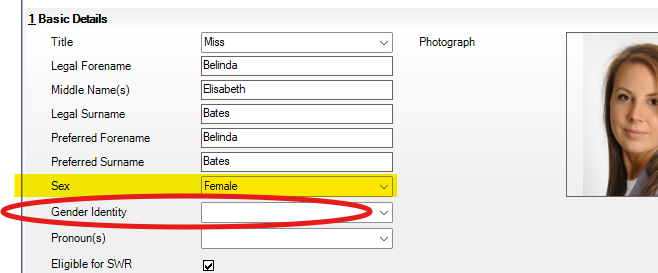
This item must be recorded for all staff records reported on at Staff Details level. This is as it is recognised in law, as recorded on a birth certificate or gender recognition certificate. This will be the same value that is reported to the HMRC, as this can affect pension ages or National Insurance contributions.
SIMS Autumn Upgrade 2024 (Version 7.220)
We have been advised by ESS that the Autumn Upgrade (7.220) will be available earlier than anticipated. With this in mind, we plan to start upgrading our schools from Monday 18th November, as long as there are no major issues. However, schools need to know that:
- the Pupil Census for Autumn MUST be completed and submitted before the upgrade.
- If the SWC has not been done, then CDPsu3 is now available for those schools who would like to include the additional ethnicity fields below. Please request this patch if you require it (patch no 30223). The 5 additional codes to the existing list of ethnicity codes in line with the DFE are:
- ABRI: Asian-British (main code)
- AWEL:Asian–Welsh (main code)
- BBRI:Black-Black British (main code)
- BWEL:Black Welsh (main code)
- ORAB: Arab (extended code for main code OOTH: Any other ethnic group)
For schools who have completed and submitted their SWC prior to their upgrade, there will also be CDPau (Consolidated Database Patch Autumn Release) 1, which will need to be applied after the Autumn upgrade to update the Ethnicity codes for the pupil Census in January. This patch is not yet available, but we anticipate it shortly.
Please click here to see the latest features and enhancements.
FMS 6 Release Notes – version 6.220
Please see the link here for all the new features and improvements for FMS6
SIMS FMS – BACS and Llyods bank/Lloyds Commercial banking
We have been made aware that those schools who utilize BACS processing in SIMS FMS and who also bank with either LLoyds Bank or LLoyds Commercial Online banking may come across an article in the banking portal, suggesting that they need to amend their BACS import template and should contact their IT to assist.
Please be aware this does NOT affect users of SIMS FMS and they should continue as normal.
Please see link below.
If you are unsure, please cheque with your banking provider or log a support call via the helpdesk.
SIMS Next Gen – Use SIMS via a web browser for free!
https://parentpay-5964770.hs-sites.com/toolkit-email-1-ssu
SIMS Next Generation provides a collection of new browser-based modules that allow your staff to use SIMS on any capable device. Once your school is onboarded you can roll out each of the modules to your teams at your own pace, as well as review and adopt new modules as they are released.
ESS have put this guide together to help you through the initial setup (onboarding videos can also be found here)- it only needs to be completed once for the whole school and then you are ready to go!
The onboarding and data preparation tasks can be completed simultaneously and are managed by different audiences. Our colleagues here at School ICT are working with schools to carryout onboarding and data preparation tasks, please get in touch via helpdesk@schoolicts.co.uk if you require support with this process.
Next Gen Updates
Recently added functionality
- Staff Absences (edit & add new) – Edit staff absences or create new ones, reflecting in both the Cover module and the Staff profile
- Attendance – Whole Attendance Overview reporting on Current year average, Previous year average against the National average, is available under Reporting and Analysis
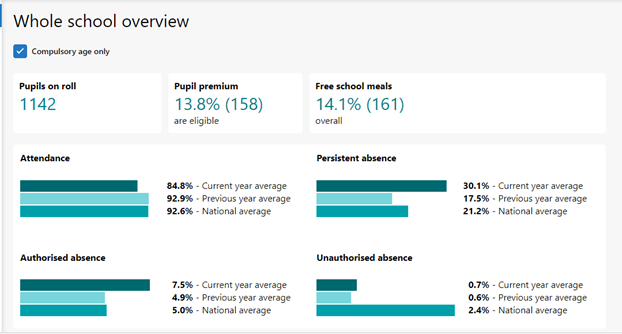
Other attendance reports available under reporting and analysis includes Attendance by category, Attendance by code and Percentage attendance.
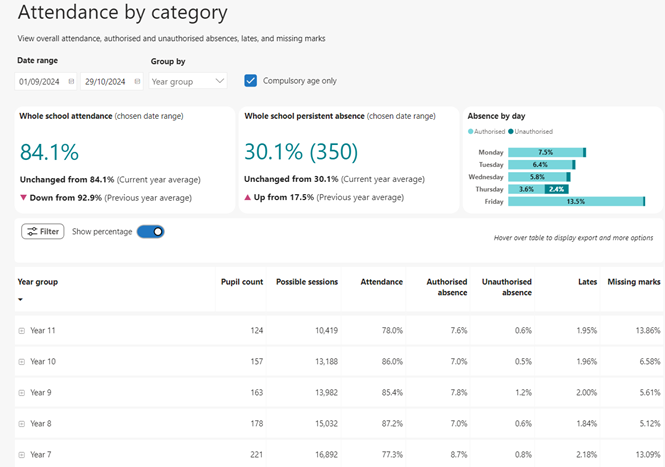
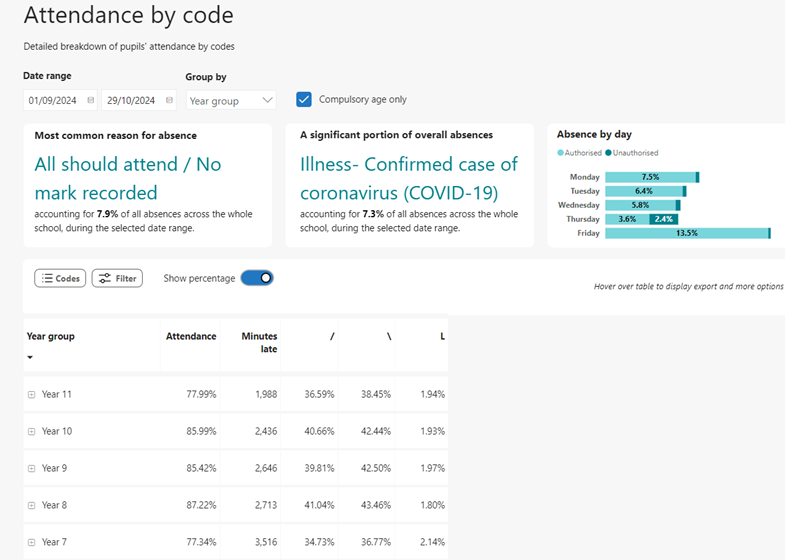
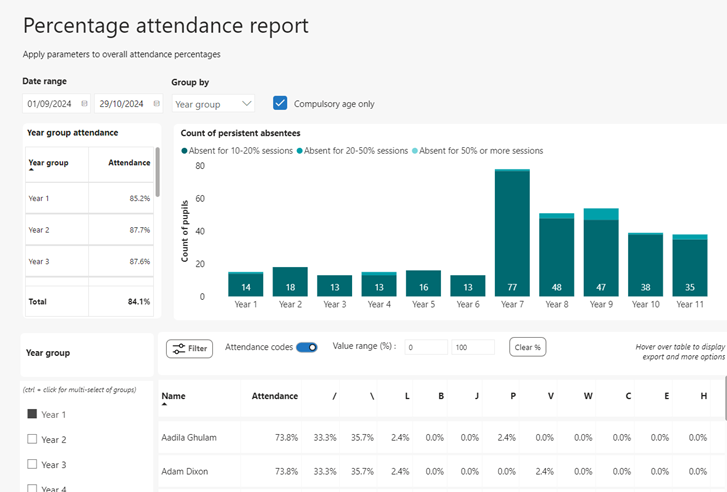
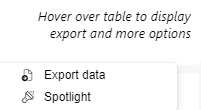
Attendance by category, Attendance by code and percentage attendance includes a focus mode and can also be exported and spotlighted by hovering over the table and clicking on either the Focus mode icon or More options to export or Spotlight the data.
Focus Mode Icon 
More Options 
Next Gen Road Map
What’s in progress
- Record pupil behaviour and achievements
- Class View
- Group Hub Matt Profile
- Online Mark Sheets for Primary Schools
- Finance Next Gen Reporting – Ledger Codes Reports
- Medical Information
- Statutory SEND/ALN Data
- Group Hub – Manage Cluster/Hubs
What’s up Next
- Student Reporting
For more information, please click here to view the Road Map and to see a sneak preview of future enhancements and features.
Next Gen Resource Hub
Access the Next Gen resource hub here to access Knowledgebase articles, training, Videos and more.
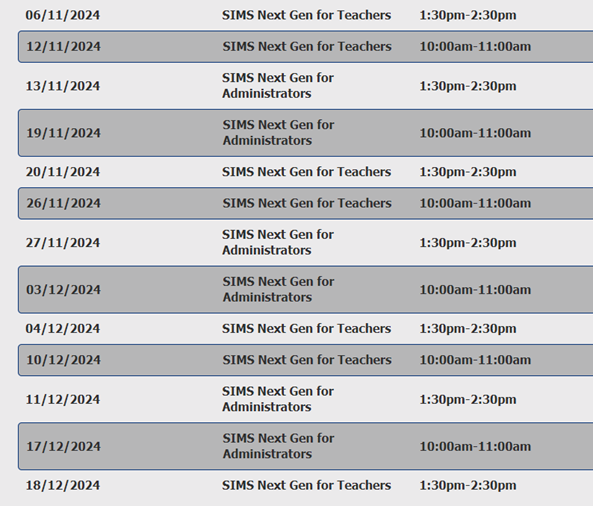
SIMs Next Gen Webinar Calendar

Arbor Updates
School Workforce Census - Guidance and Key dates
Key Dates for the School Workforce Census
- Census date: 07/11/2024
- Continuous contracts collected from 01/09/2023 to 07/11/2024
- Absences collected from 01/09/2023 to 31/08/2024
- For schools that submit data to COLLECT the deadline is Friday 6th December 2024.
Local authority schools will need to check with their LA for their return deadlines.
Arbor Documentation available from the links below: –
- School ICT link: https://halo.transforming-learning.co.uk/article id=17
- turn IT on link: https://portal.turniton.co.uk/
For our detailed guidance on the SWC please click here: https://www.schoolicts.co.uk/school-workforce-census-guidance-october-2024/
DfE Guidance
We strongly advise downloading the DfE guidance for clarification on who should and who should not be included in the census. This can be downloaded from the below link.
School workforce census guide 2024: Guide for schools (publishing.service.gov.uk)
School workforce census 2024 (publishing.service.gov.uk)
Staff profile reminder
When completing these fields for the SWC, please ensure that you use the box circled in red.
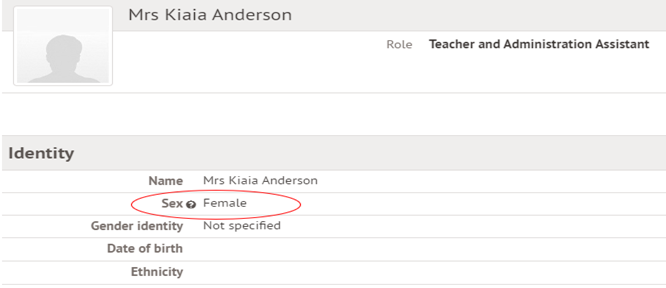
This item must be recorded for all staff records reported on at Staff Details level. This is as it is recognised in law, as recorded on a birth certificate or gender recognition certificate. This will be the same value that is reported to the HMRC, as this can affect pension ages or National Insurance contributions. For more information, please see here
Check your data using the Data Quality Dashboard.
Before the Dry Run facility opens, you can start preparing for Census by heading over to your Data Quality Dashboard. You’ll find the key areas to help you check and prepare your data, which you should work through in this order: –
1. Merge or delete any duplicate staff profiles in the Suspected Duplicates section.
2. Add and update basic details in the Staff section.
3. Add in key Census information in the School Workforce Census section to add key Census information. Just click a cell to add the data!
4. Pay Scales: In Arbor, when looking at Pay scales, all scales may display differently to your previous MIS. If you have migrated from another MIS, it is advisory to ensure that these are updated and correct. You may wish to rename the scales to ensure you are awarding correctly e.g., NJC scale 1 or Teachers Upper scale 1 etc. Please use the link below for further guidance on how to amend, update, create and complete Pay scales in Arbor https://support.arbor-education.com/hc/en-us/articles/203790902-Managing-and-Updating-Pay-Scales
5. Check your SENCo is set up, in Arbor they need a separate contract for the SENCo role, with the hours they work in that role. Detailed guidance on how to do this can be found here:- https://support.arbor-education.com/hc/en-us/articles/360014107837-How-to-set-up-your-SENCo-for-the-Workforce-Census#step-2-check-your-senco-is-set-up-0-1
6. Staff Absence data – Make sure staff absences have been recorded: How can I see Staff Absence Statistics?
7. Qualification data – Record Staff qualifications (Qualification codes, Subject Codes and Class of Degree) from the Qualifications & Checks area on staff member’s profiles.
8. Date of last pay review – Use the Staff section part of the Check your data using the Data Quality Dashboard.
9. Vacancies – On census day, you need to add in the vacancies that are currently open at your school.
10. Third-party support staff headcount – On census day, you need to add in headcount numbers for occasional teaching staff and third-party support staff are both required. You can see how to add this in the Workforce Census guide.
Note on Newly Qualified Teachers
From September 2021, statutory induction changed for new teachers and all early career teachers undergoing statutory induction starting from September 2021 are entitled to 2 years of high-quality professional support based on the ECF. State funded schools offering statutory induction will receive additional funding to deliver the new ECF.
Funding for the second year of induction will depend on data submitted in the SWC, so special care should be taken that data entered in this field is correct.
Note on School Business Professional and Leadership Non-Teaching
Schools are required to indicate those members of their staff who are School Business Professionals.
‘School Business Professional’ refers to staff and is expected to include staff with the roles of ‘Bursar’, ‘Business Manager’, ’Finance Officer’, ’Office Manager’, ‘Premises Manager’ or ‘ICT Network Manager’.
Note on staff working in multiple schools
Teachers who work in multiple schools, even if the schools are part of a Multi Academy Trust, will need to be recorded separately in each of the schools.
Each school will need to record the name, teacher number, QTS, QTLS and EYTS of the staff and to separately record the hours worked by staff in each school. This data must be recorded for each school to ensure that staff are not being double counted and to ensure that an accurate record is made of staffing and hours worked in each school
MAT MIS SWC
MAT MIS School workforce census PayScale management *(Available MATs that have MAT MIS Plus or Enterprise tiers)
Reminder: From your central MAT MIS you can manage your schools’ pay scales without needing to log in to each individual school site. Arbor’s functionality means you can update your pay scales in MAT MIS, then push them down to your schools with the click of a button: Pay scale pushdown from the MAT MIS
New Arbor Features
- The new timetable API with Tes Timetable is now live. Tes Timetable can bulk import up to 1000 slots in a single batch, improving speed and efficiency also reducing system load by sending fewer total API requests. It also offers enhanced data validation to reduce sync errors between Arbor and Edval. Schools can review and select which timetable changes to apply, and timetable imports will now automatically update calendars for staff, students, and rooms. For more information on this update, see the guidance here.
- Arbor have eased the restrictions on changing timetable cycles from 1 week to 2 weeks. This functionality is now only locked between 8am and 10am, and 12:30pm and 1:30pm. This change also applies to the times schools are able to change the week A/week B setup on their two-week timetable.
- Arbor have released the Student Dashboard (previously ‘student on a page’) in Arbor Labs. This is a data-led overview of a student supporting pastoral leads to easily have joined up conversations about a student. This can be found in Student Profile > Student Dashboard when the feature has been turned on in School > Arbor Labs.
- Arbor have released a change to restrict DfE schools from using the old attendance codes (H, J and Y) for registers in the current year. Additionally, it will no longer be possible to use these three marks when creating planned absences. Schools can still select these three codes if they are: editing an attendance record from before the 19th August 2024, viewing a date range that starts before 19th August in Bulk Edit Marks Advanced, changing a mark on a lesson register from before the 19th August 2024 or viewing a period that starts AFTER the 19th August 2024 in Bulk Edit Marks Advanced and one of the three codes has been used (this is necessary to ensure the incorrect codes are visible for correction).
- Users can now display targets in Data Collection Marksheets. Users have two ways of displaying them, either via the marksheet filters or via the Marksheet Setting (this will mean that they are on by default).
- The Attendance Summary dataset has been added to the BI Connector. This is a student-level summary of year-to-date roll call attendance and includes Percentage Present, Percentage Authorised/Unauthorised Absent, and Percentage Statutory Late Proportion. See this resource for more information.
Did you know:
- You can now report on behaviour points in the same way as behaviour incidents with the Point Awards base report in the Custom Report Writer
- A new ‘Days Suspended’ column has been added to the suspensions reporting page
- You can now approve absence notes from the Parent Portal in bulk, and quickly set the correct attendance mark at the same time
FMS 6 Release Notes – version 6.220
Please see the link here for all the new features and improvements for FMS6

ScholarPack Updates
Workforce Census
- Census open date: Monday 28th October 2024
- Collection Date: Thursday 7th November 2024
- Deadline for returns: Friday 6th December 2024
*Your local authority may have a shorter deadline if you submit to them rather than COLLECT – please contact them for details of their deadline.
The following, if they are in regular service, are examples of those for whom school workforce level data should be returned:
- Teachers employed by the school, both with and without QTS, EYTS or QTL
- Support staff employed directly by the school
- Teachers working at the school who have been supplied by an agency or a local authority if the local authority is acting like a supply agency
- Staff on paid or unpaid absence, whether long or short term
- Teachers on the School Direct (salaried) Programme, the Overseas Trained
- Teacher Programme (OTTP) and the Teach First programme
- ‘Teaching Assistants’ comprise support staff in the classroom for learning and pupil support (e.g. HLTAs, TAs, special needs support staff, nursery assistants and minority ethnic/bilingual support assistants)
- ‘Non Teacher School Leaders’ include School Business Managers and other non teaching school leaders
School workforce level data does not need to be returned for the following:
- Temporary staff with service of less than 28 days
- Casual staff without contracts employed on an ad hoc basis
- Trainee teachers on teaching practice
- Trainee teachers on a School-Centred Initial Teacher Training (SCITT) programme
- Staff working in extended school service provision, for example breakfast and after school clubs, Sure Start and Children’s Centres. Note that staff engaged in the normal running of the school, such as cleaners, must be included regardless of when they work, for example before, after, or during the normal school day
- Staff employed by the local authority that provide support to schools for example peripatetic music teachers, advisory teachers, educational psychologists, educational welfare officers (information on these will be submitted by the local authority)
- Governors and voluntary staff
- Staff for whom there is no role identifier code that equates to the function they carry out, for example clerk to governors, school crossing patrol staff and school
improvement partners - Staff whose contracts finished prior to 1 September last year
Every school will be expected to have a SENCO and to have a headteacher or executive headteacher. If this is a combined role within the school, for example the Head is also the SENCO then a note will need to put on COLLECT for queries 6540Q and 6550Q
On the day details
Headcount data (on the day) is required for supply teachers who have a contract or are employed under a service agreement with a school for less than 28 days (occasional teachers) that are in school on census day.
Headcount data is also required for support staff who are not employed directly by the school or LA who are in school on census day, i.e. contract cleaners or outsourced IT technicians.
Data does not need to be returned for the following if they are not in school on the
census day:
- temporary staff with service of less than 28 days and who are not expected to complete service of 28 days or more
- casual staff without contracts employed on an ad hoc basis
If these staff are in school on census day then head count data should be reported for them.
Note on Newly Qualified Teachers
From September 2021, statutory induction changed for new teachers and all early career teachers undergoing statutory induction starting from September 2021 are entitled to 2 years of high-quality professional support based on the ECF. State funded schools offering statutory induction will receive additional funding to deliver the new ECF.
Funding for the second year of induction will depend on data submitted in the SWC, so special care should be taken that data entered in this field is correct.
Note on School Business Professional and Leadership Non-Teaching
Schools are required to indicate those members of their staff who are School Business Professionals.
‘School Business Professional’ refers to staff and is expected to include staff with the roles of ‘Bursar’, ‘Business Manager’, ’Finance Officer’, ’Office Manager’, ‘Premises Manager’ or ‘ICT Network Manager’.
Note on staff working in multiple schools
Teachers who work in multiple schools, even if the schools are part of a Multi Academy Trust, will need to be recorded separately in each of the schools.
Each school will need to record the name, teacher number, QTS, QTLS and EYTS of the staff and to separately record the hours worked by staff in each school. This data must be recorded for each school to ensure that staff are not being double counted and to ensure that an accurate record is made of staffing and hours worked in each school
Staff Profile Reminder
When completing these fields in the staff record for the SWC, please ensure that you use the box circled in red.
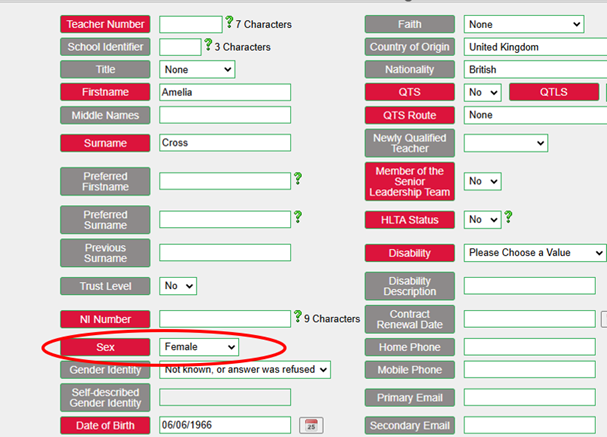
This item must be recorded for all staff records reported on at Staff Details level. This is as it is recognised in law, as recorded on a birth certificate or gender recognition certificate. This will be the same value that is reported to the HMRC, as this can affect pension ages or National Insurance contributions.
After you have completed your Census file and checked it, you are able to then Download the file. This will go to your personal computer downloads, where you are then able to send it to Collect, securely.
For continued support for the SWC please click here
Latest Guidance on Attendance Codes
Please check below for the latest guidance on attendance codes that came in to affect 19th August. Please make sure you are adhering to these.
Prepare for Ofsted Guidance
Are you expecting a visit form Ofsted any time soon?
Check out the Prepare for Ofsted guidance here to help prepare for some commonly asked questions.
Scholarpack Parent App missing from Google Play
Please be informed that the ScholarPack Parent App is currently unavailable for download from the Google Play Store for Android users only. If parents installed the app before September 25th, they can continue using it as normal. Our team is working to restore the app’s availability on the store as soon as possible. We will share more information as it becomes available.
In the meantime, for communication and information, parents should contact your school directly. We recommend using your school’s other communication channels, such as email or phone.
This is being worked on urgently and we are hoping for a resolution shortly.

Bromcom Updates
Workforce Census
For continued support please click on the following links Please note the document references 2023 as Bromcom have not provided an up-to-date version this is still valid for the moment. https://docs.bromcom.com/?s=school%20workforce%20Census%202024&ht-kb-search=1
Key Dates for the School Workforce Census
- Census date: 07/11/2024
- Continuous contracts collected from 01/09/2023 to 07/11/2024
- Absences collected from 01/09/2023 to 31/08/2024
- For schools that submit data to COLLECT the deadline is Friday 6th December 2024.
Local authority schools will need to check with their LA for their return deadlines.
The following staff member data items are collected:
- Staff details
- Contract details (including the employment start date for the period of employment that applies to each contract)
- Service Agreement details for agency teachers (including the employment start date for the period of employment that applies to each service agreement)
- Payment details for categories of staff
- Additional payment data is collected for non-teaching school leaders as well as teachers and teaching assistants. Additional payment data for other support staff is no longer required
- Absence details for teachers and teaching assistants in regular service, working for schools through a contract (not an agency agreement)
- Curriculum details for teachers and teaching assistants in the timetable cycle in which the census falls (Secondary and All-Through schools only)
- Qualification details for (NQF Level 4+) Post A Level
Qualification data is collected for teachers, teaching assistants and non-teaching school leaders. Qualification data is no longer required for other support staff.
The following school level data items are collected:
- Vacancies
- Occasional teachers
- Third party staff count
The return collects staff data for both teachers and support staff.
Teachers and Support Staff with contracts:
- who are employed by the school via a current contract that has lasted for 28 days or more on census day
or
- who are have been employed by the school via a contract for 28 days or more during the collection period
or
- who are have been employed by the school via a permanent contract or via a contract with a contract end date at least 27 days after the contract start date.
- Teachers with service agreements (agency teachers): who are employed by the school via a current service agreement with a third party on census day
or
- who have been employed by the school via a service agreement for 28 days or more during the collection period.
Staff Profile reminder
When completing these fields for the SWC, please ensure that you use the box circled in red.
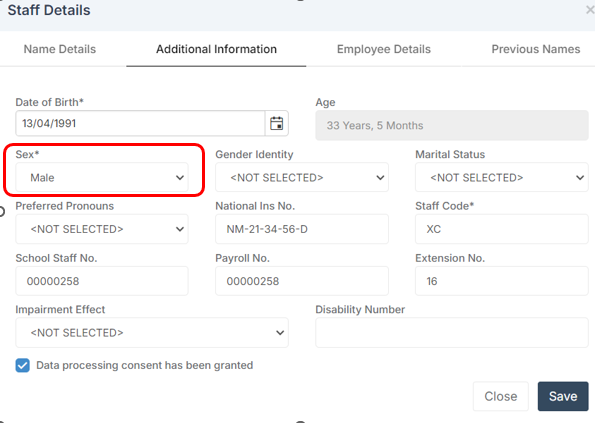
This item must be recorded for all staff records reported on at Staff Details level. This is as it is recognised in law, as recorded on a birth certificate or gender recognition certificate. This will be the same value that is reported to the HMRC, as this can affect pension ages or National Insurance contributions.
Note on Newly Qualified Teachers
From September 2021, statutory induction changed for new teachers and all early career teachers undergoing statutory induction starting from September 2021 are entitled to 2 years of high-quality professional support based on the ECF. State funded schools offering statutory induction will receive additional funding to deliver the new ECF.
Funding for the second year of induction will depend on data submitted in the SWC, so special care should be taken that data entered in this field is correct.
Note on School Business Professional and Leadership Non-Teaching
Schools are required to indicate those members of their staff who are School Business Professionals.
‘School Business Professional’ refers to staff and is expected to include staff with the roles of ‘Bursar’, ‘Business Manager’, ’Finance Officer’, ’Office Manager’, ‘Premises Manager’ or ‘ICT Network Manager’.
Note on staff working in multiple schools
Teachers who work in multiple schools, even if the schools are part of a Multi Academy Trust, will need to be recorded separately in each of the schools.
Each school will need to record the name, teacher number, QTS, QTLS and EYTS of the staff and to separately record the hours worked by staff in each school. This data must be recorded for each school to ensure that staff are not being double counted and to ensure that an accurate record is made of staffing and hours worked in each school.
Coming Soon
Here is what is planned in the next release.
A brief list of some of the expected enhancements/updates
This list highlights the features currently in development during the ongoing sprint. These items are planned for release, with a provisional release date of Friday 15th November 2024.
Last updated 22nd October 2024.
Administration
- Student profile: Contacts section – show parents preferred communication language.
- Student List: Removal Ground dropdown value update.
- Config Characteristics: Wraparound Childcare Data Items update Spring 2025.
Analysis
- Key Stage Cohort Definitions: Disadvantaged Definition Enhancement to KS4 and KS5 Cohort Definition.
Behaviour
- Ability to Bulk Delete up to 50 (from 10) Behaviour Event Records.
Census
- Update Suspension/Exclusion with new guidance for notification to cancel an exclusion.
- Update Leadership pay range minimum and leadership pay range maximum.
- Autumn 2024 – Update Exclusions process pending Appeal Outcome.
- Update Basedata URLs for Summer Series 2025 – Exams.
Dashboards
- Attendance Dashboard – Ethnicity and Search Improvements.
- Attendance Dashboard – New dropdown value will be added to display the National Data separately for the Previous Year.
- Teacher Dashboard – seating plan copy functionality.
Diary
- Equipment Booking Requests – Automated Email Confirmations for Equipment Bookings.
- Room Booking Requests – Automated Email Confirmations for Room Bookings.
Finance
- Corrections to the Balance Sheet.
- Default Payment Source for Set Finance System (with or without a Bank Account) Otherwise hide Central Bank Option.
- Introduce Central option for Online Payments (No Bank Account).
- Existing Finance Report – Cash Flow Summary – Add Budget Scenario Fil
What's New?
Reporting – Quick Reports: Medical Data Items to include Dietary Needs
Reports > Adhoc > Quick Reports
The following Data Items have been updated to include Dietary Needs information for both Students and Staff across the following Domains.
Student (Basic)
- Medical Conditions/Dietary Needs List
- Medical Conditions/Dietary Needs Notes List
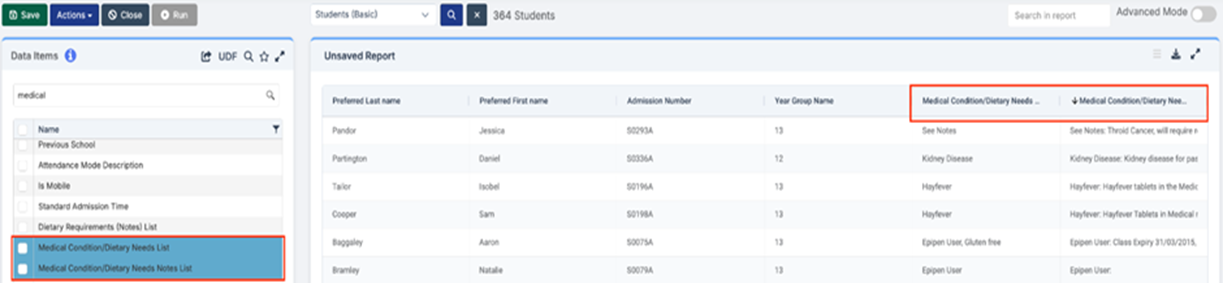
Staff (Basic)
- Medical Conditions/Dietary Needs List

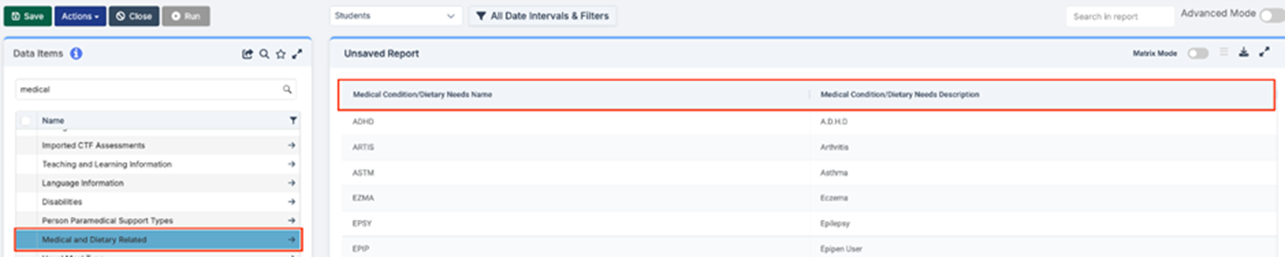
Staff
- Medical Conditions/Dietary Needs Name
- Medical Conditions/Dietary Needs Description
Students
- Medical Conditions/Dietary Needs Name
- Medical Conditions/Dietary Needs Description

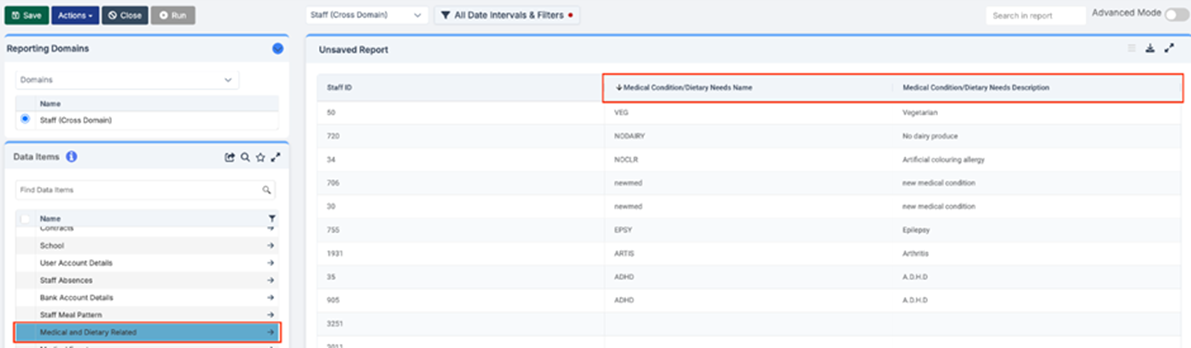
Staff (Cross Domain)
- Medical Conditions/Dietary Needs Name
- Medical Conditions/Dietary Needs Description
Student (Cross Domain)
- Medical Conditions/Dietary Needs Name
- Medical Conditions/Dietary Needs Description
- Student Medical Conditions/Dietary Needs List
Dashboards - KS4 and KS5 Performance tables
Home > My Dashboard > KS4 and KS5 Performance
The KS4 and KS5 Performance dashboards have been updated for 2025 with the latest QANs and points values.
- KS4 Performance tables: The four QANs, listed below, are the only changes that have been added, all using the 9-1 grading system with the usual points for each grade, plus U grade = 0 points:
- Pearson Edexcel Level 1/Level 2 GCSE in French (QAN: 61027182, FKF, 5650)
- AQA Level 1/Level 2 GCSE (9-1) in French (QAN: 6102790X, FKF, 5650)
- Pearson Edexcel Level 1/Level 2 GCSE in German (QAN: 61034733, FKG, 5670)
- Pearson Edexcel Level 1/Level 2 GCSE in Spanish (QAN: 61034691, FKS, 5750)
- KS5 Performance tables: 48 QANs have been removed from 2024 but no new ones added
Reporting - New Report Group "10 in 10 Unauthorised Absences"
Groups > Group List > Report Groups
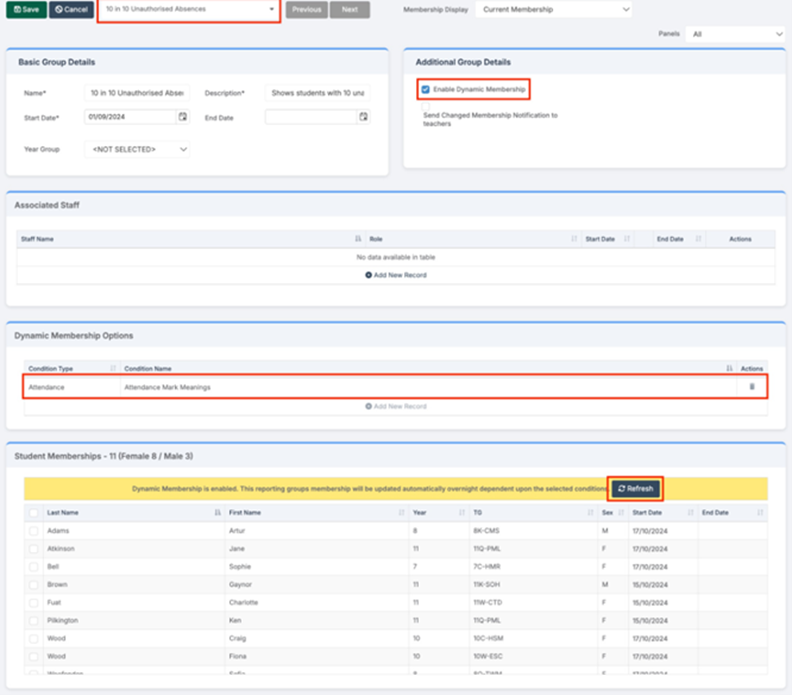
A new Report Group “10 in 10 Unauthorised Absences” has been added. This Report Group generates a Student Membership consisting of students who have missed 10 sessions (half days) of unauthorised absence within a rolling 10-week school period and is updated automatically each night. You can use the Report Group when running built-in reports to focus on those specific students.

Clicking on View :
- Enable Dynamic Membership has been ticked which will update the Student Membership nightly.
- Clicking on Dynamic Membership Options row allows users to see the conditions for the set up.
- Users will only need to click Refresh to update the Student Memberships table when they wish to view the latest update on the same day.
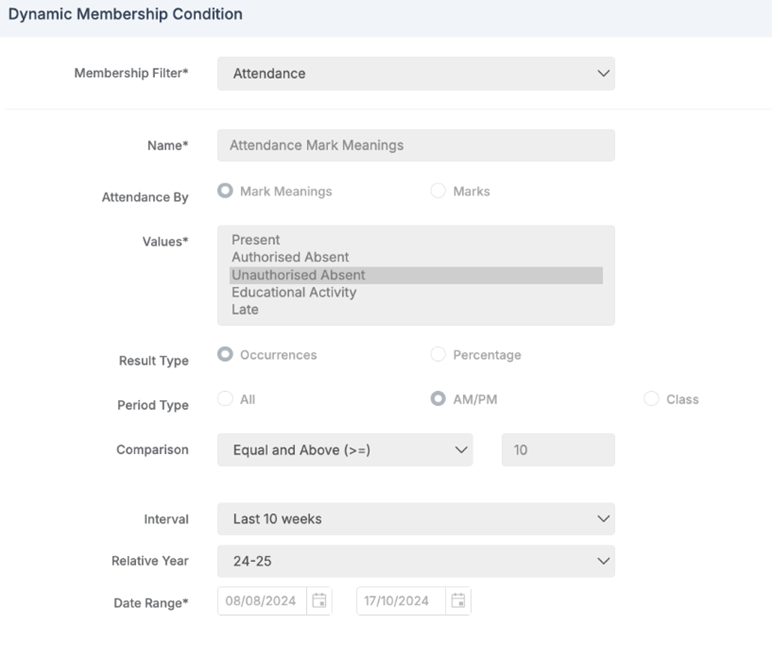
When users double click on the Dynamic Membership Options row to see the Dynamic Membership Conditions they will see that the Student Membership is based on:
- Unauthorised Absent Attendance Marks in AM and PM sessions.
- A total number of occurrences of 10 or more.
- An Interval of the last 10 weeks.
Built in Reports
Users can select any built in report where Report Group can be chosen, to run the report for that selection of students.
Search for the Report Group name in the Group Name field and then select it from the list. Click Preview to run the report.
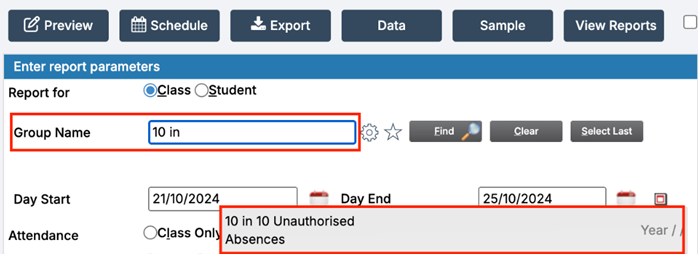
Alternatively, click Find, and in the Select Group popup – filter by Group Name, click Find again, select the Report Group returned in the table, click Done. Click Preview to run the Report.

Dashboards - Attendance: Tutor Group chart enhancements
Home > My Dashboards > Attendance
The following enhancements have been made to the Attendance Dashboard:
- When users click on individual tiles, they will now be able to access the Tutor Group chart and Students breakdown more easily as it will appear at the top of the screen without the need to scroll to the bottom of the page.
- A new column Equiv days absent has been added and will display the number of sessions a student has been absent up until yesterday’s register, alongside the existing absence percentage (Abs%). E.g. if a student is absent for half a day it will display 0.5.
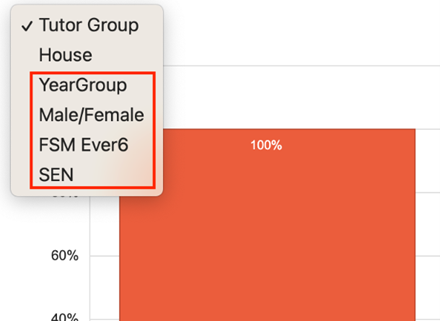
Additional dropdown options have been added to the Tutor Group chart
Attendance Dashboard Update 10 in 10 Survey
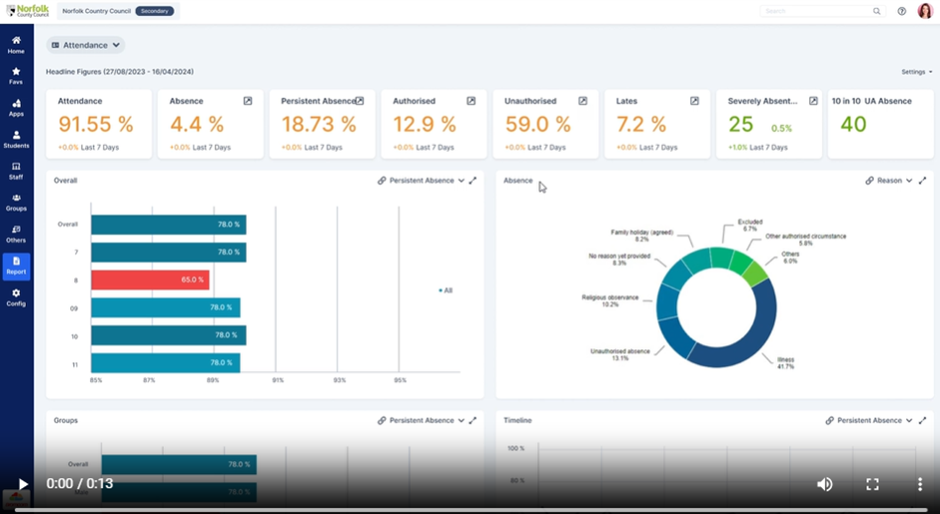
Below are a couple of workflows or scenarios for proposed updates to the attendance dashboard to reflect the need for schools to know which students have had 10 unauthorised absences in the last 10 weeks. Please see the embedded videos and feel free to respond to the survey so our product team can get useful feedback to make the update work really well for schools.
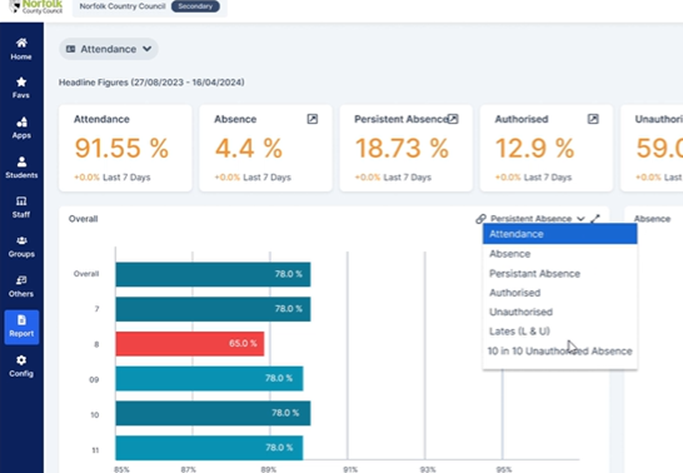
Option 1 A tile will be added to the Attendance dashboard displaying students who have accumulated 10 unauthorised absences within the Last 10 weeks. The tile will work using the date options in settings. When a period greater than 10 weeks such as year to date is selected, the calculation will focus solely on the last 10 weeks prior to the selected end date. A new graph will be included in the overall chart dropdown labelled “10 in 10 unauthorised Absences”
Option 2 Similar to option 1, a tile will be added to the Attendance dashboard showing students with 10 unauthorised absences. The tile will also work using the date option in settings. When a period greater than 10 weeks such as year to date is selected, this option will calculate all unique combinations of 10 rolling weeks within the selected weeks.
Some Reminders of Recent Changes
Attendance – CTF Export and CTF Attendance updated for 24/25 Attendance Codes/Subcodes
Students > Student List > Actions > CTF Export > Export type = Internal data transfer and General
The CTF Export has been updated to support the new Attendance Subcodes for 2024/2025.
The following changes have been implemented:
- The CTF Export version number has been updated to 24.0
- The CTF Export will now include the new 2 character Attendance Subcodes:
- C0, C1, C2 – Authorised Absent
- J1 – Authorised Absent
- Y1, Y2, Y3, Y4, Y5, Y6, Y7 – Cancelled
Students > Student Details > Enrolment > School History > CTF Attendance
The CTF Attendance has been updated to support the new attendance codes/subcodes for 2024/2025.
The following changes have been implemented:
- The CTF Attendance version number has been updated to 24.0
- The CTF Attendance popup will now include the new Attendance Codes and Subcodes and they will be represented in the following columns in the popup:
- C0, C1, C2, J1 = Possible and Authorised column
- K = Possible column
Attendance – Change to Attendance Code E description
Config > Attendance > Attendance Codes
For the Academic Year 24/25 onwards, as a result of an update to the England CBDS database, the Attendance Code E description has been amended to:
- Code E – Excluded (no alternative provision made)
Recent Investigation into dietary needs data related to medical conditions
Investigation into dietary needs major issue:
- Major Incident Reference: 18092024
- Incident Date & Time: 18th September 2024, 13:45 BST
- Incident Owner: Huseyin Guryel – Chief Technical Officer
Incident Summary
On 18/09/2024, dietary needs data related to medical conditions was transferred prematurely, contrary to protocol. This should have been completed only after consulting with customers. This premature action also led to issues with Third Party APIs and reporting within the Bromcom MIS.
Root Cause Analysis
The primary cause of the issue was the assessment of the technical requirements failing to meet the required standards, leading to a mismatch between the recorded dietary & medical needs, pre & post change. Other factors included inadequate testing, lack of stakeholder consultation and incomplete impact analysis.
Resolution
On the 19/09/2024 to address the issue, we implemented the following changes:
- Data Reconciliation: We developed and executed a data reconciliation process to identify and correct any inconsistencies in the dietary needs data. This involved comparing the original data with the migrated data and making necessary adjustments.
- Third-Party API Integration: We reviewed and updated the integration with the third-party API to ensure compatibility with the new dietary needs data format.
- Report Updates: We modified the affected reports to reflect the changes in the dietary needs data structure. This included updating queries, calculations, and formatting as needed.
Lessons Learned
- Enhanced Stakeholder Engagement: We recognize the importance of involving all relevant stakeholders, including schools and business representatives, throughout the development process. We are in the process of implementing procedures to ensure that their input is actively sought and considered.
- Thorough Requirements Gathering: We will conduct more comprehensive requirements gathering to fully understand the needs of our customers and avoid misunderstandings. This includes conducting detailed interviews, workshops, and reviews.
- More rigorous Impact Analysis: We commit to completing improved impact analyses to identify potential risks and consequences of proposed changes, and to take these into account when executing the change. This will include assessing the impact on third-party integrations, existing reports, and other relevant systems.
- Improved Testing and Quality Assurance: We will strengthen our testing procedures to include more rigorous testing of data migration, integration, and edge cases. We will also invest in advanced testing tools to improve efficiency and coverage, leveraging new AI tools at our disposal.
Incident Conclusion
We sincerely apologise for the inconvenience and disruption caused by this issue. Bromcom itself is a diverse company and therefore deeply understands the importance of accurate and reliable dietary needs information for schools. We are committed to ensuring that our system and approach to implementing changes better meet expectations in future.
Web Wednesdays
Don’t forget to check out Web Wednesdays for top tips on a variety of topics.
Please go to the Bromcom Community website and sign in.

Integris Updates
School Workforce Census
School Workforce Census
- Census date: 07/11/2024
- Continuous contracts collected from 01/09/2023 to 07/11/2024
- Absences collected from 01/09/2023 to 31/08/2024
For schools that submit data to COLLECT the deadline is 6th December 2024, local authority schools will need to check with their LA for their return deadlines.
For help and guidance on completing the SWC in Integris, you can find the overview and tasks to complete the return via this link: https://help.integris-education.com/swf-census-overview
Other articles you may find useful regarding the SWC are:
https://help.integris-education.com/school-workforce-census-recent-changes
https://help.integris-education.com/swf-census-faqs
https://help.integris-education.com/common-known-errors-and-queries
School ICT Customers please click here to download a copy of Producing the School Work Force Census 2024 Guide
TIO Customers please click here to log into the Customer Portal – Files/MIS/Census – SWC/ Integris SWC 2024 Quick Guide
The following staff member data items are collected:
- Staff details
- Contract details (including the employment start date for the period of employment that applies to each contract)
- Service Agreement details for agency teachers (including the employment start date for the period of employment that applies to each service agreement)
- Payment details for categories of staff
- Additional payment data is collected for non-teaching school leaders as well as teachers and teaching assistants. Additional payment data for other support staff is no longer required
- Absence details for teachers and teaching assistants in regular service, working for schools through a contract (not an agency agreement)
- Curriculum details for teachers and teaching assistants in the timetable cycle in which the census falls (Secondary and All-Through schools only)
- Qualification details for (NQF Level 4+) Post A Level
Qualification data is collected for teachers, teaching assistants and non-teaching school leaders. Qualification data is no longer required for other support staff.
The following school level data items are collected:
- Vacancies
- Occasional teachers
- Third party staff count
The return collects staff data for both teachers and support staff.
- Teachers and Support Staff with contracts:
who are employed by the school via a current contract that has lasted for 28 days or more on census day
or
who are have been employed by the school via a contract for 28 days or more during the collection period
or
who are have been employed by the school via a permanent contract or via a contract with a contract end date at least 27 days after the contract start date
- Teachers with service agreements (agency teachers):
who are employed by the school via a current service agreement with a third party on census day
or
who have been employed by the school via a service agreement for 28 days or more during the collection period
Staff Profile reminder
When completing these fields for the SWC, please ensure that you use the box highlighted in Yellow and NOT the box circled in red.
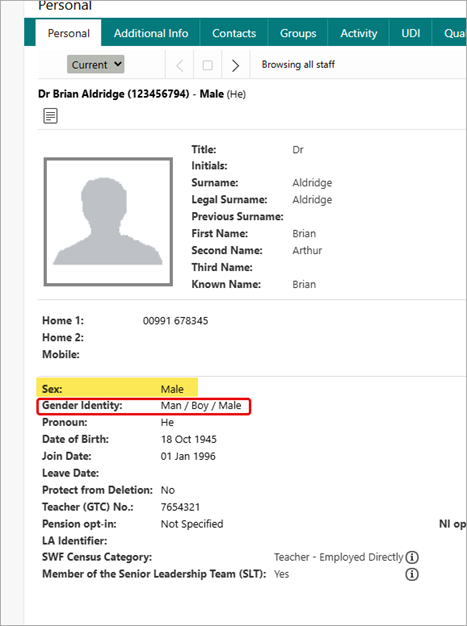
This item must be recorded for all staff records reported on at Staff Details level. This is as it is recognised in law, as recorded on a birth certificate or gender recognition certificate. This will be the same value that is reported to the HMRC, as this can affect pension ages or National Insurance contributions.
Note on Newly Qualified Teachers
From September 2021, statutory induction changed for new teachers and all early career teachers undergoing statutory induction starting from September 2021 are entitled to 2 years of high-quality professional support based on the ECF. State funded schools offering statutory induction will receive additional funding to deliver the new ECF.
Funding for the second year of induction will depend on data submitted in the SWC, so special care should be taken that data entered in this field is correct.
Note on School Business Professional and Leadership Non-Teaching
Schools are required to indicate those members of their staff who are School Business Professionals.
‘School Business Professional’ refers to staff and is expected to include staff with the roles of ‘Bursar’, ‘Business Manager’, ’Finance Officer’, ’Office Manager’, ‘Premises Manager’ or ‘ICT Network Manager’.
Note on staff working in multiple schools
Teachers who work in multiple schools, even if the schools are part of a Multi Academy Trust, will need to be recorded separately in each of the schools.
Each school will need to record the name, teacher number, QTS, QTLS and EYTS of the staff and to separately record the hours worked by staff in each school. This data must be recorded for each school to ensure that staff are not being double counted and to ensure that an accurate record is made of staffing and hours worked in each school.
New Student Form - print name line added
To assist schools in identifying the parent/carer name who signed the New Student Form, a Print Name line has been added underneath the signature line. This should help schools identify which parent/carer has signed the form and therefore given/withdrawn permission for consents.

Correction to default attendance code for part-time pupils of compulsory school age
Correction to default attendance code for part-time pupils of compulsory school age
The new release contains a fix for an error relating to the attendance code C2 which is used for pupils who are given a temporary part-time attendance pattern only in cases where the pupil is already of compulsory school age and entitled to full-time education. In very exceptional circumstances, where it is in a pupil’s best interests, there may be a need for a temporary part-time timetable to meet their individual needs. Since the introduction of the new attendance codes, Integris has been incorrectly outputting C in the register when setting a part-time timetable. This was an error and should be code C2. This release corrects the error going forward and the correct code of C2 will be applied.
Note however, any entries that you have added since the start of the Autumn term will need to be updated manually: If you have any pupils who are of compulsory school age and you have set a part-time timetable for them since September 2024, please update their attendance code from C to C2.
If you would like further information about the definition and use of codes C and C2 please refer to the DfE documentation: Working together to improve school attendance
Language Parameter List
In Parameters, the Language list is a defined list by the DfE and forms part of the Common Basic Dataset (CBDS) for exchanging data. To prevent the list from being amended, we have removed the option to edit, add and delete items. It remains possible to print the list, to set one as the default, make active and toggle locked.
Banner to alert a school to an overdue invoice
In the June 2024 release functionality was added which added a banner to schools where there was an overdue debt on their account which needed their immediate attention. This was initially only for schools who received both support and billing directly from Integris. This has now been extended to also include schools which receive support from Support Partners BUT are invoiced directly from Integris at SESL – School Educational Software Ltd.
If you are alerted by a banner at the top of Integris such as below please look to resolve any overdue debt on your account. However if you have any queries about this matter please contact customerfinances@integris-education.com


Training
Training courses for the academic year 2024/2025 are live! We have a comprehensive schedule of online ‘live’ training courses along with Distance Learning courses (My.www.schoolicts.co.uk) to help you develop your knowledge of SIMS and get the most out of your MIS (Management Information System).
To view courses and book a place, please visit https://www.schoolicts.co.uk/online-training/
| FSM Advanced | Wednesday 13th November (Half Day) | https://www.schoolicts.co.uk/events/fms-advanced/?occurrence=2024-11-13&time=1731490200 |
| Arbor Attendance | Wednesday 13th November (Half Day) | Arbor Attendance – School ICT |
| SIMS Standard Reporting | Thursday 14th November (Full Day) | https://www.schoolicts.co.uk/events/standard-reporting-online/?occurrence=2024-11-14&time=1731576600 |
| Arbor Payments, Meals and Shop | Thursday 14th November (Half Day) | Arbor Payments, Meals And Shop – School ICT |
| Arbor Standard Reporting | Friday 15th November (Half Day) | Arbor Standard Reporting – School ICT |
| Arbor Parent Engagement and Communications | Monday 25th November (Half Day) | Arbor Parental Engagement And Communications – School ICT |
| SIMS Curriculum Management using NovaT | Tuesday 26th November (4 Days) | https://www.schoolicts.co.uk/events/nova-t-online/?occurrence=2024-11-26&time=1732613400 |
| SIMS Monitoring Attendance | Thursday 28th November (Half Day) | SIMS Monitoring Attendance – School ICT |
| SIMS Data Cleansing Consultancy | Tuesday 3rd December (Half Day) | SIMS Data Cleansing Consultancy – School ICT |
| SIMS Lesson Monitor | Thursday 5th December (Half Day) | SIMS Lesson Monitor – School ICT |
| Arbor Assessment User | Tuesday 10th December (Full Day) | Arbor Assessment User – School ICT |
| SIMS Data Cleansing Consultancy | Thursday 12th December (Half Day) | SIMS Data Cleansing Consultancy – School ICT |
Can’t see the course you need? Please don’t hesitate to get in touch to discuss your requirements – we can offer bespoke training and Consultancy services if the course you’re looking for isn’t scheduled. Please call us on: 03452226802 or e-mail: helpdesk@schoolicts.co.uk

helloData
Clear and concise attainment reports – customised and filtered
Evaluating the attainment and progress of individuals and groups is important in order to understand what your next steps might be. Presented in a clear and concise manner helloData provides the ability to customise the view and apply filters as required.
Past, Present and Future Attainment Views
- Quickly view previous terms and academic years
- View the current attainment summary
- On track in each subject and Reading, Writing, Maths combined
- Average attainment
- Individual pupil results next to summary data
Statutory Attainment Summaries
Choose to view the statutory data and use our Statutory Summary Data and Phonics dashboards for a one-page summary of statutory data.
View progress your way
- Progress Steps
- Average Progress by whole school, group and individual.
- Progress across the Key Stage – choose to view this as percentages, count of pupils or by pupils’ names.
- Progress Summary – view the percentages or count of pupils that have made expected progress from any starting point.
Pupil Profile Summary
A single page overview of contextual information, attendance, attainment and progress, particularly useful for pupil progress meetings and parent consultations.
We’d love to hear from you, Leave us a Message or Book a Live Demo here.