
To navigate to the most relevant section, please click the appropriate link below: -

MIS Support
Please be aware that we are receiving an exceptionally high number of calls at the moment and we thank all of our customers for their patience when calling.
Customer contact options
Live chat @ https://my.www.schoolicts.co.uk/
Customer Portal @ https://my.www.schoolicts.co.uk/
Our Customer Portal allows you to: –
- Log and track tickets
- Watch webinars
- Search Knowledge base for information
- Latest news
Call: 0345 222 6802 Option 1 for MIS support *please leave voicemail if lines are busy during peak periods
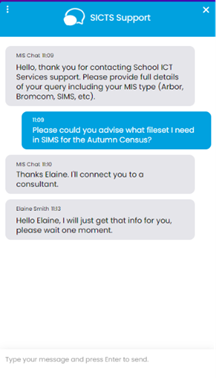
Please remember that you can request support in various different ways, by requesting support via Live chat:
Key Benefits of Our Live Chat:
- Instant Support: Get your questions answered in real-time by our knowledgeable support consultants.
- Expert Assistance: Our live chat is staffed by real people, ready to provide you with personalised support.
- Convenience: Access live assistance directly from our website, without the need for phone calls or emails.
- Efficiency: Resolve issues faster with immediate responses and quick solutions.
To start using Live Chat, simply visit our customer portal, log in and click on the chat icon at the bottom right corner. Our team is ready and eager to assist you with any enquiries or support you may need.
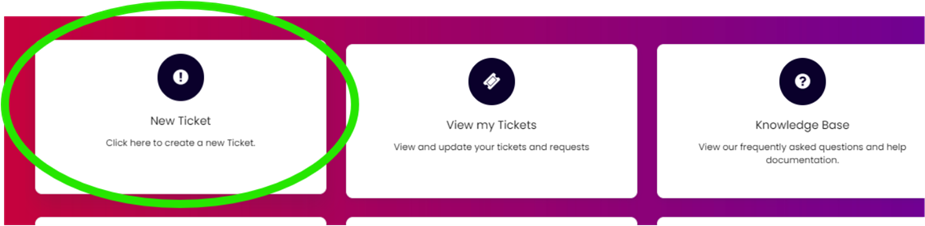
Customers can also log tickets via the customer portal at our customer portal:
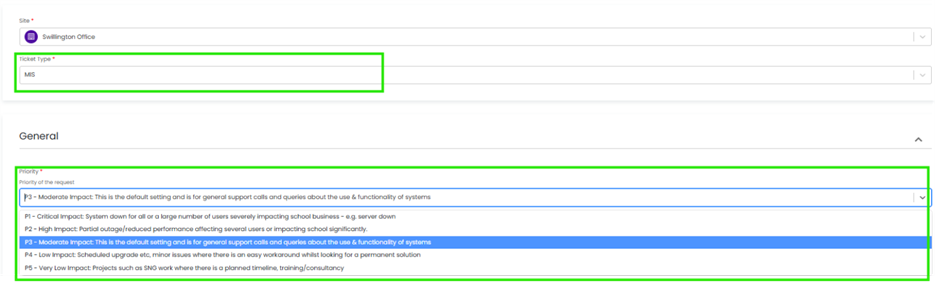
When you log a ticket via the customer portal, select the Ticket Type either MIS or Technical to ensure if gets to the right team. The Priority, if you have an urgent ticket, MIS down for example please select either P1/P2 all other tickets default to P3 or even P4 if not urgent.
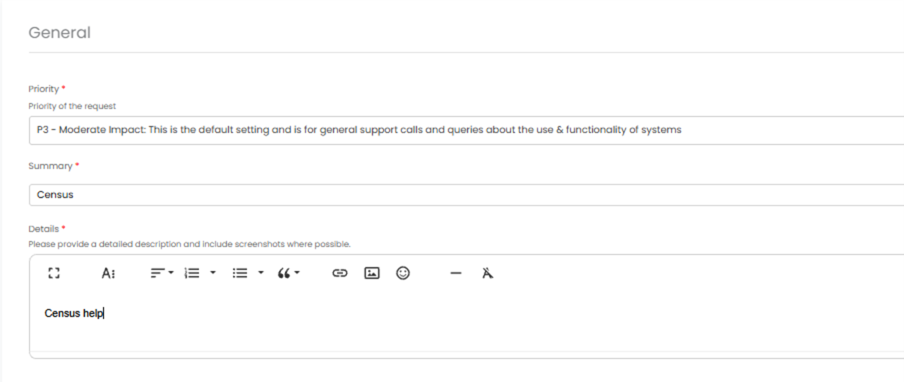
Once you enter the Subject and Details box, you will see a pop-up box with suggested articles in the top right-hand corner:
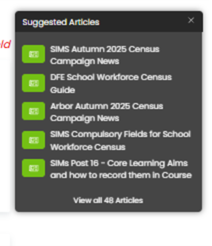
Clicking on the links in this pop-up may help you to resolve your issue without our input, so please also make use of this.
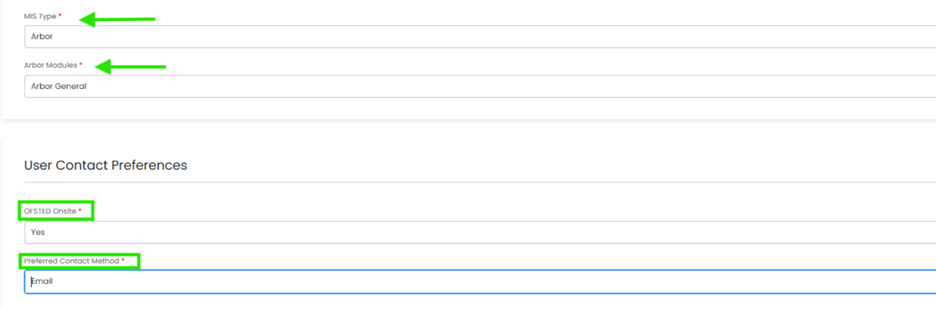
Remember to tell us which MIS and module, but also really importantly if OFSTED are onsite, as this helps us prioritise your call through our OFSTED Watch service, and your preferred contact method as we know sometimes an email reply is what you need during your busy period.
We know you like to speak to us (and we like to speak to you!) but in order to offer the best service to our customers, this is often the quickest way to log a support request at busy times.
And lastly, as always, our experienced team are on hand to take your calls, so please reach out via 0345 222 6802 if the lines are busy and to save your precious time waiting you can leave a voicemail. This method will automatically generate a ticket, and this means that the person who can help you best is the person who will call you back. If you do this, PLEASE leave your name, the name of the school, the best number to call back on and a brief description of why you’re ringing, as this means that the best person to help you is the one that will call back.
Key Dates for the School Workforce Census
- Census date: 06/11/2025
- Continuous contracts collected from: 01/09/2024 to 06/11/2025
- Absences collected from: 01/09/2024 to 31/08/2025
For schools that submit data to COLLECT the deadline is Friday 5th December 2025. Local authority schools will need to check with their LA for their return deadlines.
Guidance
SIMS School Workforce Census Guidance
Arbor School Workforce Guidance
Bromcom School Workforce Census Guidance
Integris School Workforce Census Guidance
Scholarpack School Workforce Census Guidance
Consultancy Services – Census Support – Let us complete the census for you!
Flexible, expert-led support for statutory returns – our Data Services package is a flexible, remote solution designed to support schools through key statutory returns and annual MIS procedures. Whether you need help with one return or all of them, we work alongside your team to ensure data is clean, complete, and submitted correctly saving valuable staff time and ensuring compliance. Reach out today via helpdesk@Schoolicts.co.uk for more information
School Workforce Census (Autumn)
- Help completing staff contracts, roles, and pay data
- Error resolution and validation support
- Staff absence checking
- Pay scale and allowance updates
November Webinar Weeks
Exam Services
Planning Ahead for Summer 2026 Exams
The basedata for Summer 2026 exam entries will be released later this month.
Our Exam Managed Service Consultants are already preparing to ensure all basedata imports and season setups are completed well before the Christmas break, meaning your entries are submitted long before any awarding body deadlines.
Why does this matter?
For schools that have experienced the headache of late entries, you’ll know how costly it can be. Late fees are often double or even triple the standard entry fee – an unnecessary hit to budgets that can run into tens of thousands of pounds. That’s money better spent on Teaching & Learning.
Our Exams Managed Service ensures this never happens.
We take on the responsibility, the planning, and the pressure – guaranteeing your exams stay compliant, efficient, and stress-free.
Support for New or Vacant Exam Officer Roles
If your school doesn’t currently have an Exam Officer, or your existing Officer is new to the role, our specialist support services can help:
- Exam Managed Service – We take full ownership of the exams process remotely, with on-site facilitation where needed.
- Exam Mentoring Service – Provides hands-on guidance for newly appointed Exam Officers through the busiest periods of the exam cycle.
We’ll make sure your school stays fully compliant, deadlines are met, and no late fees sneak through the cracks!
Get in touch today at examservices@schoolicts.co.uk to find out how we can help.
Vacancy: Exam Facilitator – Manchester Area
We’re looking for an Exam Facilitator to support our Managed Service schools in the Manchester area.
This is an ad hoc/seasonal role, perfect for a retired Exam Officer who enjoys staying connected to the exams world — without the year-round admin!
If you or someone you know might be interested, please contact us at examservices@schoolicts.co.uk for further details.
Why Schools Choose School ICT Exams Service
✔️ Built-in resilience & compliance assurance
✔️ Experienced consultants covering 50+ years combined expertise
✔️ Remote efficiency that reduces workload and costs
✔️ A trusted partner supporting schools and trusts nationwide
Data Management Services
Data Management Services
Our Data Management service offers an excellent, cost effective, responsive, and efficient Data Management solution delivered remotely by a team of highly experienced school data experts. Their dependable advice and guidance empower schools, academies, and MATs to maximise their investment in their management information system (MIS) team. Whether it’s a long-term solution or short term for sickness cover or maternity please reach out.
- Please click here for further information.
Data Health Check Services
An MIS health check ensures you’re getting the most out of the investment in your MIS. The benefits of one of our comprehensive health checks include: –
- Raise awareness of functionality and any issues
- Keep you up to date with the latest developments in your MIS
- Housekeeping and tidying exercises
- Report with recommendations to ensure you’re fully maximising your MIS along with any training recommendations
- For on premise MIS a server health check is also included
Our health check service usually takes around half a day. Please contact us to find out more by emailing helpdesk@schoolicts.co.uk
Timetable Services
Our Timetable Service provides a full-scale, collaborative approach to creating and managing your school’s timetable. Ahead of the timetable season, we work closely with your institution to develop a detailed Plan of Action (PoA), ensuring seamless integration and execution. By partnering with a key member of your staff, our experienced school timetable consultant not only assists in constructing a functional timetable but also manages it throughout the academic year. Enquire via helpdesk@schoolicts.co.uk for more information.
FMS - Leeds City Council Schools Only - Corporate Finance Dynamics package - affecting SIMS FMS and Arbor Finance
Recently Leeds City Council have implemented a new corporate finance package – MS Dynamics.
We gather, Vote codes have changed to a more simplified version. The change has impacted mostly Salary codes that do not agree with the corresponding codes in FMS. This in turn has led to reconciliation and reporting difficulties.
At this stage, we would recommend that schools reconcile back to the correct FMS ledger codes e.g. Teachers Basic Pay, Admin Basic Pay.
We would not advise changing any FMS codes to match the Dynamics Vote codes.
Please note: Schools that “Stamp” their invoices for payment prior to sending to the Payments Team, should use the generic replacement Dynamics codes to ensure prompt Supplier payment.
Any queries we would recommend you contact your usual School Finance team Officer.
Any further queries please contact the helpdesk on helpdesk@schoolicts.co.uk
Moving to Arbor? - helloData Assessment Migration Service
If you decide to move to Arbor, and are a helloData customer, we can set up your assessments in your new MIS, migrate your data and provide training, all for £95.

We’ve already helped a large number of schools switch to Arbor this term. The demand for this service is proving to be incredibly high so please let us know when you are moving as soon as possible by emailing admin@hello-data.co.uk.
Note: The new MIS will not setup your assessments or migrate your internal assessment data, only the statutory data is transferred.
If you are not yet using helloData, we can also support you with setting up the assessments in Arbor and assist with the data migration, email admin@hello-data.co.uk to find out more. Visit www.hello-data.co.uk to discover how our reporting tool connects with Arbor so that you can benefit for in depth assessment analysis at a click of a button.

Autumn and Spring Term Online Training Courses
You can now book courses for the Spring 2026 term!
We have a comprehensive schedule of online ‘live’ training courses along with Distance Learning courses to help you develop your knowledge and get the most out of your MIS (Management Information System).
Booking is now open please visit https://www.schoolicts.co.uk/online-training.
Please find upcoming courses below: –

Click for the latest Arbor updates
Announcement from Arbor
Following on from Arbor’s email on the 18th July 2025, this is a final reminder to schools and MATs that Arbor are switching off the old BI Connector on October 31st 2025. For those schools still using the old BI Connector, you should ensure you move your reporting suites over to the new BI Connector before this date.
In February 2024, Arbor launched the next evolution of our BI Connector, which has over 90% more data sets and over 1,000 data fields. To give schools more time to move their dashboards over to the new BI Connector, they have delayed switching off the old Connector until now.
What does this mean for your schools?
· You will need to update any existing reports with the new views
· Any views populated using the old BI Connector will no longer work from 31st October 2025
· Use Arbor’s handy Help Centre guide for clear steps on how to switch over to the new BI Connector
· There is no extra charge to use the new BI Connector
What does the new BI Connector give them?
· Arbor’s enhanced BI Connector has double the data sets and over 1,000 data fields
· Additional data views include Physical Interventions, Suspensions Analysis, Intervention Sessions and a new Data Connector for DfE Attendance. Click here for more information
· We continually add new data views to the BI Connector, which you can stay up to date with on our Change Log
School Workforce Census
Key Dates for the School Workforce Census
Census date: 06/11/2025
Continuous contracts collected from 01/09/2024 to 06/11/2025
Absences collected from 01/09/2024 to 31/08/2025
For schools that submit data to COLLECT the deadline is Friday 5th December 2025.
Local authority schools will need to check with their LA for their return deadlines.
More information can be found here:
School ICT – User Portal – Arbor School Workforce Census 2025 Campaign News
DfE Guidance
We strongly advise downloading the DfE guidance for clarification on who should and who should not be included in the census. This can be downloaded from the below link.
School workforce census 2025 Business and technical specification – Feb 2025
Check your data using the Data Quality Dashboard.
Within the Data Quality Dashboard you’ll find the key areas to help you check and prepare your data, which you should work through in this order: –
1. Merge or delete any duplicate staff profiles in the Suspected Duplicates section.
2. Add and update basic details in the Staff section.
3. Add in key Census information in the School Workforce Census section to add key Census information. Just click a cell to add the data!
4. Pay Scales: In Arbor, when looking at Pay scales, all scales may display differently to your previous MIS. If you have migrated from another MIS, it is advisory to ensure that these are updated and correct. You may wish to rename the scales to ensure you are awarding correctly e.g., NJC scale 1 or Teachers Upper scale 1 etc. Please use the link below for further guidance on how to amend, update, create and complete Pay scales in Arbor Arbor- Updating Payscales
Check your SENCo is set up, in Arbor they need a separate contract for the SENCo role, with the hours they work in that role. Detailed guidance on how to do this can be found here:- Arbor- Setting up your SENCo for SWC
Staff Absence data – Make sure staff absences have been recorded: Arbor- See and report on Staff Absence Statistics
Qualification data – Record Staff qualifications (Qualification codes, Subject Codes and Class of Degree) from the Qualifications & Checks area on staff member’s profiles.
Date of last pay review – Use the Staff section part of the Check your data using the Data Quality Dashboard.
Vacancies – On census day, you need to add in the vacancies that are currently open at your school.
Third-party support staff headcount – On census day, you need to add in headcount numbers for occasional teaching staff and third-party support staff are both required. You can see how to add this in the Workforce Census guide.
MAT MIS SWC
MAT MIS School workforce census PayScale management *(Available to MATs that have MAT MIS Plus or Enterprise tiers)
Reminder: From your central MAT MIS you can manage your schools’ pay scales without needing to log in to each individual school site. Arbor’s functionality means you can update your pay scales in MAT MIS, then push them down to your schools with the click of a button: Pay scale pushdown from the MAT MIS
New Features in Arbor
BI Viewer – graduated from Labs
No more logging in to multiple places to access your BI dashboards. BI Viewer lets you embed BI reports created in Microsoft’s PowerBI or Google Looker Studio directly into a page in your MIS. This makes sharing reports simpler and gives you controlled access to share with colleagues in your organisation. Learn more.
Venn diagrams – graduated from Labs
Arbor have graduated their Venn diagram feature out of Arbor Labs and into the School MIS, so all Arbor users now have access! With this, they have updated the tool with more accurate intersection logic, faster drilldowns, and widened the permissions needed to use it. Find it under Students > All Students > Venn Diagram Analysis. Learn more.
Prevent parent meal debt
Arbor have added a new setting to the Parent Portal and App to help you manage and prevent parent meal debt. You’ll find the ‘Allow Meal choices if not enough balance?’ setting in the Parent Portal Menu Availability slide over, which you can toggle on or off. Learn more.
Arbor have updated their integration with Hachette Learning (formerly Hodder Education) to connect to their new platform, Boost Insight.
A new feature has been created to allow Exam Officers to reverse EDI entry and amendment files directly in Arbor.
In the Developer Portal, you can now approve third-party integrations with Multi-Factor Authentication (MFA) turned on.
Arbor AI Subscription and Monthly Free Allowance
Arbor believe that all schools should benefit from AI and have made it free to access all of their Standard AI features. Your school will get a free allocation of AI usage credits each year, based on your Arbor package and school phase.
Monitoring your usage
You can monitor your usage allowance via the Arbor AI Dashboard, which can be found in the navigation under School -> Arbor AI.
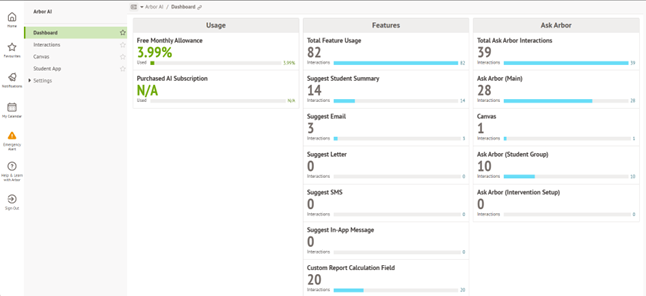
Free Monthly Allowance – This is the amount of free monthly AI usage allowance remaining for the month. If your school uses up your monthly allowance, you can either pay to upgrade to AI Subscription for uninterrupted access or wait until the allowance resets at the start of the next month.
Purchased AI Credits – This shows the amount of AI subscription credits that are remaining. You will only use your purchased AI credits when your monthly usage allowance for that month runs out. The following month, you will continue to use your free monthly allowance before your AI credits are used again.
Usage Notifications
When you are approaching the limit of your free monthly allowance, Arbor will:
· Send your Head Teacher and Data Manager an email letting them know
· Send your Head Teacher and Data Manager a notification in the MIS.
The notifications will be available in the Notifications popout in the sidebar, and on the ‘Alerts’ section of your homepage.
For more information and FAQ please click HERE

Click for the latest Bromcom updates
DfE Guidance
We strongly advise downloading the DfE guidance for clarification on who should and who should not be included in the census. This can be downloaded from the below link.
Key Dates for the School Workforce Census
Census date: 06/11/2025
Continuous contracts collected from 01/09/2024 to 07/11/2025
Absences collected from 01/09/2024 to 31/08/2025
For schools that submit data to COLLECT the deadline is Friday 5th December 2025. Local authority schools will need to check with their LA for their return deadlines.
Updates to the school workforce census for 2025
The most significant change is that additional validation rules have been added to encourage the return of data on disability and ethnicity
For the 2025 census a new validation rule has been added. Where staff have been employed for more than 3 months, a query will be raised if their disability status is still listed as ‘information not yet obtained’. Staff have an absolute right to not answer this question, in which case the answer should be recorded as ‘Refused’ and no query will be raised.
Note on Newly Qualified Teacher
From September 2021, statutory induction changed for new teachers and all early career teachers undergoing statutory induction starting from September 2021 are entitled to 2 years of high-quality professional support based on the ECF. State funded schools offering statutory induction will receive additional funding to deliver the new ECF.
Funding for the second year of induction will depend on data submitted in the SWC, so special care should be taken that data entered in this field is correct
Note on School Business Professional and Leadership Non-Teaching
Schools are required to indicate those members of their staff who are School Business Professionals.
‘School Business Professional’ refers to staff and is expected to include staff with the roles of ‘Bursar’, ‘Business Manager’, ’Finance Officer’, ’Office Manager’, ‘Premises Manager’ or ‘ICT Network Manager’.
Schools are required to indicate those members of their staff who are part of the Senior Leadership Team, including non-teachers
‘Leadership non-teacher’ refers to any member of staff, not reported in a teaching post, who is part of the school’s Senior Leadership Team (SLT) or has other formal leadership responsibilities.
Please note that to be listed as a School Business Professional, the member of staff is required to have a level 3 qualification in a specific list of qualifications. This list can be found on page 69 of the School workforce guide 2025
Note on staff working in multiple schools
Teachers who work in multiple schools, even if the schools are part of a Multi Academy Trust, will need to be recorded separately in each of the schools.
Each school will need to record the name, teacher number, QTS, QTLS and EYTS of the staff and to separately record the hours worked by staff in each school. This data must be recorded for each school to ensure that staff are not being double counted and to ensure that an accurate record is made of staffing and hours worked in each school.
Full guidance on producing the SWC can be found here:
School Workforce Census - Bromcom Guidance
Bromcom School Workforce Census 2025 Campaign News
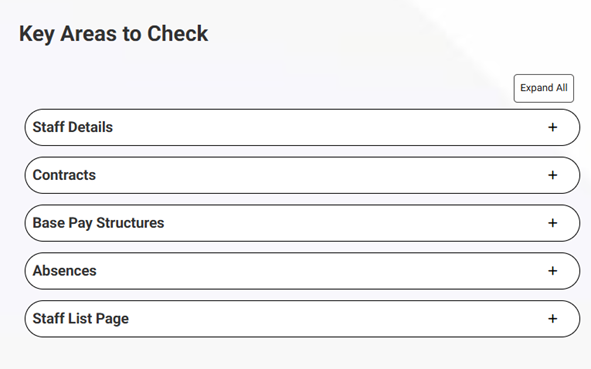
This guide provides details of the key data areas to check
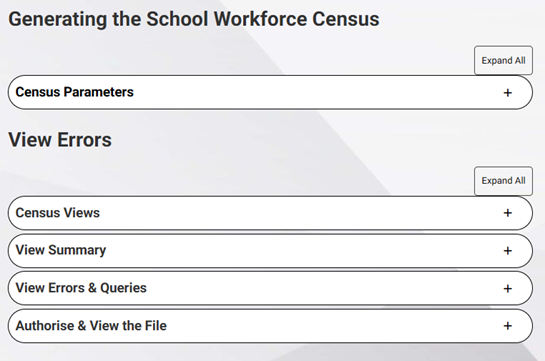
There are sections for generating the census, dealing with errors and more
Announcements from Bromcom
MCAS – Removal of School Meal Balances Page and Permission – please view using the link below
MCAS – Removal of School Meal Balances Page and Permission
Modules > MyChildAtSchool > Online Payments > School Meal Balances
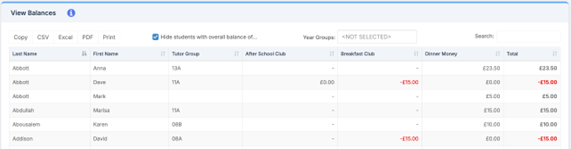
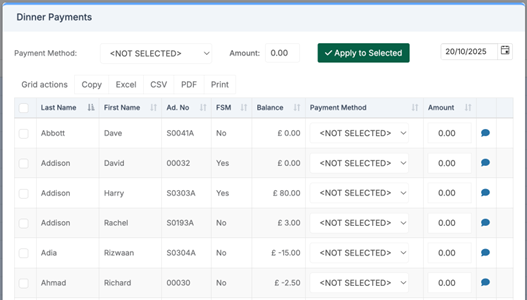
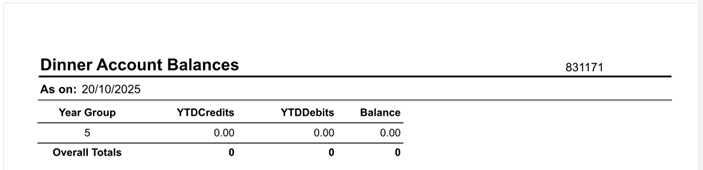
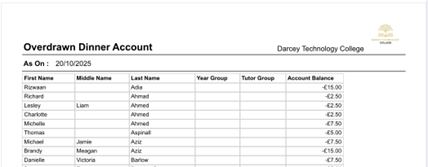
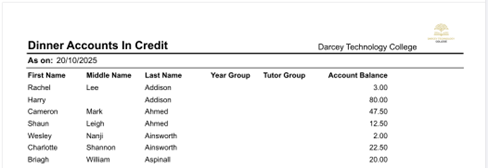
The School Meal Balances page and its associated permission have been removed from the MIS. To view student Account Balances, users can now use the following alternative pages within the MIS:
- Modules > MCAS > View Balances
- Students > Selections > Select All > Actions > Dinner Payment
- Reports > Dinner > Dinner Account Balances
- Reports > Dinner > Overdrawn Dinner Account
- Reports > Dinner > Dinner Accounts in Credit
- Reports > Adhoc > Quick Report
- Modules > MCAS > View Balances
- Students > Selections > Select All > Actions > Dinner Payment
- Reports > Dinner > Dinner Account Balances
- Reports > Dinner > Overdrawn Dinner Account
- Reports > Dinner > Dinner Accounts in Credit
6. Reports| Adhoc | Quick Report Alternatively a Quick Report can be created using the (Dinner) Student Account Balances and (Dinner) Student Account Balances & Payments domains
Catch Up on the Bromcom Customer Webinar
We’re grateful to everyone who joined our recent Customer Incident Webinar. You can now catch up on the session materials and share any further feedback or questions via our short survey.
Thank you to all the schools, MATs and local authorities who joined our Customer Incident Webinar. We appreciate the time you took to attend, the thoughtful feedback shared, and the constructive questions submitted in advance.
Our aim was to be open and transparent about what happened, what we’ve done since, and how we’re strengthening performance and communication across the Bromcom community.
To help you stay informed and share consistent information within your own teams, the following resources are now available:
- Presentation slides – CLICK HERE
- FAQ document – CLICK HERE
- Webinar recording – CLICK HERE
We’d also love your feedback. Please take a few minutes to complete our short survey, where you can share your thoughts or submit additional questions:
We’ll review all responses and update the FAQ with any new themes that emerge.
Thank you again for your ongoing partnership and support as we continue building a stronger, more reliable Bromcom platform together.
New Items
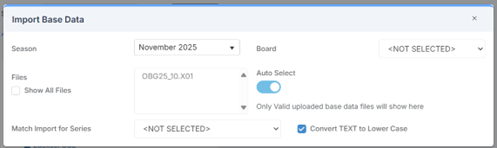
Exams – Base Data URLs Update Autumn 2025
Examination > Manage Base Data
The base data URLs for WJEC Autumn 2025 examination series have been updated to ensure schools can download and manage the correct WJEC and awarding organisation data within the MIS.
Autumn 2025 Series
Database updated with base data URLs for WJEC Autumn 2025 examination series.
Existing Summer 2025 URLs remain available and accessible.
This update ensures that schools can meet statutory exam entry requirements for the Autumn 2025 season while retaining full access to previous data.
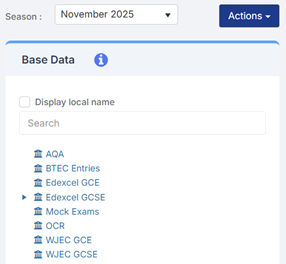
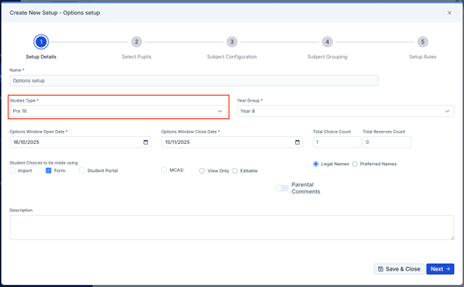
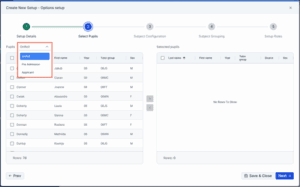
Options – Options Setup: Pre 16 Now Supports On Roll, Pre Admission, and Applicant Students
Modules > Options > Options Setup
This release introduces the ability to create Pre-16 Studies Type setups with the option to include On Roll, Pre Admission, and Applicant students – just as available in Post-16 setups.
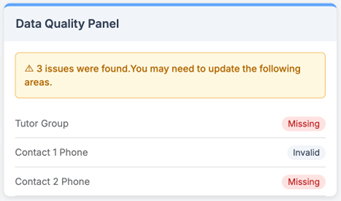
Dashboards – Student Data Quality: Contact Phone Validation aligned with CBDS
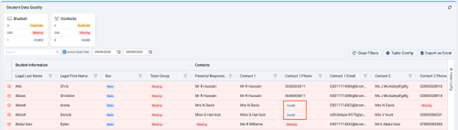
Home > Student Data Quality Dashboard
Contact Phone numbers are now more closely aligned to CBDS standards. Users can still save numbers with formatting issues (excluding special characters), but invalid entries will be flagged in both the Student Data Quality Dashboard and Student Details > Profile > Data Quality Panel.
Valid formats:
8–15 digits in total
A leading + for international numbers
Spaces are permitted
Invalid formats:
Fewer than 8 or more than 15 digits
Use of ()
Use of –
Any other special characters
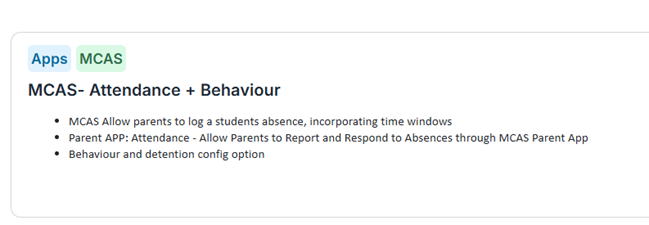
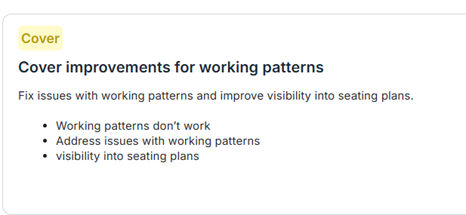
Roadmap - Things of note that are upcoming



Click for the latest Integris updates
School Workforce Census
DfE Guidance
We strongly advise downloading the DfE guidance for clarification on who should and who should not be included in the census. This can be downloaded from the below link.
DfE School workforce census guide
DfE School workforce census 2025 Business and technical specification, version 1
Key Dates for the School Workforce Census
Census date: 06/11/2025
Continuous contracts collected from 01/09/2024 to 06/11/2025
Absences collected from 01/09/2024 to 31/08/2025
For schools that submit data to COLLECT the deadline is Friday 5th December 2025. Local authority schools will need to check with their LA for their return deadlines.
Updates to the school workforce census for 2025
The most significant change is that additional validation rules have been added to encourage the return of data on disability and ethnicity
For the 2025 census a new validation rule has been added. Where staff have been employed for more than 3 months, a query will be raised if their disability status is still listed as ‘information not yet obtained’. Staff have an absolute right to not answer this question, in which case the answer should be recorded as ‘Refused’ and no query will be raised.
Note on Newly Qualified Teacher
From September 2021, statutory induction changed for new teachers and all early career teachers undergoing statutory induction starting from September 2021 are entitled to 2 years of high-quality professional support based on the ECF. State funded schools offering statutory induction will receive additional funding to deliver the new ECF.
Funding for the second year of induction will depend on data submitted in the SWC, so special care should be taken that data entered in this field is correct
Note on School Business Professional and Leadership Non-Teaching
Schools are required to indicate those members of their staff who are School Business Professionals.
‘School Business Professional’ refers to staff and is expected to include staff with the roles of ‘Bursar’, ‘Business Manager’, ’Finance Officer’, ’Office Manager’, ‘Premises Manager’ or ‘ICT Network Manager’.
Schools are required to indicate those members of their staff who are part of the Senior Leadership Team, including non-teachers
‘Leadership non-teacher’ refers to any member of staff, not reported in a teaching post, who is part of the school’s Senior Leadership Team (SLT) or has other formal leadership responsibilities.
Please note that to be listed as a School Business Professional, the member of staff is required to have a level 3 qualification in a specific list of qualifications. This list can be found on page 69 of the DfE School workforce census guide
Note on staff working in multiple schools
Teachers who work in multiple schools, even if the schools are part of a Multi Academy Trust, will need to be recorded separately in each of the schools. Each school will need to record the name, teacher number, QTS, QTLS and EYTS of the staff and to separately record the hours worked by staff in each school. This data must be recorded for each school to ensure that staff are not being double counted and to ensure that an accurate record is made of staffing and hours worked in each school.
Integris documentation available from the link below. Please note the document references 2024 as Integris have not provided an up-to-date version this is still valid for the moment.
School ICT – User Portal – Integris School Workforce Census 2025 Quick Guide

Click for the latest ScholarPack updates
School Workforce Census
DfE Guidance
We strongly advise downloading the DfE guidance for clarification on who should and who should not be included in the census. This can be downloaded from the below link.
Key Dates for the School Workforce Census
Census date: 06/11/2025
Continuous contracts collected from 01/09/2024 to 07/11/2025
Absences collected from 01/09/2024 to 31/08/2025
For schools that submit data to COLLECT the deadline is Friday 5th December 2025. Local authority schools will need to check with their LA for their return deadlines.
Updates to the school workforce census for 2025
The most significant change is that additional validation rules have been added to encourage the return of data on disability and ethnicity
For the 2025 census a new validation rule has been added. Where staff have been employed for more than 3 months, a query will be raised if their disability status is still listed as ‘information not yet obtained’. Staff have an absolute right to not answer this question, in which case the answer should be recorded as ‘Refused’ and no query will be raised.
Note on Newly Qualified Teacher
From September 2021, statutory induction changed for new teachers and all early career teachers undergoing statutory induction starting from September 2021 are entitled to 2 years of high-quality professional support based on the ECF. State funded schools offering statutory induction will receive additional funding to deliver the new ECF.
Funding for the second year of induction will depend on data submitted in the SWC, so special care should be taken that data entered in this field is correct
Note on School Business Professional and Leadership Non-Teaching
Schools are required to indicate those members of their staff who are School Business Professionals.
‘School Business Professional’ refers to staff and is expected to include staff with the roles of ‘Bursar’, ‘Business Manager’, ’Finance Officer’, ’Office Manager’, ‘Premises Manager’ or ‘ICT Network Manager’.
Schools are required to indicate those members of their staff who are part of the Senior Leadership Team, including non-teachers
‘Leadership non-teacher’ refers to any member of staff, not reported in a teaching post, who is part of the school’s Senior Leadership Team (SLT) or has other formal leadership responsibilities.
Please note that to be listed as a School Business Professional, the member of staff is required to have a level 3 qualification in a specific list of qualifications. This list can be found on page 69 of the School workforce guide 2025
Note on staff working in multiple schools
Teachers who work in multiple schools, even if the schools are part of a Multi Academy Trust, will need to be recorded separately in each of the schools.
Each school will need to record the name, teacher number, QTS, QTLS and EYTS of the staff and to separately record the hours worked by staff in each school. This data must be recorded for each school to ensure that staff are not being double counted and to ensure that an accurate record is made of staffing and hours worked in each school.
Full guidance on producing the SWC can be found here:
ScholarPack School Workforce Census 2025 Campaign
This file will download to your computer, and you will be required to either send this information to your Local Authority or upload directly to the DfE Collect Portal. If you are unsure, we recommend you contact your Local Authority for more information.
For support in resolving your census errors why not check our handy guide: School Workforce Census Error and Resolutions Spreadsheet 2025
Upcoming Census Changes
For full guidance from the DfE on what data your school must return in the census, click here.
The Gender field has been changed to Sex in ScholarPack. Please see our guidance here: Sex, Gender and Gender Identity in ScholarPack and statutory returns. Schools can choose to record Gender Identity but this is not returned in the census.
New for 2025
· You must have an Ethnicity recorded for any staff member who has been with the school for at least 100 days.
· You must have a Disability Status recorded for any staff member who has been with the school for at least 100 days.
Both of the above can be bulk edited by use of the Staff Group Updater which is accessible via Admin > Personnel.
You can select the appropriate attribute, Ethnicity and/or Disability from the drop down.

Click for the latest SIMS updates
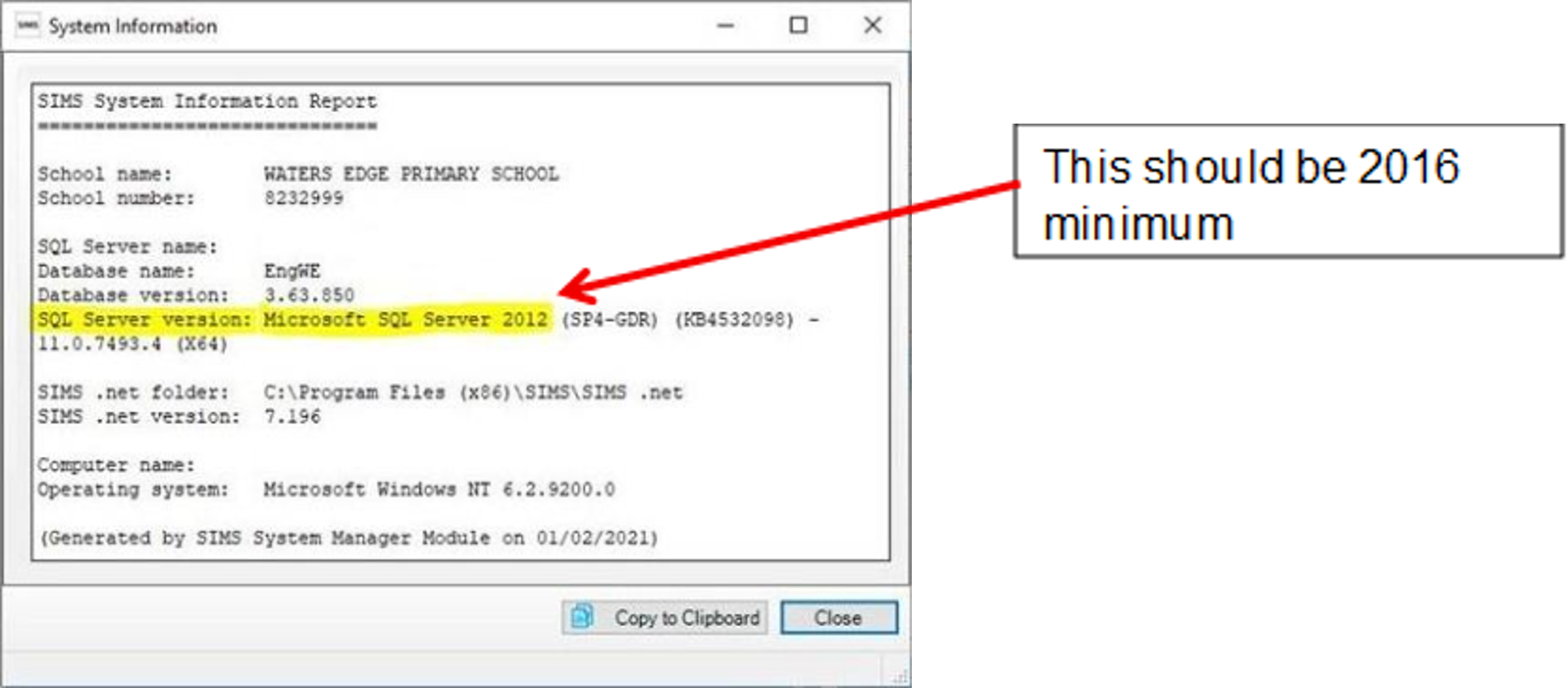
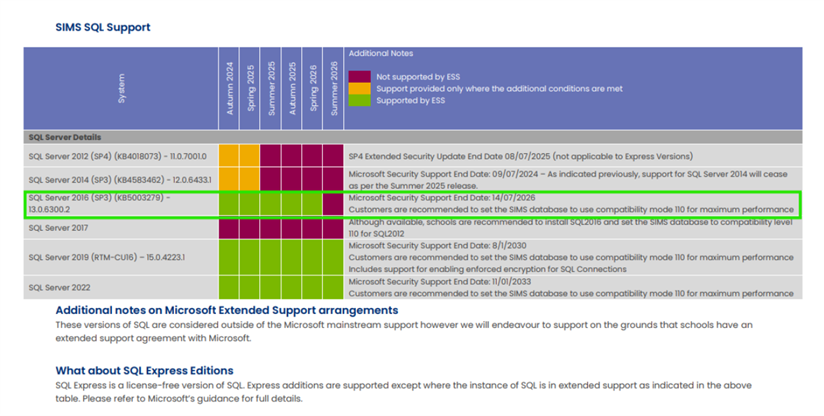
Technical teams please note, SQL Server 2016 support will come to end in July 2026
Following on from the recent technical guidance update from Parent Pay Group in the Spring update, which highlighted the changes to the Microsoft Support for 2016 coming to an end in June 2026; this change only impacts schools who have SIMS on premise.
We have put together the below information which explains what this means for you and your school.
Please see the SIMS Technical roadmap Spring 2025 on our customer portal here for more information on what is and isn’t supported: https://halo.transforming-learning.co.uk/portal/kb?id=310
What is SQL Server?
Microsoft SQL Server is the database management software used to manage the SIMS database on the school’s SIMS server and is required to provide access to the SIMS database.

How to check your SQL server version
If your school has had a new SIMS server installed or upgraded by School ICT/Turn IT On within the past 1 to 2 years, then you are likely to be already on the last supported version of SQL Server.
You can check your current SQL server version from within SIMS.
- Select “Help” from the top SIMS Menu
- Select “System Information”.
- The SQL version will be listed next to “SQL Server Version” and will show
How to upgrade to SQL server
If you are using SQL Server 2016, then you will need to book in an ‘SQL Server Migration’. This is a process where a new SQL instance is installed onto the SIMS Server and your SIMS database migrated across onto the new SQL install.
This process will require some small changes to some SIMS workstations with an update to each local Connect.ini file. Third parties will also need updating with the new connection details used to connect to SIMS.
If you wish School ICT to carry out the SQL server migration, our experienced team can do this with minimal downtime. Due to the time this takes this is a chargeable service.
What happens if we do not upgrade SQL Server?
If the school is still running SQL 2016 after Summer of 2026, then there is no guarantee that future SIMS upgrades will work with these older versions of SQL Server.
Reach out today to ensure you can secure your spot via my.www.schoolicts.co.uk or helpdesk@schoolicts.co.uk
Azure in the Cloud unsupported, for information please note:

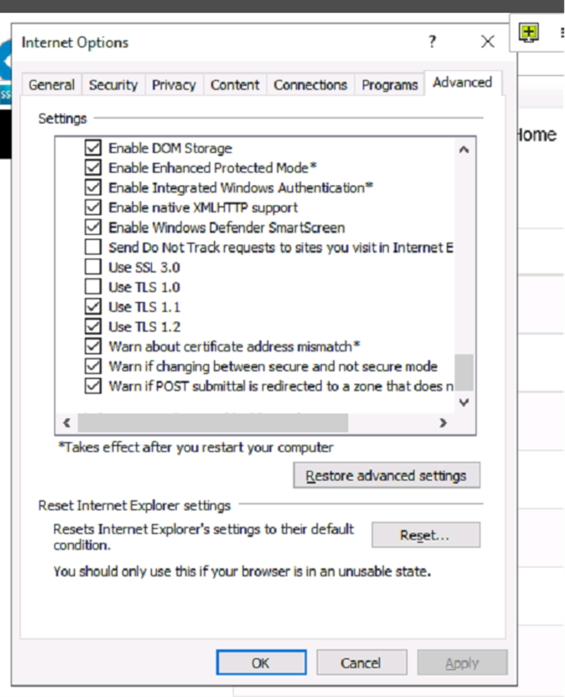
SIMS Service Manager and Internet Options, please ensure that TLS1.2 is ticked as live in your Internet options on in Sims Services Manager this is a requirement.

School Workforce Census
Training:
SIMS Personnel – Distance Learning
Key Dates for the School Workforce Census
Census date: 06/11/2025
Continuous contracts collected from 01/09/2024 to 06/11/2025
Absences collected from 01/09/2024 to 31/08/2025
For schools that submit data to COLLECT the deadline is Friday 5th December 2025. Local authority schools will need to check with their LA for their return deadlines.
Updates to the school workforce census for 2025
The most significant change is that additional validation rules have been added to encourage the return of data on disability and ethnicity.
For the 2025 census a new validation rule has been added, and a new field has been added to SIMS. Where staff have been employed for more than 3 months, a query will be raised if their disability status is still listed as ‘information not yet obtained’. Staff have an absolute right to not answer this question, in which case the answer should be recorded as ‘Refused’ and no query will be raised.
For our quick guide on SIMS School Workforce census please visit our portal: SIMS School Workforce Census Guidance 2025
Parental Engagement Platform – Update from Parent Pay Group
Earlier this year, Parent Pay Group (PPG) announced plans to unify their parental engagement and messaging tools into a single, streamlined platform. Development is well underway, with a phased rollout scheduled to begin in February 2026. PPG will provide further updates to confirm when the platform will be available for your school.
This initiative involves a complex migration process to ensure all existing SIMS ID accounts are accurately mapped to new Parent Pay Group accounts. To safeguard the user experience for both schools and parents, PPG is taking a meticulous approach to this transition.
They understand schools are eager to begin using the new platform and are committed to delivering a high-quality solution once everything is ready.
SIMS Next Gen
SIMS Next Gen is now available to SIMS schools and there are lots of features available now!
Developed for teachers
SIMS Next Gen enables teachers to complete key classroom tasks quickly and efficiently. Anytime, anywhere, and on any device.
Available modules include:
- Attendance Registers
- Fire Registers
- Seating Plans
- My Markbook
- Online Marksheets
- Role-based homepage
Developed for leaders and administrators
SIMS Next Gen provides clear visibility and actionable insight into school, class, group, or individual performance. Key pupil and staff information is pulled together in one central place.
Available modules include:
- Staff Profile
- Pupil Profile
- Custom Groups
- Exclusions and Suspensions
- Staff Timetables Calendar
- Role-based homepage
Conduct is now live in SIMS Next Gen
The full conduct management suite is now live in SIMS Next Gen which means teachers can now manage everything from taking registers and updating seating plans to logging conduct events and viewing key pupil information — all from one place.
Key features include:
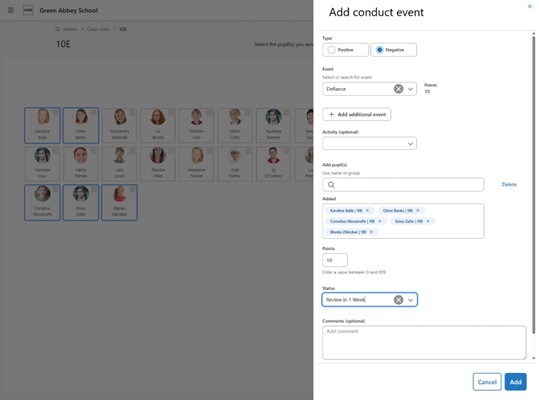
- Record conduct events in seconds – log behaviour for individuals or groups using multi-select. Fully customisable to your school’s policy with smooth workflows for accurate capture.
- Customise to your school policy – define positive and negative event types, set severity levels, and choose how much detail to record.
- Clear behaviour insights – view conduct points on pupil cards and drill deeper with customisable Conduct Dashboards for historical data and trends—no complex reports required.
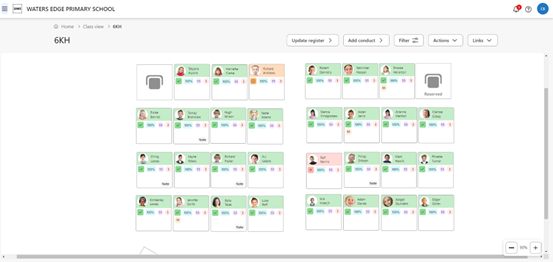
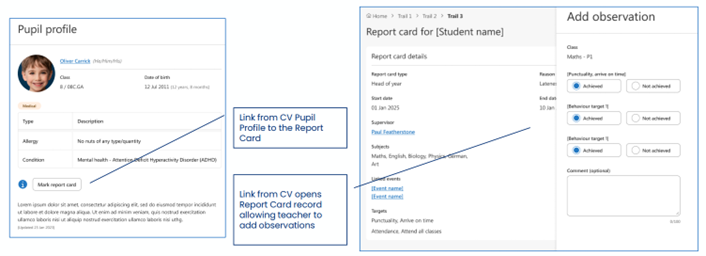
- Assign consequences with ease – set detentions, report cards or other follow-up actions straight from Class View. Every detail in one place.
Conduct events: summary table
The summary table displays all the conduct events that have been added to the system. This focuses on the event, not the pupils involved and the search will allow the user to easily retrieve a saved record. Users can also add new events from this page.
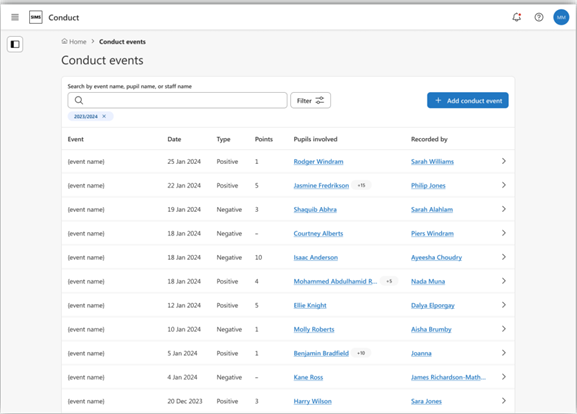
Conduct events and report cards on Class View
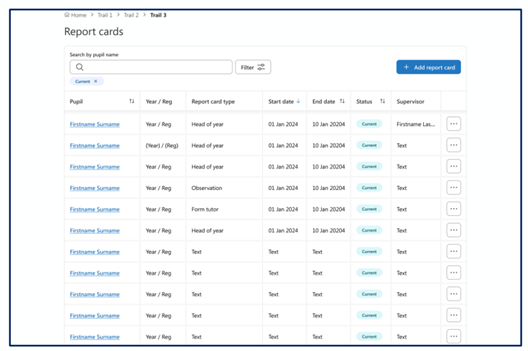
Report Cards
Accessed from the Main Menu | Conduct | Report Cards, this overview shows the user the current report cards and some of the main important details. User can open a report card’s details or add a new report card, you can also search for report cards by the pupil’s name. If choosing to use the filter option, the user can pick the report card type, status or the date range of the report card start date.
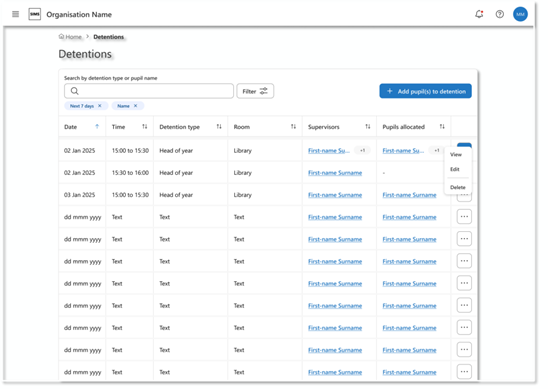
Detentions
Accessed from the conduct menu in SIMS Next Gen, the user will see, by default, the detentions taking place in the next 7 days that are being supervised by themselves. If the user needs to see detentions being supervised by other teachers, then editing the filters is simple and quick to do. From the list of detentions, the user can add pupils to a detention, view, edit or delete a detention
Conduct Dashboard: Accessed from the conduct menu in SIMS Next Gen. The dashboard has been designed for teachers and middle leaders and is meant for regular or daily use to oversee and evaluate student behaviour incidents. It is primarily an operational report to help users closely monitor individuals within a group.
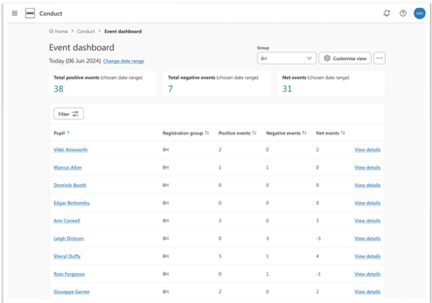
To view the SIMS Next Gen video channel on conduct, please click here
Attendance reporting is available in SIMS Next Gen. Reports include:
PowerBI Reports include Attendance by code • Attendance overview • Persistent Absence • Attendance Timeline
Pupil Drilldowns • Attendance by category • Attendance by code
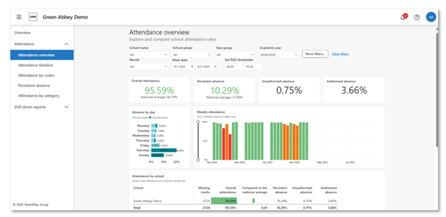
Group Hub is now available
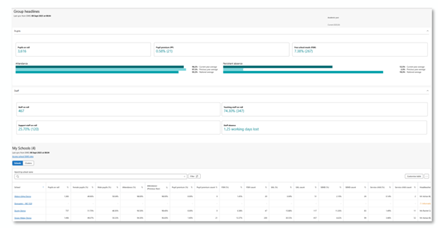
Homepage with at-a-glance group headlines, it also includes a list of schools with key information. Group hub has the ability to navigate to School MIS, create school clusters, consolidated staff list and produce integrated attendance reporting.
The attendance reports video channel can be found here
Some improvements have also been made to the attendance reporting:
This includes:
Missing marks filter for insights reports – This new filter allows users to choose whether or not to include missing marks in their data.
Default setting: Missing marks not included • Options: – No – Missing marks are excluded – Yes – Missing marks are included
Save functionality on drilldown reports – Create and save a template with selected parameters retained
Reporting timeline:
New reports that are expected to be available by the end of 2025
Pupils:
Suspensions and exclusions
SEND:
Demographics
Drill down reports: Pupil premium, SEND and key attributes
Staff:
Staff demographics, staff turnover, staff absence overview, staff absence breakdown, gender pay gap.
Drill down reports on staff absences
Admin staff – learn more about SIMS Next Gen here
Please let us know if you haven’t started using SIMS Next Gen and would like some assistance onboarding.