
To navigate to the most relevant section, please click the appropriate link below: -

MIS Support
Hello from the MIS Team,
We’re currently experiencing a high volume of support requests, which may mean slightly longer wait times than usual. Please be assured that our team are working hard to respond to every enquiry as quickly and efficiently as possible.
We really appreciate your patience and understanding during this busy period. To help us support you more effectively, we kindly encourage you to use our Customer Portal or email as your first point of contact — these are the most efficient ways to reach us. You’ll find all the contact details listed just below.
Customer contact options
Live chat @ https://my.www.schoolicts.co.uk/
Customer Portal @ https://my.www.schoolicts.co.uk/
Our customer portals allow you to
- Log and track tickets
- Watch webinars
- Search Knowledge base for information
- Latest news
Email: helpdesk@schoolicts.co.uk
Call: 0345 222 6802 Option 1 for MIS support *please leave voicemail if lines are busy during peak periods
Please remember that you can request support in various different ways, by requesting support via Live chat:
Key Benefits of Our Live Chat:
- Instant Support: Get your questions answered in real-time by our knowledgeable support consultants.
- Expert Assistance: Our live chat is staffed by real people, ready to provide you with personalised support.
- Convenience: Access live assistance directly from our website, without the need for phone calls or emails.
- Efficiency: Resolve issues faster with immediate responses and quick solutions.
To start using Live Chat, simply visit our customer portal, log in and click on the chat icon at the bottom right corner. Our team is ready and eager to assist you with any enquiries or support you may need.
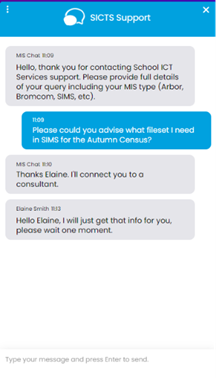
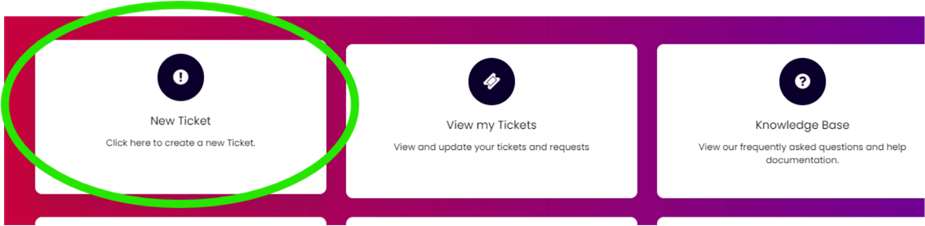
Customers can also log tickets via the customer portal at our customer portal:
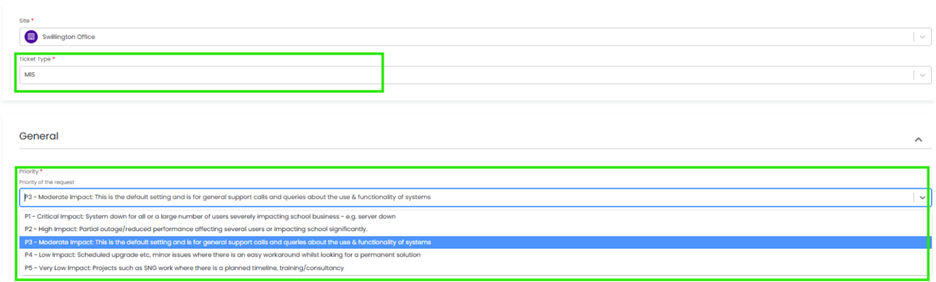
When you log a ticket via the customer portal, select the Ticket type either MIS or Technical to ensure if gets to the right team. The Priority, if you have an urgent ticket, MIS down for example please select either P1/P2 all other tickets default to P3 or even P4 if not urgent.
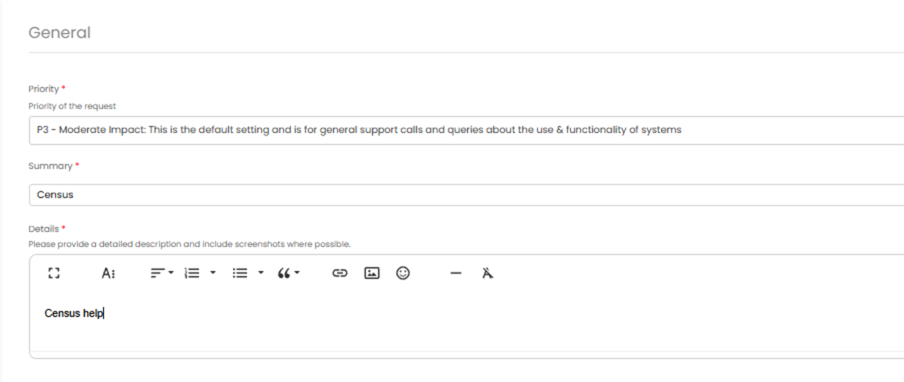
Once you enter the Subject and Details box, you will see a pop-up box with suggested articles in the top right-hand corner:
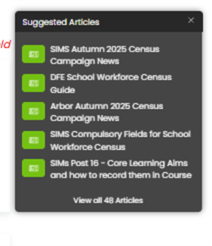
Clicking on the links in this pop-up may help you to resolve your issue without our input, so please also make use of this.
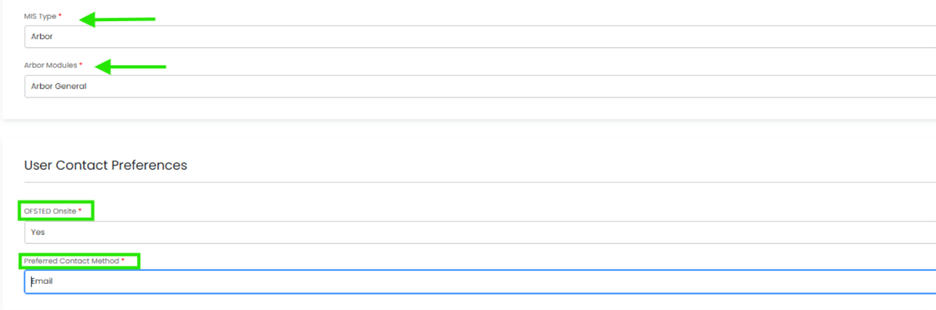
Remember to tell us which MIS and Module but also really importantly if OFSTED are onsite as this helps us prioritise your call through our OFSTED Watch service and also your preferred contact method as we know sometimes an email reply is what you need during your busy period.
We know you like to speak to us (and we like to speak to you!) but in order to offer the best service to our customers, this is often the quickest way to log a support request at busy times.
And lastly, as always, our experienced team are on hand to take your calls, so please reach out via 0345 222 6802 if the lines are busy and to save your precious time waiting you can leave a voicemail. This method will automatically generate a ticket, and this means that the person who can help you best is the person who will call you back. If you do this, PLEASE leave your name, the name of the school, the best number to call back on and a brief description of why you’re ringing, as this means that the best person to help you is the one that will call back.
Key Dates for the School Workforce Census
Census date: 06/11/2025
Continuous contracts collected from 01/09/2024 to 06/11/2025
Absences collected from 01/09/2024 to 31/08/2025
For schools that submit data to COLLECT the deadline is Friday 5th December 2025. Local authority schools will need to check with their LA for their return deadlines.
Scheduled Training
If this is your first time completing the School Workforce Census, or your first time doing it in a new MIS, we strongly recommend booking onto one of our training sessions. Our expert-led training is designed to give you confidence, avoid common mistakes, and ensure your data is accurate and compliant.
If the session you’d like is fully booked, please get in touch and we’ll add you to the waiting list. Where there’s high demand, we’ll also release extra training dates, so no one misses out.
Bromcom Personnel – Monday 13th October 1pm -4:00pm
Bromcom School Workforce Census – School ICT – Thursday 16th October 1:00pm-4:00pm
Arbor Personnel – Tuesday 14th October 9.30-12.30
Arbor School Workforce Census – School ICT – Friday 17th October 9:30am-12:30pm
SIMS Personnel – Distance Learning (available 24/7)
SIMS School Workforce Census – School ICT – Thursday 16th October 9:30am-12:30pm
SIMS School Workforce Census – School ICT – Tuesday 21st October 9:30am-12:30pm
Consultancy Services – Census Support – Let us complete the census for you!
Flexible, expert-led support for statutory returns – our Data Services package is a flexible, remote solution designed to support schools through key statutory returns and annual MIS procedures. Whether you need help with one return or all of them, we work alongside your team to ensure data is clean, complete, and submitted correctly saving valuable staff time and ensuring compliance. Reach out today via helpdesk@schoolicts.co.uk for more information
School Workforce Census (Autumn)
- Help completing staff contracts, roles, and pay data
- Error resolution and validation support
- Staff absence checking
- Pay scale and allowance updates
Exam Services
Exams Update – October 2025
The Autumn Term is well underway, and it’s already been a busy period for our Exams Team.
Enquiries About Results (EARs)
The 2025 EAR season has now finished, and our team has processed a huge volume of reviews of marking across our schools. We are pleased to report a significant percentage of grades were successfully increased – in some cases, this has made a real difference to students’ next steps and progression routes.
JCQ 2025–2026 Literature
The new JCQ regulations and guidance for the 2025–2026 academic year are now available. As always, our Managed Exams Service ensures schools remain compliant, up to date, and supported in interpreting and applying the latest requirements.
Our Services
- Managed Exams Service – Complete peace of mind with an experienced Exams Consultant assigned to your school, supported by our wider team. We take on the heavy workload, ensure JCQ compliance, and free up school staff to focus on teaching and learning.
- Mentoring Service – For new or developing Exams Officers, our mentoring programme provides step-by-step guidance and CPD from our experienced consultants, ensuring confidence in role and reducing the risk of costly mistakes.
Facilitators – Join Us
Are you a retiring (or recently retired) Exams Officer, or someone with strong management and leadership skills? We are always looking for Exam Facilitators to support schools on exam days. The role involves overseeing exam sessions on site to ensure everything runs smoothly – with no admin, just good organisation and people skills.
If you’d like to know more about any of our services, or if you’re interested in becoming a Facilitator, please get in touch at examservices@schoolicts.co.uk
Secondary and Primary Data Management Services
Our Data Management service offers an excellent, cost effective, responsive, and efficient Data Management solution delivered remotely by a team of highly experienced school data experts. Their dependable advice and guidance empower schools, academies, and MATs to maximise their investment in their management information system (MIS). Whether it’s a long-term solution or short term for sickness cover or maternity please reach out.
- Please click here for further information
helloData
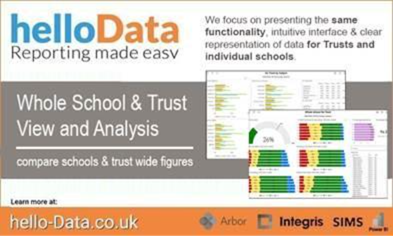
Moving to Arbor? – helloData assessment migration service
If you decide to move to Arbor, and are a helloData customer, we can set up your assessments in your new MIS, migrate your data and provide training, all for £95.

We’ve already helped a large number of schools switch to Arbor this term. The demand for this service is proving to be incredibly high so please let us know when you are moving as soon as possible by emailing admin@hello-data.co.uk.
Note: The new MIS will not setup your assessments or migrate your internal assessment data, only the statutory data is transferred.
If you are not yet using helloData, we can also support you with setting up the assessments in Arbor and assist with the data migration, email admin@hello-data.co.uk to find out more. Visit www.hello-data.co.uk to discover how our reporting tool connects with Arbor so that you can benefit for in depth assessment analysis at a click of a button.
Data and Census Health Check Services
Data Health Check
An MIS health check ensures you’re getting the most out of the investment in your MIS. The benefits of one of our comprehensive health checks include: –
- Raise awareness of functionality and any issues
- Keep you up to date with the latest developments in your MIS
- Housekeeping and tidying exercises
- Report with recommendations to ensure you’re fully maximising your MIS along with any training recommendations
- For on premise MIS a server health check is also included
Post-16 Health Check – Protect and Maximise Your Funding
Our Post-16 Health Check is a targeted consultancy service designed to safeguard your school’s Post-16 funding by ensuring your MIS data is accurate, compliant, and audit ready.
We deep-dive into the critical data areas that directly impact funding:
- Condition of Funding Compliance
- Prior Attainment Data
- Student Enrolment & Programme of Study
- Planned Hours & Course Information
- Core Learning Aims
- Planned End Dates & Leavers
Our expert Post-16 consultants have a proven track record of saving schools £££££ through hands-on guidance and deep knowledge of funding criteria. We don’t just check your data — we help you understand it, fix it, and future-proof it.
Remote or onsite, tailored to your MIS and school needs.
Protect and Maximise your Post-16 funding – don’t risk costly clawbacks.
Our Health Check services usually take around half a day. Please contact us on: helpdesk@schoolicts.co.uk to find out more.
Timetable Services
Our Timetable Service provides a full-scale, collaborative approach to creating and managing your school’s timetable. Ahead of the timetable season, we work closely with your institution to develop a detailed Plan of Action (PoA), ensuring seamless integration and execution. By partnering with a key member of your staff, our experienced school timetable consultant not only assists in constructing a functional timetable but also manages it throughout the academic year. Enquire via helpdesk@schoolicts.co.uk for more information.
FMS - Leeds City Council Schools Only - Corporate Finance Dynamics package - affecting SIMS FMS and Arbor Finance
Recently Leeds City Council have implemented a new corporate finance package – MS Dynamics.
We gather, Vote codes have changed to a more simplified version. The change has impacted mostly Salary codes that do not agree with the corresponding codes in FMS. This in turn has led to reconciliation and reporting difficulties.
At this stage, we would recommend that schools reconcile back to the correct FMS ledger codes e.g. Teachers Basic Pay, Admin Basic Pay.
We would not advise changing any FMS codes to match the Dynamics Vote codes.
Please note: Schools that “Stamp” their invoices for payment prior to sending to the Payments Team, should use the generic replacement Dynamics codes to ensure prompt Supplier payment.
Any queries we would recommend you contact your usual School Finance team Officer.
Any further queries please contact the helpdesk on helpdesk@schoolicts.co.uk
FMS - The future of FMS is in the cloud
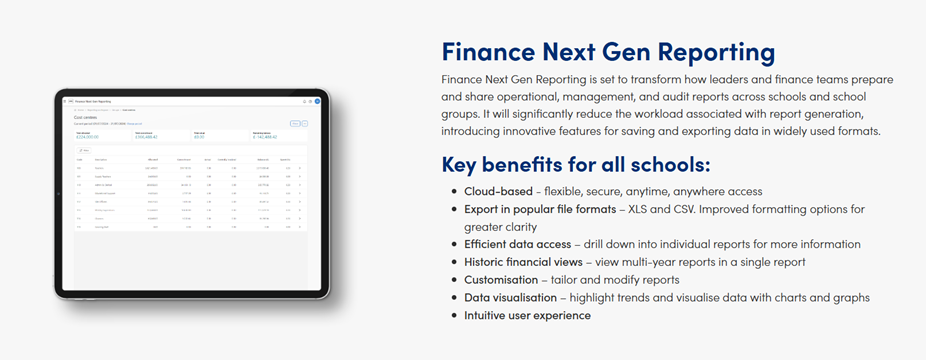
The next generation of FMS is coming – and it’s built for the cloud. Launching in early 2026, the cloud-native FMS is designed to support the challenges schools face every day. From protecting sensitive financial and school data to giving staff secure access to systems anytime, anywhere — this is the future of school finance, and we want to help you get ready.
Reach out today to discuss how we can support your transition.
Customer Contact Information
- Contact: 0345 222 6802 Option 1, helpdesk@schoolicts.co.uk
- Portal: https://my.www.schoolicts.co.uk/
Our customer portals allow you to: –
- Log and track tickets
- Watch webinar recordings
- Search the Knowledge base for helpful tips, guidance and information
- Keep updated on the latest news

Autumn and Spring Term Online Training Courses
Training courses for the remainder of the Autumn Term and NEWLY added Spring Term are now live! We have a comprehensive schedule of online ‘live’ training courses along with Distance Learning courses to help you develop your knowledge and get the most out of your MIS (Management Information System).
Booking is now open please visit https://www.schoolicts.co.uk/online-training/ for online courses or https://learning.www.schoolicts.co.uk/ for Distance Learning courses.

Click for the latest Arbor updates
New Features in Arbor
Ask Arbor is the new AI assistant, built right into Arbor MIS. Arbor have designed it to save school staff hours every week by making everyday tasks faster. With Ask Arbor, your schools can find student or staff information, draft emails and comms, spot trends, and take action – all in one user-friendly chat.
What you need to know:
It will be available to all Arbor MIS schools at launch as long as they do not have Arbor AI disabled
It is built into the MIS, with no setup required
Every school automatically gets a free monthly allowance of AI usage as part of their MIS package. You can read more about this here.
Document Manager – ArborFest Pitch Perfect winner
At this year’s ArborFest, Arbor hosted a pitch session where you voted on what feature you’d like them to release next. The winning feature – Document Manager – is now live! This means one central place to view, search, filter, and bulk manage documents linked to students, staff, guardians, and wider school activities. Learn more.
Updates to report cards
At ArborFest, one of the top-voted improvements from schools was around making it easier to find and edit previously created report cards. To fix this, Arbor have converted every section of standard and long report cards to tables instead of simple lists and added bulk actions.
Prevent parent meal debt
Arbor have added a new setting to the Parent Portal and App to help you manage and prevent parent meal debt. You’ll find the ‘Allow Meal choices if not enough balance?’ setting in the Parent Portal Menu Availability slide over, which you can toggle on or off. Learn more.
What’s new in MAT MIS
Updates to permissions
- You can now reset permission management for group and school business roles, directly from MAT MIS. Here, you can take control of permissions and tailor them to your needs, with the flexibility to switch back at any time.
- Arbor have created a new All Staff Ad-Hoc Permissions page, so you can see which school and trust staff have permissions outside of their standard business roles and can amend them if needed.
Post 16 Handy Tip
Did you know in Arbor you can bulk update Programmes of Study?
Go to students | All students | Bulk update, you can then choose to update learning aims. You can also use the bulk action tool in here to complete a variety of different options including withdrawing students, update planned start date and update learning hours.
Guidance on completing the return can be found here
Did you miss the Autumn census webinar – click on the link to watch it here: School ICT – User Portal – Arbor Autumn Census webinar 8/9/25
School Workforce Census
Training:
Arbor Personnel – Tuesday 14th October 9.30-12.30
Arbor School Workforce Census – School ICT -Friday 17th October 9:30am-12:30pm
Workforce Census Dry Run Date Thursday 23rd October 2025
For all of your SWC information, please visit School ICT – User Portal – Arbor School Workforce Census 2025 Campaign News
Changes this census
- The most significant change is that additional validation rules have been added to encourage the return of data on disability and ethnicity
For the 2025 census a new validation rule has been added. Where staff have been employed for more than 3 months, a query will be raised if their disability status is still listed as ‘information not yet obtained’. Staff have an absolute right to not answer this question, in which case the answer should be recorded as ‘Refused’ and no query will be raised.
Note on staff working in multiple schools
Teachers who work in multiple schools, even if the schools are part of a Multi Academy Trust, will need to be recorded separately in each of the schools.
Each school will need to record the name, teacher number, QTS, QTLS and EYTS of the staff and to separately record the hours worked by staff in each school. This data must be recorded for each school to ensure that staff are not being double counted and to ensure that an accurate record is made of staffing and hours worked in each school.
Check your data using the Data Quality Dashboard.
Before the Dry Run facility opens, you can start preparing for Census by heading over to your Data Quality Dashboard. You’ll find the key areas to help you check and prepare your data, which you should work through in this order:
1. Merge or delete any duplicate staff profiles in the Suspected Duplicates section.
2. Add and update basic details in the Staff section.
3. Add in key Census information in the School Workforce Census section to add key Census information. Just click a cell to add the data!
4. Pay Scales: In Arbor, when looking at Pay scales, all scales may display differently to your previous MIS. If you have migrated from another MIS, it is advisory to ensure that these are updated and correct. You may wish to rename the scales to ensure you are awarding correctly e.g., NJC scale 1 or Teachers Upper scale 1 etc. Please use the link below for further guidance on how to amend, update, create and complete Pay scales in Arborhttps://halo.transforming-learning.co.uk/article?entity=articles&text=updating%20payscales&id=945
a. You may find these links useful to find pay scale information.
i. NASUWT –The Teachers’ Union – Pay Award
ii. NJC National Joint Council – Support Staff Pay
5. Check your SENCo is set up, in Arbor they need a separate contract for the SENCo role, with the hours they work in that role. Detailed guidance on how to do this can be found here https://support.arbor-education.com/hc/en-us/articles/360014107837-How-to-set-up-your-SENCo-for-the-Workforce-Census#step-2-check-your-senco-is-set-up-0-1
6. Staff Absence data – Make sure staff absences have been recorded: How can I see Staff Absence Statistics?
7. Qualification data – Record staff qualifications (qualification codes, subject codes and class of degree) from the Qualifications & Checks area on staff members’ profiles.
8. Date of last pay review – Use the Staff section part of the Check your data using the Data Quality Dashboard.
9. Vacancies – On census day, you need to add in the vacancies that are currently open at your school.
10. Third-party support staff headcount – On census day, you need to add in headcount numbers for occasional teaching staff and third-party support staff are both required. You can see how to add this in the Workforce Census guide.
Arbor have now separated out recording a staff member’s disability status from recording an impairment to make collecting this data simpler and more transparent as to what data is being submitted in the Workforce Census.
The new field is Staff Disability Status – recording of any actual impairment is optional and is not collected for the Workforce Census.
- On-the-day Workforce Census errors – Errors 7100, 7110, 7111, 7112 and 7210 and Query 7240Q – these errors and queries cannot be resolved until on or after census day
- School Workforce census guidance can be found here along with our handy report which can be downloaded and imported to show who is being counted in your SWC
Re-enrolling a student that has returned to your school
If a student returns to your school after being unenrolled, you can either, add a new enrolment or extend their enrolment if there is no gap between attendance
If the student needs to be reinstated after a break in their enrolment, a new enrolment should be created. To do this:
Go to the student’s Student Profile and go to the Enrolments section.
Click +Add in the top left of the School Enrolments section. In the slide over select their re-enrolment date and their year group, registration form and house (where applicable). Then click Enrol student.
The student will then have two enrolments for their two separate periods of attendance.
Remember: If a student has left your school, you should never delete all records of them. This is so you can accurately report on your attendance figures for the School Census etc. You should also not remove their enrolment data if they were present for any classes

Click for the latest Bromcom updates
School Workforce Training
Training:
Bromcom Personnel – Monday 13th October 1pm -4:00pm
Bromcom School Workforce Census – School ICT -Thursday 16th October 1:00pm-4:00pm
DfE Guidance
We strongly advise downloading the DfE guidance for clarification on who should and who should not be included in the census. This can be downloaded from the below link.
Key Dates for the School Workforce Census
Census date: 06/11/2025
Continuous contracts collected from 01/09/2024 to 06/11/2025
Absences collected from 01/09/2024 to 31/08/2025
For schools that submit data to COLLECT the deadline is Friday 5th December 2025. Local authority schools will need to check with their LA for their return deadlines.
Important information
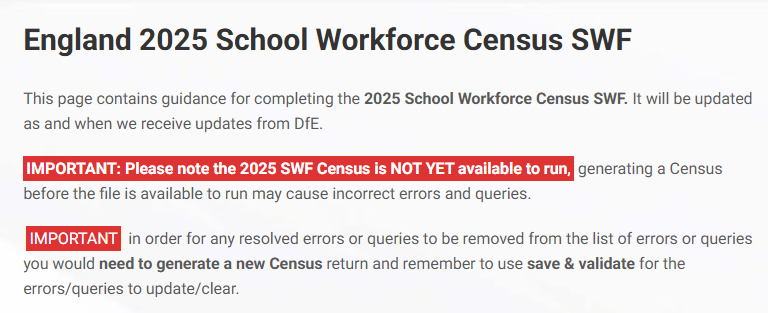
Updates to the school workforce census for 2025
The most significant change is that additional validation rules have been added to encourage the return of data on disability and ethnicity
For the 2025 census a new validation rule has been added. Where staff have been employed for more than 3 months, a query will be raised if their disability status is still listed as ‘information not yet obtained’. Staff have an absolute right to not answer this question, in which case the answer should be recorded as ‘Refused’ and no query will be raised.
Disability
Navigate to Staff > Profile > Medical Conditions, Dietary Needs and Impairments;
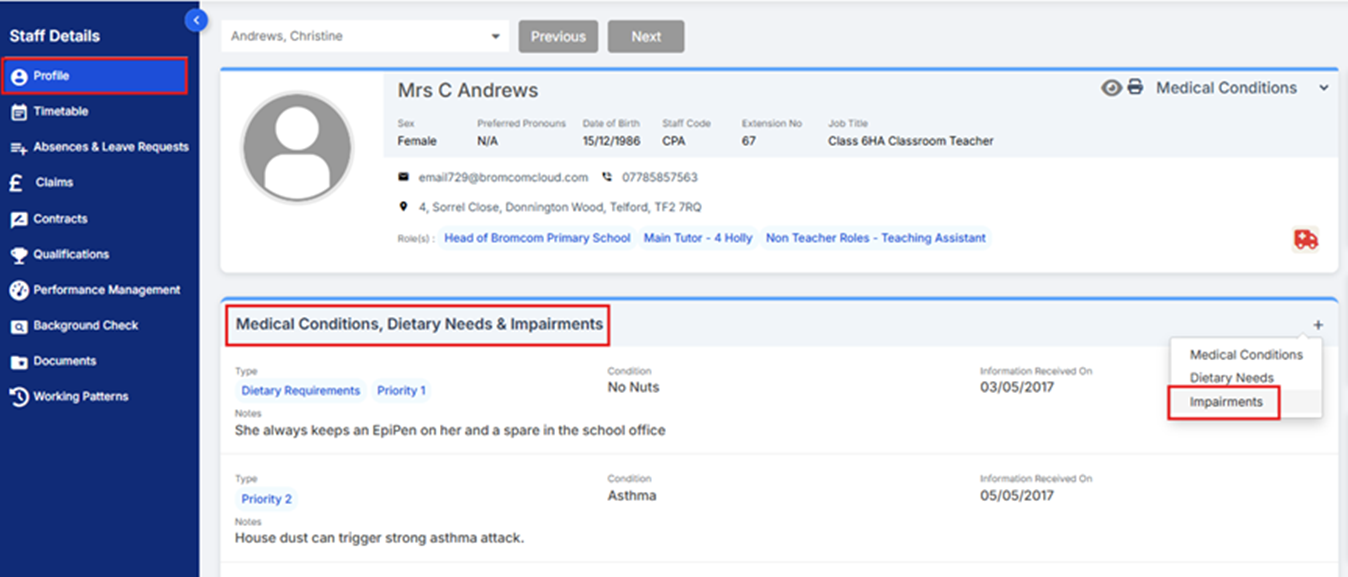
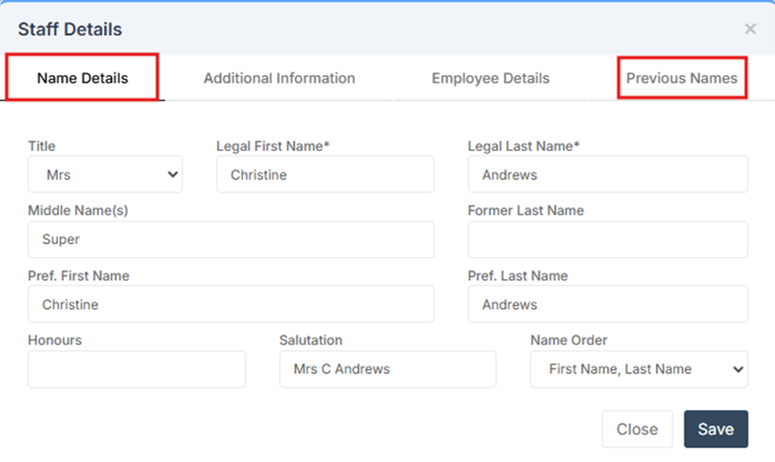
Add/Update the Declared Disability, if required, and click Save.
Check your data
THE SCREENSHOTS USED IN THE GUIDE ARE FOR ILLUSTRATION PURPOSES ONLY AND MAY DIFFER IN A LIVE SCHOOL’S MIS.
Key Areas to Check
Staff Details
The School Workforce Census collects a range of information for both current staff and leavers. Below are details of the key areas collected and where each item can be found within the Staff Profile.
Family/Given/Former Family Names
Navigate to Staff > Edit Staff Details > Name Details & Previous Names;
Update if required and click Save.
Date of Birth / Sex
Navigate to Staff > Edit Staff Details > Additional information;
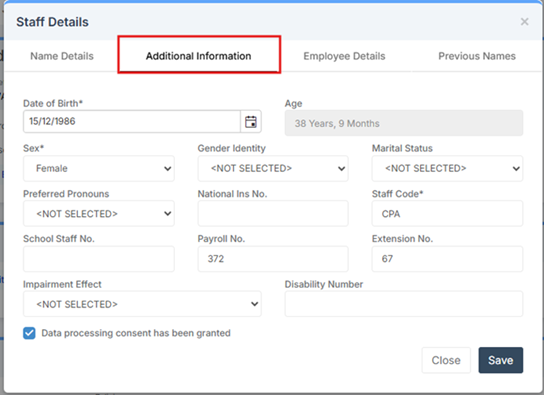
Update if required and click Save.
National Insurance Number
Navigate to Staff > Edit Staff Details > Additional Information;
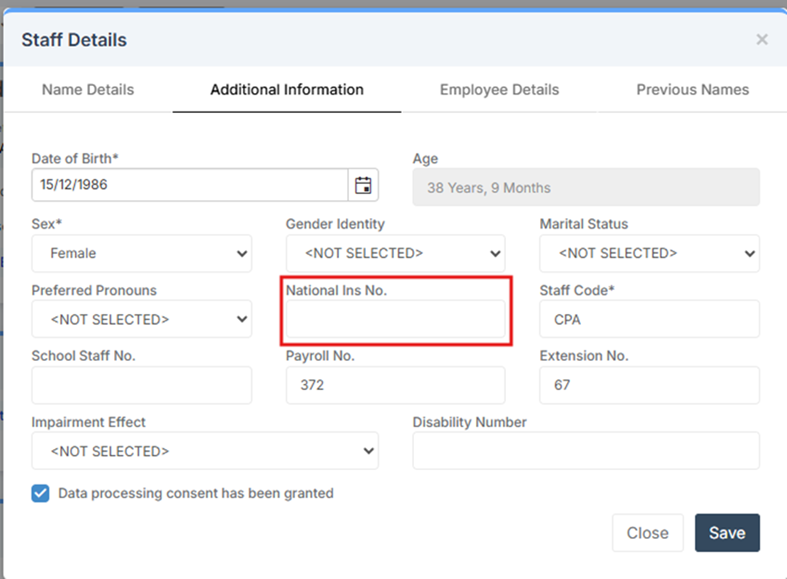
Update if required and click Save.
For more information on data checking items see out customer portal knowledge base here
Note on staff working in multiple schools
Teachers who work in multiple schools, even if the schools are part of a Multi Academy Trust, will need to be recorded separately in each of the schools.
Each school will need to record the name, teacher number, QTS, QTLS and EYTS of the staff and to separately record the hours worked by staff in each school. This data must be recorded for each school to ensure that staff are not being double counted and to ensure that an accurate record is made of staffing and hours worked in each school.
School Census
Updated guide – Bromcom Autumn 2025 Census
Census – Autumn Census Validation Files v1.1 and v1.2
Modules > Census > School
For schools in England, the Autumn Census Validation Files have been updated with v1.1 and v1.2, which applies the latest set of validations issued by the DfE to ensure schools can meet statutory return requirements from 2 October 2025.
This update includes corrections to validation rules to help prevent errors when generating census files.
The following Errors and Queries have been updated:
Error 1859 and Error 3032 – updated to include DOB range test.
Query 2775Q and Query 3030Q – corrected validation logic.
Query 1925Q – corrected Leaving Date range check.
Known Issues
01.10.25: CAS-435257-H6C1M5 – Prior attainment upload from exams not showing correct dropdown result for English Language.
Resolved Issues
01.10.25 The latest validation files from the DfE have been applied to the MIS. This will clear the following errors and queries that were being triggered incorrectly.
1859, 3032, 2775Q, 3030Q and 1925Q
In addition, this update also resolved issues with errors 4043 & 4044 to ensure these trigger correctly when multiple Learner FAM records of type MMH and EMH exists per pupil.
Please re-run your census to clear any errors caused by the previous version of the files.
24.09.25 4-year-old Reception students showing in Pupil Reconciliation on the Census. This was causing the census to produce errors 5170 and 5190 for the students.
Top Tip: If you encounter an Error or Query, simply search for the specific code in the Bromcom Help Centre (or via google – e.g. Bromcom census error 2700). This will take you straight to the guidance you need, saving time and reducing stress
Our helpdesk is here to assist you, so get in touch if you need assistance with the census.
P16 Census Tips
Main guidance page- https://docs.bromcom.com/knowledge-base/autumn-census-post-16-guide/
The census can generate considerable errors and queries for P16. Many of these can be resolved in bulk. Below are some useful links and some tips to help speed the process up
If data is correct for prior attainment, you may still see query codes
3030(English) and 3020 (Maths) with the collect guidance below
3030 – Confirmed as correct is not acceptable, as this will impact on Post 16 funding we expect the following action to be undertaken:
Check your Maths & English condition of funding report (both previous and current years) to identify any non-compliant students; this available from the report section of COLLECT.
Ensure those students are undertaking compliant maths/English delivery and that the specific learning aim has been accurately recorded in your return.
Acceptable notepad is an indication that these actions have been taken or provide a reason why they are non-compliant.
3020 – Confirmed as correct is not acceptable, as this will impact on Post 16 funding we expect the following action to be undertaken:
Check your Maths & English condition of funding report (both previous and current years) to identify any non-compliant students; this available from the report section of COLLECT.
Ensure those students are undertaking compliant maths/English delivery and that the specific learning aim has been accurately recorded in your return.
Acceptable notepad is an indication that these actions have been taken or provide a reason why they are non-compliant.
Learning Aims
The recommended path to add leaning aims is via the course > link classes to the course. This will put the data from the course to the class and onto the student record
Users do not need to manually add students to the membership panel, as the classes contain the student memberships.
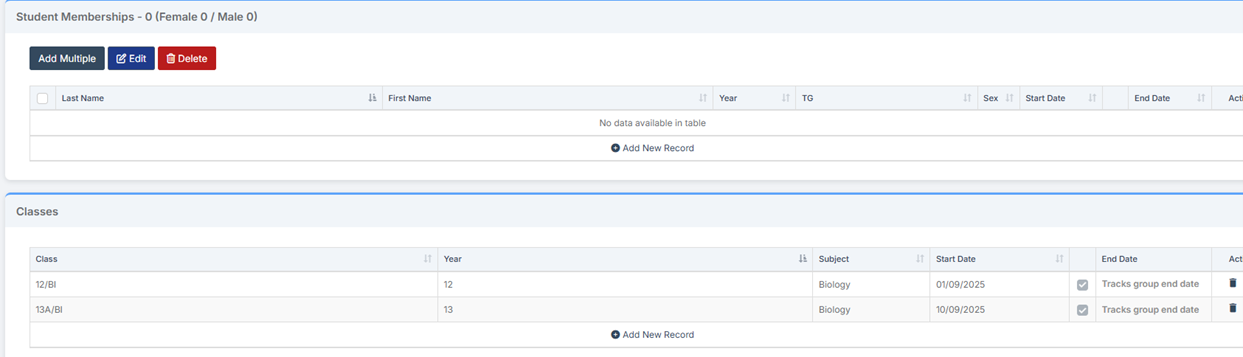
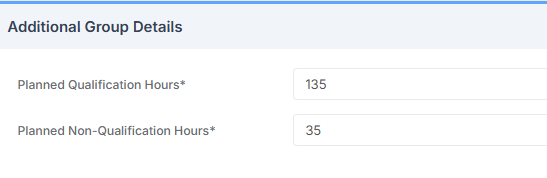
This will also pull any hours that are added into the course, and store this against the students
Using the bulk Learning aims screen
Modules > curriculum > Bulk Learning Aims Update
NOTE – Recently migrated schools may have Year 13 students showing end dates for continuing courses which will cause errors. These end dates can be removed on bulk from this screen
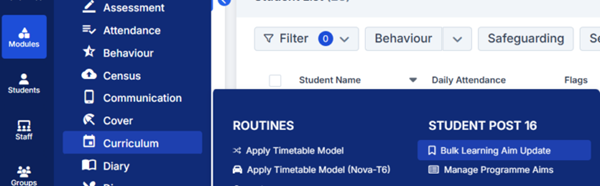
This screen allows users to update and correct any information on bulk
The top columns and buttons can be used to manage individual students or groups by clicking on Student names in the grid or by using Select All to update fields such as Planned End Dates or Status.
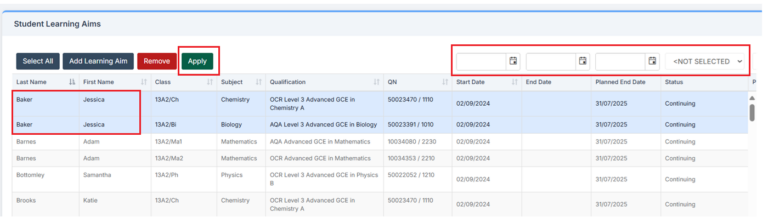
Bulk learning hours screen
The Autumn Census requires Learning Hours to be included in the return. These represent the expected planned qualification and non-qualification hours a student will undertake during the upcoming curriculum year.
IMPORTANT: We recommend setting these up at the course level. For further information, make use of the Add Learning Aims section in this guide. For instructions on creating a new course from scratch, see How to Create a New Course.
To import Learning Hours from courses into the Census file, or to input/update them manually, go to:
Modules > Census > Routines > Learning Hours Maintenance.
Prior attainment screen – no CTF import for results – LRS etc
The Autumn Census also requires including each student’s Prior Attainment in English and Maths GCSE, or equivalent qualifications.
Prior Attainment data must be provided for two years: the current academic year and the previous year.
The table below outlines the data required.
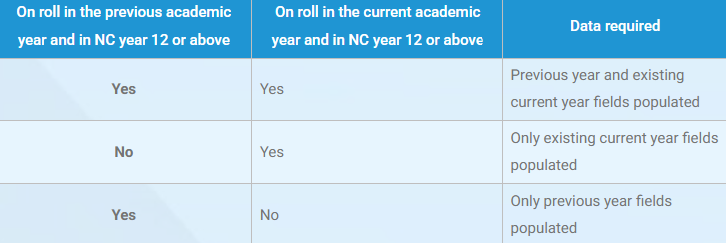
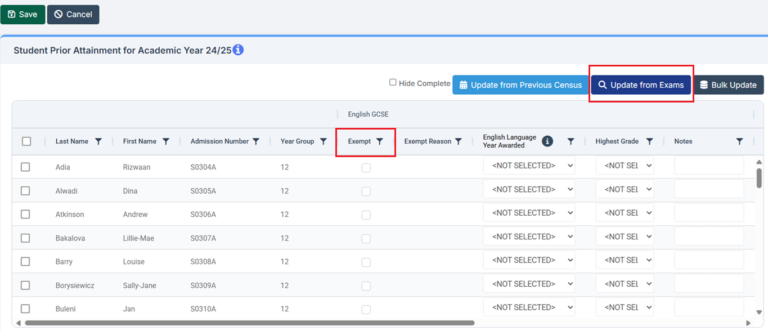
To review and update this information, navigate to Modules > Census > Routines > Student Prior Attainment.
This screen allows manual entry for English and Maths prior attainment and when this was achieved
Users can click Update from Exams / last census to pull in any data already available within your system but there will be students who have not sat exams in your school, for whom you will need to enter the data
NOTE– Exam results cannot be imported into Bromcom via CTF.
Bromcom News
Photos have been switched back on in New UI
This morning following work from our technical team we have switched back on the photos in the new UI. We will be monitoring closely what impact this has on performance
Root cause analysis for performance issues at the start of term
Bromcom have issued a statement about the issues and the identified causes and steps to prevent this happening again.
Here is a link to the file – Final RCA September 2025 v2.0 (1).pdf
MCAS iOS Performance (New version now available) – MCAS
Update 24/09: The issue was with the iOS app only, the fixed version has now been approved by Apple, and its availability will increase over the coming hours. Once we are confident that all users have it available, we will push a forced update so little messaging from schools should be required. The web version of MCAS has remained available to all users as an alternative throughout the update process.
Update 23/09: The team has identified a potential cause and there is a potential fix going through testing.
We are aware that some parents using the iOS app are experiencing issues with MCAS. We are actively investigating, will provide an update once we know more.
Exams – Updated Base Data Gradesets for 2025-26 (Version 2)
Modules > Examination > Manage Base Data
The system has been updated with the latest JCQ Exam Codes Version 2.
The changes can be found in the JCQ > Exams Office > Entries web page under JCQ Format 14 Exam Codes 2025/26 Version 2.
Here is a summary of the key updates:
Cambridge OCR
Updated Exam Qualification:
Level 3 Certificate VRQC
Level 3 Certificate Unit VRQU
Level 3 Certificate Registration VRQR
Cambridge Advanced Nationals units CAN
Cambridge Advanced Nationals Certificate CAN
Cambridge Advanced Nationals Extended Certificate CAN
Cambridge Advanced Nationals Diploma CAN
Cambridge Advanced Nationals Registration CAN
Updated Exam Type Level to L3 for Cambridge Advanced Nationals units CAN
Exam Type Qualification
New Exam Type Qualification:
VRQC Vocationally Related Qualification Certificate
VRQU Vocationally Related Qualification Unit
VRQR Vocationally Related Qualification Registration
CAN Cambridge Advanced Nationals’
Exam Type Level
New Exam Type Level:
L2EC – Level 2 Extended Certificate Pearson Extended Certificate – Addition of Level 2 Extended Mathematics qualification
Pearson
Updated descriptions:
Pearson BTEC Technical Occupational Entry (Diploma) BTOE
New Exam Qualification:
Pearson Extended Certificate – Addition of Level 2 Extended Mathematics qualification L2EC
WJEC
New T Level Qualifications:
T Level Registration TLEV
T Level Core Cash-in TLEVC
T Level Core Units TLEVC
T Level Occupational Specialism TLEVO
Gradeset Listing
New Gradeset Listing:
82 – GCSE double award (Wales from 2026)
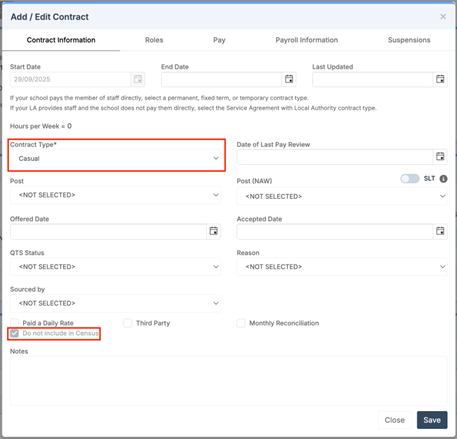
Administration – Staff: New Casual Contract Type
Staff > Staff Details > Contracts
For schools in Wales, a new Contract Type ‘Casual’ is now available. When selected, the Do not include in Census option will be automatically ticked and locked.

Click for the latest Integris updates
School Workforce Census
DfE Guidance
We strongly advise downloading the DfE guidance for clarification on who should and who should not be included in the census. This can be downloaded from the below link.
Key Dates for the School Workforce Census
- Census date: 06/11/2025
- Continuous contracts collected from 01/09/2024 to 06/11/2025
- Absences collected from 01/09/2024 to 31/08/2025
For schools that submit data to COLLECT the deadline is Friday 5th December 2025. Local authority schools will need to check with their LA for their return deadlines.
Updates to the school workforce census for 2025
The most significant change is that additional validation rules have been added to encourage the return of data on disability and ethnicity
For the 2025 census a new validation rule has been added. Where staff have been employed for more than 3 months, a query will be raised if their disability status is still listed as ‘information not yet obtained’. Staff have an absolute right to not answer this question, in which case the answer should be recorded as ‘Refused’ and no query will be raised.
Note on Newly Qualified Teacher
From September 2021, statutory induction changed for new teachers and all early career teachers undergoing statutory induction starting from September 2021 are entitled to 2 years of high-quality professional support based on the ECF. State funded schools offering statutory induction will receive additional funding to deliver the new ECF.
Funding for the second year of induction will depend on data submitted in the SWC, so special care should be taken that data entered in this field is correct
Note on School Business Professional and Leadership Non-Teaching
Schools are required to indicate those members of their staff who are School Business Professionals.
‘School Business Professional’ refers to staff and is expected to include staff with the roles of ‘Bursar’, ‘Business Manager’, ’Finance Officer’, ’Office Manager’, ‘Premises Manager’ or ‘ICT Network Manager’.
Schools are required to indicate those members of their staff who are part of the Senior Leadership Team, including non-teachers
‘Leadership non-teacher’ refers to any member of staff, not reported in a teaching post, who is part of the school’s Senior Leadership Team (SLT) or has other formal leadership responsibilities.
Please note that to be listed as a School Business Professional, the member of staff is required to have a level 3 qualification in a specific list of qualifications. This list can be found on page 69 of the School workforce guide 2025
Note on staff working in multiple schools
Teachers who work in multiple schools, even if the schools are part of a Multi Academy Trust, will need to be recorded separately in each of the schools. Each school will need to record the name, teacher number, QTS, QTLS and EYTS of the staff and to separately record the hours worked by staff in each school. This data must be recorded for each school to ensure that staff are not being double counted and to ensure that an accurate record is made of staffing and hours worked in each school.
Integris documentation available from the links below. Please note the document references 2024 as Integris have not provided an up-to-date version but this is still valid for the moment.

Click for the latest ScholarPack updates
School Workforce Census
DfE Guidance
We strongly advise downloading the DfE guidance for clarification on who should and who should not be included in the census. This can be downloaded from the below link.
Key Dates for the School Workforce Census
- Census date: 06/11/2025
- Continuous contracts collected from 01/09/2024 to 07/11/2025
- Absences collected from 01/09/2024 to 31/08/2025
For schools that submit data to COLLECT the deadline is Friday 5th December 2025. Local authority schools will need to check with their LA for their return deadlines.
Updates to the school workforce census for 2025
The most significant change is that additional validation rules have been added to encourage the return of data on disability and ethnicity
For the 2025 census a new validation rule has been added. Where staff have been employed for more than 3 months, a query will be raised if their disability status is still listed as ‘information not yet obtained’. Staff have an absolute right to not answer this question, in which case the answer should be recorded as ‘Refused’ and no query will be raised.
Note on Newly Qualified Teacher
From September 2021, statutory induction changed for new teachers and all early career teachers undergoing statutory induction starting from September 2021 are entitled to 2 years of high-quality professional support based on the ECF. State funded schools offering statutory induction will receive additional funding to deliver the new ECF.
Funding for the second year of induction will depend on data submitted in the SWC, so special care should be taken that data entered in this field is correct
Note on School Business Professional and Leadership Non-Teaching
Schools are required to indicate those members of their staff who are School Business Professionals.
‘School Business Professional’ refers to staff and is expected to include staff with the roles of ‘Bursar’, ‘Business Manager’, ’Finance Officer’, ’Office Manager’, ‘Premises Manager’ or ‘ICT Network Manager’.
Schools are required to indicate those members of their staff who are part of the Senior Leadership Team, including non-teachers
‘Leadership non-teacher’ refers to any member of staff, not reported in a teaching post, who is part of the school’s Senior Leadership Team (SLT) or has other formal leadership responsibilities.
Please note that to be listed as a School Business Professional, the member of staff is required to have a level 3 qualification in a specific list of qualifications. This list can be found on page 69 of the School workforce guide 2025
Note on staff working in multiple schools
Teachers who work in multiple schools, even if the schools are part of a Multi Academy Trust, will need to be recorded separately in each of the schools.
Each school will need to record the name, teacher number, QTS, QTLS and EYTS of the staff and to separately record the hours worked by staff in each school. This data must be recorded for each school to ensure that staff are not being double counted and to ensure that an accurate record is made of staffing and hours worked in each school.
Full guidance on producing the SWC can be found here:
https://www.gov.uk/government/publications/school-workforce-census-guides
Workforce Census 2024 – ScholarPack
Validating your Census File
Once you have ensured that all necessary information is complete, go to Admin > Census > Workforce Census> Calculate Full Census Return to validate your information. Any errors or queries will be displayed here.
Generating your Census File
Once you have checked the validity of your data you will be able to generate a summary of the information in Admin > Census > Workforce > Generate Census Summary. Once you are happy with the summary of information you will need to click on Download Census File from the main census page.
This file will download to your computer, and you will be required to either send this information to your Local Authority or upload directly to the DfE Collect Portal. If you are unsure, we recommend you contact your Local Authority for more information.
School Workforce Census Error and Resolutions Spreadsheet
For support in resolving your census errors why not check our handy guide. School Workforce Census Error and Resolutions Spreadsheet 2025

Click for the latest SIMS updates
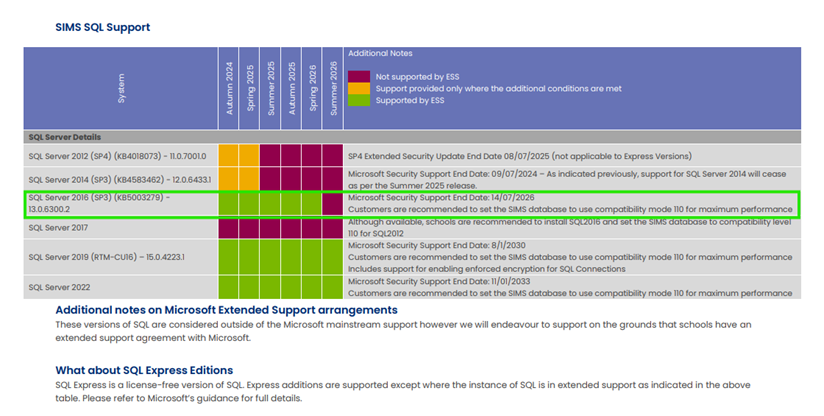
Technical teams please note, SQL Server 2016 support will come to end in July 2026
Following on from the recent technical guidance update from Parent Pay Group in the Spring update regarding the highlighting changes to the Microsoft Support for 2016 coming to an end in June 2026. This change only impacts schools who have SIMS on premise.
We have put together the below information which explains what this means for you and your school.
Please see the SIMS Technical roadmap Spring 2025 on our customer portal here for more information on what is and isn’t supported: https://halo.transforming-learning.co.uk/portal/kb?id=310
What is SQL Server?
Microsoft SQL Server is the database management software used to manage the SIMS Database on the school’s SIMS Server and is required to provide access to the SIMS Database.

How to check your SQL Server Version
If your school has had a new SIMS Server installed or upgraded by School ICT/turn IT on within the past 1 to 2 years, then you are likely to be already on the last supported version of SQL Server.
You can check your current SQL Server Version from within SIMS.
- Select “Help” from the top SIMS Menu
- Select “System Information”.
- The SQL version will be listed next to “SQL Server Version” and will show
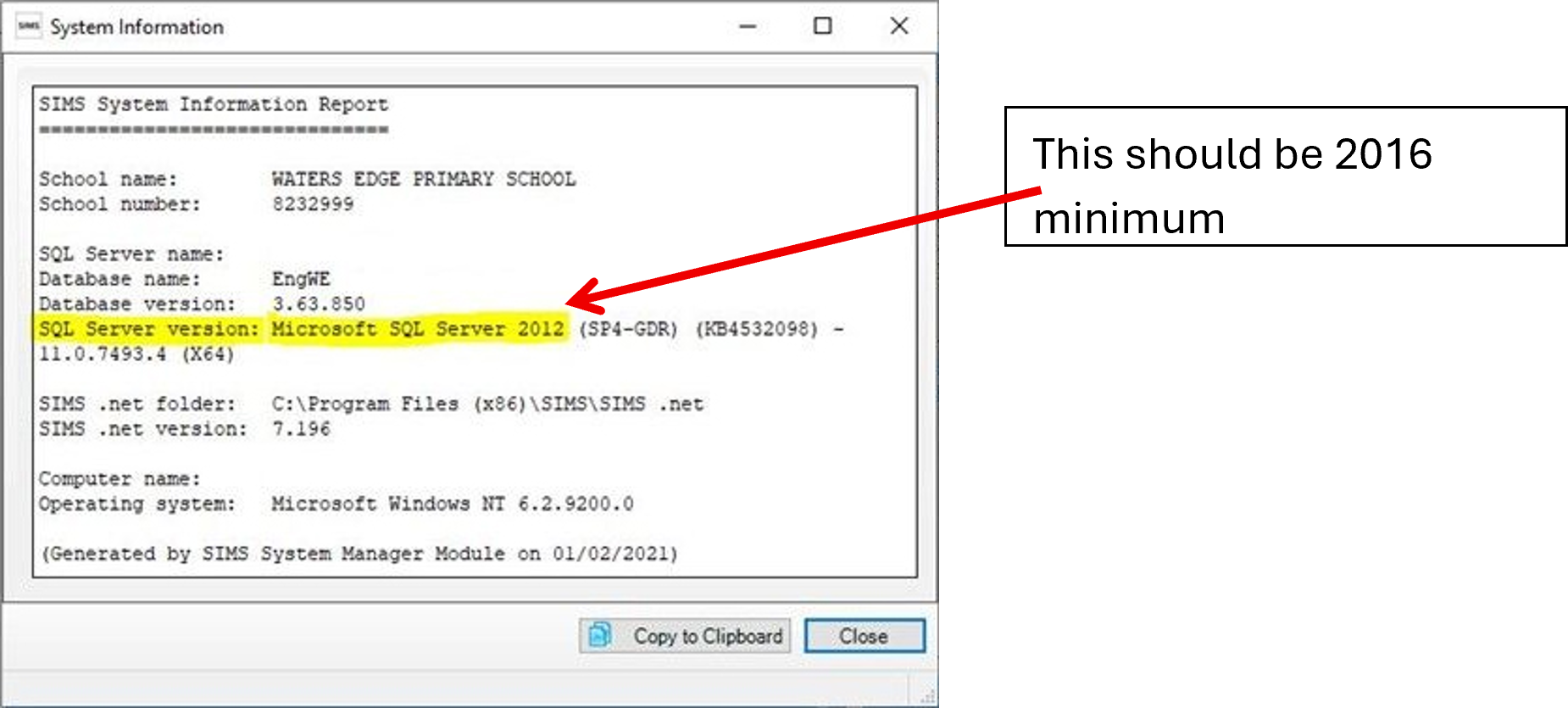
How to upgrade to SQL Server
If you are using SQL Server 2016, then you will need to book in an ‘SQL Server Migration’. This is a process where a new SQL instance is installed onto the SIMS Server and your SIMS database migrated across onto the new SQL install.
This process will require some small changes to some SIMS workstations with an update to each local Connect.ini file. Third parties will also need updating with the new connection details used to connect to SIMS.
If you wish School ICT to carry out the SQL Server migration our experienced team can do this with minimal downtime. Due to the time this takes this is a chargeable service.
What happens if we do not upgrade SQL Server?
If the school is still running SQL 2016 after Summer of 2026, then there is no guarantee that future SIMS upgrades will work with these older versions of SQL Server.
Reach out today to ensure you can secure your spot via my.www.schoolicts.co.uk or helpdesk@schoolicts.co.uk
Azure in the Cloud unsupported, for information please note:

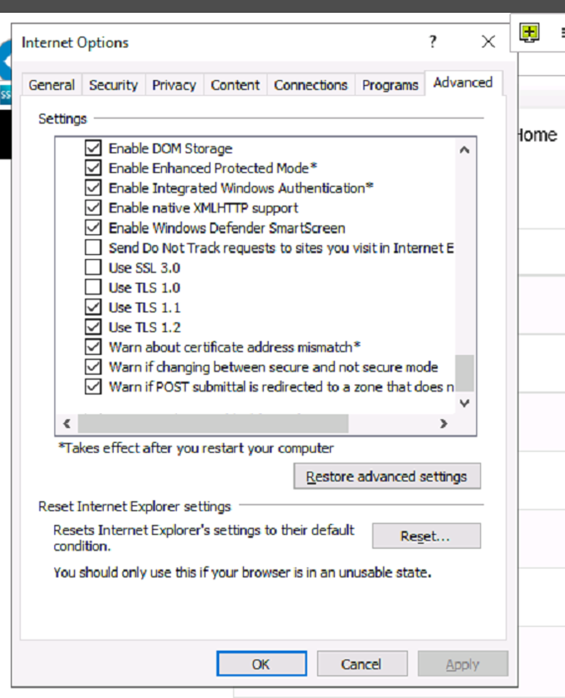
SIMS Service Manager and Internet Options, please ensure that TLS1.2 is ticked as live in your Internet options on in Sims Services Manager this is a requirement.

School Workforce Census
Training:
SIMS Personnel – Distance Learning
SIMS School Workforce Census – School ICT- Thursday 16th October 9:30am-12:30pm
SIMS School Workforce Census – School ICT -Tuesday 21st October 9:30am-12:30pm
Key Dates for the School Workforce Census
- Census date: 06/11/2025
- Continuous contracts collected from 01/09/2024 to 06/11/2025
- Absences collected from 01/09/2024 to 31/08/2025
For schools that submit data to COLLECT the deadline is Friday 5th December 2025. Local authority schools will need to check with their LA for their return deadlines.
Updates to the school workforce census for 2025
The most significant change is that additional validation rules have been added to encourage the return of data on disability and ethnicity
For the 2025 census a new validation rule has been added, and a new field has been added to SIMS. Where staff have been employed for more than 3 months, a query will be raised if their disability status is still listed as ‘information not yet obtained’. Staff have an absolute right to not answer this question, in which case the answer should be recorded as ‘Refused’ and no query will be raised.
For our quick guide on SIMS School Workforce census please visit our portal: SIMS School Workforce Census Guidance 2025
SIMS Next Gen
Every school office is the heartbeat of the school — busy, multi-tasking, and always under pressure. SIMS Next Gen is built to reduce that pressure. It helps office staff stay in control, save time and improve accuracy, so you can get back to what matters most: supporting staff, pupils and parents.
SIMS Next Gen will:
- Simplify attendance management
- Say goodbye to multiple screens
- Make spotting issues easy
- Give office staff freedom to work from anywhere
Learn more about SIMS Next Gen here
5 reasons why you’ll love Class View
- All in one place: Complete registers, build seating plans, log conduct and view pupil information – without switching screens.
- Support every pupil: See attendance, behaviour events, EAL, SEND and much more at a glance.
- See how every pupil is doing: Record your own assessments in Class View for real-time, data-driven insights.
- Conduct made simple: Capture behaviour events with one click and spot patterns quickly.
- Simple, modern and intuitive: Class View is designed for teachers. Get started right away – no training needed.
Learn more about class view here
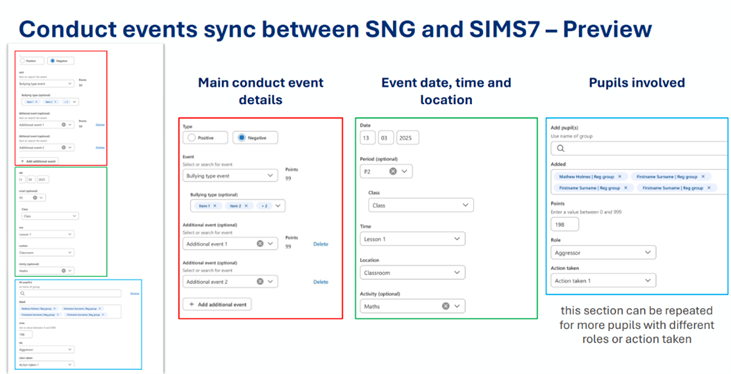
Conduct
From the Autumn term, conduct events with sync with SIMS 7. This includes detentions, report cards as well as behaviour.
Attendance Management
The start of the academic year will see the release of attendance management to early adopters, the new, all-in-one module designed to make attendance simpler, quicker, and far less stressful. Attendance officers can use this new, simplified attendance hub to do everything from creating and managing expected attendance patterns, including handling exceptional circumstances, or preparing for statutory returns efficiently with automated data collection saving vital admin time. Staff can also track a pupil’s location at any time instantly, ensuring they comply with safeguarding and attendance regulations efficiently.
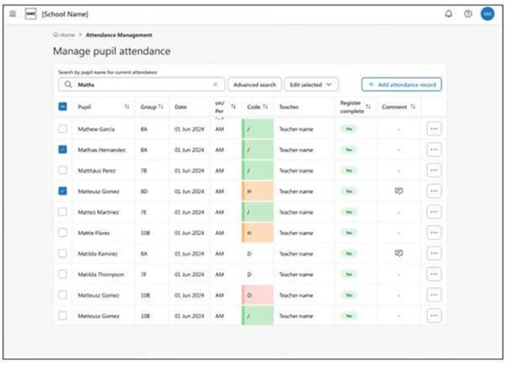
Attendance reporting is now live
Another key milestone was the launch of seven new attendance reports, which went live to all schools on Thursday 18th September.
This release marks the start of the SNG reporting journey, beginning with five Pupil Insights Reports and two Pupil Drill-Down Reports, all focused on attendance.
Group Hub
Group Hub is a modern, cloud-based solution designed for Multi-Academy Trusts. It helps them access school data in one central place, gain insights, and support their schools with greater clarity and consistency.
September 2025 Group Hub:
- General Release Central Access
- Single login across schools
- Drill-down to school MIS
- Clusters
- At-a-glance headlines and school list
- User access management Central Control
- Staff List Reporting & Analytics
- MAT Overview
- 4 x Attendance dashboards
If you would like any information about SIMS Next Gen, assistance onboarding or to talk about the features currently available, please log a ticket in the usual way.