Dear Colleague
Could I please draw your attention to the following important school census information this is based on current guidance. If there is additional information, we will make customers aware via email as well as updating the news section on our website https://www.schoolicts.co.uk/latest-news/
Documentation
- https://support.scholarpack.com/hc/en-gb/articles/6288779856285-Spring-Census-2023
- https://support.scholarpack.com/hc/en-gb/articles/6288777123741-Spring-Census-Specific-Data-Items
- https://support.scholarpack.com/hc/en-gb/articles/8639654214813-Census-School-Time
Known Issues
There are a couple of issues that Scholarpak are aware of, which the Development Team are working to fix as soon as possible:
- School Time error – Causing census error 2980 despite the figure being entered in correct format
- Error when clicking Calculate button – Unable to calculate their census (generates an error)
The census is saying that the student numbers are different to what I believe to be on roll?
The census will calculate the student numbers on the day of the census (even if you are running your census after census day).
If you go to Reporting >Reports > Students (tab) > On Roll by Date and enter the census date, you can see the numbers ScholarPack will be using on the day of the census. Check the numbers per year group to see if there are any irregularities. It would be worth focusing on new starters and those who have gone off roll recently to check if entry/leaving dates are correct.
It is also worth going to Admin > Students > Group Updater and checking the student attribute of Hidden Pupil. Any student who is set to Yes for this will be excluded from all census calculations, including on roll figures.
Can I look at data from a previous census?
If you go to Admin > Census, look under “Past Census Viewer” and find the census from last year then click on the ‘Open SP Summary’ button. From here you can then see the census summary with all the data that was recorded for the census. Please note you can only view the Censuses you did on ScholarPack. Only Student Censuses will be available – we do not store historic Workforce Census.
Why is a pupil not showing in Table 11 of the census for having SEN support?
Go to the student profile and choose the support tab. SEN provision needs to be correctly recorded in here.
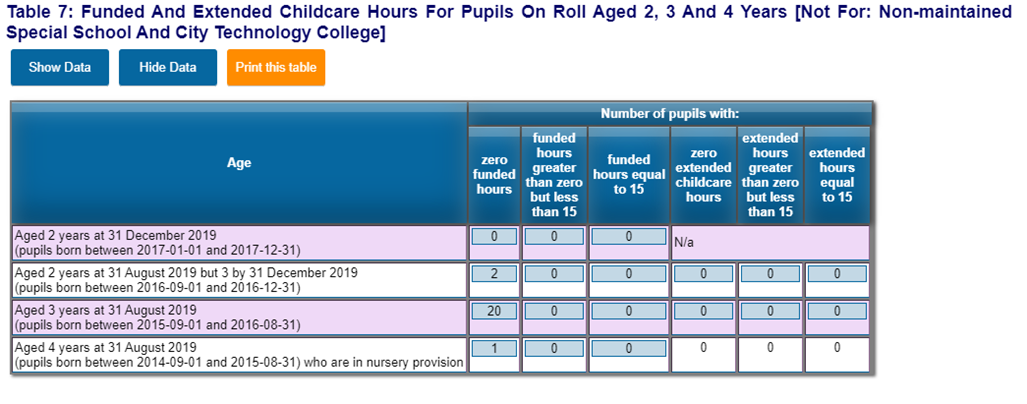
Table 7 in the Census displays data for Funded and Extended Childcare Hours for pupils on roll aged 2, 3, and 4 years
If you go to Reporting>Custom Report, New Report, select the nursery year groups (-2, -1 etc) on the left side under General Filters, and on the right Features tab select Funded Hours, Hours at Setting, Extended Childcare Hours and 30 Hour Code.

Select Run Report at the bottom of the page and then filter the columns by date of birth (click on the header to bring in date order), or funded hours (enter 0.0 to filter for those with no funded hours, or 15.0 for 15 funded hours, etc). Total numbers will appear at the base of the page. Make sure you are choosing students who are born between the dates in Table 7 for each row to ensure the correct number of students have recorded funded and extended childcare hours.
Any changes to these hours can be made in the student record on the extended tab.
If this is for an individual student, you can do this on their profile’s extended tab, under the School Information header.

The Hours at Setting will be the total number of hours they attend your nursery, and the Funded Hours cannot be greater than 15. The Extended Childcare Hours is additional funding the student is eligible for (not any additional hours that parents pay for). If the Hours at Setting is 30, and Funded Hours plus Extended Childcare Hours are both 15, then the student will need to have a 30 Hour Code, provided by HMRC. Save the information entered here at the base of the Extended Tab.
How do I enter UIFSM on census day?
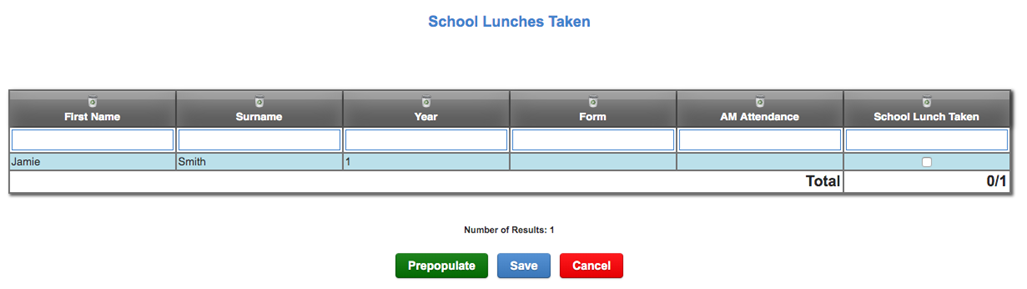
On the census it is necessary to enter if a student in reception, year 1 or year 2 has had a meal on census day. To enter this information please go to Admin > Census > School Lunch Taken.

If the school is closed, or a class absent on Census Day, the DfE offers advice for unusual circumstances – click here for details.
For any further support or guidance, please contact the School ICT helpdesk on: 0345 222 6802 or by e-mailing: helpdesk@schoolicts.co.uk
Should you need any help or assistance with any of the above please call the School ICT helpdesk on: 0345 222 6802 – Option 1, log a ticket via the Customer Portal or e-mail: helpdesk@schoolicts.co.uk.