Following on from the recent email from Parent Pay Group regarding changes to Microsoft support for SQL Server 2012 and SQL Server 2014, which came to an end in 2022 & 2024, we would also like to highlight upcoming changes affecting SQL Server 2016.
These changes only impact schools running SIMS on‑premise.
We have put together the information below to explain what this means for you and your school.
Please see the SIMS Technical roadmap Spring 2025 on our customer portal here for more information on what is and isn’t supported: SIMS Technical Roadmap – SICTS Customer Portal
What is SQL Server?
Microsoft SQL Server is the database management software used to host and manage the SIMS database on the school’s SIMS Server.
It is a critical component required for SIMS to function correctly and securely.

SQL Server End‑of‑Life Summary
Microsoft has set the following end‑of‑support dates for older versions of SQL Server:
- SQL Server 2012 – support ended 12 July 2022
- SQL Server 2014 – support ended 9 July 2024
- SQL Server 2016 – extended support ends 14 July 2026
After these dates, the affected SQL versions will no longer receive security updates or fixes from Microsoft. This significantly increases risk and means these versions fall outside the supported platforms referenced in the SIMS Technical Roadmap. [learn.microsoft.com]
How to Check Your SQL Server Version
If your school has had a new SIMS Server installed or upgraded by School ICT / Turn IT On within the last 2–3 years, you are likely already on a supported version of SQL Server.
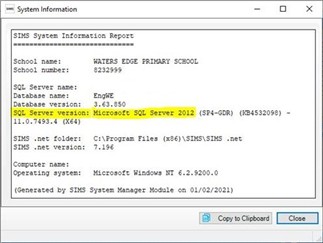
You can check your current SQL Server version directly within SIMS:
- Select Help from the top SIMS menu
- Select System Information
- Check the value shown next to SQL Server Version
How to Upgrade SQL Server
If your school is using SQL Server 2012, 2014, or 2016, you should now be planning an upgrade.
Upgrading requires an SQL Server Migration, which involves:
- Installing a new, supported SQL Server instance on the SIMS Server
- Migrating the existing SIMS database to the new SQL instance
- Updating SIMS workstation Connect.ini files
- Updating third‑party systems that connect to SIMS with the new SQL connection details
If you would like School ICT to carry out this work, our experienced team can complete the migration with minimal downtime.
Please note that, due to the time and expertise involved, this is a chargeable service.
What Happens If We Do Not Upgrade?
If a school continues to run SQL Server 2012, 2014, or 2016 beyond their supported lifecycle:
- Future SIMS upgrades may fail or be blocked
- Security vulnerabilities will no longer be patched by Microsoft
- SIMS issues may fall outside supported configurations
- Third‑party integrations may stop working as expected
Next Steps
We strongly recommend reviewing your SQL Server version as soon as possible and planning any required upgrades early to avoid disruption.
To secure your upgrade slot, please visit: https://my.schoolicts.co.uk or contact us at helpdesk@schoolicts.co.uk