
To navigate to the most relevant section, please click the appropriate link below: -

Welcome to our May MIS Newsletter
We understand everyone works differently, so we’ve made it easy for you to reach us in the way that suits you best. There are several flexible support options available, and you can simply choose the one that’s most convenient for you.
Customer contact options: –
- Live chat @ https://my.schoolicts.co.uk/
- Customer Portal @ https://my.schoolicts.co.uk/
Our customer portals allow you to: –
- Log and track tickets
- Watch recorded webinars
- Search Knowledge base for useful information and guidance
- Latest news, tips and reminders
Call: 0345 222 6802 Option 1 for MIS support (*please leave a voicemail if lines are busy during peak periods)
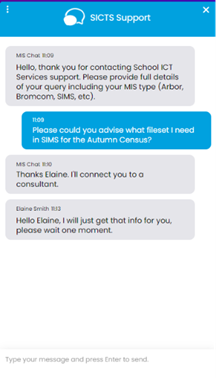
Please remember that you can request support in various different ways, by requesting support via Live chat:
Key Benefits of Our Live Chat:
- Instant Support: Get your questions answered in real-time by our knowledgeable support consultants.
- Expert Assistance: Our live chat is staffed by real people, ready to provide you with personalised support.
- Convenience: Access live assistance directly from our website, without the need for phone calls or emails.
- Efficiency: Resolve issues faster with immediate responses and quick solutions.
To start using Live Chat, simply visit our customer portal, log in and click on the chat icon at the bottom right corner. Our team is ready and eager to assist you with any enquiries or support you may need.
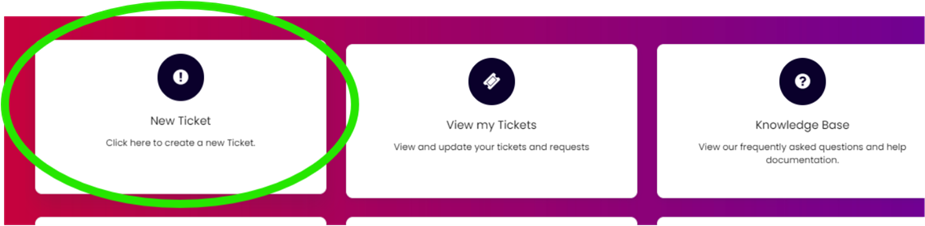
Customers can also log tickets via the customer portal at our customer portal:
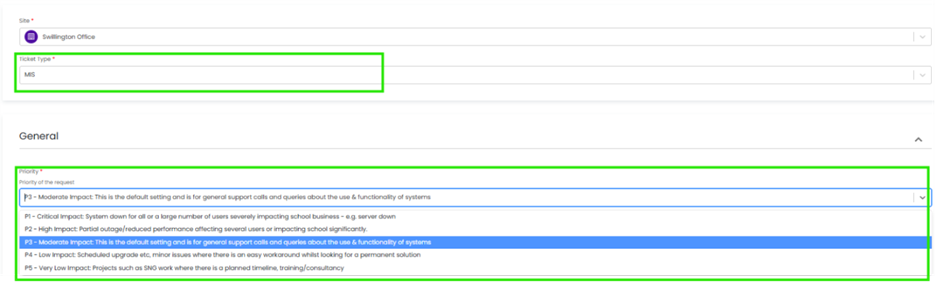
When you log a ticket via the customer portal, select the Ticket type either MIS or Technical to ensure it gets to the right team. The Priority, if you have an urgent ticket, MIS down for example please select either P1/P2 all other tickets default to P3 or even P4 if not urgent.
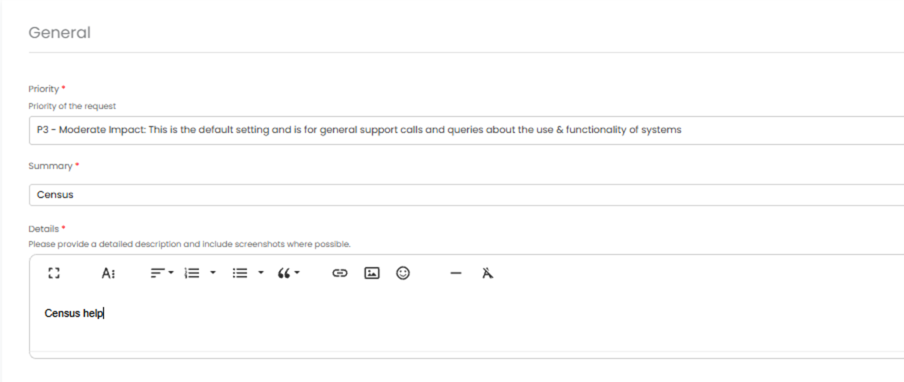
Once you enter the Subject and Details box, you will see a pop up box with suggested articles in the top right hand corner:
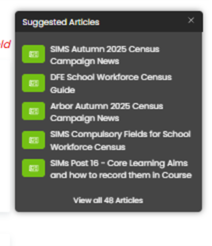
Clicking on the links in this pop-up may help you to resolve your issue without our input, so please also make use of this.
Remember to tell us which MIS and Module but also really importantly if OFSTED are onsite as this helps us prioritise your call through our OFSTED Watch service and also your preferred contact method as we know sometimes an email reply is what you need during your busy period.
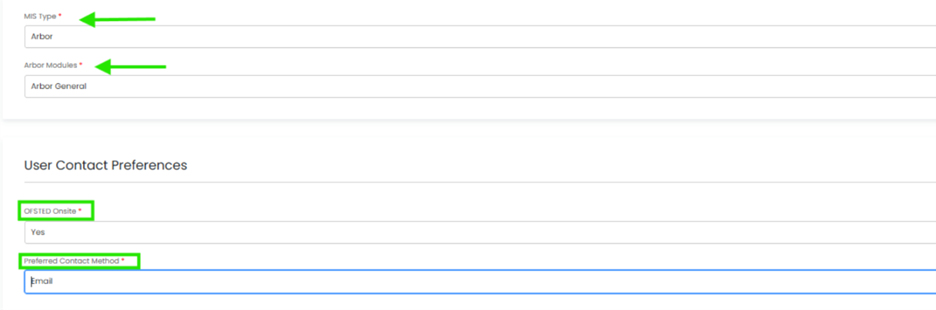
We know you like to speak to us (and we like to speak to you!) but in order to offer the best service to our customers, this is often the quickest way to log a support request at busy times.
And lastly, as always, our experienced team are on hand to take your calls, so please reach out via 0345 222 6802 if the lines are busy and to save your time waiting you can leave a voicemail. This method will automatically generate a ticket and this means that the person who can help you best is the person who will call you back. If you do this, PLEASE leave your name, the name of the school, the best number to call back on and a brief description of why you’re ringing, as this means that the best person to help you is the one that will call back.
Changes to DFE 16-19 funding rules
The Department for Education (DfE) has published the 16–19 funding rules, rates and formula for the 2026 to 2027 academic year. These rules apply for the funding year 1 August 2026 to 31 July 2027 and replace all previous guidance.
Summary of Key changes for 2026/27
- Increased national funding rates
-
- The base rate (Band 5) 580+ planned hours has increased to £5,133 per student. All other bands have increased proportionately.
- The base rate (Band 6- 9 T level ) 1330-1830 Average planned hours has increased to £10,680 – £14,772 per student.
- Retakes
-
- Providers cannot claim funding for learners retaking a qualification they have already passed purely to improve their grade.
- Planned hours when a qualification finishes early.
-
- Where planned activity ends early (e.g. English/maths achieved mid-year), hours must be replaced with meaningful activity.
- End date clarification
-
- The actual end date is now defined as the final learning, exam or assessment date whichever is later – institutions cannot claim planned hours after this date.
- High Value Courses Premium (HVCP)
-
- A new targeted premium has been introduced for construction courses, this is additional funding to encourage and support delivery of selected level 2 and level 3 qualifications and reflects national skills priorities.
- Large Programme Uplift (LPU)
-
- This will only apply to the costs of specific larger than normal maths and high value A level programmes to support the progression of students into priority sectors
For further information please see the links below.
https://www.gov.uk/government/publications/t-level-funding/t-levels-funding-guide-2026-to-2027
Free School Meals – Important Update for Schools
The Department for Education has published updated guidance on free school meals (FSM), including significant changes taking effect from the 2026-27 academic year.
Key Points:
- FSM eligibility is expanding
From September 2026, all pupils in households receiving Universal Credit will be entitled to free school meals
- Two FSM categories from 2026-27
- Targeted FSM: Pupils in Universal Credit households with earnings below the existing income threshold
- Expanded FSM: Pupils in Universal Credit households who do not meet the targeted threshold but will newly qualify from September 2026
- Transitional protection is ending
Existing transitional protections will end at the close of the 2025/26 academic year. From September 2026, ongoing eligibility will depend on meeting the new criteria.
- Disadvantage funding will be based on Targeted FSM eligibility only. Pupils qualifying solely under the new Expanded FSM category will not be eligible for Disadvantage funding.
For more information see the updated guidance here: Free school meals: guidance for local authorities, local -authority-maintained schools, academies and free schools – GOV.UK
The Department for Education has published a checklist for school use: Operational readiness checklist for schools (Annex D) – GOV.UK
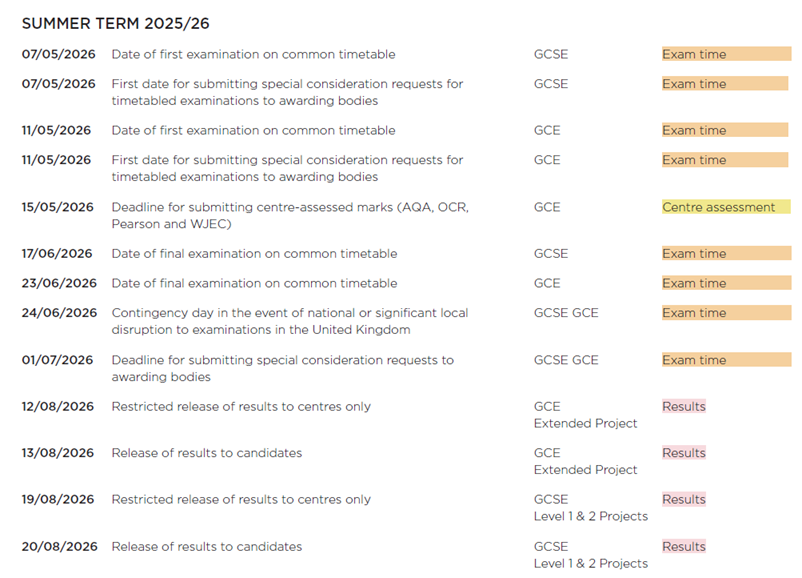
JCQ Key Dates for the summer term
Please click image to expand: –
Key Stage - Important Dates
The deadlines to return the data to the Department for Education (DfE) are listed below. Please check with your local authority as they may require you to submit the data earlier.
| Early Years Foundation Stage Profile (EYFS) – Year Reception | Submission Deadline | 10th July 2026 |
| Phonics Screening Check – Year 1 & Year 2 Resits | Test Period | 8 June – 12 June 2026 (15 June – 19 June for pupils absent the week before) |
| Threshold Marks Released | 22 June 2026 | |
| Submission Date to the Local Authority | 17 July 2026 | |
| Key Stage 1 (Optional tests) – Year 2 | Test Period | May |
| Raw Score Conversion Tables released | 1 June 2026 | |
| Multiplication Tables Check – Year 4 | Test Period | 1 June – 12 June 2026
(15 June – 19 June for pupils absent during the first 2 weeks) |
| Results | 22 June 2026 | |
| Key Stage 2 SATs – Year 6 | Test Period | 11 May – 14 May 2026
|
| Submission Date | 26 June 2026 | |
| Test Results Available on PAG | 7 July 2026 |
Exam Services
🌼 Exam Season is Here! 🌼
After weeks (and months!) of meticulous preparation, planning, and organisation, exams are once again underway this month. It’s hard to believe how quickly the year has flown by and yet here we are again, supporting another cohort of students as they sit some of the most important assessments of their lives.
For many of these young people, this is their first real experience of high-stakes exams. Some already have a clear vision for their future, while others are still figuring things out and that’s completely okay. It’s a pivotal time, full of opportunity, pressure, and possibility.
It also brings me to reflect on the role of the Exam Officer.
Because if we’re honest, no one sitting in an exam hall today is thinking “one day, I’d love to be an Exam Officer!”
And yet, it is one of the most critical roles within a school!
Often working quietly behind the scenes, Exam Officers carry an extraordinary level of responsibility. Many schools now seek degree-level applicants – a clear indication of the complexity involved. Interestingly, many moons ago, this responsibility would typically have sat with a member of the Senior Leadership Team, which speaks volumes about the level of accountability the role still holds today.
From navigating hundreds of JCQ and awarding body regulations, to managing strict deadlines (where missing just one can result in significant financial penalties), to coordinating every logistical detail, it is a role that demands exceptional organisation, accuracy, and resilience.
Despite this, it is widely recognised across the sector that the role is undervalued, with lower retention rates compared to other support staff positions. Burnout and stress are, unfortunately, common – especially when the entire responsibility sits with one individual without sufficient support.
At School ICT Services, we understand this pressure all too well.
Our Exams Team has seen first-hand the impact the role can have without the right support structures in place. The workload can feel overwhelming at key points throughout the year … and that’s exactly where we can help!
✨ How we support schools:
- Full Exam Managed service – we can take care of the entire exam cycle
- 2-year Mentoring program for new Exam Officers – providing structured, guided support
- Flexible Project support – stepping in to assist with:
- Entries
- Seating plans
- Enquiries About Results (EARs)
- And more
Whether you need full coverage or just a helping hand during peak periods, our aim is simple: to ease the burden, ensure compliance, and give Exam Officers the support they deserve.
In fact, many schools are now turning to our services to reduce workload, improve retention, and ensure consistency and compliance across the board. With increasing pressure on budgets and staffing, having a reliable, expert team in place can make a significant difference, both operationally and financially.
If you’d like to find out more about how we can support your school, please do get in touch. We might be exactly what you need to make a real difference this exam season and beyond.
📩 Contact us today to start the conversation.
Wishing all students and staff the very best of luck over the coming weeks – we’ve got this! 💪
Data Management Services
Our Data Management service offers an excellent, cost effective, responsive, and efficient Data Management solution delivered remotely by a team of highly experienced school data experts. Their dependable advice and guidance empower schools, academies, and MATs to maximise their investment in their management information system (MIS) team. Whether it’s a long-term solution or short term for sickness cover or maternity please reach out.
FMS
FMS Migrations
PPG is gradually moving schools from FMS6 to FMS Connected, and then on to the new FMS. Schools will receive a direct email from PPG inviting them to book a migration slot and outlining the next steps, so we recommend regularly checking inboxes (and junk folders) for this communication. This email begins a five-week migration window, during which schools will be supported through the process. Engaging early in this period helps ensure the migration can be completed smoothly, reducing the risk of any disruption to day-to-day use of FMS.
Once your migration date has been confirmed with PPG, please let us know so we’re aware your migration is underway.

At this time of year attention turns to recording statutory assessments along with the end of year assessments for the other year groups, ready to produce the end of year reports to parents.
Summer Data
Please ensure all summer data has been entered into Arbor or SIMS prior to the end of the summer term and check it is appearing in helloData. This includes importing the MTC and KS2 test results into the MIS.
helloData provides a set of comprehensive reports for analysing statutory data, more on this in the next newsletter!
Setting up Assessments for the new academic year – Arbor
You must first create the new academic year and define your terms and half-terms in the calendar. Once your courses are scheduled and students are assigned to their next year’s classes, you can complete the assessment setup ready for next year. There are three main steps:
- Check the courses & create dummy courses if required
- Copy the annual policy assigning Students and Linked Courses
- Check the assessment period names to ensure the data pulls into helloData
We have produced step-by-step videos which are available in the help section of helloData, please ensure all videos are followed. We will also be providing printable instructions and hosting a live webinar later on this term. For £65+vat we can do the setup for you, email admin@hello-data.co.uk for more information.
Summer User Group Meeting – Monday 6th July 1.30pm, booking details to follow.
Not heard of helloData?
Integrating seamlessly with Arbor or SIMS, our reporting tool delivers comprehensive analysis of assessment, attendance, and demographic data across MAT, school, and cohort levels, contact admin@hello-data.co.uk or visit www.hello-data.co.uk to find out more.
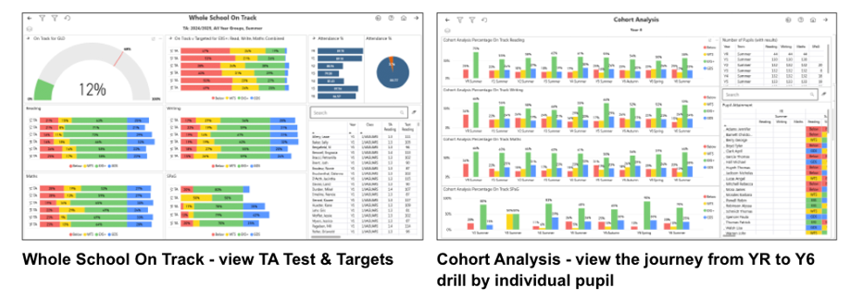

Summer Term Online Training for Arbor, Bromcom and SIMS
Training courses for the summer term are now live! We have a comprehensive schedule of online live training courses along with Distance Learning courses to help you develop your knowledge and get the most out of your MIS (Management Information System).
Booking is now open please visit https://www.schoolicts.co.uk/online-training/
Making the most of your MIS – with expert consultancy
Schools have powerful MIS modules in place – but they’re not always being used as efficiently or consistently as they could be.
Our consultancy service gives you dedicated time with an expert MIS consultant to review how modules are set up and used; streamline processes and help you get clearer, more meaningful outcomes – without increasing workload.
✔ More value from the systems you already have
✔ More efficient processes, less manual work
✔ Practical, tailored consultancy for your schools
Not sure whether consultancy is right for you? Get in touch and we’ll help you explore your options.
Protect and maximise your Post-16 funding
It may only be the summer term, but before you know it the autumn census will be approaching. Our Post-16 data scrutiny service provides expert assurance that key funding-related data is recorded accurately and in line with requirements, helping you feel confident well ahead of census deadlines and reducing the risk of costly errors.
Would you value an independent check of your Post-16 data? Get in touch to find out how our scrutiny service can support you.
Why now is a great time for HR/Personnel training
With year‑end approaching, now is the ideal time to ensure your staff records are accurate and up to date. Summer often brings staff changes, pay scale updates, and system transitions—getting these right now will save time and pressure later, especially ahead of the School Workforce Census in November.
Whether you’re managing starters and leavers, updating pay scales, or settling into a new MIS, targeted training helps you work more efficiently and with confidence.
Upcoming training – click on the links for more information and to book
✅ Free webinars – Managing Staff Starters & Leavers
- Arbor – Mon 1 June, 2.30–3.00pm – Arbor – Managing Staff Starters And Leavers Webinar – School ICT
- SIMS – Thu 4 June, 10.30–11.00am – SIMS – Managing Staff Starters And Leavers Webinar – School ICT
- Bromcom – Thu 4 June, 2.30–3.00pm – Bromcom – Managing Staff Starters And Leavers Webinar – School ICT
📘 Chargeable training
- SIMS Personnel & Reporting – Wed 3 June, 9.30am–3.30pm – SIMS Personnel And Personnel Reporting – School ICT
- Bromcom Personnel – Mon 15 June, 1.00–4.00pm – Bromcom Personnel – School ICT
- Arbor Personnel – Thu 18 June, 9.30am–12.30pm – Arbor Personnel – School ICT

Click for the latest Arbor updates
ArborFest 2026 - Taking place in June!
This year’s Arbor Fest is taking place on the 30th June at the Liverpool Experience Campus.
You can now book tickets here – ArborFest 2026
- More information here: https://www.arborfest.arbor-education.com/
Some of the sessions running this year include: –
- Get ready for the future of work in schools
- A new era of Assessment is coming
- “I didn’t know Arbor could do that!”: The gems in Arbor which will transform your everyday
- From Process to Progress: How we’re using Arbor Workflows to transform operations in our school
- AI: What’s here, what’s next, and the secret to thinking even bigger
- School reporting, reimagined: Introducing Smart Reports
- Everything we learned from our first 12 months as an Arbor primary school
- Beyond the register: How to get smart with attendance in Arbor
- Closing keynote with Baroness Floella Benjamin
Don’t forget to come and visit our School ICT stand to say hello if you are attending!
Arbor School Summer Census Thursday 21st May 2026
You can find all the key dates, and full guidance for the May Summer census in our Census campaign:
New Year Set Up
Now that the New Year Setup is available in Arbor, if you’re thinking about getting ready for 2026/2027 why not check out our campaign:
School ICT – User Portal – Arbor End of Year Campaign News
This will include links to all our help guides and our upcoming training.
Arbor Admin Access
Arbor Admin Access
Did you know that we can provide additional Arbor support at no extra cost, as part of your existing MIS SLA?
What benefit does Arbor Admin functionality bring to you?
With your permission, School ICT can be granted Admin functionality on your Arbor MIS site. This access allows our experienced support team to quickly diagnose and resolve common issues including refreshing invoices, populating missing payment accounts and accessing audit logs for troubleshooting.
By enabling this functionality, you’ll benefit from faster resolutions without needing to escalate these tasks to Arbor Support—saving your team valuable time and ensuring smoother day-to-day operations.
If you haven’t had the email and feel you should have, please call School ICT on 0845 222 6802 or email helpdesk@schooolicts.co.uk.
What's New in Arbor
Increased free monthly AI allowance
From Tuesday 28th April, Arbor are more than tripling the Monthly Free Allowance each school get to use on Arbor AI features. So every school can get the benefit of secure, time-saving AI tools – for free!
What is Arbor AI?
Arbor AI is like having an assistant that’s seamlessly built into your MIS. It can answer questions, take admin tasks off your plate and free up hours each week. So school leaders can focus on the more impactful work that only they can do.
What is the Monthly Free Allowance?
Every Arbor school gets a free allowance of AI usage, which renews each month. Arbor have significantly increased this allowance, so it’s unlikely schools will run out – but if they ever do, there are no hidden costs. Their access to Arbor AI features will simply pause until the next month, or they can choose to upgrade to get a higher allowance.
Ask Arbor is now even better!
Arbor users can now choose from a built-in prompt library, see your recent chats more easily and get notified when you answer is ready!
Ask Arbor gives you instant answers. No need to click through menus or build reports – just ask! It can help you do things like:
- Find student information quickly
- Analyse attendance or behaviour, broken down by year or demographics
- Log absences or medical incidents
- Check a timetable
- Book a room
Subject line for in-app messages
You can now add a subject line when sending in-app messages so your recipients can see what a message is about before opening it.
Log medical events with Ask Arbor
Give Ask Arbor a short, natural description (e.g. what happened and when) and it can create a student medical event for you
EDI file generation
EDI file generation is now blocked if the school postcode is missing, clear guidance is provided on what to do next
Medical notes report
A new field has been added to custom report writer, and you can now report on medical notes!
What’s live in Arbor Labs?
- Exlusions and suspensions dashboard in MAT MIS
- Smart reports
DfE Statutory Assessment
In line with DfE guidance, End of Key Stage 1 (KS1) Teacher Assessments are no longer required to be collected or reported. There are no changes in the DfE Assessment area in Arbor. If you won’t be administering KS1 assessments, do not set them up. All other assessments (KS2, Phonics, MTS and EYFSP) continue to be statutory and required.
Please read our key stage return guidance here

Click for the latest Bromcom updates
Bromcom Summer Census
For all the key dates, and full guidance for the May Summer census why not look at our Census campaign:
New Year Set up
If you’re thinking about getting ready for 2026/2027 check out our campaign: School ICT – User Portal – Bromcom End of Year Campaign News which includes links to all our help guides and our upcoming training.
What's New in Bromcom
Assessment – Updated EYFS, KS1 and KS2 Stage Assessment sheets for 2026
Modules > Assessment > Assessment Sheets List
For schools in England, the EYFS, KS1, and KS2 Assessment sheets have been updated for 2026 to ensure compliance with statutory requirements. These updates include ensuring assessment sheets are available for 2026.

What’s New
EYFS (Early Years Foundation Stage)
EYFS Stage Assessment tables have been rolled forward to 2026.
KS1 (Key Stage 1)
KS1 Stage Assessment tables have been rolled forward to 2026.
Phonics remains mandatory.
KS1 assessments are now optional for statutory returns.
KS2 (Key Stage 2)
KS2 Stage Assessment tables have been rolled forward to 2026.

Click for the latest SIMS updates
School Summer Census - Thursday 21st May 2026
Please note that this return will now be available in SIMS 7 & SIMS Next Gen. It is being recommended you look at both versions to familiarise yourself with census in SIMS Next Gen.
For guidance on important dates, and how to run your census please refer to our SIMS Summer Census Campaign.
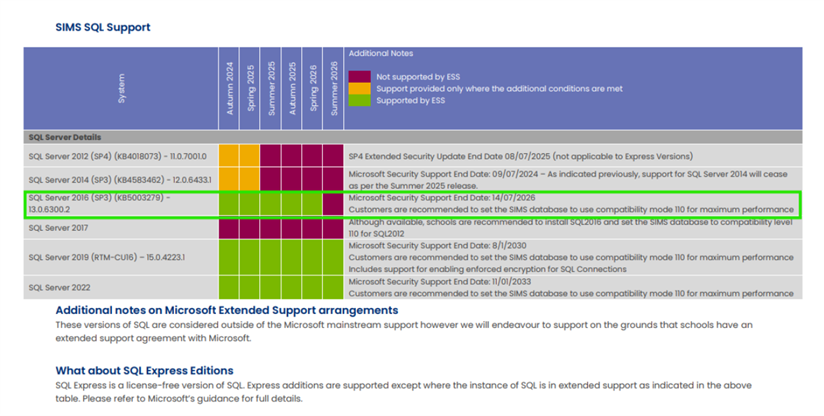
Technical teams please note, SQL Server 2016 support will come to an end in July 2026
Following on from the recent technical guidance update from Parent Pay Group in the Spring update, which highlighted the changes to the Microsoft Support for 2016 coming to an end in June 2026; this change only impacts schools who have SIMS on premise.
We have put together the below information which explains what this means for you and your school.
Please see the SIMS Technical roadmap Spring 2025 on our customer portal here for more information on what is and isn’t supported:
What is SQL Server?
Microsoft SQL Server is the database management software used to manage the SIMS database on the school’s SIMS server and is required to provide access to the SIMS database.

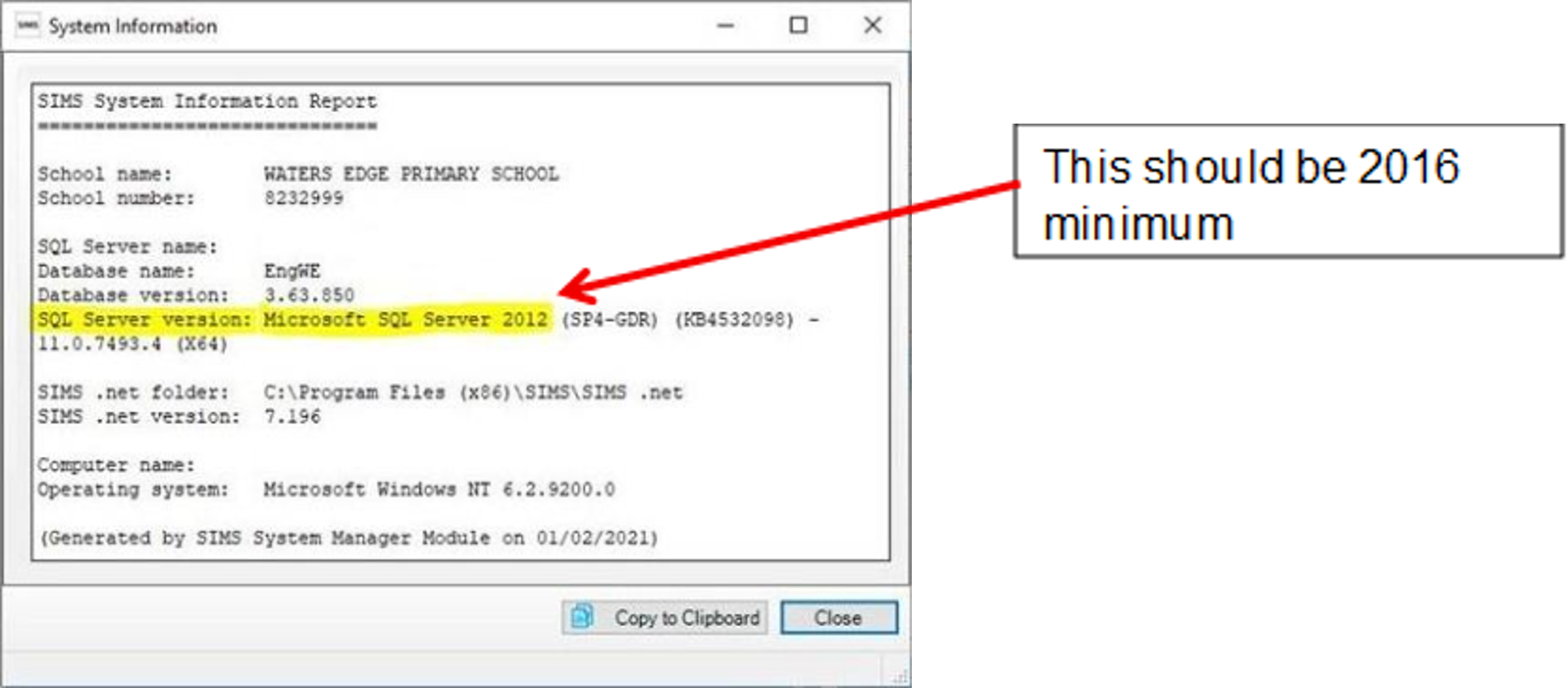
How to check your SQL server version
If your school has had a new SIMS server installed or upgraded by School ICT/Turn IT On within the past 1 to 2 years, then you are likely to be already on the last supported version of SQL Server.
You can check your current SQL server version from within SIMS.
- Select “Help” from the top SIMS Menu
- Select “System Information”.
- The SQL version will be listed next to “SQL Server Version” and will show
How to upgrade to SQL server
If you are using SQL Server 2016, then you will need to book in an ‘SQL Server Migration’. This is a process where a new SQL instance is installed onto the SIMS Server and your SIMS database migrated across onto the new SQL install.
This process will require some small changes to some SIMS workstations with an update to each local Connect.ini file. Third parties will also need updating with the new connection details used to connect to SIMS.
If you wish School ICT to carry out the SQL server migration, our experienced team can do this with minimal downtime. Due to the time this takes this is a chargeable service.
What happens if we do not upgrade SQL Server?
If the school is still running SQL 2016 after Summer of 2026, then there is no guarantee that future SIMS upgrades will work with these older versions of SQL Server.
Reach out today to ensure you can secure your spot via my.schoolicts.co.uk or helpdesk@schoolicts.co.uk
Azure in the Cloud unsupported, for information please note:

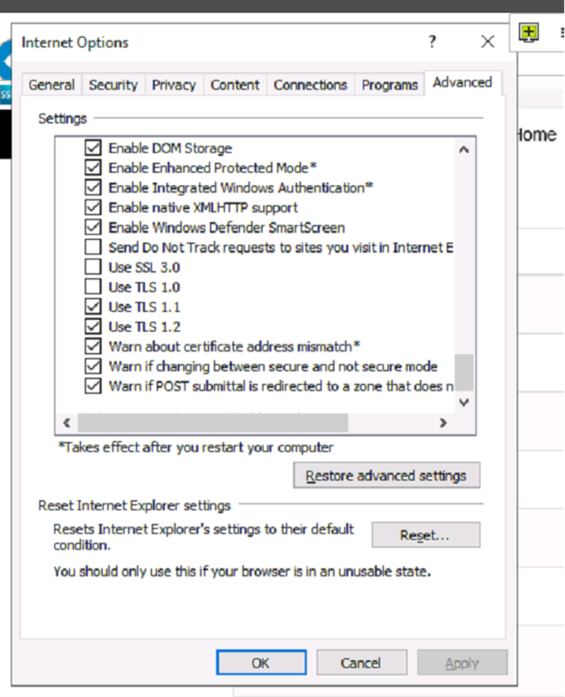
SIMS Service Manager and Internet Options, please ensure that TLS1.2 is ticked as live in your Internet options on in Sims Services Manager this is a requirement.

New Year Setup/End of year Procedures
If you’re thinking about getting started with your End of year procedures, and getting ready for 2026/2027, take a look at our campaign which includes links to all our help guides and upcoming training: School ICT – User Portal – SIMS End of Year Campaign News
SIMS 7 Permanent Menu Redirects to SIMS Next Gen
Following the introduction of SIMS7 redirect functionality in March, PPG are now beginning a phased rollout of permanent menu redirects.
This step is about:
- simplifying the experience for staff
- reducing duplication between SIMS7 and SIMS Next Gen
- providing a clear, supported route forward for schools
From 8 June 2026, PPG will begin enabling redirects for schools, starting with timetables, then attendance registers (AM&PM + Lesson), then conduct and custom groups. When a user selects one of these areas in SIMS7, they’ll be taken directly to the equivalent workflow in SIMS Next Gen.
This is a structured, mandatory programme with confirmed dates, and it represents a significant step forward in driving adoption of SIMS Next Gen. Redirects will be introduced gradually, by module, and will continue through the remainder of 2026.
What is changing – and when
Schools will be transitioned through three stages as noted below:
Stage one – school-controlled (available now)
System Managers in schools can already enable redirects themselves at any time via the SIMS Next Gen Admin Console. Several schools have already enabled redirects successfully since March.
Stage two – redirects enabled, schools can still opt out
From the dates below, PPG will switch redirects on for schools.
- Schools can temporarily switch redirects off via the Admin Console
- This option is time limited and intended to support short term readiness
- Any changes made will take effect overnight
Stage three – redirects become permanent
At this stage:
- Redirects are permanently enabled
- Schools will no longer be able to switch them off
- All relevant users will need to be working in SIMS Next Gen
The key dates for each area are shown below:
| Stage two
will begin |
Stage three
will begin |
|
| Timetables | From 8 June 2026 | From 6 July 2026 |
| Attendance | From 22 June 2026 | From 28 September 2026 |
| Conduct and Custom Groups | From 13 July 2026 | From 26 October 2026 |
Please note not all schools will have their redirects enabled on the same day. Individual school dates will fall on or after the dates shown above.
Key Actions for Schools
On-Premises Schools
Action required before stage two – redirects enabled, with a temporary opt out
- Staff who use these areas must have SIMS Next Gen login details. Teachers or support staff without an active login cannot access registers after the redirect is activated.
- Confirm the school’s System Manager can access the SIMS Next Gen Admin Console, if they need to manage redirects. Any changes made will take effect overnight.
Action required before stage three – redirects are permanently enabled
- Confirm all relevant users, particularly teaching staff, can access SIMS Next Gen to ensure continuity as schools are transitioned to SIMS Next Gen.
SIMS Connected Schools
Action required before stage two – redirects enabled, with a temporary opt out
- Staff will be able to use their existing login credentials.
• Schools should check users who need access can log in to home.sims.co.uk
Action required before stage three – redirects are permanently enabled
- Confirm staff can access SIMS Next Gen successfully to ensure continuity as schools are transitioned to SIMS Next Gen.
What's New in SIMS Next Gen?
Summer Census
Available for all England schools
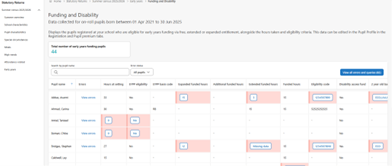
SIMS Next Gen introduces a clearer, more structured way to manage Census.
A central place to start
All Census activity is brought together in a dedicated Summer Census landing page. No more clicking through multiple menus.
- See what needs attention
- Track what’s complete
- Know what to work on next
Better visibility of tasks and progress
Census sections are clearly organised and prioritised, making it easy to pick up where you left off. Built‑in notes let you track checks, conversations, and decisions – all in one place.
Faster error resolution
Errors and queries are clearly highlighted and broken into manageable steps.
- Clear, step‑by‑step guidance
- Direct links to the exact place to fix the issue
- Less repeat validation and rework
Save time with bulk updates
Apply changes across multiple records at once – helping you resolve issues faster and reduce manual effort.
Less time fixing data. More time focusing on what matters.
DfE updates, clearly surfaced
DfE changes are surfaced directly in SIMS Next Gen and deployed immediately.
- No last‑minute patches
- No surprise rule changes
- Fewer resubmissions
Stay compliant, with less stress.
Exams Seating
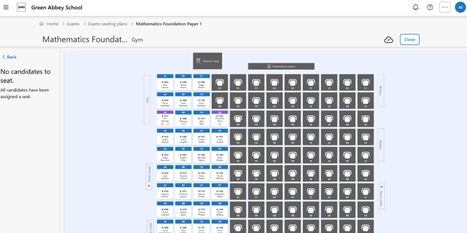
Phase 2 now available for early adopters
Phase 2 of SIMS Next Gen Exams Seating is now available to SIMS Support Units and early adopter schools. Building on your feedback from Phase 1, this release gives exam officers greater control over room setup and candidate management – making the process of allocating seats faster and more straightforward.
- Room layout management
Exam officers can now design and configure room layouts directly in SIMS Next Gen, adding key features to reflect the physical environment, including:
- windows and doors
- presentation screens
- power sockets
- invigilator desks
This gives a more accurate picture of each room before seating begins, reducing the need for manual workarounds.
- Seating management
A streamlined set of tools to support the end-to-end process of rooming and seating candidates, including:
- a clear overview of candidates, clashes, access arrangements, and extra time
- filtering tools to review candidates by these attributes before rooming begins
- room assignment for each exam component
- candidate assignment and seating within rooms
This helps exam officers work through complex seating requirements methodically, with all the information they need in one place.
School Calendar
Available for all schools
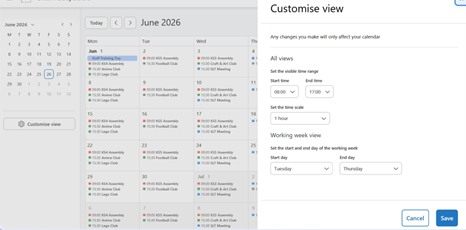
The School Calendar is now available to all schools in SIMS Next Gen, giving staff a clear, visual way to view school events and key dates in one place – ideal for classroom staff, pastoral managers, registration tutors, and senior management teams.
Users can switch between day, week, working week, and month views to see upcoming activities across the school, with clear information on which school groups and categories each event relates to.
This helps schools to:
- see upcoming events in one place, without switching between systems
- understand which school groups and categories events relate to
- build familiarity and confidence in the calendar ahead of relying on it operationally
Interventions
Available for all schools
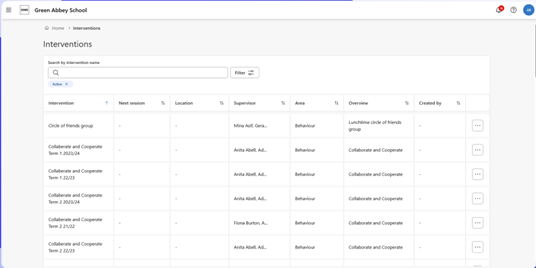
The Interventions module (Phase 1) is now available to all schools in SIMS Next Gen, giving teachers and staff a quick, intuitive way to capture and track intervention activity – improving visibility across the school and laying the foundations for stronger evidence of impact.
Interventions are a fundamental part of the school day. Without clear and consistent recording, it can be difficult to understand what support is in place,
for which pupils, and how it is being delivered. This module makes that process easier, supporting more informed decisions and more repeatable strategies for targeted support.
This is ideal for teachers and staff responsible for delivering and tracking interventions. Staff with plan permissions can also manage outcome and area
settings in the admin console, and view costs associated with interventions.
Key features and benefits include:
- School-wide visibility
Easy access to all active and historic interventions across the school, improving oversight and awareness of the support in place.
- Session management
Schedule one-off or recurring sessions with timestamp and location details, giving staff clearer information on when and where interventions take place.
- Attendance registers
Record attendance through intervention session registers quickly and accurately, available in real time or retrospectively.
- Progress and outcome tracking
Capture progress, outcomes, and notes individually or in bulk, supporting consistent and meaningful tracking of intervention activity across the school.
- Configurable areas and outcomes
Manage intervention areas and outcome settings directly in the admin console, giving schools control over how interventions are categorised and measured.
- Intervention costs
View costs associated with interventions against the planned number of sessions, supporting financial awareness alongside delivery.
Please note: for Phase 1, interventions must continue to be planned in SIMS 7, including creating intervention overviews and instances, enrolling pupils, and assigning staff. Interventions planned in SIMS 7 will be available in SIMS Next Gen within 60 minutes, with activity recorded in SIMS Next Gen written back to SIMS 7.
Smart Seating Plans
Available for all schools
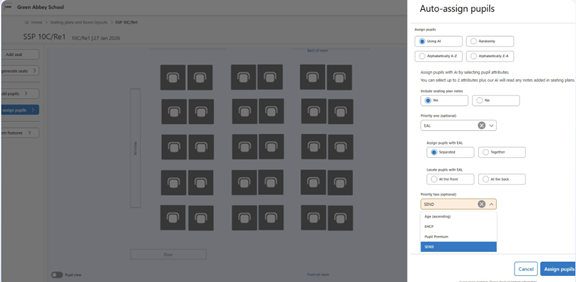
Smart Seating Plans is now available to all schools in SIMS Next Gen, giving teachers a faster, more flexible way to allocate pupils to seats. By combining a range of factors and conditions to automate the process, it saves time and reduces the manual effort involved in arranging a class.
Key features and benefits include:
- Pinned seating plan notes
Teachers can add natural-language instructions to guide how pupils are seated, including:
- tagging individual pupils using @ to specify who should or should not sit together – for example, ‘do not sit @Martina Spencer next to @Steve Robinson’
- positional directions within the room – for example, ‘do not sit Martina at the back of the room’
This gives teachers a simple, familiar way to apply nuanced seating preferences without complex configuration.
- Zoning
Teachers can add doors and windows to their room layouts, enabling position-aware seating allocation. Pinned notes can reference these features directly – for example, ‘sit Martina Spencer next to the door as they have a hall pass’ – so the layout reflects the practical needs of the classroom.
- Pupil attributes and conditions
Seating plans can take into account pupil indicators such as English as an additional language (EAL) and special educational needs and disabilities (SEND), combined with conditions to seat pupils separately or together. This supports more inclusive and considered classroom arrangements with less manual effort.
- AI processing consent
Where parents have opted their child out of AI processing, those pupils will be automatically excluded from AI-assisted seating allocation. This ensures
schools can use Smart Seating Plans with confidence, in line with parent preferences and data responsibilities.
- Allocation review
Once seating has been allocated, the final layout highlights any instances where directions could not be followed – giving teachers a clear view of what
has been applied and where adjustments may be needed.
Next Gen Ideas Portal
Within This Portal, You Can:
- Raise Ideas for improvement for the SIMS Next Gen, Parental Engagement & Payments functionalities
- Provide feedback on the usability of SIMS Next Gen, Parental Engagement & Payments
- View, Vote and Comment on Ideas raised by other users
- Free to join
SOLUS 3 - 'Process must exit before requested information can be determined.'
§ Description of Issue
When attempting to deploy an update via SOLUS, the deployment will fail with the following error found in the agent deployment log:
‘Process must exit before requested information can be determined’
Schools that have previously successfully deployed the update may see issues when deploying SIMS to newly added agents:
‘Decompiling of the package SIMS Summer 2025 Full Release failed’
Cause
This issue at present appears to be caused by Sophos blocking the SOLUS Agent from finishing the SIMS Update, though this error may also show for other Anti-Virus software.
Workaround
This issue occurs when an antivirus program blocks the SOLUS Agent from completing the SIMS Update.
We have recently observed an increased frequency of this issue for sites running Sophos.
We have confirmed via testing undertaken, where Sophos has been temporarily disabled/uninstalled from the affected workstations, that SOLUS works as expected.
Resolution
We have found that having the following exceptions in place will resolve the issue for most Schools; however, we would encourage affected users to consult with Sophos prior to making any changes to their application
AMSI Protection:
C:\ProgramData\Capita\Solus3\Deployments\
C:\ProgramData\Capita\Solus3 – Real-time only
Exploit Mitigation And Activity Monitoring:
C:\ProgramData\Capita\Solus3\Deployments\**