
To navigate to the most relevant section, please click the appropriate link below: -

Welcome to our June MIS Newsletter
We wanted to take a moment to thank you for choosing School ICT as your MIS support provider. As a valued School ICT customer, our goal is to not only offer expert technical support, but to ensure you’re getting the full value from everything your service includes. Beyond day-to-day expert technical support, you’ve got access to a whole network of expert knowledge, training, and extra services — all included, at no extra charge.
Here’s a quick reminder of what’s available to you as part of your MIS support package:
🔹 Unlimited Helpdesk Support
Available via phone, chat, email or portal — fast, friendly, and knowledgeable assistance whenever you need it.
🔹 Monthly Newsletters and Updates Packed with updates, tips, key deadlines, and guidance to help you stay ahead.
Read our latest news here: https://www.schoolicts.co.uk/latest-news/ Sign up to our monthly newsletter here: https://www.schoolicts.co.uk/subscribe
🔹 Free Live Webinars Covering the latest MIS updates, best practices, and deep dives into common challenges. https://www.schoolicts.co.uk/latest-events/
🔹 Account Review Meetings
Tailored sessions to check in on how things are going, explore upcoming needs, and make sure you’re getting the most from your system.
🔹 Helpdesk Reporting
On request, we can provide usage data and insights to support your internal planning and identify any recurring issues.
🔹 Advisory & Best Practice Guidance Our MIS team includes ex-Data Managers, Exams Officers and Primary School staff – offering practical advice around DfE, Ofsted, funding and more.
🔹 Ofsted Watch
If your school is undergoing inspection, let us know and we’ll prioritise any guidance or help you need.
🔹 MIS Migration & Data Support
Expert support for data cleansing, migration planning or consultancy if you’re considering a system change.
🔹 Cross-Business Expertise As part of the Transforming Learning Group, you also benefit from connections to specialists in GDPR, business services, software integration and more. See here for more information https://www.transforming-learning.co.uk/
If you’re not currently using some of these, we’d love to help you take full advantage. Let us know if you’d like to schedule a review, register for a webinar, or just have a quick catch-up.
Thanks again for being part of the School ICT community — we really appreciate your continued trust.
Primary Data Services
Let us take the pressure off your statutory returns and year-end MIS tasks with flexible, expert support tailored to your school.
Whether you need help with one return or support across the whole year, we work alongside your team to keep your data accurate, compliant and on time — while saving staff time.
What we can support with: –
Statutory returns
|
Additional support
|
All services are delivered remotely by a trained MIS expert, giving you a flexible service with no disruption in school.
Why schools choose us: –
Efficient and hassle-free support. |
From real people who understand school MIS. |
We work with Arbor, Bromcom and SIMS. |
Pay only for the support you need. |
We handle the admin so your team can focus on running the school!
Changes to DfE 16-19 funding rules
The Department for Education (DfE) has published the 16–19 funding rules, rates and formula for the 2026 to 2027 academic year. These rules apply for the funding year 1 August 2026 to 31 July 2027 and replace all previous guidance.
Summary of Key changes for 2026/27
- Increased national funding rates
- The base rate (Band 5) 580+ planned hours has increased to £5,133 per student. All other bands have increased proportionately.
- The base rate (Band 6- 9 T level ) 1330-1830 Average planned hours has increased to £10,680 – £14,772 per student.
- Retakes
Providers cannot claim funding for learners retaking a qualification they have already passed purely to improve their grade.
- Planned hours when a qualification finishes early
Where planned activity ends early (e.g. English/maths achieved mid-year), hours must be replaced with meaningful activity.
- End date clarification
The actual end date is now defined as the final learning, exam or assessment date whichever is later – institutions cannot claim planned hours after this date.
- High Value Courses Premium (HVCP)
A new targeted premium has been introduced for construction courses, this is additional funding to encourage and support delivery of selected level 2 and level 3 qualifications and reflects national skills priorities.
- Large Programme Uplift (LPU)
- This will only apply to the costs of specific larger than normal maths and high value A level programmes to support the progression of students into priority sectors
For further information please see the links below: –
https://www.gov.uk/government/publications/t-level-funding/t-levels-funding-guide-2026-to-2027
Data and Audit Scrutiny Service
Data Audit and Scrutiny Services
- Independent audit and scrutiny services that help schools and trusts strengthen data, systems and processes through clear insight and practical recommendations.
Post-16 Funding Scrutiny
Post-16 Funding Scrutiny. We review the key MIS data that underpins Post-16 funding, including:
- Condition of Funding compliance
- Student programmes, learning aims and planned hours
- Prior attainment data
- Course information & data accuracy
- Student end dates and leaver records
Benefits for schools:
Helps protect Post-16 funding by checking that key data, including planned hours, core aims and enrolments, is accurate and meets DfE requirements.
Why choose us:
Our Post-16 specialists have a strong track record of helping schools secure funding and address issues before they become costly.
We give schools practical support and straightforward advice based on real experience of Post-16 funding rules.
Free School Meals – Important Update for Schools
The Department for Education has published updated guidance on free school meals (FSM), including significant changes taking effect from the 2026-27 academic year.
Key Points:
FSM eligibility is expanding
- From September 2026, all pupils in households receiving Universal Credit will be entitled to free school meals
- Two FSM categories from 2026-27
- Targeted FSM: Pupils in Universal Credit households with earnings below the existing income threshold
- Expanded FSM: Pupils in Universal Credit households who do not meet the targeted threshold but will newly qualify from September 2026
- Transitional protection is ending
- Existing transitional protections will end at the close of the 2025/26 academic year. From September 2026, ongoing eligibility will depend on meeting the new criteria.
- Disadvantage funding will be based on Targeted FSM eligibility only. Pupils qualifying solely under the new Expanded FSM category will not be eligible for Disadvantage funding.
For more information see the updated guidance here: Free school meals: guidance for local authorities, local -authority-maintained schools, academies and free schools – GOV.UK
The Department for Education has published a checklist for school use: Operational readiness checklist for schools (Annex D) – GOV.UK
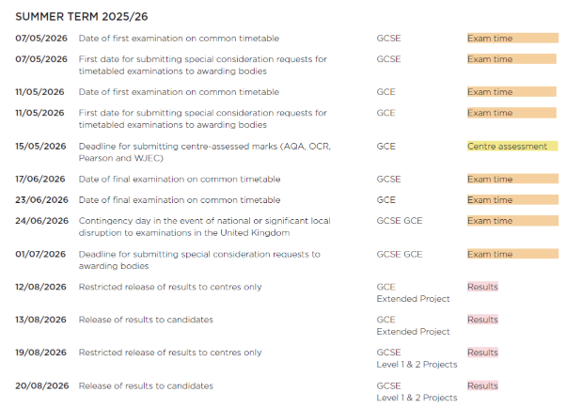
JCQ Key Dates for the Summer Term
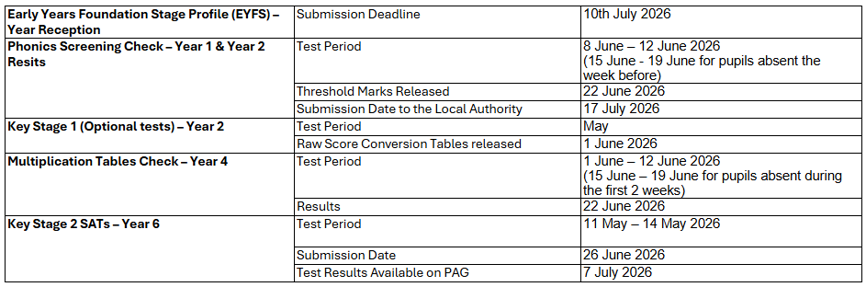
Key Stage - Important Dates
The deadlines to return the data to the Department for Education (DfE) are listed below. Please check with your local authority as they may require you to submit the data earlier.
Year 11 and Year 13 Leaving Dates
Year 11:
The leaving date for all children in England is the last Friday in June in the school year in which the child reaches 16 years of age and their attendance and absence must be recorded to this date.
Schools remain responsible for Year 11 pupils up to the leaving date, even when they have finished exams. It is up to schools to consider how they might seek to widen the range of learning opportunities during this time to meet the needs of their pupils. If schools choose to grant Year 11 pupils leave of absence between them completing their examinations and leaving school, then it must be recorded as an authorised absence (Attendance Code C).
Pupils staying on for 6th Form
If a pupil has applied and been accepted into the school 6th form, the pupil must remain on roll and for the period after the last Friday in June to the end of term, the school would record their attendance as Code X.
Schools without 6th form
Please note schools that do not have a 6th form, or pupils do not meet the criteria to be accepted a place in the 6th form should not be kept on roll until September and should be removed from roll with effect from the last Friday in June.
If schools record their pupil’s attendance and absence correctly, we do not anticipate any problems in collecting the data as part of the Autumn Census.
Year 13:
Post 16 students not of statutory school age so they do not have an official leaving date as such, however, DfE guidance does state that to be classed as ‘retained’ Post 16 students need to be registered on courses on the last working day of June.
‘When students are on a 2-year programme and they complete the first year, they will be counted as retained in that academic year. We define completing the first year as being in learning on the last working day in June. The same principle applies in the second year’.
Some schools will use the same leaving date as Year 11 for Year 13 students, others use the last day of term. If Year 12 or Year 13 are given a leaving date on or after 1st August this takes them into the next funding year and will include them in the next Autumn census return, which is not correct. The date needs to be before 31st July.
Exam Services
The Mighty Role of the Exam Officer – Not for the Faint-Hearted!
Yet another exam season is underway, and in true Exam Officer fashion, it’s all systems go! Over the past few months, the exam team at School ICT Services, have been neck-deep in making entries and registrations, creating seating plans with surgical precision, withdrawing and amending entries at lightning speed, training invigilators to JCQ standards, and racing to cross those final ‘t’s’ and dot the elusive ‘i’s’ in the classic pre-season dash. And now? Their hard work is paying off, with exam candidates across all our Exam Managed Schools enjoying a smooth and structured start to their assessments. So far, so good—and we’ll take that win!
But let’s take a moment to talk about the role of the Exam Officer. It’s not just a job – it’s a calling. It takes someone truly special to navigate the daily curveballs, organise timetable clashes, and printer meltdowns with grace (and caffeine). It’s a role that should probably come with a health warning (and perhaps a free massage voucher!) especially during the summer term. From eleventh hour transferred candidates, changes to tiers, sleeping invigilators, broken fingers, to last-minute candidate panics, Exam Officers have truly seen it all. And somehow, they still come back for more!
We’re incredibly proud to have some of the best in the business as part of our Exam Team at School ICT. People who have weathered the storm of many a past season and still manage to smile (or at least grit their teeth) through it. These seasoned pros are now sharing their wisdom, handy tips, and calm guidance with new and aspiring Exam Officers who are bravely stepping into the arena.
Schools who’ve taken advantage of our Exams Support Package have had an excellent start this year—even with new and less experienced officers at the helm. With our help, they’ve navigated the season confidently, knowing we’re only ever a phone call (or emergency chocolate delivery) away.
And just as we exhale after this season’s start, planning begins again for the next big challenge: preparing Year 10s for their summer mock assessments. The cycle never ends—but that’s what makes the role so rewarding. You’re not just pushing paper—you’re setting the stage for a student’s future.
So, here’s to all Exam Officers, at School ICT Services and across the UK: the multitasking heroes, crisis-managing champions, and unsung legends behind the scenes. Thank you for all you do. Keep climbing that exam mountain, and if you ever need our support, we’ll be here with a rope, a torch, and probably a spreadsheet or two!

At this time of year attention turns to recording statutory assessments along with the end of year assessments for the other year groups, ready to produce the end of year reports to parents.
Summer Data
Please ensure all summer data has been entered into Arbor or SIMS prior to the end of the summer term and check it is appearing in helloData. This includes importing the MTC and KS2 test results into the MIS.
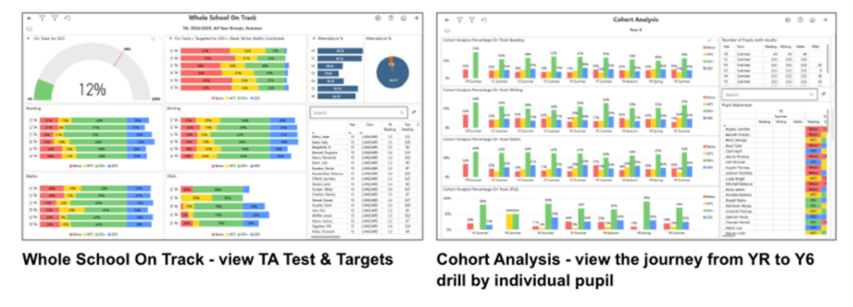
helloData provides a set of comprehensive reports for analysing statutory data, more on this in the next newsletter!
Setting up Assessments for the new academic year – Arbor
You must first create the new academic year and define your terms and half-terms in the calendar. Once your courses are scheduled and students are assigned to their next year’s classes, you can complete the assessment setup ready for next year. There are three main steps:
- Check the courses & create dummy courses if required
- Copy the annual policy assigning Students and Linked Courses
- Check the assessment period names to ensure the data pulls into helloData
We have produced step-by-step videos which are available in the help section of helloData, please ensure all videos are followed. We will also be providing printable instructions and hosting a live webinar later on this term. For £65+vat we can do the setup for you, email admin@hello-data.co.uk for more information.
Summer User Group Meeting – Monday 6th July 1.30pm, booking details to follow.
Not heard of helloData?
Integrating seamlessly with Arbor or SIMS, our reporting tool delivers comprehensive analysis of assessment, attendance, and demographic data across MAT, school, and cohort levels, contact admin@hello-data.co.uk or visit www.hello-data.co.uk to find out more.

Not sure where to start with reporting?
You’re not alone! Your MIS captures a huge amount of data, and it can be hard to know how to use it. Our reporting courses are designed to build your confidence step by step, so you can create reports that really support your day-to-day work.
Take a look at our upcoming courses and book a place;
- Tuesday 23rd June 9.30am-12.30pm, Arbor Standard Reporting Arbor Standard Reporting – School ICT
- Friday 26th June 9.30am-3.30pm, SIMS Standard Reporting SIMS Standard Reporting – School ICT
Summer Term Training Courses - Training to support a successful end to the academic year and ensure you're set up for success in September
There are still some remaining spaces on training courses for the rest of the summer term – helping you to finish the 2025/6 academic year on a high and ensure that the 2026/7 academic year gets off to a flying start!
We also have Distance Learning courses for anyone working over the summer that what’s to set themselves up for a successful new academic year by developing your knowledge and learning how to get the most out of your MIS.
- For online training courses please visit: https://www.schoolicts.co.uk/online-training/
- For Distance Learning courses please visit: https://learning.schoolicts.co.uk/
Primary Data Services – expert support when schools need it most
We know that statutory returns and end-of-year MIS processes can put real pressure on school teams. Our Primary Data Services are designed to provide flexible, expert support to help make these key tasks smoother, more manageable and less stressful.
Whether you need help with Pupil Census, Workforce Census, Key Stage returns, end-of-year procedures, Catholic Census or assessment processes, our experienced consultants work alongside your team remotely to keep things on track, support data accuracy and reduce pressure on staff.
With flexible support tailored to your school’s needs, you can choose help for a single return or a wider package of support. Whatever your MIS platform, we’re here to provide practical guidance and reassurance at every stage.
If you’d like to find out how our Primary Data Services could support your school, we’d be delighted to help. Get in touch to explore the best option for your school.
Preparing for Secondary Year-End with Confidence
For secondary schools, year-end can bring a lot of competing priorities – from ensuring data is accurate and complete, to getting systems ready for the new academic year. Whether it’s your first year using a new MIS, a new member of staff leading the process or you’re simply running short on time, our consultancy team is here to provide practical, flexible support to help you stay in control during this busy period.
We can work alongside your team to support key processes and make sure everything is set up in line with best practice – giving you the confidence that nothing has been missed.
Our approach is tailored and hands-on, whether you’re looking for targeted support with a specific task or support across the whole end-of-year process. We’ll provide guidance that meets your school’s needs.
If you’d like to explore how consultancy support could help take the pressure off your team, we’d be happy to talk it through – just get in touch.
Looking to get more from your MIS? (Arbor, Bromcom or SIMS)
With the end of term approaching, it’s a good time to think about how your systems are working for you. Our team of expert consultants can help you make better use of your MIS, from quick wins to longer-term improvements. Recently, this has included helping schools tidy up their data, design bespoke assessment systems and set up new behaviour frameworks.
If you’re interested in finding out more, or just want to talk through what might help, please get in touch via any of the usual channels.
Preparing for Exam result days - FREE Webinars
Results days can be busy and high-pressure, with lots to check in a short space of time. Whether your MIS is Arbor, Bromcom or SIMS, these sessions will help you feel more prepared and confident – covering key tasks, common pitfalls and how to make sure you’re ready when it matters most: –
- Monday 6th July 10.30am Arbor – Getting Ready For Results Day Webinar – School ICT
- Monday 6th July 2.30pm Bromcom – Getting Ready For Results Day Webinar – School ICT
- Tuesday 7th July 10.30am SIMS – Getting Ready For Results Day Webinar – School ICT
Post-16 Essentials - FREE Webinars
The Autumn term will be here before you know it – so now’s the perfect time to get ahead with a few practical tips. Post-16 processes can feel complex, especially if you’re new to them. Whether you use Arbor, Bromcom or SIMS, our short webinars will guide you through the key concepts and how they link together in your MIS, giving you a clearer understanding of what to do and when. Book your FREE place using the links below: –
- Tuesday 7th July 2.30pm Arbor – Post 16 Essentials For Schools Webinar – School ICT
- Wednesday 8th July 10.30am Bromcom – Post 16 Essentials For Schools Webinar – School ICT
- Thursday 9th July 10.30am SIMS – Post 16 Essentials For Schools Webinar – School ICT
MIS Data Assurance Review
Confidence in your data. Confidence in your decisions!
Independent audit and scrutiny services that help schools and trusts strengthen data, systems and processes through clear insight and practical recommendations.
- Post-16 Funding Scrutiny
Post-16 Funding Scrutiny. We review the key MIS data that underpins Post-16 funding, including:
- Condition of Funding compliance
- Student programmes, learning aims and planned hours
- Prior attainment data
- Course information & data accuracy
- Student end dates and leaver records
Benefits for schools:
Helps protect Post-16 funding by checking that key data, including planned hours, core aims and enrolments, is accurate and meets DfE requirements.
Why choose us:
Our Post-16 specialists have a strong track record of helping schools secure funding and address issues before they become costly.
We give schools practical support and straightforward advice based on real experience of Post-16 funding rules.
- MIS Data Assurance Review
MIS Data Assurance Review. We carry out a structured review of your MIS to provide independent assurance that it is set up well, used consistently and supporting day-to-day operations. We review the areas most likely to create risk, inefficiency or uncertainty, including:
- Accuracy & integrity of key MIS data
- Compliance with statutory returns and funding requirements
- User access, permissions and data security
- Efficiency and consistency of day-to-day MIS processes
- Effectiveness of core operational areas, including attendance, behaviour, assessment and cover
Benefits for schools:
Strengthens confidence in the data used for decisions, returns and reporting, while reducing risk around compliance, access permissions and inconsistent system use.
Why choose us:
Our MIS consultants work across Arbor, Bromcom and SIMS, giving schools practical, independent assurance grounded in day-to-day operational knowledge.
We highlight what needs attention, what to prioritise first and how to get more from the system you already have.
- MAT Engagement Audit
MAT MIS Engagement Audit. We assess how effectively the MIS supports the wider strategic and operational needs of your trust, with a focus on consistency across schools, the quality of trust-level information and how well systems and processes support leadership oversight. This review includes:
- Core operational processes
Reviewing whether key processes such as attendance, behaviour, assessment and cover are aligned well enough across schools to support trust-wide oversight
- Data quality & strategic reporting
Assessing whether the trust has access to accurate, meaningful and consistent information to support strategic planning, challenge and decision-making
- Statutory returns and compliance
Reviewing whether census and reporting processes are sufficiently aligned and robust to support trust assurance and reduce risk
Benefits for MATs:
Gives trusts a clearer view of how well MIS-related processes support strategic oversight, highlights where greater consistency is needed across schools, and strengthens confidence in trust-level reporting.
Why choose us instead of other suppliers:
We combine trust-level insight with school-level MIS expertise to show how systems, processes and reporting come together across the organisation, giving leaders a joined-up view of what is working well and where greater alignment is needed.
We provide clear recommendations and practical next steps through initial meetings, questionnaires/consultation, followed up at 6 months, 12 months and then annually by agreement to help trusts strengthen oversight, improve consistency across schools and make better use of trust-wide information.
- MAT Systems Audit
MAT Systems Audit. We audit how the MIS is configured and used across the trust’s schools, with a focus on making better use of existing functionality, improving consistency in system use and identifying where third-party software may be unnecessary. This review focuses on key areas including:
- Use of existing MIS functionality and whether features are being adopted consistently across schools
- System and data alignment across schools to support stronger reporting and more effective MAT-level analytics
- System configuration, setup and use of core functionality
- Efficiency of workflows and day-to-day system use across schools
- Use of third-party systems, including where software can be reduced or removed because the MIS already meets the need
- Staff confidence, capability and training needs
Benefits for MATs:
Helps trusts get more value from their existing MIS, improve consistency in how systems are used across schools, strengthen MAT-level analytics, and reduce unnecessary spend on third-party software.
Why choose us:
We combine audit expertise with practical knowledge of how MIS works in schools, helping trusts identify where functionality is underused, where processes can be simplified and where other systems may no longer be needed.
We provide a clear report and practical recommendations through initial meetings, questionnaires/consultation, followed up at 6 months, 12 months and then annually by agreement to help trusts optimise system use, improve consistency across schools and get more from the MIS they already have.
Interested in a Data Assurance Review? Get in touch at helpdesk@schoolicts.co.uk to find out more or book your session.

Parent Pay Group project to move all FMS6 schools to FMS
Parent Pay Group are moving forward with their on-going project to move all FMS6 schools to FMS (next gen)!
This is a huge project that will continue throughout all of 2026!
ESS/PPG will be actively contacting schools direct and inviting them to migrate at a suitable time.
- Step 1 – When school receive the email, please complete the On-boarding form.
- Step 2 – School will be invited to choose their migration timeslot.
- Step 3 – Move from FMS6 local to FMS Connected. – This is usually a 24 hr process.
- Step 4 – Later in the year – Move from FMS6 Connected to FMS.
Why this change matters
Moving to a single, cloud-based platform allows us to deliver a more secure, reliable and continuously improving service for schools while reducing the technical burden on school finance teams. This is a mandated move, and so your school will need to transition to FMS Connected by the end of the move period. If the move process is not scheduled as per the timeline then access to local FMS6 may be restricted.
We advise that schools keep a look out for the comms from PPG/ESS when your time to migrate is due. When it is your time to move you will receive weekly reminders to complete the on-boarding form and choose your preferred date. Please do not ignore these emails.
Any queries or help lease contact the Helpdesk.
FMS Equipment Register
Are You Using the Equipment Register Already Included in SIMS FMS?
All schools already have access to the SIMS FMS Equipment Register module but may not be taking advantage of its full capabilities, or even aware it exists!
Equipment Register enables schools to manage assets, track equipment by room or staff member, perform stock takes, support SFVS compliance, and generate audit-ready reports — all from within the SIMS FMS environment you already use.
Because it integrates directly with FMS purchasing data, schools can reduce duplicate data entry and improve visibility of school assets without investing in additional asset management software.
Key benefits include:
- Included within SIMS FMS — leverage functionality you may already own
- Save Time — import equipment directly from finance records and generate instant reports
- Improve Accountability — track who has what equipment and where it is located
- Support Compliance — maintain accurate records for insurance, PAT testing, audits, and SFVS
- Reduce Spreadsheet Dependency — move away from disconnected Excel asset lists
Discover how your school can get more value from SIMS FMS — at no extra software cost.
Please contact the helpdesk 0345 222 6802, Option 1

Click for the latest Arbor updates
ArborFest 2026 - Taking place in June!
This year’s Arbor Fest is taking place on the 30th June at The Liverpool Experience Campus (formerly known as ACC Liverpool)
We’d really love to see you there again this year, plus, it’s a great opportunity to meet our Arbor Lead, Laura Letifi!

Laura is passionate about supporting schools not just as they move to Arbor, but as they build confidence and consistency in using it long term. From a strategic level, she works with schools to help embed Arbor into everyday practice, from policies and processes to staff engagement and onboarding, making sure the system is fully adopted and delivering real value over time. Come and say hello, and have a chat with us about how we can support your school on its MIS journey.
Make sure you come and join us at our stand for a chat and don’t forget to spin the wheel for your chance to win a prize!

You can book tickets here – ArborFest 2026
Some of the sessions running this year include:
- Get ready for the future of work in schools
- A new era of Assessment is coming
- “I didn’t know Arbor could do that!”: The gems in Arbor which will transform your everyday
- From Process to Progress: How we’re using Arbor Workflows to transform operations in our school
- AI: What’s here, what’s next, and the secret to thinking even bigger
- School reporting, reimagined: Introducing Smart Reports
- Everything we learned from our first 12 months as an Arbor primary school
- Beyond the register: How to get smart with attendance in Arbor
- Closing keynote with Baroness Floella Benjamin
You can view the full programme and event information here:
Arbor Admin Access
Did you know that we can provide additional Arbor support at no extra cost, as part of your existing MIS SLA?
What benefit does Arbor Admin functionality bring to you?
With your permission, School ICT can be granted Admin functionality on your Arbor MIS site. This access allows our experienced support team to quickly diagnose and resolve common issues including refreshing invoices, populating missing payment accounts and accessing audit logs for troubleshooting.
By enabling this functionality, you’ll benefit from faster resolutions without needing to escalate these tasks to Arbor Support—saving your team valuable time and ensuring smoother day-to-day operations.
If you haven’t had the email and feel you should have, please call School ICT on 0845 222 6802 or email helpdesk@schooolicts.co.uk.
New Year Set Up
Now that New Year Setup is available in Arbor, now is a great time to start planning for 2026/27.
Our end-of-year campaign is a really useful source of information, bringing together guidance, help articles and training to support schools through both end-of-year tasks and the key steps needed to get ready for the new academic year.
Whether you are working through final processes for this year or starting to prepare for September, the campaign will help guide you through what needs to be done and when. Take a look at the campaign here.
DfE Statutory Assessment
In line with DfE guidance, End of Key Stage 1 (KS1) Teacher Assessments are no longer required to be collected or reported. There are no changes in the DfE Assessment area in Arbor. If you won’t be administering KS1 assessments, do not set them up. All other assessments (KS2, Phonics, MTS and EYFSP) continue to be statutory and required.
Please read our key stage return guidance here
What's New in Arbor
FSM eligibility changes
Arbor has been updated to support the DfE’s new FSM eligibility structure, ahead of the Autumn 2026 changes.
Arbor now records FSM across three categories of Targeted, Expanded, and Other and supports annual re-verification. Existing records have been automatically migrated to Targeted FSM. The bulk update tool makes it straightforward to manage re-verification across your whole cohort.
Re-verification for 2026–27 can begin from 1 June 2026.
For further guidance, check the following help centre articles:
Managing FSM Eligibility
Bulk update students’ FSM eligibility
Use Arbor AI up to 6x more – for free!
Arbor have increased your Monthly Free Allowance for Arbor AI so you can use it up to 6x more, completely for free! Schools typically save 70 minutes per staff member per week by using Arbor AI – so more usage means more time saved for your whole team.
What’s happening?
- Arbor have significantly increased the Monthly Free Allowance of Arbor AI usage that they give every school
- This means you can use Arbor AI features up to 6x more, completely for free
- Arbor AI can help you find and update information instantly (Ask Arbor), pull together your data for an inspection (Ofsted Inspection Companion), draft and translate emails (Suggest Comms) – and much, much more!
- Arbor have designed the allowance so most schools won’t run out, but if you ever do, your access to Arbor AI will simply pause. No unexpected costs – you’re always in control.
New assessment module in Arbor
The new Assessment module will give you an intuitive and flexible way to manage your assessment data. With powerful, easy to set up marksheets, stronger MAT level controls, and meaningful data analysis.
Arbor are treating Assessment in Arbor as three distinct areas: Marksheets, Analysis, and Report Cards. By splitting these out, they can make sure each part is intuitive and flexible.
Starting with marksheets – they are building phase by phase! Currently, assessments and marksheets are tied together. In the new module, they have separated them, giving you much more control:
- Assessment Data Sets: You define exactly what data you are collecting (grades, test scores, attitudes to learning, or comments).
- Custom Subjects: You are no longer restricted to the Department for Education’s list. You can create subjects specific to your school or MAT.
- Template Control: You can build marksheet templates that dictate exactly what a teacher sees. You can hide or lock columns, change the order, and rotate headers.
- Role-Specific Views: You can create different templates for different people, such as specific views for Heads of Department or Heads of Year.
What’s happening when?
- June 30th – ArborFest: Arbor will be showcasing the new marksheet functionality at ArborFest. You’ll have the chance to get hands-on with test sites!
- Summer 2026: The early adopter programme starts – focused just on the new marksheets. It won’t include analysis tools initially, and you’ll also need to be using Custom Report Cards.
- Academic Year 26/27: Eligible schools will begin rolling out the new Assessment functionality, and Arbor will continue to migrate customers throughout the year in phases as they build more features and capabilities.
- Academic Year 27/28: Arbor expect all schools to be using the new Assessment functionality.
A note for schools in MATs: Arbor will be implementing a “control switch” in the MAT MIS. To help MATs manage consistency and rollout, your trust will need to agree to your school trialling the new marksheets before you can get started.
Arbor are currently working through eligibility criteria for early adopters, and will have another update for you in June about the programme and how to join.
Staff paying for items in Arbor
Whilst you can use school shop for students, staff can’t be linked to school shop items, but you can still charge staff for items purchased by creating an ad hoc Customer Account Type.
You can create a customer account type and then raise an invoice to create a debt against the account (in this case for something like a ticket). Staff can pay by going to My Items | My Payments. They can pay by card for the tickets. (This method will work for other items as well)
Please see the example below. Go to School > Payments > Setup > Customer Account.
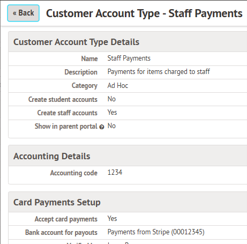
Staff can then be issued an invoice.
This can be done from their profile. Go to payments and select the account to invoice
Select Invoices | + Add
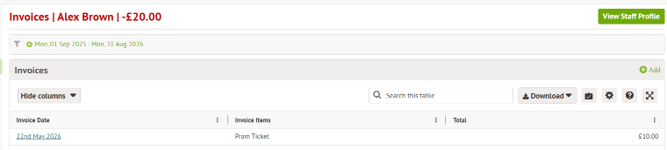
When staff log in they will be able to see the invoice and make payment via My Items| My payments
As an administrator you will be able to see the overview in School | Payment | Accounts | balances – select Prom Tickets in this case or go to school | payments | Accounts | Invoices.


Click for the latest Bromcom updates
Bromcom Admin Access
Did you know that we can provide additional Bromcom support at no extra cost, as part of your existing MIS SLA?
What benefit does Bromcom Admin functionality bring to you?
With your permission, School ICT can be granted Admin functionality on your Bromcom MIS site. This access allows our experienced support team to quickly diagnose and resolve common issues including refreshing invoices, populating missing payment accounts and accessing audit logs for troubleshooting.
By enabling this functionality, you’ll benefit from faster resolutions without needing to escalate these tasks to Bromcom Support—saving your team valuable time and ensuring smoother day-to-day operations.
If you haven’t had the email and feel you should have, please call School ICT on 0345 222 6802 or email helpdesk@schooolicts.co.uk.
Bromcom at The Shard
Shard 2026: MAT & LA event– Wednesday 17th June 2026 9am, Shangri-La, The Shard, Floor 34, London
Event Outline: –
Bromcom is proud to welcome education leaders from across the UK to Bromcom at The Shard, our flagship event for MATs and LAs, located in one of London’s most iconic buildings.
This year’s event is especially significant as Bromcom celebrates 40 years in education, marking four decades of innovation, partnership, and progress within the sector. From pioneering cloud-based MIS technology to continuously evolving solutions that support schools, trusts, and local authorities, Bromcom has remained committed to helping education providers work smarter, more collaboratively, and more efficiently.
Bringing together Multi Academy Trusts, Local Authorities, and education specialists, this year’s event will provide an inspiring day of strategic insight, thought leadership, and valuable networking opportunities. Attendees will hear from influential voices across education, explore the future of digital transformation, and gain practical perspectives on the challenges and opportunities driving the sector.
As Bromcom reflects on 40 years of innovation and looks ahead to the future of education technology, this event promises to be both a celebration of progress and a platform for forward-thinking discussion.
Due to limited spaces, they kindly ask that no more than three delegates per establishment register for the event.
If you’d like to find out more about the annual Shard event, the Bromcom team would be happy to answer all your questions.
Email them: events@bromcom.com
What's New in Bromcom
Administration – 2026 Admission Files Update – Release date 29th May 2026
The Admissions Transfers process has been updated for the 2026 intake to ensure compliance with statutory requirements for Schools in England.
What’s New
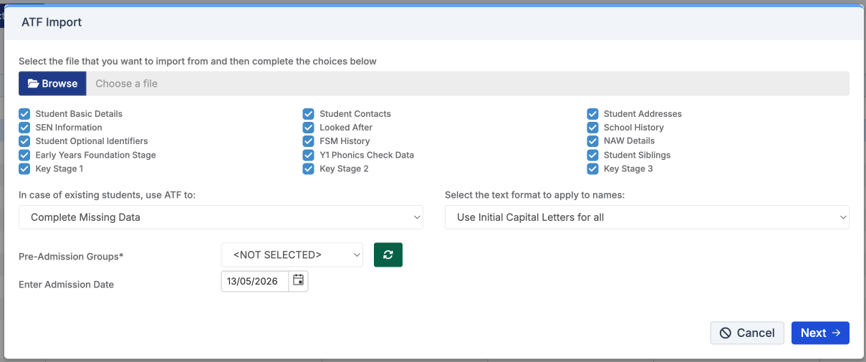
ATF Import
Admissions Transfer File, issued by the local authority where the school is not its Own Admissions Authority.
Available at Students > Student List > Actions > ATF Import.
File naming updated: Example “999LLLL_ATF_1114999_26001.XML”
ATF Version updated to 23.0.
DfE Statutory Assessment
In line with DfE guidance, End of Key Stage 1 (KS1) Teacher Assessments are no longer required to be collected or reported. All other assessments (KS2, Phonics, MTS and EYFSP) continue to be statutory and required.
Please read our key stage return guidance here.
Administration - New 'Young Carer' User Defined Flag
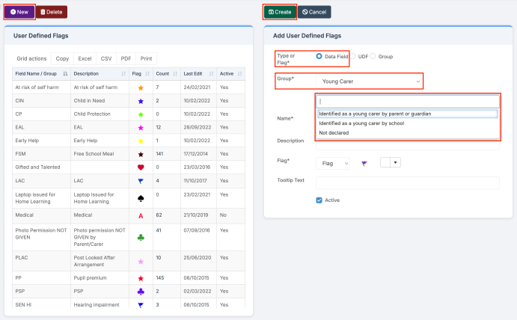
Config > Administration > User Defined Flags
With this release, the Young Carer field has been added to the User Defined Flags page. When a student is identified as a Young Carer and the flag is active, it is now visible across key areas of the system.
What’s New
When creating a new User Defined Flag – Data Field, a new Young Carer option is available in the Group dropdown. Selecting Young Carer provides the following values:
Identified as a young carer by parent or guardian
Identified as a young carer by school
Not declared
No default value is selected, and multiple values can be applied where appropriate.
Once created, the Young Carer flag appears in the User Defined Flags panel and across applicable areas of the MIS.
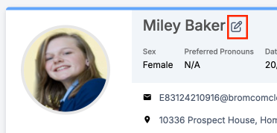
The Young Carer Indicator is maintained in Students > Student Details when clicking on Edit Student Details.
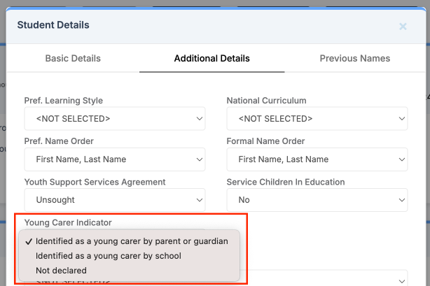
Where You’ll See the Young Carer Flag
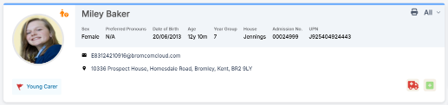
Students > Student Details
The Young Carer flag is displayed on the Student Details panel where applicable.
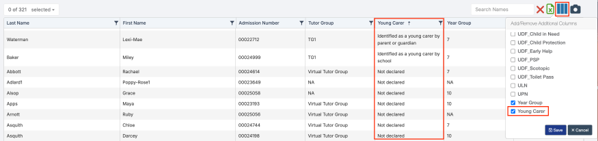
Students > Student List
A Young Carer column can be added using Add/Remove Additional Columns.
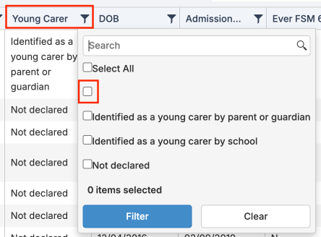
Note: Some students may have no value recorded in the Young Carer field. These students can be identified by a blank value in the field. When editing the Young Carer field for these students, the value will default to “Not declared”. You must save the record for this value to be applied and updated.
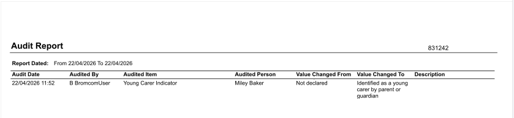
Reports > Administration > Audit Report
Changes to the Young Carer Indicator are recorded in the Audit Report.
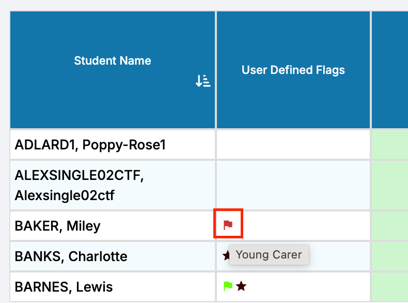
Modules > Assessment > Assessment Sheets List
The Young Carer flag is displayed in the User Defined Flags column on Assessment Marksheets where applicable.
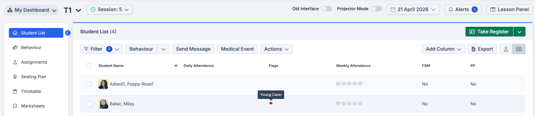
Home > Teacher Dashboard
The Young Carer flag appears in the Flags column of the Student List where applicable.
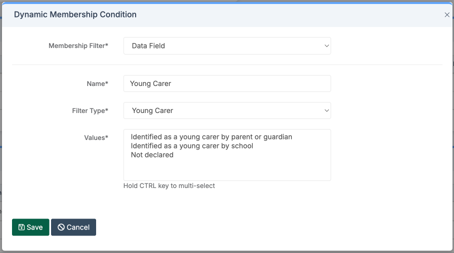
Groups > Report Group (Dynamic Membership)
A new Young Carer filter is available in Data Field – Membership Filters when creating or updating dynamic report groups, using the same three selectable values.
Tip: Hold the Control key to multi-select.
Note: Changes to the Young Carer flag in the User Defined Flags page and any changes made to the student’s Young Carer Indicator, will be updated automatically in real-time across the MIS.
Administration - Students: New Managed Move Section
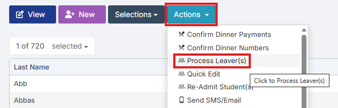
Students > Actions > Process Leaver(s)
A Managed Move section has been created for schools in England to assist with processing applicable school leavers. This will be needed for the Autumn Census for leavers between 1st August 2026 and 30th September 2026.
Key Features
To log a Managed Move first navigate to Process Leaver(s).
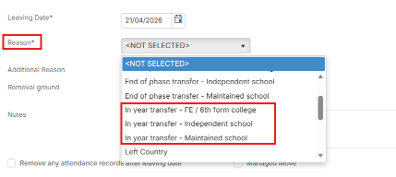
Add in the Leaving Date and Reason from the drop down menu. Additional Reason, Removal Ground and Notes are optional. Managed Moves should only be used for In year transfers.
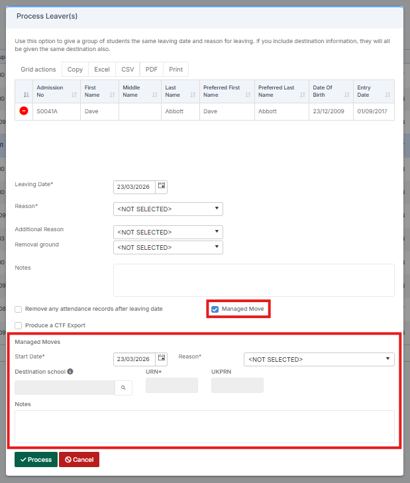
After ticking the Managed Move tick box in the pop up a new section is shown. Users must provide a Start Date, Reason, Destination School and URN when completing this section.
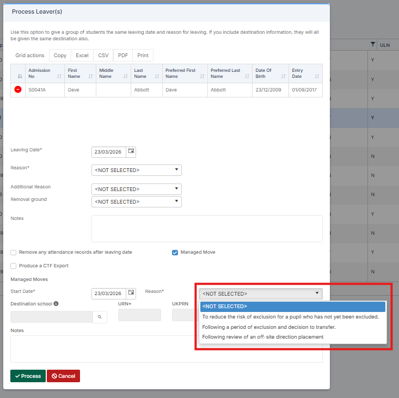
The Reason for the Managed Move must be selected from the drop down:
- To reduce the risk of exclusion for a pupil who has not yet been excluded.
- Following a period of exclusion and decision to transfer.
- Following review of an off-site direction placement.
After a Managed Move the relevant details will shown with the Audit Report.
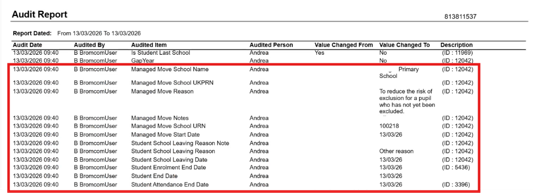
When a student has had a Managed Move an M icon will show on their school history within Student profile.

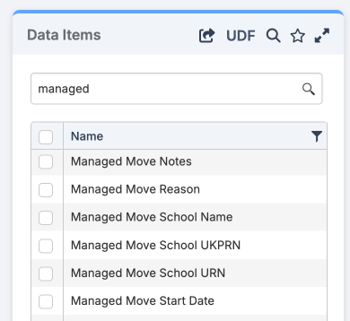
The following Manage Move Data Items can be found in Quick Reports in the Student domains.
30th June - Bromcom MIS and Finance Open Day with School ICT

Join us on Tuesday the 30th June for Bromcoms MIS open day in Lancashire!
At this in person event, schools will get the chance to see a live demo of Bromcom MIS and Finance, have an overview of School ICTs services and network with other school leaders.
To register for the event, please e-mail: events@bromcom.com

Click for the latest SIMS updates
SIMS 7 permanent menu redirects to SIMS Next Gen
Following the introduction of SIMS7 redirect functionality in March, PPG are now beginning a phased rollout of permanent menu redirects.
This step is about:
- simplifying the experience for staff
- reducing duplication between SIMS7 and SIMS Next Gen
- providing a clear, supported route forward for schools
From 8 June 2026, PPG will begin enabling redirects for schools, starting with timetables, then attendance registers (AM&PM + Lesson), then conduct and custom groups. When a user selects one of these areas in SIMS7, they’ll be taken directly to the equivalent workflow in SIMS Next Gen.
This is a structured, mandatory programme with confirmed dates, and it represents a significant step forward in driving adoption of SIMS Next Gen. Redirects will be introduced gradually, by module, and will continue through the remainder of 2026.
What is changing – and when
Schools will be transitioned through three stages as noted below:
Stage one – school-controlled (available now)
System Managers in schools can already enable redirects themselves at any time via the SIMS Next Gen Admin Console. Several schools have already enabled redirects successfully since March.
Stage two – redirects enabled, schools can still opt out
From the dates below, PPG will switch redirects on for schools.
- Schools can temporarily switch redirects off via the Admin Console
- This option is time limited and intended to support short term readiness
- Any changes made will take effect overnight
Stage three – redirects become permanent
At this stage:
- Redirects are permanently enabled
- Schools will no longer be able to switch them off
- All relevant users will need to be working in SIMS Next Gen
The key dates for each area are shown below:
| Stage two
will begin |
Stage three
will begin |
|
| Timetables | From 8 June 2026 | From 6 July 2026 |
| Attendance | From 22 June 2026 | From 28 September 2026 |
| Conduct and Custom Groups | From 13 July 2026 | From 26 October 2026 |
Please note not all schools will have their redirects enabled on the same day. Individual school dates will fall on or after the dates shown above.
Key Actions for Schools
On-Premises Schools
Action required before stage two – redirects enabled, with a temporary opt out
- Staff who use these areas must have SIMS Next Gen login details. Teachers or support staff without an active login cannot access registers after the redirect is activated.
- Confirm the school’s System Manager can access the SIMS Next Gen Admin Console, if they need to manage redirects. Any changes made will take effect overnight.
Action required before stage three – redirects are permanently enabled
- Confirm all relevant users, particularly teaching staff, can access SIMS Next Gen to ensure continuity as schools are transitioned to SIMS Next Gen.
SIMS Connected Schools
Action required before stage two – redirects enabled, with a temporary opt out
- Staff will be able to use their existing login credentials.
• Schools should check users who need access can log in to home.sims.co.uk
Action required before stage three – redirects are permanently enabled
- Confirm staff can access SIMS Next Gen successfully to ensure continuity as schools are transitioned to SIMS Next Gen.
What's New in SNG?
Staff contracts
Available for all schools
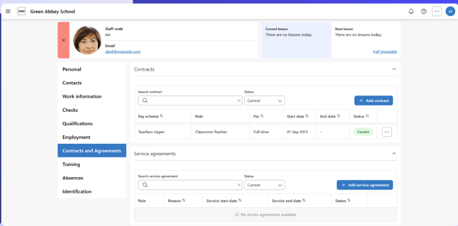
School administrators can now create and manage staff contracts and service agreements directly through the staff profile, with changes synchronised automatically between SIMS 7 and SIMS Next Gen.
This functionality is primarily used by personnel officers responsible for managing staff employment information and contractual records. It may also be
used by members of the senior leadership team and other authorised administrative users who need visibility of contract or service agreement data.
What you can manage
The staff contracts section is organised into dedicated areas to support a consistent, end-to-end workflow, including:
- roles within a contract, configured to ensure compliance with the School Workforce Census (SWC)
- salary and allowances, with automated calculations to reduce manual effort
- service agreements, managed alongside contracts in a single, unified view
Pupil Overview
Available for all schools
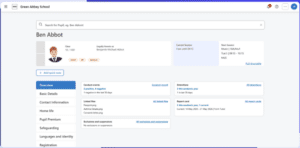
The Pupil Overview is a new tab on the pupil profile, giving all staff a holistic view of a child at a glance – helping them quickly identify where they want to explore further and get a deeper understanding of that pupil.
What you can see
The Pupil Overview brings together information from across the platform in one place, including:
- a snapshot of the pupil’s timetable, showing where they are now and where they will be next
- an overview of conduct, including conduct events and report cards
- all files linked to that pupil, pulled together from across the system
Linked files can be viewed in one place regardless of where they were added in SIMS. General files can also be added directly from the overview, and key files can be pinned so they are easy to find at a glance.
Staff timetable – detention events
Available for all schools
The staff timetable has been enhanced to include detention events, giving staff a clearer, more complete view of their day. Staff can now see detention events directly alongside their timetable, including detentions they are supervising and when they are taking place.
This is particularly relevant for school administrators, teaching staff, pastoral teams, senior leaders, and attendance teams.
What you can do
The updated staff timetable allows staff to:
- view detention events in the timetable calendar, including today’s, past, and future events
- see key detention details, including detention type, supervisor, allocated pupils, and location
- take the register for detentions happening on the day
- access the detentions area directly from the detention details panel
Bulk update
Available for all schools
A new bulk update section has been added to the Admin > Pupil area, allowing school administrators, operational teams, data managers, and census administrators to edit data across multiple pupils at once – saving time and reducing the need to visit each pupil record individually.
Bulk update is particularly useful for maintaining census fields and identifying where key data is missing or incomplete ahead of statutory returns. Changes
made in bulk update are written back to SIMS 7 automatically.
What you can do
The table header shows the number of invalid data entries, making it straightforward to identify incomplete or missing data for census reporting and fix issues without navigating back to individual pupil records.
Phase 1 – now available
The following census data fields are available in bulk update:
- Service children in education
- English as an additional language (EAL)
- Boarder status
- Ethnicity
- First language
- Special educational needs (SEN) status
- Youth Support Services Agreement
- Early Years Pupil Premium
- Parental consent
- SEN provision type
Phase 2 – coming soon
A further set of general data fields will be added in a future release, including:
- birth certificate seen
- ethnic data source
- country of birth
- mode of travel
- national identity
- pronoun(s)
- source of service children
- dietary preference
- disability
- allergy
- medical condition
- first language source
- home religion
- proficiency in English
- speaks Welsh
Dates for Phase 2 will be confirmed in a future update.
Group Hub – staff absence types and staff absence reasons
Available for all multi academy trusts
Group Hub settings management has been extended to include staff absence types and staff absence reasons, giving multi academy trust HR teams a central place to view and manage the absence lookup values used across their schools in SIMS Next Gen.
Staff absence lookups are used whenever schools record staff absence. Absence types classify the absence – for example, sickness, training, secondment,
or unauthorised absence – while sub-types provide further detail where needed. Reasons and sub-reasons are particularly important where schools record
absence through Cover, helping to explain why an absence is occurring and supporting the correct absence type being applied.
From Group Hub, trust users can:
- view staff absence types and reasons across all schools in the trust
- filter by school to review values for a specific school
- update existing values directly from Group Hub
- create new values where needed
- roll values out to selected schools or all schools in the trust
Once updated or rolled out, these values are immediately available in SIMS Next Gen when staff absences are recorded.
Please note: changes to absence values can take up to 24 hours to appear in trust-level reports, as data needs to be processed and aggregated before it is reflected.
Updates to account for FSM changes
The SIMS 7 Summer Release 2026 and its SNG counterpart will take account of the DfE changes to FSM eligibility for academic year 2026/27.
Following further consultation with customers, we have decided to add support for FSM eligibility with a category of ‘OFSM’, where the category of ‘OFSM’ indicates that the funding for the free meals is ‘other’ than the traditional central authority FSM eligibility funding.
This refinement will impact our development work for CTF 26 import (Routines | Data In | CTF) as well as Eligibility for Free Meals in Pupil Details (Eligibility for Free Meals table in Dietary panel of Focus | Pupil | Pupil Details), but we are still expecting to provide our SIMS7 Summer Release 2026 at the end of June.
Once this release has been applied, it will be possible to enter FSM eligibility for academic year 2026/27 in line with the new DfE regulations for FSM eligibility that apply for academic year 2026/27.
If the start date is before the 1st of August 2026, an existing blank FSM eligibility category will have the same meaning as FSM eligibility category of ‘TFSM’ (Targeted FSM eligibility). If the start date is on or after the 1st August 2026, a category of ‘TFSM’, ‘EFSM’ (Expanded FSM eligibility) or ‘OFSM’ (Other FSM eligibility) must be selected.
CTF 26 can be used to import FSM eligibility records where the FSM eligibility category is ‘TFSM’, ‘EFSM’ or ‘OFSM’. However, you should note that CTF 26 only applies from the 1st August 2026.
SNG shares data with SIMS7, so we will ensure that the SNG update for FSM eligibility follows the same rules as described above.
We recommend that schools start their work on updating pupils’ FSM eligibility as soon as possible on or after the SIMS7 Summer Release 2026 and its SNG counterpart are made available.
End of Year Process
As the end of the school year approaches please follow the links below for guidance on how to perform the various tasks required for Year End processes: –