
To navigate to the most relevant section, please click the appropriate link below: -

Summer School Census - Thursday 15th May
Summer School Census 2025 – 15/05/2025
| Attendance collected from (All Schools) | 01/01/2025 | 20/04/2025 |
| Exclusions Collected from (All Schools) | 01/08/2025 | 20/04/2025 |
| AP Placements collected from (All Schools) | 16/01/2025 | 15/05/2025 |
| FAM Collected from (All Schools) | 01/08/2025 | 15/05/2025 |
| FSM Collected From (All Schools – only for on roll pupils) | 17/01/2025 | 15/05/2025 |
| Learner Support Collected from (secondary schools only) | 01/08/2024 | 15/05/2025 |
To see data items collected please click here
Multiplication Tables Check (MTC) for Year 4 Pupils
The multiplication tables check (MTC) is statutory for all year 4 pupils registered at state-funded maintained schools, special schools or academies, including free schools, in England.
Schools can access the MTC service to prepare for the check via DfE Sign-in from Monday 28 April 2025.
Schools must generate a school password and individual pupil PIN within the MTC service before pupils are able to sign in to access the check using the pupil application.
In 2025, schools must administer the MTC to all eligible year 4 pupils between Monday 2 June and Friday 13 June.
Schools can use the following week, Monday 16 June to Friday 20 June, to administer the check to any pupils who were absent during the first 2 weeks or in case of any delays to the administration of the check due to technical difficulties.
Schools must provide a reason within the MTC service for any pupils who are not able to participate in the check.
Annual Increments
April is usually a time for NJC/Support Staff to have their annual increment awards. This is something that should be updated within your MIS as soon as you receive the information, to ensure they are up to date for the SWC (School Workforce Census) and any reporting you may do.
For guidance on how to update your payscales within your specific MIS, please contact your support team:
School ICT customers:
Tel: 0345 222 6802 Option 1
Email: helpdesk@schoolicts.co.uk
Portal: https://my.www.schoolicts.co.uk/
turn IT on customers:
Tel: 01865 597620 Option 2
Email: mis.support@turniton.co.uk
Portal: https://portal.turniton.co.uk
Data Management Services
Our Data Management service offers an excellent, cost effective, responsive, and efficient Data Management solution, delivered remotely by a team of highly experienced school data experts. Their dependable advice and guidance empowers schools, academies, and MATs to maximise their investment in their management information system (MIS) team. Whether it’s a long-term solution or short term for sickness cover or maternity please reach out to discuss your needs.
- Please click here for further information.
Contact Details
School ICT customers:
Contact: 0345 222 6802 Option 1, helpdesk@schoolicts.co.uk; Portal: https://my.www.schoolicts.co.uk/
turn IT on customers:
Contact: 01865 597620 Option 2, mis.support@turniton.co.uk; Portal: https://portal.turniton.co.uk
Our customer portals allow you to: –
- Log and track tickets
- Watch recordings of our range of webinars
- Search the Knowledge base for information, guidance and tips
- Keep up to date with the latest news
FREE Webinars
We are running a continued webinar series throughout the year. Please see below for upcoming webinars, click the hyperlinks to book: –

Bitesize Training
**LIMITED INTRODUCTORY OFFER** Buy 3 courses, get the 4th free!
Upcoming Online Training Courses
Training courses for the Summer Term are now live! We have a comprehensive schedule of online (live) Arbor, SIMS and Bromcom training courses, and a range of Distance Learning, (pre-recorded), courses to help you develop your knowledge and get the most out of your MIS (Management Information System).
Booking is now open please visit https://www.schoolicts.co.uk/online-training/
Data Health Check Services
An MIS health check ensures you’re getting the most out of the investment in your MIS. The benefits of one of our comprehensive health checks include: –
- Raise awareness of functionality and any issues
- Keep you up to date with the latest developments in your MIS
- Housekeeping and tidying exercises
- Report with recommendations to ensure you’re fully maximising your MIS along with any training recommendations
- For on premise MIS a server health check is also included
Our health check service usually takes around half a day. Please contact us to find out more on: helpdesk@schoolicts.co.uk to find out more.
FMS - Cost Centre/Ledger Code Links
Top Tip!! Did you know that you can link Cost Centres and Ledger Codes within the Cost Centre Allocation Screen? This saves time as you don’t have come out of this screen to go to Tools | General Ledger Setup and create a new link within the C/Centre Ledger Links tab and then go back into Cost Centre Allocation to continue entering your budget.
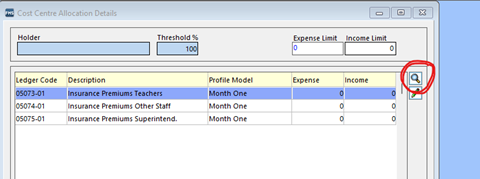
Within the Cost Centre Allocation Screen (Budget Management | Cost Centre Allocation if you use the shortcuts, or Focus | Budget Management | Cost Centre Allocation if you use the menu routes). Go into the relevant Cost Centre and to add a new Ledger Code click on the spyglass on the right:
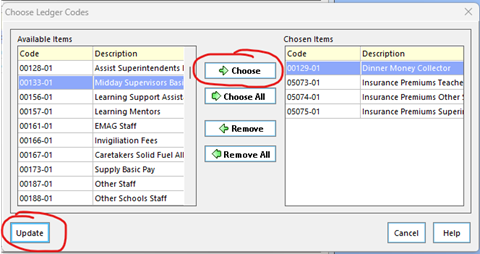
This will give you a window where you can select the new ledger code from the left-hand list, click on Choose to move it to the right, and then click on Update to save:
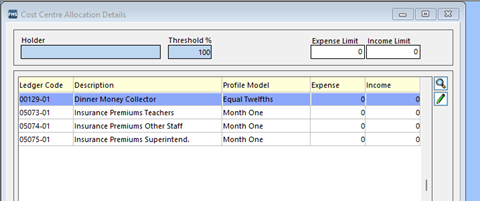
This will take you back to your screen and your new Ledger Code will now be linked to your Cost Centre:
FMS Year End/New Year
The change of Financial Year always brings a few queries and with this in mind, we’ve created a Help sheet with some of the most common ones:
- ‘Structures Need Updating’
- Buttons Greyed Out When Adding a Purchase Order or Invoice
- No Order Number Book When Trying to Add a Purchase Order
- ‘Your Budget for this Cost Centre is 0.00. Saving this line would cause it to be exceeded by £X.XX’ Message when trying to save a line on a Purchase Order.
You can access this helpsheet via the customer portals:
- TIO Customer Portal: https://portal.turniton.co.uk/
- SICT Customer Portal: https://my.www.schoolicts.co.uk/ or for SICT Customers by clicking on this link: https://my.www.schoolicts.co.uk/portal/kb?btn=46&text=year%20end&entity=articles&id=816
helloData Product Overview - Your MIS Data Visualised
Tracking pupil achievements at an individual and group level is a crucial part of improving pupil outcomes and overall school improvement. Since the change in the curriculum, schools assess their pupils in a variety of ways depending on the subject, year and pupils’ ability. Different grades and expectations are commonplace, as is the way a school or trust prefers to analyse and present the data.
Simplifying assessment in Primary schools
This complexity of assessment tracking in schools can often be overwhelming and leads to unnecessary expenditure of time and money. At trust level it can involve a lot of work to collate the information from each school. At helloData, having spent years working in the assessment tracking field and with cutting-edge data analytics tools, we specialise in consulting with schools and trusts on how they want to assess, to ensure the setup in use is as efficient and informative as possible.
Combine the power of your MIS and helloData
We provide simple methods for entering data, utilising the MIS functionality found within Arbor, Integris and SIMS. We then automatically present the data back in a comprehensive set of ready-made dashboards using Power BI to visualise your data.

In-depth analytics and pupil data at a click of a button
Assessment data can often be seen as daunting and hard to decipher, it can also take the focus away from the individual learner. This is why we have made all helloData reports intuitive to use, interactive and, at a click of a button, view individual pupil data on one screen.
Accessible for all
School, Governor and Trust views are all provided, allowing leaders to choose how to visualise the data based on their own need.
We’d love to hear from you, Leave us a Message or Book a Live Demo here.

Click for the latest Arbor updates
ArborFest 2025!
School ICT will have a stand at ArborFest which is taking place this year on Wednesday 21st May at the Repertory Theatre in Birmingham. This year’s ArborFest is going to be their biggest in-person customer conference to date and is focusing on “The future of work in schools.”
There are two types of tickets. In-Person Tickets and Live Stream Tickets:
In person tickets for School Staff: These tickets are for schools using Arbor as their MIS. SLT and Office Staff will get the most from the programme.
In-Person Tickets for MAT Central Teams: These tickets are for MAT Leaders. Arbor are inviting both MATs using Arbor, and those who aren’t, to join them at their special MAT Stage.
Live Stream Tickets: These tickets are for schools and MATs who can’t make the live event. These tickets will give you access to watch the live stream of Arbor’s Main Stage.
There are limited tickets available so get yours now to avoid missing out! https://www.arborfest.arbor-education.com/tickets
Don’t forget to come and visit our School ICT stand to say hello if you are attending!
New Features
91 new features have been released in Arbor in the last term, some of these include:
- Absence logging via the portal.
- Ability to edit trips up until the trip end time and date.
- New basket feature allowing parents to purchase multiple items at the same time.
- Wraparound club – simplified information for parents including displaying club names at registration and week day on cancellations.
- Improved payments reconciliation reporting.
- Candidate count on candidate lists and exam registers.
Arbor AI student summary and suggest communications are now available to every school. The student summary can quickly give you information from a student profile based on the information recorded.
Since launching the student app, it has been downloaded 154,000 times and over 270 schools are using it.
Lots of work is going on within the MAT MIS, making it easier to pushdown information into schools, for example, consents and reporting.
What Arbor are focussing on this spring:
Three key areas are being focused on:
- Fly through your to-do list.
- Surface clear and impactful data
- Build consistent ways of working.
Currently available or coming soon in Arbor Labs:
- Speed up communication workflows with the new inbox and outbox feature – much quicker to filter communications to search for the information required.
- Automatic absence: step 1 is the parent calling the schools absence line and leaves a voicemail; step 2 involves Arbor transcribing the voicemail and creates a pending absence note. In step 3, the absence is accepted, edited, or rejected which leads to step 4 where the student absence is recorded.
- Ask Arbor assistant: find student information, access attendance information, view behaviour information, explore student demographics. Access timetables, locate free rooms, draft and email or record absences.
- Report library – access all your reports in one place!
- Arbor LA MIS – Local authorities having access to your Arbor site / data.
- Ask Arbor ‘Canvas’ – create reports and analysis, build reports from written prompts or questions, get insights and data instantly, there will be no need to use excel or Power Bi – Just ask Arbor!
- Integration with MS Teams including both user provisioning and team classes provisioning from Arbor courses, phase 2 will include the integration of homework to Teams assignments.
- “Suggest text” helps you write long pieces of text, report cards, feedback, analysis. Arbor will only write about the data you want to include and will be created according to the school’s tone guide.
A new way to shape the roadmap!
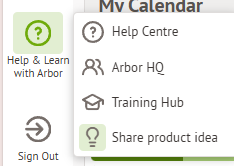
You can now share ideas within Arbor itself! There is a link on the ‘help and learn with Arbor tab’ where you can share new ideas and provide feedback about existing features.
Exams – Withdrawals and Changes of Tier
In April you can normally withdraw student entries and make tier changes and receive a credit note from exam boards. For deadlines, please check with the relevant exam board – main ones below:
| AQA | Pearson/Edexcel | OCR | WJEC/Eduqas |
To action a withdrawal in Arbor, the easiest way is Students/Examinations/Entries/Entries by Student Group, change the filter to the correct group then withdraw students from the qualification using Bulk Action à Withdraw Candidates.
Please ensure you withdraw from the Award AND the Learning Unit.
If you need to make tier changes (for example Maths Foundation to Maths Higher), please carry out the above to withdraw from a tier then select the same student(s) and use Bulk Action à Enter Candidates to add to the new tier.
Once you have carried out these processes, you will need to go to Students/Examinations/EDI Exports/Entries, confirm any pending files, download and send to the boards via A2C.
If this withdrawal/change of tier is actioned after the exam has been seated, the student will automatically be removed from the room/seat.
New School Year Set Up
- For New School Year Setup and Year End guides click here.
- For New School Year Setup videos click here
New AI Features
All schools have access to three, free, AI features; Student Summary, Suggest a Formula and Suggest Communication.
If you haven’t used these features yet, 3 free e-learning courses have been added to Arbor HQ to help you get started. Each course shows you how to use the feature in 3 simple steps so you can click along on your own site and start using Arbor AI straightaway.
You can find the e-learning courses in the ‘Courses’ area at the top of the Arbor HQ page.

Click for the latest Bromcom updates
Upcoming Updates to the Bromcom Roadmap
https://crmapps.Bromcomcloud.com/customer/productroadmap
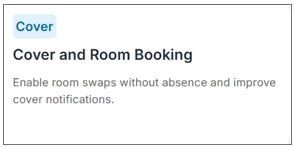
There are some updates to the system due by the end of Q1, including the room swap for cover, which will allow ad hoc room swaps to take place without an absence/ closure being recorded in cover first.
Exams and Withdrawals Change of Tiers
In April you can normally withdraw student entries and make tier changes and receive a credit note from exam boards. For deadlines, please check with the relevant exam board – main ones below:
| AQA | Pearson/Edexcel | OCR | WJEC/Eduqas |
To action a withdrawal in Bromcom, you can either go to Modules > Examination > Manage Entries to amend the entries for individual students, or via Modules > Examination > Exam Sheets List to amend entries in bulk. You can either remove the entry altogether, or use the W code to record a withdrawal so that there is a record that the student was originally enrolled for the qualification.
Once you have carried out these processes, you will need to go to Modules > Examination > Manage Submissions, click on Create to create an amendment file for any exam board for which you have made changes, then submit the file via A2C.
Please note that any changes made AFTER components have been seated will remove the student from the original seating, and will add them to the candidates to be seated list for the new exam they are entered for.
Ideas Portal
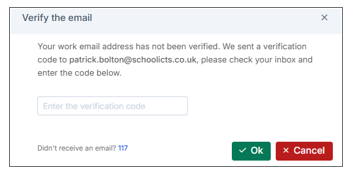
Whilst this is locked behind a Bromcom support account, if users click the I icon they can generate a one time passcode and sign up to the ideas portal (development ideas option).
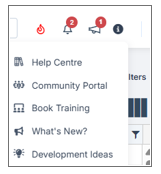
Clicking “Development Ideas” will trigger an email with a passcode.
There are lots of good ideas being suggested, which require 50 votes to be considered for implementation.
Bromcom Updates and News
Update on Bromcom Drop-in Sessions [UPDATED]
Due to demand, Bromcom adjusting their drop-in sessions to twice per week from Monday 17th March 2025. We will continue to monitor usage, and if demand increases, they will review and adapt accordingly.
You can join the session by clicking the link below.
New Drop-in Session Times (from Monday 17th March 2025):
Tuesdays – 13:30 to 14:30
Thursdays – 10:30 to 11:30
Thank you for your continued engagement!
MIS Mondays: Duplicate Contacts
Online (Microsoft Teams)
MIS Mondays are a great opportunity to sharpen your Bromcom skills, ask questions, and get the most out of your MIS.
We look forward to seeing you there!
This weeks session will be on Duplicate Contacts.
Format:
- 30-minute focused training session
- 30-minute live Q&A

Sarah Karaca
Update on Options
We want to provide you with an update on the current functionality of the Options Module.
Working Features
- Options Setup: Fully operational and working as expected.
- Importing Pupil Choices: Successfully collects and processes data from parents and students according to the school’s defined rules.
Known Issues
- Pattern Generator (Manual & Automatic): Some users are experiencing inconsistencies in the generated patterns. While it works correctly for some, others may see inaccurate results.
-
- [UPDATE 18/03/2025] – the software team have enhanced the way the patterns are generated to prevent this from occuring. Planned Delivery Date for this is 26/03/2025
- Exporting Pupil Choices: Currently, choices are being exported in alphabetical order rather than in the original choice order.
- [UPDATE 18/03/2025] – This is on the Known Issues list with the Kanban team under KB-00319 with an estimated release date of 04/04/2025.
Recommended Actions
- Continue Using for Setup: The module remains functional for setting up options and importing/exporting pupil choices.
- Pattern Generator Workaround: If the generated patterns are incorrect, we recommend:
- Exporting to Excel: This can serve as a temporary workaround, allowing users to manually adjust patterns as needed.
Next Steps
Our development team are actively working on resolving the algorithm issues affecting the pattern generator. We understand the importance of this functionality and are prioritizing a fix, which will be released as soon as possible.
Thank you for your patience and understanding! We will provide further updates as soon as we have more information.
Exporting Pupil Choices
- Currently, choices are being exported in alphabetical order rather than in the original choice order.
- [UPDATE 18/03/2025] – This is on the Known Issues list with the Kanban team under KB-00319 with an estimated release date of 04/04/2025.
Ad Hoc Reports Update from Bromcom
As you may be aware, we have previously delayed the ‘switch-off’ of Ad Hoc reports after listening to customer feedback about both the readiness of Quick Reports as a replacement, and the continuity of Ad Hoc Reports as a relied upon product among the userbase.
Based on further consultation, and in line with best practice, from January 2025, we will begin ‘sunsetting’ Ad Hoc Reports. This consists of a gradual withdrawal of support and issue resolution, instead of simply retiring it immediately.
The current timeline for this is below. Please note that this plan is subject to change, and we will aim to keep you informed of any amendments to it.
From January 2025
Support-only
- Customers can log cases and seek support for any issues
- Bromcom will provide support but will no longer develop any new features or functionality (statutory or otherwise) against Ad Hoc Reports, nor fix bugs/defects in it
- Bromcom will refer users encountering bugs to use Quick Reports instead
- Any additional requests for new features or functionality will be developed within Quick Reports (subject to approval).
From April 2025
Usage-only
- Customers can continue to use Ad Hoc Reports
- In addition to no longer fixing bugs/defects in Ad Hoc Reports, customers will no longer be able to log cases, seek support for issues or assistance on it.
- Any requests for Support will be referred to the use of Quick Reports.
September 2026
Sunsetting / Retirement
While Ad Hoc Reporting may persist within Bromcom, there will be no guarantees from this point that the software will be available or usable. As the timelines involved are extended, this part of the product lifecycle is hardest to predict and is therefore the most at risk of change. However, we anticipate that, from this point, there will be no further use of Ad Hoc Reports and therefore the product can be safely retired and removed from the MIS.
New Updates to System
Analysis – EYFS GLD Analysis: New GLD On Track summary totals
Modules > Analysis > Primary Tracker > EYFS GLD Analysis
We have enhanced the EYFS GLD Analysis report to include summary totals for the GLD On Track column. This update allows users to view both the number and percentage of students who are on track and those who are not, without the need to manually recalculate these totals.
When running the EYFS GLD Analysis report, apply the following filters to see the new summary totals:
- Check box: Include GLD On Track
- Check box: Grade totals & info and/or Percentages & info
- Subject: GLD Subjects
The report will now automatically generate totals for the GLD On Track status, broken down as follows:
- At row: Displays the number and percentage of students who are on track (i.e., students with a YES in the GLD On Track column).
- Below row: Displays the number and percentage of students who are not on track (i.e., students with a NO in the GLD On Track column).
Options – Review Pupil Choices: Enhancement to validation message
Modules > Options > Review Pupil Choices
This update introduces an enhancement to the pupil choices validation message popup. When reserves are not selected for a student, the “Reserves” section will no longer be displayed in the validation popup.
If reserves are selected, they will continue to be displayed as per the current functionality.
Administration – Students: Additional columns available in the Student List
Students > Student List
Two new columns have been added to the Student List page and they will be hidden by default:
- Destination School
- Leaving Reason
Note: Currently, Destination School and Leaving Reason is entered in Action > Process Leaver(s) popup from the Student List. Leaving Reason is also be displayed in Enrolment > School History
Quick 'How To...'
How to… ‘find pre admission students once they have been added’.
- Student list > search filters > change status from on roll to pre admission
To assist in filtering students, you can add the admission date column or use the Date of birth fields to filter to correct cohort.
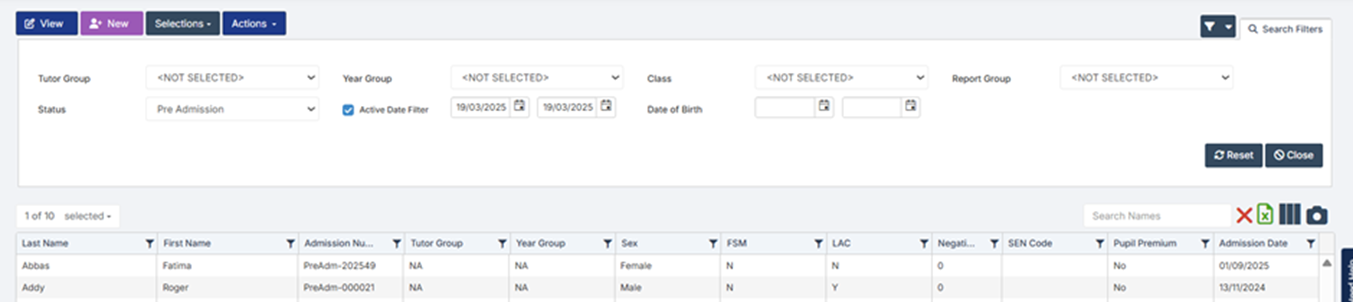
NOTE– if you have created new records via CTF or ATF import, you may need to change the active end date to September for them to show. Students added manually to Bromcom will show up without changing dates. This is as expected behaviour currently, with no known plans to change it, however can be confusing when trying to locate pre admissions.
Unless there is a specific reason to (a 3rd party product requires them to be on roll for example), the advice is not to admit students until September
- If you do, you may not be able to select the students within the options module, as they are not in preadmission, and not currently on roll
- If they don’t start, their record will need to deleted, and so the application record will also be removed.
CTF updates for pre-admission
If you wish to import a CTF to update pre admission records, this can be done in the same way as for on roll students, and the system will match any students that are in pre admission to the CTF. It will display whether students have been matched, and also allows manual matches if for example, the names are not quite the same.
Importing a CTF
- From the left hand-side menu click on Students to open the student list page
- Go to Actions>CTF Import
- Click on Browse and select your CTF File
- By default, all information is selected to import however you can deselect any of the options prior to import
- You will need to change the option with If this file contains New Students, to ensure you are selecting the Pre-Admissions, you can then select your Pre-Admission Group
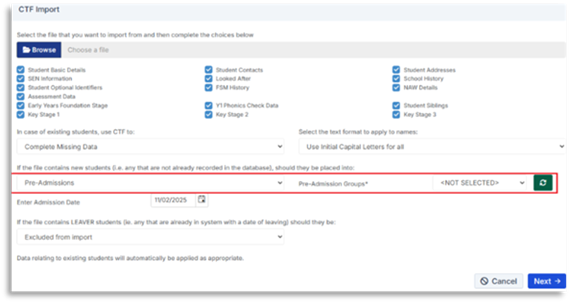
- Click Next
- A table will be displayed showing your applicants to import and whether they have been matched to existing students or not
- If there are any matches this will be reflected in the table
- Review the information and once happy click Next
Sibling Match Screen (New)
This is new for February 2025 to help streamline student import processes for both ATF’s and CTF’s. This will automatically linking new students/Applicants to existing potential siblings.
After selecting Actions> ATF Import or CTF Import an initial popup will include a Student Sibling check box which is checked by default. When ticked any students that meet three of more of the following criteria will be automatically matched as a potential sibling to the new students, which you can decided whether to link at the import stage.
- Home phone number match
- Parental addresses match
- Parental email addresses match
- Parental names match
- Sibling match
- Click Next to see list of applicants in file
Bromcom Webinars and Training
Our Summer Term training schedule is out now!
Courses can be booked here: https://www.schoolicts.co.uk/online-training/ or directly through the hyperlinks in the Training Schedule.
Webinars can be booked here: https://www.schoolicts.co.uk/latest-events/

Click for the latest Integris updates
Important Update: The Future of Integris
Integris will be discontinued from 12th February 2026. We will instead support your school to switch to Arbor Core at no extra cost. You’ll get all the same features as Integris, plus extras like student report cards, email, SMS and report scheduling. Find out more
What are my next steps?
- Join a demo to see Arbor in action
- Book a call with our team to ask questions and discuss your switch
This is a big change, but we’re confident it will be a positive one. If you need anything, just get in touch.
Integris Status
Click here to check the status of Integris.
Maintaining Staff Spine Points
The Staff Spine Point can be set on the Staff Contracts Tab and is linked to each contract the staff member has.
Adding a Spine Point to a contract
- Browse to the staff member you wish to add the spine point to by going to Modules > General > Staff Details.
- Click the Contracts tab and then click Edit.
- Select the contract you wish to add the spine point to and then click the Edit icon (
 ) on the right hand side to edit the contract.
 - Select the relevant spine point in the Spine Point field and its description will then be displayed.
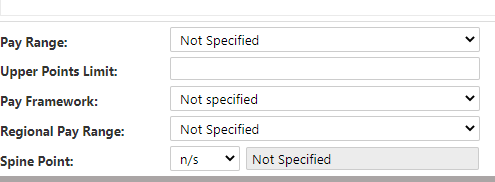
- If you don’t wish to make any other changes then click OK and then click Save to save the staff record.
The spine points available by default are those requested by the DfE as part of the School Workforce Census. If you want to add your own, you can do this see below.
Adding/Editing/Removing Spine Points
You can add, change or disable Spine Points via the Modules > General > Parameters > Staff Spine Point parameter list.
Adding a new Spine Point
Go to Modules > General > Parameters and select the Staff Spine Point parameter list and click the view ( ) icon
- Click the + and enter a central code, school code and description. We would advise making the Central Code and School Code the same for each spine point. Note – Central Codes MUST be unique.
- Click OK to save the Spine Point
Editing a Spine Point
- Go to Modules > General > Parameters and select the Staff Spine Point parameter list and click the view () icon
- Select the Spine Point you want to edit and click the edit icon () and make the changes needed to central code, school code and description. Note – Central Codes MUST be unique.
- Click OK to save the Spine Point

Click for the latest ScholarPack updates
Important ScholarPack Announcement
- On the 12th February 2025, it was announced that ScholarPack will be discontinuing in February 2026 and moving to Arbor. Arbor will be partnering with all schools using ScholarPack, and supporting them to move to Arbor by February 2026.
- All schools have been informed to give plenty of time to plan and make the move.
- Schools will be supported throughout by Arobr’s dedicated in-house teams, or by their local partner.
Questions For Ofsted
Attendance
You’ll need to be able to provide up to date attendance figures. They may ask for both your whole school figures, as well as attendance figures for special cohorts and specific groups of students, such as:
- Individual Year Groups
- Pupil Premium
- FSM
- EAL
- SEN
- A bespoke group of students, such as those in a Dynamic Group
- Comparative figures for special groups
Enrolment and Student Demographics
Ofsted may ask for details about the number of students on roll, as well as any students that have been taken off roll. The following reports can be found via Reporting > Reports > Students (blue tab).
On Roll By Date
Admissions and Leavers
Student Custom Report
School Summary
Special Cohorts
Behaviour and Conduct
Ofsted may ask to see records of specific types of behaviour and incidents, or a record of exclusions and suspensions. The following reports can be found via Reporting > Reports > Conduct (orange tab).
Please note:
Schools have the option to rename many of the conduct categories in the Admin > Config > Custom Relabelling area. If your school has renamed them, the names of your conduct reports may be different to the guidance. The icons however will still match.
Incident Report
Exclusions Report
Safeguarding
Ofsted will require access to safeguarding information. This may include looking at the Single Central Record (Central Register).
Central Register
Tracking Daily Attendance
Student Custom Report
https://support.scholarpack.com/hc/en-gb/articles/6144271945245-How-to-build-a-Custom-Report
The custom report above is an extremely useful report for student data. It has a wide range of reporting options and is highly customisable, which is very useful if you’re looking to report on several aspects combined into one report. The link above goes through the details on building these.
Staff Custom Report
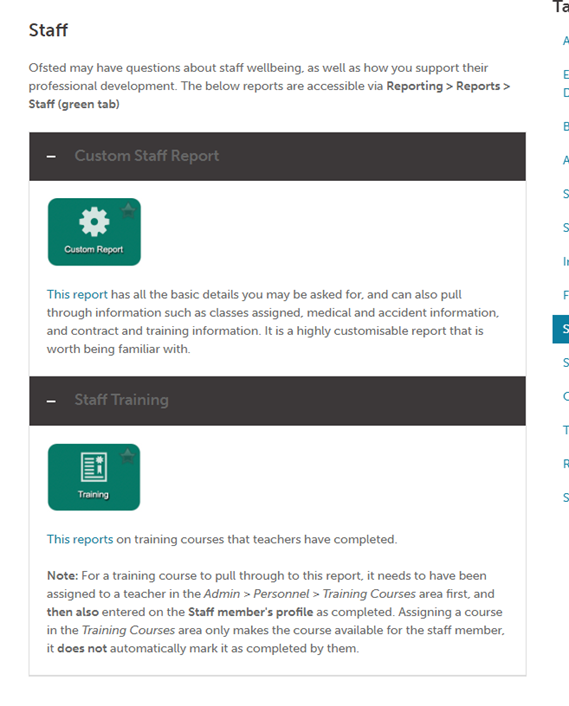
The staff custom reports are very useful too.

Click for the latest SIMS updates
Summer School Census 2025 – 15th May
Click on the links for guidance and information

Census is coming to SIMS Next Gen
Can I still use Summer Census in SIMS 7? This Summer term you can still use SIMS 7 but we highly recommend trying out the Summer Census in SIMS Next Gen. It’s been revamped from the ground up and makes it much simpler to prepare your school’s Census. If you’d like to try the new Summer Census in SIMS Next Gen, we’re giving a limited number of schools early access to the new Summer Census in SIMS Next Gen – places are available on a first come, first served basis
Schools should register their interest here.
Please click here to see the guidance of Data items collected.
SIMS Upgrades
Please click here to see the new release features and enhancements to improve accessibility.
Exams Withdrawals and Change of Tiers
In April you can normally withdraw student entries and make tier changes and receive a credit note from exam boards. For deadlines, please check with the relevant exam board – main ones below:
| AQA | Pearson/Edexcel | OCR | WJEC/Eduqas |
To action a withdrawal in SIMS, the easiest way is to go to the candidate record then tab 2: Entries & Forecast, highlight the qualification then click on the pencil and change the entry to No Entry.
Rather than using the minus sign which would delete the entry altogether, using No Entry ensures that there is a record that the student was originally enrolled for the qualification.
If you need to make tier changes (for example Maths Foundation to Maths Higher), please carry out the above to withdraw from a tier then click on the plus sign to add the new tier from the basedata.
You can also make these changes via the marksheets you created when you made the original entries.
Once you have carried out these processes, you will need to go to Focus/Submissions and click on Add to create an amendment file for any exam board for which you have made changes.
Please not that any changes made AFTER components have been seated will not automatically change the seating. You will need to remove the student from the seating and, in the case of tier changes, add to the new tier components.
SIMS Next Gen
Next Gen Release Notes For All School Staff
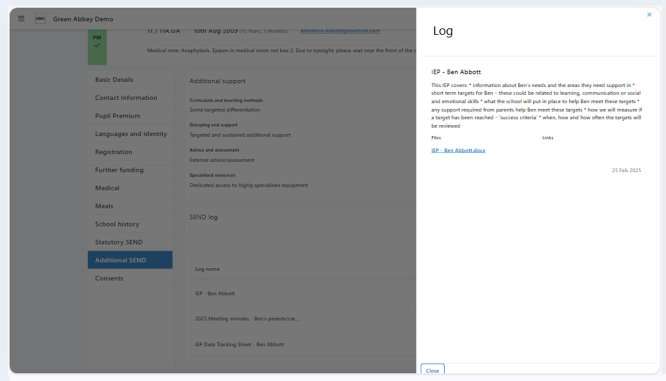
Pupil Profile: Additional SEND/ALN
- View and update additional support areas carried over from SIMS7, ensuring continuity and compliance
- Access a new SEND/ALN Log, exclusive to SIMS Next Gen, where SENDCos/ALNCos can record detailed, tailored information about a pupil’s needs
- Use the pinned status feature to highlight the most critical notes for display in other areas of SIMS Next Gen, such as the Class View Pupil Profile, ensuring that teachers have the right information at the right time
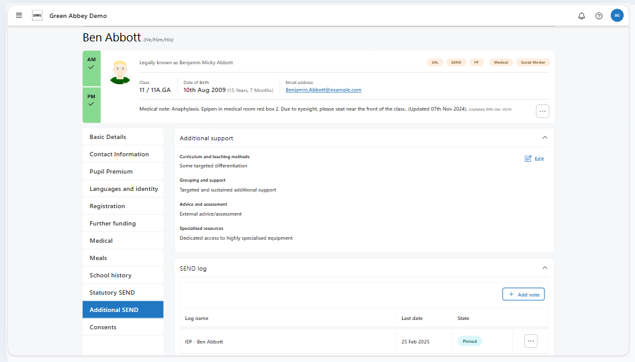
Please click here for further resources
For office staff
Pupil Profile: View and edit leavers
- Quickly create groups of leavers or process individual leavers
- Search for leavers using multiple filters and reinstate pupils on-roll when needed
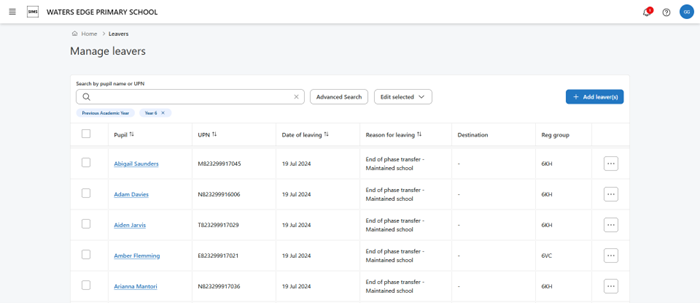
Leavers complete the School History section which is another key building block in Pupil Profile, ensuring schools have a single source of truth for key pupil information.
Please click here to keep up to date for all enhancements past and present.
Staff Absences
With Staff Absences, you can quickly record, or update staff absences and easily gain a clear overview of staff availability at-a-glance:
- Customise, export, and print absence lists
- Record absences by period – Making it even faster to log timetabled staff absences.
- New ‘Sub-type’ field (Illness category) – Bringing in SIMS7 illness data to provide deeper insights.
- Analytics overview in Staff Profiles – allows you to easily identify absence patterns and act proactively
This feature is now available for both primary and secondary schools.
Census is Coming to SIMS Next Gen!
Can I still use Summer Census in SIMS 7?
This Summer term you can still use SIMS 7 but we highly recommend trying out the Summer Census in SIMS Next Gen. It’s been revamped from the ground up and makes it much simpler to prepare your school’s Census. If you’d like to try the new Summer Census in SIMS Next Gen, a limited number of schools can sign up for early access – places are available on a first come, first served basis.
Schools should register their interest here.
If you are still not using SIMS Next Gen, please give us a call and we will be happy to discuss getting your school onboarded!
Call us on: 0345 2226802 or e-mail: helpdesk@schoolicts.co.uk
Webinars
If you are not yet using SIMS Next Gen, please get in contact and we will be happy to go through setting up your SIMS system if needed, help onboarding staff and discuss any of these features!
SIMS Reporting and Analytics – 1st May 2025 10.30-11.00 book here
SIMS Reporting and Analytics enables leaders to get a clear picture of attendance data to help drive improvement.
- Clear and easy to interpret data, with visualisations and key insights, enabling school leaders to identify at risk cohorts and individuals
- Designed to equip you with up to date and relevant data, empowering you to make informed decisions regarding interventions that can enhance attendance and positively influence learning outcomes