
To navigate to the most relevant section, please click the appropriate link below: -

Welcome to our February Newsletter
As we head into the final weeks of the Spring half term, we’d like to update you on a few things coming up next half term: –
- Save the date! Our Spring Term best in class MIS webinar week will be running from the 9th March – invites, schedules and booking links coming soon!
- Summer term training – Summer Term training dates are in the process of being finalised and will be going live ASAP! Watch out for e-mails with course schedules or keep an eye on our bookings page: Online Training
- Working over half term? Our Distance Learning Training courses could be a great fit – content is available for twelve months from sign up, giving you the time and flexibility to complete a course when it’s convenient for you.
- Love it or loathe it? We’d love to hear your feedback on our monthly Newsletter. To capture this we’ve put together a quick survey to find out what you think! It should only take a minute to complete, and hearing your views, thoughts and suggestions would be really valuable to us, so we can shape our content and frequency to what our customers want to see going forward: – Newsletter Feedback Survey – Fill in form
- We’re recruiting! We currently have a vacancy for a Senior MIS Consultant, specialising in Bromcom. If this may be of interest to yourself or anyone you know further information can be found here
Wishing those lucky enough to have time off, an enjoyable half term!
Exam Services
February is a crucial checkpoint in the exams calendar, and the Exams Team at School ICT Services are working closely with schools to ensure everything is in place, on time and fully compliant as we move steadily towards the summer exam series.
📆 Key deadlines coming up this month
- GCSE, A Level & Cambridge Nationals summer exam entries
Most awarding bodies summer entry deadline is 21 February, which is during half term. Entries submitted after this point will begin to attract late fees, which can quickly escalate. - Cambridge International (May/June series)
Final registrations and amendments must be completed this month to avoid additional charges. - BTEC and vocational entries
February is also a key point for checking registrations, cash-ins and learner details to ensure accuracy ahead of moderation and assessment windows. - JCQ – Modified papers
The standard deadline for ordering modified papers has now passed. A late ordering window remains open until 21 March, but additional charges will apply and availability may be limited. Early action is essential to ensure students receive the correct materials. - JCQ – Access Arrangements
The deadline for submitting and approving Access Arrangements for the summer exam series is 21 March. February is the ideal time to ensure assessments are completed, evidence is in place, and applications are submitted well ahead of this cut-off.
Late summer entries and late access arrangement submissions cost schools’ tens of thousands of pounds every year, and in many cases, they’re entirely avoidable with the right planning and support.
If your school is currently without an Exams Officer, or if exam deadlines are becoming a concern, the Exams Team at School ICT can step in quickly to provide calm, experienced support. Whether you need our help with our Exam Mentoring Program to get you safely through entry deadlines, or full exam management of your entire exam processes, we’re here to help.
📞 0345 222 6802
Let February be the month everything falls into place – with no surprises, no late fees, and confidence that your exams are in safe hands!
Data Management Support Services
The Data Services team has been working hand-in-hand with our schools this month, delivering expert support across a range of vital areas – and we’re ready to do the same for you. Whether your data requirements are large or small, you can rely on us as an extension of your own team, dedicated to helping you achieve your strategic data goals. Think of us as your in-house data specialists: we support SLT directly and seamlessly integrate with your school, providing guidance, expertise, and practical solutions even if you don’t have a dedicated Data Manager on staff.
This month, for example, we prepared and organised data for Ofsted requests, ensuring schools had everything needed for inspection. We’ve also delivered best practice guidance on SISRA, showing staff how to maximise this powerful tool and set up reports effectively. In addition, we’ve assisted schools with the Spring Census, offering step-by-step advice and thorough checks for a smooth, compliant submission.
By partnering with our Data Services team, you gain access to a highly experienced Data Manager who will work alongside you, taking the pressure off and ensuring your data is accurate, well managed, and always ready when you need it.
Let us help turn your data challenges into successes – contact us today to discover how we can support your school.
- Please click here for further information.
Timetable Build and Consultancy Services
Best in Class Timetable Services
Timetabling is one of the most demanding jobs in a school. Usually sitting with SLT or Key Data Leads and takes weeks and months of focused work, often spilling into evenings and weekends.
Our timetable services give schools access to experienced timetablers who do this every day, freeing up a huge amount of senior leader time, reducing pressure at peak points in the year, and giving you peace of mind that the timetable has been properly built with confidence and not rushed.
We take a clear, collaborative approach to building and managing your timetable. Ahead of timetable season, we work closely with your school to agree a simple Plan of Action so expectations, timescales and responsibilities are clear. We work alongside a key member of your staff, with an experienced timetable consultant supporting the build and, where needed, continuing to support the timetable throughout the academic year.
Reach out today for more information, request a call back here.
NEW for 2026! Timetable and Curriculum Management Service
Our NEW Timetable and Curriculum Management Service provides schools with expert, year-round support for managing their timetable and curriculum.
The service can work alongside our Timetable Build Consultancy, taking over once the timetable is live, or it can be used as a standalone service for schools that already have a timetable in place but need ongoing support to manage it properly.
Schools are supported by a team of experienced consultants, who understands your structure, staffing and priorities. The team manages the day-to-day and in-year changes that often take up large amounts of time, including rooming, PPA and duties, staff changes, class moves, curriculum updates and year-end preparation. This helps keep data accurate, reduces risk, and stops small changes turning into bigger issues later on.
Used alongside the Timetable Build Consultancy; the service provides a complete end-to-end solution. Used on its own, it gives schools confidence that their timetable and curriculum are being managed consistently and professionally throughout the year, without adding pressure to already stretched teams.
Please enquire here if you’d like to find out more.
MIS and Data Health Check Services
Have you tried our MIS and Data Health Check service?
It’s a simple, yet cost‑effective, way to make sure your school is getting the most out of its MIS. Our team looks at how you’re using your system and helps you spot anything that could be improved.
A health check gives you:
- Clear guidance on best practice
- Updates on new features and useful functions
- Housekeeping and tidy‑up work to keep your data in good shape
- A full report with recommendations and any training you may need
- For on‑premise schools, a server health check is also included
It’s a completely remote service, which usually takes around half a day.
If you’d like to book or find out more, please email helpdesk@schoolicts.co.uk or request a call back here.

February Training Focus: Training Based on What Schools Are Asking Us
This month we have lots of Online Training courses still available and also have our Distance Learning courses too.
In addition to training, we have a FREE Moving MIS webinar on the 27th Feb, which you can book onto here: Moving MIS Considerations – Webinar – School ICT
Please find popular Training courses with further information and links to book below: –
Arbor Clubs and Trips: 🎓 Maximise your use of Arbor with our Clubs and Trips training!
Many schools have recently contacted our helpdesk for support with setting up and managing clubs, trips, and wraparound activities in Arbor — from free after-school groups to paid trips and activities. Our Arbor Clubs and Trips course walks you through how to set up, maintain, and manage these features efficiently, including how pupils join, how bookings work, and how parents can use the Arbor Parent Portal. It’s a great way to save admin time and make sure you’re getting the most from your MIS — book your place today! Arbor Clubs And Trips – School ICT
Arbor Personnel: 📅 Strengthen your staff data in Arbor with our Arbor Personnel training!
Accurate personnel records are the backbone of many statutory requirements, reporting tasks and everyday school administration. Our Arbor Personnel course will guide your team through how to add, edit and maintain staff records, manage pay and contract information, and produce standard reports — giving you confidence that your data is reliable and up to date. With recent support queries highlighting the importance of good staff data, this training is a great opportunity to reduce admin errors and boost efficiency across your school. Learn more and book your place today! Arbor Personnel – School ICT
SIMS Standard Reporting: 📊 Boost your reporting confidence with our SIMS Standard Reporting Online training!
Extracting meaningful information from your MIS doesn’t have to be a headache — and this training is designed to help you do just that. Our Standard Reporting Online course walks you through how to design, filter, sort and produce useful reports efficiently, including setting up outputs, scheduling and sharing results. Whether you’re responding to data requests or analysing trends, this session will give you practical skills to save time and get the most out of your school data. Don’t miss this opportunity to strengthen your reporting skills and make data work harder for you — book your place today! SIMS Standard Reporting – School ICT
Bromcom: 🧑💼 Get confident with your staff records in Bromcom Personnel training!
Accurate personnel information is essential for smooth school administration and data returns — and our Bromcom Personnel course is designed to help you do just that. You’ll learn how to add and update staff records, manage contracts and pay details, handle leavers and promotions, and produce useful reports for checking data quality. With well-maintained personnel data you’ll save time, reduce errors and be better prepared for statutory reporting — don’t miss this opportunity to strengthen your Bromcom skills and boost your confidence with your MIS. Book your place today! Bromcom Personnel – School ICT
FMS
Moving MIS and Financial Year-End considerations in SIMS FMS
It has become apparent that a number of schools are moving MIS and along with this transitioning away from SIMS FMS to alternative finance systems. It is essential that schools carefully assess the implications of such a move, particularly in relation to the timing of their SIMS FMS licence expiry. While some schools may be planning a transition effective from 31 March, this timing requires thorough consideration.
Schools must remain mindful that key FMS year-end processes may extend beyond 1 April, including any statutory or Local Authority (LA) requirements that necessitate continued access to FMS. In many cases, statutory returns such as the Consistent Financial Reporting (CFR) and VAT returns are required after 1 April. Failure to maintain an active licence during this period could adversely affect system access and functionality, potentially delaying or impairing compliance.
For these reasons, we strongly recommend that any proposed transition away from SIMS FMS is discussed in advance with your Local Authority finance team to ensure all financial, statutory, and operational obligations are fully met.
You may want to consider the new FMS Next Gen package. FMS Next Gen is an integrated, 100% cloud-based finance solution with new and enhanced functionality. It provides a comprehensive overview of your school’s finances, enabling busy finance staff to complete day-to-day financial tasks quickly.
To find out more about this package please follow this link.
Or to join our FREE moving MIS webinar on 27th Feb, book here: Moving MIS Considerations – Webinar – School ICT

Click for the latest Arbor updates
Exams
Just a reminder that the exam entry deadline for the Summer 2025 season for most boards is 21st February 2026.
Here are some things you could do to prepare:
- Add students to Exams via Students/Examinations/Candidates/Internal Candidates
- Add your qualifications to Students/Examinations/Qualification Offering – don’t forget, you need both the award and the learning unit, and use the bottom panel to link them to your courses and classes
- Make your entries via Students/Examinations/Entries/Entries by Student Group – don’t forget to make entries for the learning unit too, otherwise you won’t be able to seat exams
- Get your teachers/Heads of department to check the examination entry lists – Students/Examinations/Entries/Download Statement of Entry (by Subject), or (by Course) -> Classes and Courses must be linked to the Qualification
- Create a submission file via Students/Examinations/EDI Exports/Entries
- Download and send the submission file to the relevant exam board via A2C
- Once entries are added a School Timetable can be printed to start planning rooms and invigilators for the summer season via Students/Examinations/Scheduling/School Timetable
- Rooms and seats can start to be allocated and assigned
Do call us if you need assistance with any of the above.
Good luck with the forthcoming exam season!
Exam Fees and Cost Reporting
Please see below for the latest information on Exam Fees and Cost Reporting
Arbor import exam fees information alongside the basedata so you can report on these directly in your MIS.
For more details on basedata, see our guidance here: How does Examination Basedata work in Arbor?
Seeing and editing amounts
EDI exams
Go to School > Examinations > Qualification Offering and select the award. Click the Qualification Offering button in the slide over.
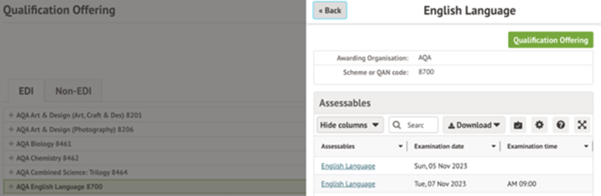
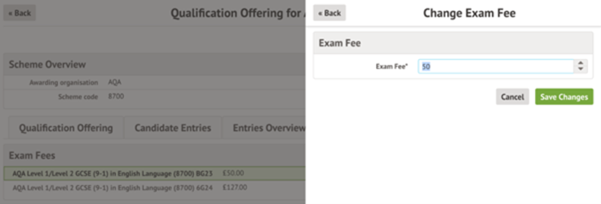
Click into the Exam Fees tab.
You’ll see one line per series. Click on the fees to update them.
Non-EDI exams
As Non-EDI exams are not set up with basedata, you need to define the fees. Go to School > Examinations > Non-EDI and select the award.
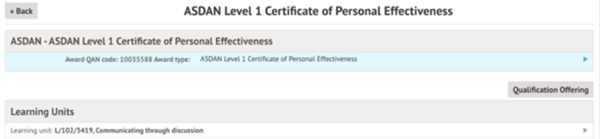
Scroll down to the Exam Fees section and click on the fee to update if needed.
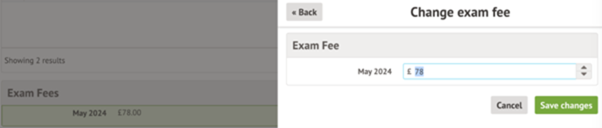
When you add new Candidate Entries, a new row will be added to the Exam Fees section so you can define the fee.

Reporting on fees
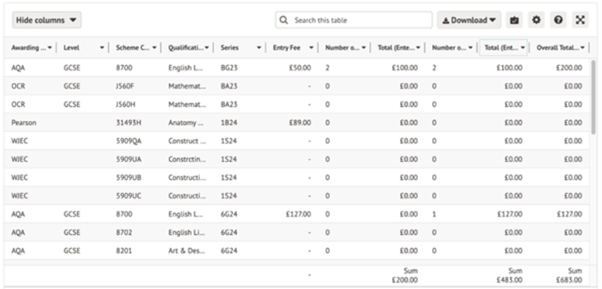
To report on the fees, go to Students > Examinations > Entries > Exam Fees
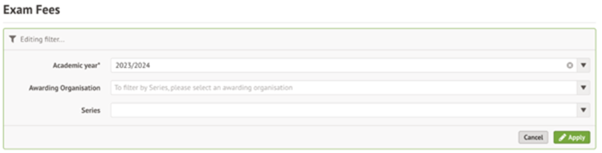
Use the filters to select the academic year, awarding organisation and series if needed.
You’ll see each award as a separate row in the report, including award and series details, fee, number of entries for internal and external candidates and a total cost. You can see an overall sum in the bottom right.
FAQ
Where does the fee information come from?
Fee information comes from the basedata file – this is automatically brought into Arbor so you can set up exams. For more details on basedata, see Arbor’s guidance here: How does Examination Basedata work in Arbor?
Can we reset the amount back to what’s in the basedata?
It isn’t possible to reset the amount, so you’ll need to amend the amount. If you are unsure what the amount is, please contact the Awarding Organisation.
Does this page work with payments?
This feature does not include collecting or paying costs for Exam Fees, integrations with payment gateways or financial institutions.
Why is the fee missing?
Some basedata may not include the fee information. If this field is blank and you are unsure what the amount is, please contact the Awarding Organisation.
Arbor Admin Access
Did you know that we can provide additional Arbor support at no extra cost, as part of your existing MIS SLA?
What benefit does Arbor Admin functionality bring to you?
With your permission, School ICT can be granted Admin functionality on your Arbor MIS site. This access allows our experienced support team to quickly diagnose and resolve common issues including refreshing invoices, populating missing payment accounts and accessing audit logs for troubleshooting.
By enabling this functionality, you’ll benefit from faster resolutions without needing to escalate these tasks to Arbor Support—saving your team valuable time and ensuring smoother day-to-day operations.
If you haven’t had the email and feel you should have, please call School ICT on 0845 222 6802 or email helpdesk@schooolicts.co.uk.
School Census Reminder
Just a reminder that if you are submitting to the DfE the deadline for this is Wednesday 11th February. The next school census will be Thursday 15th May 2025.
Lesson Dashboard – Warning!
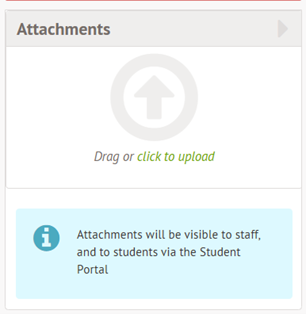
A warning has recently been added to the lesson dashboard advising that any documents uploaded will be accessible to students via the student portal! One to be aware of here if you are adding information to the lesson dashboard which could be confidential!
New Ofsted Report
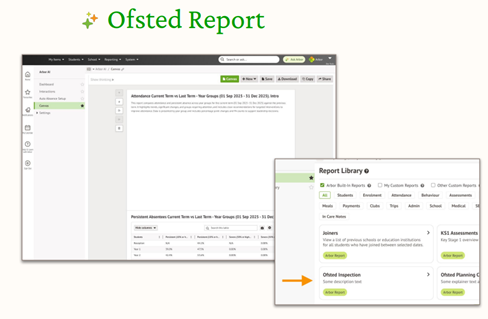
A new Ofsted report is now available in Arbor! It can be used to quickly and easily gather the data you need to share with Ofsted – save time when you need it the most, giving you the space to focus on what’s relevant to your context.
This can be accessed by going to the report library and searching for the Ofsted Inspection Companion.

Click for the latest Bromcom updates
Census Reminder
Just a reminder that if you are submitting to the DfE, the deadline for this is Wednesday 11th February. The next school census will be Thursday 15th May 2025.
Updates and Latest News from Bromcom
System Performance January 2026
“We want to take a moment to update you on the steps we’ve taken to improve your experience with our platform.
In September 2025, the platform didn’t perform at the level we aim to deliver, and we understand the concerns this raised. Since then, we’ve made significant investments in both the platform and its underlying infrastructure to ensure greater stability and performance.
Over the past six months, a dedicated cross-functional team has worked tirelessly, meeting daily from the start of term to monitor platform performance and availability.
These efforts have delivered measurable results:
- Improved stability and uptime during peak periods
- Enhanced performance with faster response times
- Minimal disruption and noise at critical times
We’re proud to share that this term has been one of the smoothest yet, thanks to these improvements. Your feedback and patience have been invaluable in guiding these changes, and we remain committed to continuous improvement.
Thank you for your continued trust and partnership. If you have any questions or would like to share feedback, please don’t hesitate to reach out via the usual channels.”
Roadmap – https://crmapps.bromcomcloud.com/customer/productroadmap
Bromcom have a roadmap page which outlines some of the upcoming features and module updates. On the list for “now” are some long awaited fixes such as: –
- Seating plans not being compatible when opening elsewhere in the system (old vs new UI)
- Brings the new Seating Plan interface to the old UI ensuring a consistent drag-and-drop experience that automatically updates with future improvements
- MCAS – Clubs and Trips
- Redesign Clubs and Trips page to offer admins a streamlined interface with improved navigation, clear sections, and intuitive controls for managing and creating clubs and trips.MCAS – Introduction of new Clubs & Trips Overview, Management of Club Membership & Various Payment Options
- Automatic Duplicates detection during Contact creation and CT/ATF Imports
- Improved workflow with duplicate checking in the New Contact process to prevent duplicates from being created
There are many more updates on the list, but the dates and implementation timeframes may vary.
Census – PLASC Validations Update – Transitional Protection (FSM)
Modules > Census > PLASC > View Errors
We have updated Validation Rule 13242 to support the phasing out of Transitional Protection for Free School Meals (FSM) for the following year groups: Reception, Year 1, Year 7 and Year 8.
This is a statutory update. With this change, schools are able to validate their census data accurately.
What has changed: –
Rule 13242 now enforces the following logic:
If a pupil:
Is not FSM eligible, and
Has an Entry Date on or after 1 January 2024, and
Is not in year group R, 1, 7 or 8,
Then the pupil is not expected to be in receipt of Transitional Protection for free school meals.
Validation message shown to users
Pupil may have been incorrectly recorded as being in receipt of transitional protection for free school meals after becoming eligible via the means-tested criteria after the end of the transitional protection policy on 31 December 2023. If the learner is correctly recorded as being transitionally protected due to being eligible via the means-tested criteria on or before 31 December 2023, please add a comment onto DEWi to reflect this.
(PREVIEW) Vision – Improved Real-Time Updates for Assessments
Draft Preview Releasing 6th February
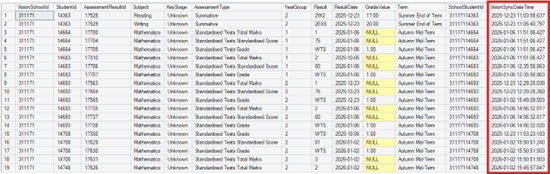
Assessment data now updates in Vision almost instantly when changes are made in Bromcom.
To support Assessment real-time updates, the following tables will be updated to add “VisionSyncDateTime” column:
Student.AssessmentResults
Student.CurriculumAssessmentResults
Student.CTFAssessments
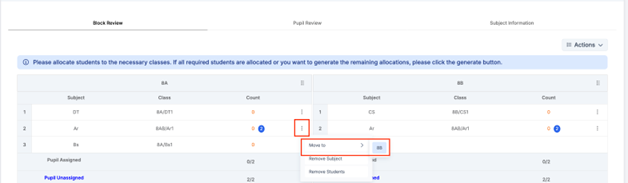
Options – Manual Pattern Validation for Weighted Subjects
Modules > Options > Timetable Patterns
Manual patterns now follow the same validation rules as automatic patterns for weighted subjects, ensuring timetables do not contain duplicate or invalid class allocations. As a result, users will see the following updates:
Subject Information
Weighted subjects will be displayed only once on the Subject Information page.
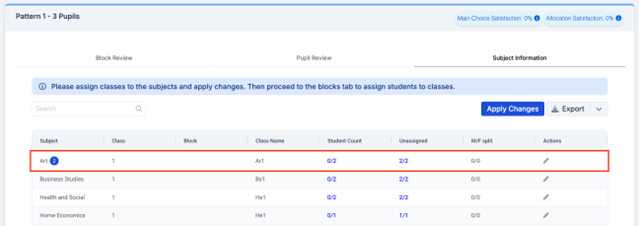
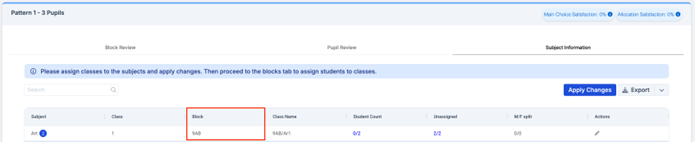
After assigning blocks and selecting Apply Changes, the Block column will retain the exact block combination selected and does not revert back to all the classes going into block A.
Block Review
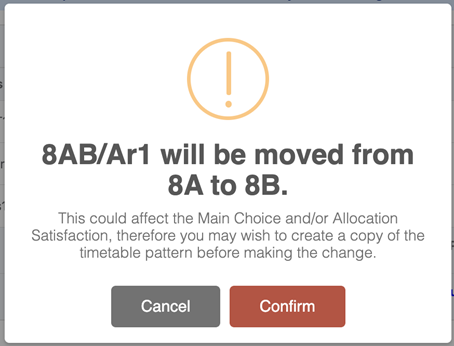
When Apply Changes is selected, each class within a weighted subject will be assigned to a different block.
Each class will be allocated to one of the selected blocks with no duplication, unless the classes contain entirely different students.
All classes within a weighted subject (e.g. Double Science) will contain the same students, with no additional, missing, or differing students.
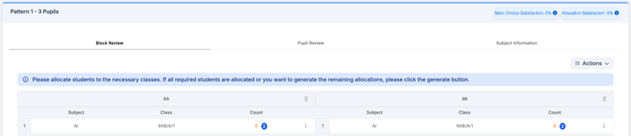
If a user attempts to move a class to a block that already contains the same weighted subject with the same students, the following message will be displayed:

Click for the latest SIMS updates
School Census Reminder
Just a reminder that if you are submitting to the DfE directly then the deadline is Wednesday 11th February 2026. For a valid submission the return should be run using fileset 3202.
The next return will be Thursday 15th May and at present it is being advised that this will be generated in SIMS Next Gen – we will be running training on this prior to the census.
Exams
Just a reminder that the exam entry deadline for the Summer 2026 season for most boards is 21 February 2026.
Here are some things you could do to prepare:
- Create a summer season which includes the months of May/June/July
- Import your candidates into the season
- Visit the websites of the exam boards you use and download the latest basedata for the summer season
- Import your basedata then refresh every time exam boards issue updated basedata – there is an instruction video on our Customer Portal here about refreshing basedata
- Create entry marksheets via Focus/Marksheet Setup – Award and make your entries via Focus/Marksheet – Data Entry
- Get your Teachers/Heads of Department to check the examination entry lists (Reports/Entries/Examination Entry Lists – don’t forget to tick Include Signature box and Include Null List
- Create a submission file via Focus/Submissions/Add
- Send the submission file to the relevant exam board via A2C
- Print a skeleton timetable via Reports/Basedata/Skeleton Timetable to start planning rooms and invigilators for the summer season
Do call us if you need assistance with any of the above.
Good luck with the forthcoming exam season!
PPG will be retiring: SIMS Parent and School Gateway
Starting in February 2026 PPG are introducing a new engagement tool that will replace schools existing SIMS Parent or Schoolcomms application. This will consolidate all the best features from the entire range of engagement tools into a single web based application and App.
This article will highlight upcoming migration steps you will need to consider, what to expect if you currently use SIMS Parent and/or School Gateway, and how the release sequence works.
What’s changing?
PPG will be retiring:
- SIMS Parent – the parent app + Product Admin.
- School Gateway – the parent app + Schoolcomms (legacy version).
These will be replaced by:
- The new Schoolcomms Back Office – a refreshed web experience for school staff.
- The new Schoolcomms App – a modern, fully branded app for parents.
*Important information for SIMS Parent schools the new solution will not include replacements for Activities or Homework until later in 2026.
They plan to migrate schools with low or no usage of these features in February. If your school uses these features actively, please contact them at PEandPayMigration@parentpay.com so they can adjust your migration date*
For more information please see our Knowledge base article
SIMS Next Gen
Are you already using SIMS Next Gen? If not, now is the time to ensure you have onboarded to SIMS Next Gen so that you can start familiarising yourself with how it works!
There is now lots of functionality available in SIMS Next Gen with more features being developed every term.
Please contact us for any assistance with onboarding to SIMS Next Gen or if you have any questions!
SIMS Next Gen for teachers
Teachers should now be able to complete the majority, if not all day-to-day tasks in SIMS Next Gen. From taking daily registers, to recording behaviour and updating marksheets, all this functionality is live now in SIMS Next Gen.
SIMS Class View – Centralising all key functionality in one holistic class overview to support teachers with efficient classroom management
- Teachers can perform key classroom tasks instantly in one place such as taking registers, creating seating plans, access SEND data, add conduct and view vital pupil information such as EAL
- Class View removes the need to purchase additional standalone products or integrate with third parties and migrate data between systems.
- Allows teachers to drive data driven decisions for early intervention
- Assists with Ofsted lesson observations and inspections
SIMS Pupil Profile – Central hub for viewing and editing pupil information
- Each individual pupil record provides instant access to important pupil information such as their medical and school history, meal choices, registration and absences, SEN and Pupil Premium, Parent contact details and more.
- Staff can also access student timetables in real time to view details such as upcoming subjects, lesson codes, room details, teacher etc., helping deal with any safeguarding concerns quickly and efficiently.
SIMS Conduct Management – A simplified approach to managing behaviour effectively
- Record conduct events in seconds – log behaviour for individuals or groups using multi-select. Fully customisable to your school’s policy with smooth workflows for accurate capture.
- Customise to your school policy – define positive and negative event types, set severity levels, and choose how much detail to record.
- Clear behaviour insights – view conduct points on pupil cards and drill deeper with customisable Conduct Dashboards for historical data and trends—no complex reports required.
- Assign consequences with ease – set detentions, report cards or other follow-up actions straight from Class View. Every detail in one place.
Marksheets
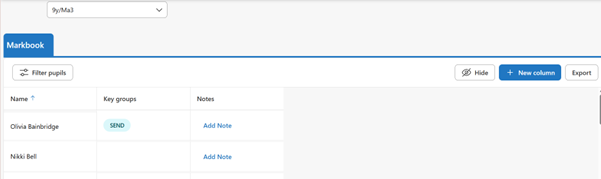
- You can make SIMS 7 marksheets available in SIMS Next Gen for teachers to view and enter data. Adding [SNG] in the notes section of the assessment template will allow an overnight sync and class teachers being able to view the marksheets as a tab within ‘my markbook’ the following day.
Single Central record
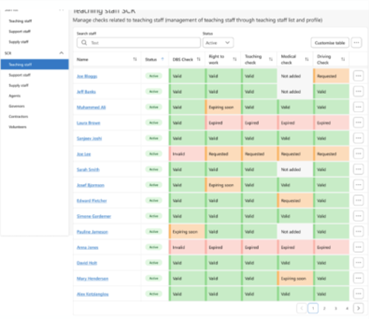
- All safeguarding checks in one place – Easily manage and evidence every compliance requirement for staff, governors, contractors, and volunteers from a single screen.
- Real -time visibility and control – Colour -coded statuses and filters help identify missing or expiring checks instantly, reducing audit risk.
- Flexible and customisable – Each user can tailor the view, select which checks to display, and export or print complete records in one click.
- Covers everyone linked to the school – Supports both staff and non -staff roles, ensuring no individual connected to the school is left outside safeguarding oversight.
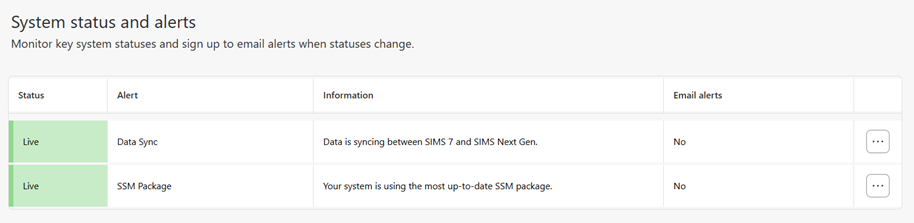
SNG System Status and Alerts
You can also keep up to date with system status and alerts from within the Next Gen admin console to ensure your system is syncing successfully. This component notifies the school if the synchronisation between SIMS 7 and Next Gen has stopped working and confirms that the SIMS Service Manager (SSM) is up to date.
SIMS Next Gen Whitelisting
SIMS Next Gen requires access to various endpoints in order to successfully exchange data. The list below shows the current known URLs that may need to be accessed and therefore may need to be whitelisted through a school/site Firewall, Proxy or ISP.
The SIMS Next Gen config wizard will need the following URLs whitelisted to connect:
- Core URL: https://simsid-orgsel.sims.co.uk
- simsid_verifyurl = ‘https://simsid-live-rapapi.azurewebsites.net/api/v1/Onboarding/ValidateClient‘
- simsid_onboardingUrl = ‘https://simsid-live-rapapi.azurewebsites.net/api/v1/Onboarding‘
- simsid_selfregistrationUrl = ‘https://simsid-live-rapapi.azurewebsites.net/api/v1/Admin‘
- simsid_RetrieveUsersUrl = ‘https://simsid-live-rapapi.azurewebsites.net/api/v1/onboarding/ValidateOrganisation‘
Other SIMS Next Gen URLs to be whitelisted are:
- staff.sims.co.uk
- Teacher.sims.co.uk
- Learners.sims.co.uk
- Customgroups.sims.co.uk
- sas.sims.co.uk
- class.sims.co.uk
- cnd.sims.co.uk
- staff.sims.co.uk/absences
- school.sims.co.uk/staff-timetable
- https://live-mfe.teacher.sims.co.uk
- https://simsdatatransfer-live-relay.servicebus.windows.net/
- https://sts.sims.co.uk
- https://data-transfer.sims.co.uk
- https://simslabs.blob.core.windows.net/datatransfer
- https://live-ssm-blb.sims.co.uk
- https://data-transfer-ng.sims.co.uk
- stprocessorsmprod.blob.core.windows.net
- blob.lon23prdstrz12a.store.core.windows.net
- blob.lon24prdstr09a.store.core.windows.net
- pazprdstfsa.blob.core.windows.net
- https://s9uksouth.blob.core.windows.net
- https://s9ukwest.blob.core.windows.net
- https://s9northeurope.blob.core.windows.net
- https://s9westeurope.blob.core.windows.net