

To navigate to the most relevant section, please click the appropriate link below: -

Wishing You a Great Summer from all at School ICT!
As the summer break begins, we’d like to wish all our schools a restful, happy and well-deserved summer.
We know how much hard work goes into the school year, and summer often brings a welcome chance to pause after another busy term.
Whether you are finishing for the holidays or continuing to work behind the scenes, we hope the weeks ahead give you some time to recharge.
Our teams will continue to be here throughout the summer, Monday to Friday, 8am to 5pm, ready to support you. Alongside our MIS support team, our Data Management and Exams Service teams will also be working hard behind the scenes on the key work that continues over the summer, helping schools prepare for the new academic year and supporting those all-important A-Level and GCSE results days. Whether you need help with day-to-day queries, preparation for the new academic year, or support at these important times, we are here if you need us.
For exam results download days, the team will be available:
- Email and portal enquiries from 7am
- Telephone lines will open as normal from 8am to 5pm
Thank you for working with us this year. We really do value the relationships we have with our schools and MATs, and we appreciate the trust you place in us. We hope you have a lovely summer, and we look forward to working with you again in the new academic year.
Ruth
Head of Services
MIS Support
We know everyone works differently, so we’ve made it easy for you to reach us in the way that suits you best. There are several flexible support options available, and you can simply choose the one that’s most convenient for you.
Customer contact options
Live chat @ https://my.schoolicts.co.uk/
Customer Portal @ https://my.schoolicts.co.uk/
Our customer portals allow you to
- Log and track tickets
- Watch webinars
- Search Knowledge base for information
- Latest news
Call: 0345 222 6802 Option 1 for MIS support *please leave voicemail where lines are busy during peak periods
Please remember that you can request support in various different ways, by requesting support via Live chat:
Key Benefits of Our Live Chat:
- Instant Support: Get your questions answered in real-time by our knowledgeable support consultants.
- Expert Assistance: Our live chat is staffed by real people, ready to provide you with personalised support.
- Convenience: Access live assistance directly from our website, without the need for phone calls or emails.
- Efficiency: Resolve issues faster with immediate responses and quick solutions.
To start using Live Chat, simply visit our customer portal, log in and click on the chat icon at the bottom right corner. Our team is ready and eager to assist you with any enquiries or support you may need.

Customers can also log tickets via the customer portal at our customer portal:

When you log a ticket via the customer portal, select the Ticket type either MIS or Technical to ensure it gets to the right team. The Priority, if you have an urgent ticket, MIS down for example please select either P1/P2 all other tickets default to P3 or even P4 if not urgent.
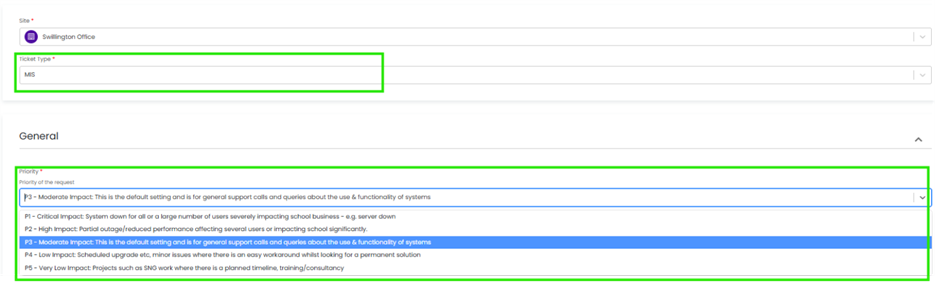
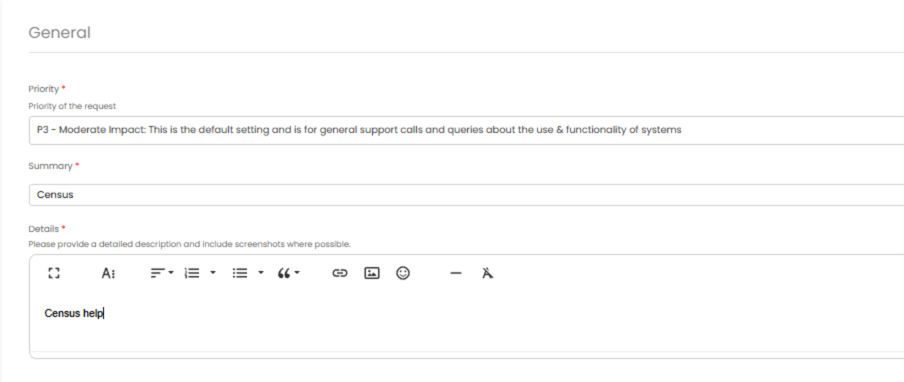
Once you enter the Subject and Details box, you will see a pop up box with suggested articles in the top right hand corner:
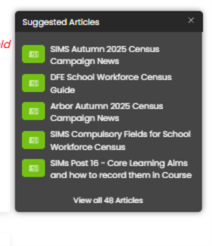
Clicking on the links in this pop-up may help you to resolve your issue without our input, so please also make use of this.
Remember to tell us which MIS and Module but also really importantly if OFSTED are onsite as this helps us prioritise your call through our OFSTED Watch service and also your preferred contact method as we know sometimes an email reply is what you need during your busy period.
We know you like to speak to us (and we like to speak to you!) but in order to offer the best service to our customers, this is
often the quickest way to log a support request at busy times.
And lastly, as always, our experienced team are on hand to take your calls, so please reach out via 0345 222 6802 if the lines are busy and to save your precious time waiting you can leave a voicemail. This method will automatically generate a ticket and this means that the person who can help you best is the person who will call you back. If you do this, PLEASE leave your name, the name of the school, the best number to call back on and a brief description of why you’re ringing, as this means that the best person to help you is the one that will call back.
Exam Services - Another exam season comes to a close
As the 2026 exam series draws to an end, many Exam Officers across the country will finally be taking a well-earned breath.
For most schools, the summer exam season represents the culmination of almost an entire year’s worth of planning, preparation, administration and compliance. Whilst students sit their final papers over a matter of weeks, Exam Officers have often been working behind the scenes for months to ensure everything runs smoothly.
As we reflect on another busy exam year, it is worth recognising some of the challenges schools may have faced along the way.
For some schools, unexpected staff absence may have required the activation of their JCQ Contingency Plan, with schools needing to quickly identify how critical exam processes would continue in the absence of their Exam Officer.
Others may have experienced difficulties recruiting and retaining invigilators, particularly during peak exam periods where experienced and reliable invigilators are increasingly difficult to secure.
We continue to see examples nationally of maladministration, often not through negligence, but simply through lack of experience, insufficient training, or limited support. In a role where regulations change annually and deadlines are unforgiving, even the most capable individuals can find themselves facing challenges.
Many schools will also have undergone a JCQ Inspection this year. Whilst inspections are a valuable part of maintaining standards across the sector, they can understandably create additional pressure and anxiety, particularly for newer Exam Officers navigating their first exam cycle.
The reality is that the Exam Officer role has evolved significantly over the years. What was once a responsibility often overseen by senior leaders has become a highly specialised profession requiring exceptional organisational skills, attention to detail, regulatory knowledge and resilience.
Yet many Exam Officers still find themselves managing this responsibility alone.
At School ICT Services, we understand these challenges because our team has lived them.
Our experienced Exams Team supports schools throughout the entire exam cycle, helping to reduce risk, improve compliance and provide reassurance when it is needed most.
Whether you are:
- Recruiting a new Exam Officer
- Supporting an existing member of staff who is new to role
- Concerned about resilience and contingency planning
- Looking to reduce workload during peak periods
- Preparing for future JCQ inspections
- Seeking additional expertise for complex exam administration
We can help!
Our Two-Year Exam Officer Mentoring Programme provides structured guidance throughout the full exam cycle, ensuring new Exam Officers are never left to navigate the role alone. We provide practical support, expert advice and ongoing reassurance during every stage of the academic year.
For schools requiring additional capacity, our team can also provide project support for key activities such as entries, access arrangements administration, seating planning, results preparation, post-results services and more.
For those seeking a fully outsourced solution, our Managed Exam Service offers complete exam administration support delivered by experienced specialists, providing schools with built-in resilience, compliance expertise and continuity throughout the year.
As we look ahead to the 2026/27 academic year, now is the perfect time to reflect on what worked well, identify any areas of risk, and put support in place before the next exam cycle begins.
If you’d like to discuss how we can support your school, your Exam Officer, or your wider exams team, we’d be delighted to have a conversation.
Contact Us To find out more contact us today via info@schoolicts.co.uk or calling 0345 222 6802 option 5
Whether you need mentoring, project support, invigilation services or a fully managed solution, our team is here to help.
Together, we can make the next exam season less stressful, more resilient and fully compliant from start to finish.
Wishing all students, Exam Officers, invigilators and school staff a restful and well-deserved summer break.
Data Management Services
Our Data Management Service gives schools, academies and MATs access to experienced school data experts who act as a dependable extension of your team. Delivered remotely through secure access, the service provides a trusted managed service across assessment, census, exam results analysis, reporting and wider day-to-day data management, with a strong focus on managing statutory returns accurately and supporting schools to maximise funding.
For schools, the value is not only in having the work completed, but in knowing it is being handled accurately, efficiently and by specialists who understand the realities of the education sector. It offers a reliable long-term solution for data management capacity, while also giving schools access to short-term cover during sickness absence, maternity leave, busy periods or unexpected staffing gaps. Customers value the reassurance of responsive, knowledgeable support, the confidence that comes from expert advice and best practice, and the peace of mind of knowing continuity is in place. Feedback consistently highlights the service as reliable, efficient and good value for money, helping schools reduce pressure on internal teams without the cost and delay of recruitment or additional training.
To find out more contact us today via info@schoolicts.co.uk or calling 0345 222 6802 option 5 or read our case-study from St Richard Gwyn Catholic High School to find out why they couldn’t be without their remote Data Manager from School ICT.
Primary School MIS Reporting Made Easy!

This time of year is incredibly busy with assessments, in this newsletter we have provided some quick tips for analysing statutory data and where to find information on how to do the assessment new year setup.
Summer Data
Please ensure all summer data has been entered into Arbor or SIMS prior to the end of the summer term and check it is appearing in helloData. This includes importing the MTC and KS2 test results into the MIS.
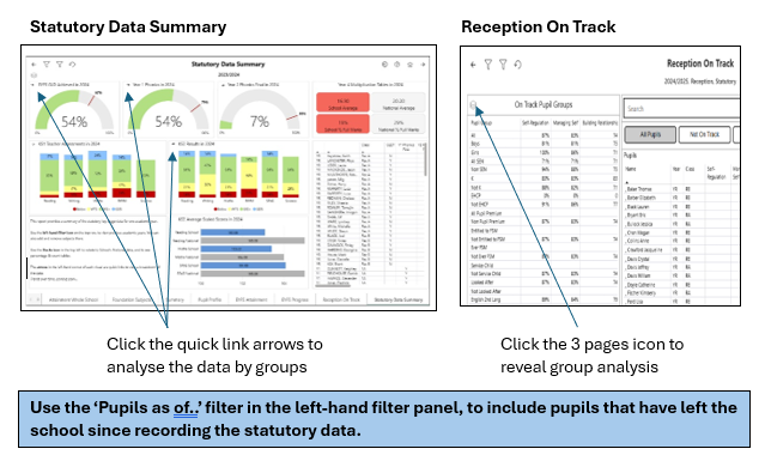
There are several reports available to analyse your statutory data quickly and against national data, both at school level and trust level, for example:
Setting up Assessments for the new academic year – Arbor
- Videos and instructions are available in the help section of helloData.
- Come along to our summer user group meeting on July 6th at 1.30pm to see the process book here.
- Live webinar in the new academic year, booking details will be sent in September.
- We can do it for you, costing just £65, email admin@hello-data.co.uk.
Not heard of helloData?
Integrating seamlessly with Arbor or SIMS, our reporting tool delivers comprehensive analysis of assessment, attendance, and demographic data across MAT, school, and cohort levels, contact admin@hello-data.co.uk or visit www.hello-data.co.uk to find out more.

Summer Term Training Courses - Training to support a successful end to the academic year and ensure you're set up for success in September
With our final courses of the academic year approaching, we’re focussing on supporting you through exams results season. Our distance learning courses are also a great option over the summer – the quieter period can be the perfect opportunity to fit in training.
Thank you for joining us this year and keep an eye out for our 2026-27 courses launching shortly.
Getting ready for a stress-free results day
Our final courses of the year are focussed on preparing for results days and handling exams results in your MIS – what to do, what to check beforehand and how to avoid any last-minute surprises. If you’re involved in results day this is a great chance to feel properly prepared. You’ll leave feeling confident about what needs to be in place before results day, and what to do if anything doesn’t look quite right.
Arbor Exams – Managing Results day – Monday 13th July 9.30am-12.30pm Arbor Managing Results Day – School ICT
SIMS Exams – Managing Results Day – Tuesday 14th July 9.30am-3.30pm SIMS Managing Results Day – School ICT
Bromcom – Managing Results Day – Wednesday 15th July 9.30am-12.30pm Bromcom Managing Results Day – School ICT
To view all available courses or to book a place please visit https://www.schoolicts.co.uk/online-training/
Looking ahead to September
For schools with some summer capacity, now is an ideal time to review and strengthen systems, processes and preparation for September. Our experienced consultants support everything from data quality and reporting, to checking your MIS is fully set up and ready – helping ensure a smooth start to the new academic year.
Contact us to explore how we can help you prepare for September, call us on 0345 2226802 or email helpdesk@schoolicts.co.uk.
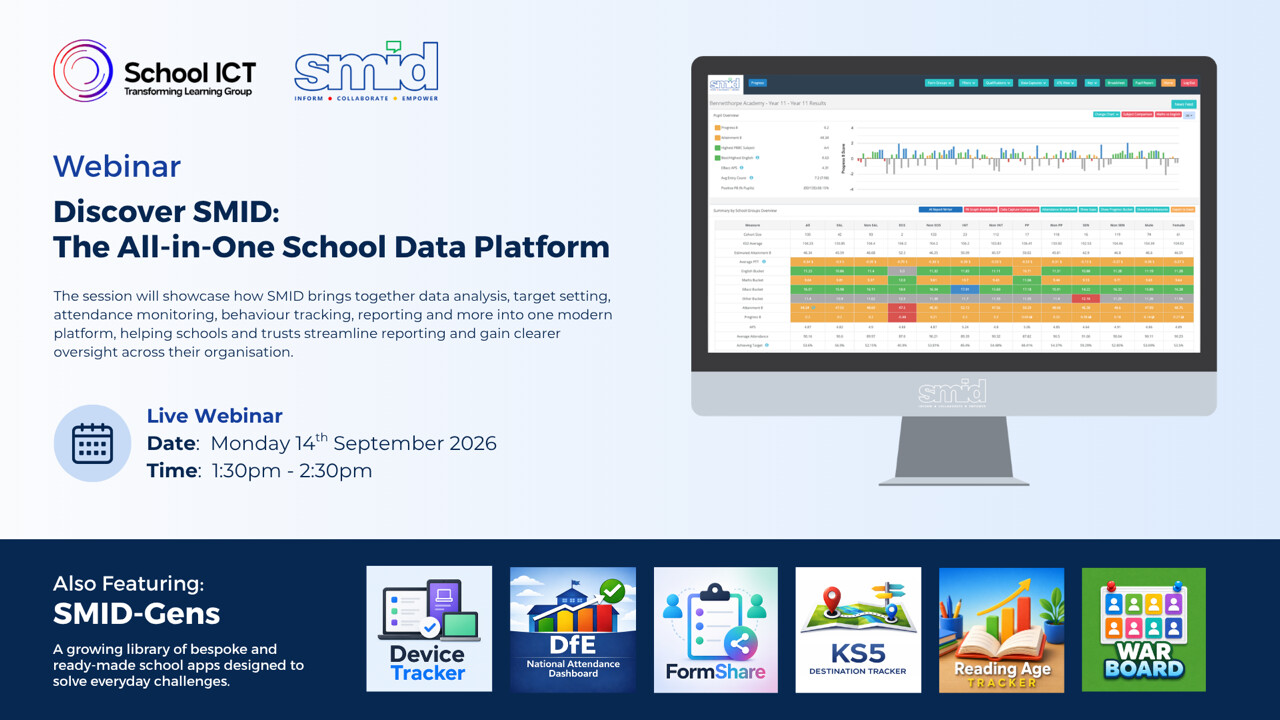
FREE Webinar - Discover SMID: Making Your School Data Work Smarter
Schools hold a huge volume of data – but bringing it together in a way that’s clear, meaningful and genuinely useful can be a challenge.
Join us for this free webinar on Monday 14th September to discover SMID, an all-in-one school data platform designed to simplify how you work with your MIS data. We’ll showcase how SMID brings together your school data into one modern, easy to use system – giving you clearer oversight across your school or trust.
If you’re looking for a more joined-up, accessible way to turn data into strategic insight, this session is a great place to start.
Register here: Discover SMID: The All-in-One School Data Platform
Data Healthcheck Services
Confidence in your data = Confidence in your decisions.
Independent audit and scrutiny services that help schools and trusts strengthen data, systems and processes through clear insight and practical recommendations.
Post-16 Funding Scrutiny
Post-16 Funding Scrutiny. We review the key MIS data that underpins Post-16 funding, including:
- Condition of Funding compliance
- Student programmes, learning aims and planned hours
- Prior attainment data
- Course information & data accuracy
- Student end dates and leaver records
Benefits for schools:
Helps protect Post-16 funding by checking that key data, including planned hours, core aims and enrolments, is accurate and meets DfE requirements.
Why choose us:
Our Post-16 specialists have a strong track record of helping schools secure funding and address issues before they become costly.
We give schools practical support and straightforward advice based on real experience of Post-16 funding rules.
MIS Data Assurance Review
MIS Data Assurance Review. We carry out a structured review of your MIS to provide independent assurance that it is set up well, used consistently and supporting day-to-day operations. We review the areas most likely to create risk, inefficiency or uncertainty, including:
- Accuracy & integrity of key MIS data
- Compliance with statutory returns and funding requirements
- User access, permissions and data security
- Efficiency and consistency of day-to-day MIS processes
- Effectiveness of core operational areas, including attendance, behaviour, assessment and cover
Benefits for schools:
Strengthens confidence in the data used for decisions, returns and reporting, while reducing risk around compliance, access permissions and inconsistent system use.
Why choose us:
Our MIS consultants work across Arbor, Bromcom and SIMS, giving schools practical, independent assurance grounded in day-to-day operational knowledge.
We highlight what needs attention, what to prioritise first and how to get more from the system you already have.
MAT Engagement Audit
MAT MIS Engagement Audit. We assess how effectively the MIS supports the wider strategic and operational needs of your trust, with a focus on consistency across schools, the quality of trust-level information and how well systems and processes support leadership oversight. This review includes:
- Core operational processes
Reviewing whether key processes such as attendance, behaviour, assessment and cover are aligned well enough across schools to support trust-wide oversight
- Data quality & strategic reporting
Assessing whether the trust has access to accurate, meaningful and consistent information to support strategic planning, challenge and decision-making
- Statutory returns and compliance
Reviewing whether census and reporting processes are sufficiently aligned and robust to support trust assurance and reduce risk
Benefits for MATs:
Gives trusts a clearer view of how well MIS-related processes support strategic oversight, highlights where greater consistency is needed across schools, and strengthens confidence in trust-level reporting.
Why choose us instead of other suppliers:
We combine trust-level insight with school-level MIS expertise to show how systems, processes and reporting come together across the organisation, giving leaders a joined-up view of what is working well and where greater alignment is needed.
We provide clear recommendations and practical next steps through initial meetings, questionnaires/consultation, followed up at 6 months, 12 months and then annually by agreement to help trusts strengthen oversight, improve consistency across schools and make better use of trust-wide information.
MAT Systems Audit
MAT Systems Audit. We audit how the MIS is configured and used across the trust’s schools, with a focus on making better use of existing functionality, improving consistency in system use and identifying where third-party software may be unnecessary. This review focuses on key areas including:
- Use of existing MIS functionality and whether features are being adopted consistently across schools
- System and data alignment across schools to support stronger reporting and more effective MAT-level analytics
- System configuration, setup and use of core functionality
- Efficiency of workflows and day-to-day system use across schools
- Use of third-party systems, including where software can be reduced or removed because the MIS already meets the need
- Staff confidence, capability and training needs
Benefits for MATs:
Helps trusts get more value from their existing MIS, improve consistency in how systems are used across schools, strengthen MAT-level analytics, and reduce unnecessary spend on third-party software.
Why choose us:
We combine audit expertise with practical knowledge of how MIS works in schools, helping trusts identify where functionality is underused, where processes can be simplified and where other systems may no longer be needed.
We provide a clear report and practical recommendations through initial meetings, questionnaires/consultation, followed up at 6 months, 12 months and then annually by agreement to help trusts optimise system use, improve consistency across schools and get more from the MIS they already have.
Interested in a Data Assurance Review? Get in touch at helpdesk@schoolicts.co.uk to find out more or book your session.
Looking to get more from your MIS? (Arbor, Bromcom or SIMS)
With the end of term approaching, it’s a good time to think about how your systems are working for you. Our team of expert consultants can help you make better use of your MIS, from quick wins to longer-term improvements. Recently, this has included helping schools tidy up their data, design bespoke assessment systems and set up new behaviour frameworks.
If you’re interested in finding out more, or just want to talk through what might help, please get in touch via any of the usual channels.

FMS - Migrations to FMS Connected
FMS – The future of your Finances!
Parent Pay Group are moving forward with their on-going project to move all FMS6 schools to FMS (next gen)!
This is a huge project that will continue throughout all of 2026!
ESS/PPG will be actively contacting schools direct and inviting them to migrate at a suitable time.
- Step 1 – When school receive the email, please complete the On-boarding form.
- Step 2 – School will be invited to choose their migration timeslot
- Step 3 – Move from FMS6 local to FMS Connected. – This is usually a 24 hr process.
- Step 4 – Later in the year – Move from FMS6 Connected to FMS
Why this change matters
Moving to a single, cloud-based platform allows us to deliver a more secure, reliable and continuously improving service for schools while reducing the technical burden on school finance teams. This is a mandated move, and so your school will need to transition to FMS Connected by the end of the move period. If the move process is not scheduled as per the timeline, then access to local FMS6 may be restricted.
We advise that schools keep a look out for the comms from PPG/ESS when your time to migrate is due. When it is your time to move you will receive weekly reminders to complete the on-boarding form and choose your preferred date. Please do not ignore these emails.
Please note: Schools who are scheduled to move over the summer break will be contacted by PPG in July. This is mainly targeted to Secondary/High schools who may have staff working over this period.
Any queries or help lease contact the Helpdesk.

Click for the latest Arbor updates
End of Year
With the Summer holidays rapidly approaching, many of you will be busy completing your End of Year procedures and preparing for the new academic year. Our comprehensive End of Year resources provide guidance, key information and useful reminders to help you work through essential tasks with confidence. Use the resources to support a smooth end to the academic year and get September-ready before enjoying a well-earned summer break.
You can find our End of Year resources here: Arbor End of Year Campaign News
Top tips
- Ask staff to check their Arbor access before the first day back. If anyone has forgotten their password, they can use the forgotten password option. Expired passwords will need to be reset by the Arbor Administrator.
- Remember that registers will not show on the homepage for teachers until the first day students are back in school.
- If staff cannot see their registers, check that the lesson exists, the staff member has been assigned to it, and they have the correct permissions.
- For new starters, check applicants have been enrolled with the correct start date so they appear in the right registers.
- If duplicate students are created after importing a CTF, use the Data Quality Dashboard to review and resolve suspected duplicates.
Arbor Admin Access
Did you know that we can provide additional Arbor support at no extra cost, as part of your existing MIS SLA?
What benefit does Arbor Admin functionality bring to you?
With your permission, School ICT can be granted Admin functionality on your Arbor MIS site. This access allows our experienced support team to quickly diagnose and resolve common issues including refreshing invoices, populating missing payment accounts and accessing audit logs for troubleshooting.
By enabling this functionality, you’ll benefit from faster resolutions without needing to escalate these tasks to Arbor Support—saving your team valuable time and ensuring smoother day-to-day operations.
If you haven’t had the email and feel you should have, please call School ICT on 0345 222 6802 or email helpdesk@schooolicts.co.uk.
Summer Exam Results Days 2026
With GCSE and A-Level results days on the horizon, now is a great time to make sure you’re prepared. Our guidance and resources can help you understand the key processes involved, giving you the confidence that everything’s in place before results are released and helping to make results day as smooth as possible.
Before results day
- Ensure you have set the embargo settings for who can view results on download days by going to Students | Examinations |Administration | Results Embargo Settings Setting exam results embargo dates
- Check your Arbor permissions will allow you to import exam results
- Check that all qualifications you are expecting results for are shown in Students | Examinations | Qualifications |Qualification Offering
- If you have students who will be certificating for BTEC qualifications, please request the 7B basedata from Edexcel Online. Once received, please upload via Students | Examinations | Administration | Pearson Basedata Upload. Please allow 24 hours for the basedata to finish uploading to your site. The qualifications can then be added to your Qualification Offering and the relevant entries should be made and sent to Pearson via an entry file. Adding 7B exam basedata
On results download day
- Import results via Students | Examinations | Results Administration | Results Import Add or Import exam results into Arbor
- Prepare to create and share statements of results Create and share statements of exam results
- Troubleshoot any errors Why can’t I import exam results?
Performance Measures
What's New in Arbor
Arbor have continued to develop regular enhancements across the platform, with recent updates focusing on compliance, efficiency and usability. Here’s a summary of some of the latest improvements now available to schools.
The Weekly Bulletin
Arbor have just launched the Weekly Bulletin. At the press of a button you can access an analysis of your school’s attendance and behaviour data for the past two full weeks. It’s short and easy to digest, making to perfect to share ahead of your weekly SLT meeting.
To find it simply head to Reporting | Report Library and search for Weekly Bulletin.
Free School Meals (FSM) eligibility updates
Ahead of the DfE’s intrudction of new FSM eligibility categories, Arbor have enhanced FSM management within the MIS. Schools can now manage Targeted FSM, Expanded FSM and Other FSM separately, with new verification fields to support annual eligibility checks and compliance.
New for MATs: KS2 DfE Assessment KPIs
MAT users can now access KS2 DfE Assessment KPIs directly within MAT MIS, bringing the same attainment and progress insights available in School MIS t a trust-wide view. This makes it easier to analyse performance across schools and support strategic decision-making.
Faster access to demographic information
Finding key pupil information is now even quicker. Demographic pages such as Pupil Premium, FSM and SEN can now be accessed directly from Arbor’s main search bar, reducing the need to navigate through multiple menus.
Improvements to Ask Arbor AI
Arbor have introduced a range of enhancements to Ask Arbor, their built-in AI assistant, including:
- A new prompt library to help users get started
- Easier access to recent conversations
- Personalisation options for the assistant
- Notifications when responses are ready
- An increased free monthly AI allowance, providing up to six times more usage at no extra cost
Ask Arbor can help users quickly access student information, explore attendance and behaviour trends, and find answers without the need to navigate menus or build reports.
A number of additional improvements have also been released, including:
- Automatic display of Unique Property Reference Numbers (UPRNs) on validated addresses
- A new review step within Automatic Enrolment, allowing schools to confirm students before enrolment is completed
- Updates to Timetabler 6.606, including improved lesson rooming performance, clearer visibility of lesson allocation and availability, and fixes for bulk teacher unassignment when using filters.

Click for the latest Bromcom updates
End of Year
With the Summer holidays rapidly approaching you will be starting, or in the process of your End of Year Procedures.
For guidance and important information, please check out our Bromcom End of Year Campaign News
Top tips
- Ask staff to check their Bromcom access before September. If they have forgotten their password, they can use the forgotten details option, unless your school uses Single Sign On.
- If a user cannot see a register, check they are assigned to the group with the correct date range and that the group is still active.
- Make sure new students have been admitted through Finalise Admissions so they show as On Roll and appear in the search bar.
- If timetable changes are needed, consider whether these should be made in your timetable software and imported, or updated manually in Bromcom.
- For student membership changes in September, use the student enrolment tab for individual changes or Curriculum Bulk Group Assignment for larger updates.
What's New in Bromcom?
Recent Bromcom updates continue to focus on statutory compliance and reducing administration. Here are the latest enhancements that are likely to have the biggest impact in schools.
Improved ATF and CTF imports
Admissions and Common Transfer File imports now include contact matching to help prevent duplicate parent and contact records being created during imports. This should reduce manual data cleansing and improve the quality of student contact information, particularly during busy admissions and transition periods.
Managed Move enhancements
The Managed Move process has been refined ahead of the Autumn Census, making it easier to record and maintain the information required for in-year managed moves. This supports more accurate statutory reporting and provides a clearer audit trail for schools managing pupil transfers.
wTimetable developments
Schools using wTimetable can now benefit from a standard two-week timetable report, together with the ability to import Nova timetable files. These improvements should make timetable production and migration easier for schools reviewing or replacing existing timetable processes.
Vision reporting improvements
Several updates have been made to Vision, including enhanced Attendance Dashboard filtering and exports, alongside performance improvements for Staff Absence and Student Exclusion data. These changes make analysing key operational data faster and more efficient for leadership teams.
Finance enhancements
Online Payments schedules and mappings now apply across all financial years, reducing the need for annual reconfiguration. In addition, improvements to online banking audit logs provide clearer financial tracking and support stronger audit processes.
Summer Exam Result Days
With the exam results period fast approaching, we have collated all of the information you need to feel prepared, including early morning help desk support, training sessions, and key documentation.
Full details can be found in our Bromcom Exams Campaign News.
Key tasks include:
- Ensure you check and refresh your basedata if necessary – guidance linked below.
- If you are using the Student Portal to publish examination results, please refer to the How to configure Exams for the Student Portal document linked below to configure it correctly.
- Ensure you set result embargoes. First, define which staff can view embargoed results via Config > Setup > Roles and Permissions. Choose a role (eg Exams Officer), go to the Examination module, then the Maintenance section and ensure View Embargoes Results is ticked. Second, set the embargo via Config > Examination > Seasons. Select the correct season and ensure that Results Embargoed? is ticked (full instructions in the guide below).
- If you have students who will be certificating for BTEC qualifications this summer, please request the 7B basedata from Edexcel Online. Once received, please import into Bromcom, make the relevant entries and send to Pearson via an entry file.
- Please refer to the Results Day Guide 2026 need to be for a full explanation of all the above tasks.

Click for the latest SIMS updates
Important: SIMS menu redirects are being introduced over the coming weeks
Upcoming change to SIMS that will begin affecting schools over the next couple of weeks.
As part of the continued rollout of SIMS Next Gen, some areas currently accessed through SIMS 7 will begin redirecting to SIMS Next Gen instead. This is being introduced in phases and means that, when users select certain menu options in SIMS 7, they will be taken directly to the equivalent area in SIMS Next Gen.
The first areas affected include:
- Timetables
- Attendance registers
- Conduct
- Custom groups
What schools need to do
If your school uses SIMS on-premise, it is important to make sure staff are ready before these redirects go live.
Your school should:
- Ensure that all relevant staff have been given access to SIMS Next Gen
- Ask staff to log in and test access before the redirects are enabled
- Make sure your System Manager / administrator can access the SIMS Next Gen Admin Console
- Review the guidance and resources available using the below link:
https://link.parentpay.com/m/1/60688785/p1-t26131-6831823328244b3e985fb821aaa11e63/1/1/1
If these steps are not completed in advance, staff may not be able to access the redirected areas when the change takes effect.
Need support?
If you need any help preparing for these changes, please get in touch via the service desk. We will be happy to support you with access, setup and any questions you may have.
End of Year
With the summer holidays fast approaching, many schools will already be starting, or working through, their End of Year procedures. These tasks must be completed before September, so it is important to make sure everything is in place ready for the new academic year.
For guidance, key reminders and important information, please check out our SIMS End of Year Campaign News, scroll to the bottom and you’ll find a series of quick guides in the related articles section at the bottom of the page, which give a reminder of the tasks that need to be carried out.
Top tips
- If your school has a 6-term academic year, please remember that you do not need to set up half terms when creating your new academic year. If you need any help, please contact the helpdesk.
- In September, remember to change the academic year on your SIMS homepage so it shows the new academic year. You should also admit pre-admission pupils when they begin school.
- It is also a good time to carry out some housekeeping tasks to help keep your data tidy and up to date.
- Update Mailing Point, reset parental ballot flags and update name formats: Tools | Housekeeping | General
- Delete unlinked contacts: Tools | Housekeeping | Delete unlinked contacts
- Update salutations: Routines | Pupil | Update salutation
- Tidy and merge addresses: Tools | Housekeeping | Bulk Address Tools | Tidy and Merge Addresses
What's New in SNG?
Migration of SIMS 7 Documents to the Cloud
In the first stage PPG will copy SIMS 7 documents, for Next Gen enabled schools, on-premises and Connected, to their secure SIMS Next Gen cloud storage. This means all documents will have a single, safe home – across both SIMS 7 and SIMS Next Gen.
What this means for schools
- Following the SIMS 7 Summer (7.230) release, any new documentssaved in SIMS 7 will go directly to cloud storage in SIMS Next Gen.
- Day-to-day use of SIMS 7 continues exactly as normal and documents can still be added, viewed, and edited in the usual way.
- Over the coming months, existing documents will be copied securely in the background, automatically, and outside school hours to avoid any disruption.
Pupil reports – Conduct Pupil Insight Report and Absence Bandings Pupil Drill-Down Report
Available for all schools in England and Wales
Two new pupil reports are now available in SIMS Next Gen, giving staff richer insight into pupil conduct and attendance, so schools can spot patterns early and act fast.
Key features
Conduct Pupil Insight Report
- A clear, high-level summary of behaviour and achievement across the school:
- a simple overview of behaviour and achievement points so staff can read pupil conduct at a glance.
- monthly trend analysis to spot changes early and act proactively.
- visual charts of the most common positive and negative incidents, showing what’s working and where support is needed.
- In practice: staff get a fast, visual read on conduct without digging through raw data.
Absence Bandings Pupil Drill-Down Report
- A detailed breakdown of attendance levels to support better monitoring of pupil engagement:
- absence bandings that mirror Department for Education (DfE) dashboards, keeping schools aligned with national standards.
- the ability to drill from summary straight to the individual pupils within each banding, for targeted intervention.
- early flagging of pupils approaching severe absence thresholds, so schools can act before they’re breached.
- In practice: schools can intervene before absence becomes entrenched, not after.
Exams Seating: Phases 1, 2 and 3
Available for all secondary schools
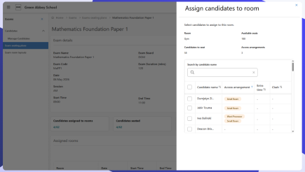
Exams Seating is now available to all secondary schools in SIMS Next Gen, giving exam officers the tools to manage room layouts, allocate candidates to seats, and generate seating reports, all directly within the platform.
With the Summer 2026 season under way, schools can start familiarising themselves now, ready to use it in full for the next exam season.
Key features
Phases 1 and 2 introduce:
- Managing access arrangements for candidates
- Designing and configuring exam room layouts, including windows, doors, presentation screens, power sockets, and invigilator desks
- Reviewing candidates, clashes, access arrangements, and extra time in one place
- Filtering candidates by these attributes before rooming and seating begins
- Assigning rooms for each exam component
- Assigning candidates to rooms and allocating seats
- Copying seating plans for use across components
In practice: exam officers get one structured workflow instead of juggling spreadsheets and manual checks.
Phase 3 introduces seating-related reports, bringing key reporting functionality from Exams Organiser 6 into SIMS Next Gen:
- Seating plans
- Candidate labels
- Candidate component labels
- Exam registers
- Summary timetables
- Exam timetable
- Access arrangements
In practice: exam officers can generate the reports they need for exam day directly within SIMS Next Gen, without relying on Exams Organiser 6.
Interventions – Phase 2
Available for all schools
Schools can now plan and run interventions entirely within SIMS Next Gen, with no dependency on SIMS 7.
Phase 2 delivers a seamless, role-aware plan-to-run workflow, making it easier to create interventions, enrol pupils, and manage activity through to completion. Bringing planning and running together in one place cuts friction and gives schools greater transparency over targeted support.
Who this is for: staff responsible for planning and creating interventions. Users with run permissions also benefit from enhancements to the run workflow, including the first iteration of the Pupil Summary Report.
Key features
Plan interventions
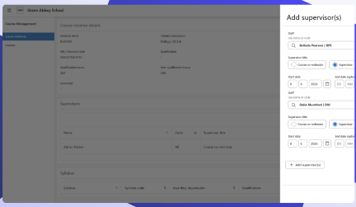
Create, edit, and delete intervention instances directly within the module:
- Link to an existing intervention overview
- Add pupils and assign supervisors
- Set dates and number of sessions
- Capture associated costs
In practice: planning happens in one place, end to end, without switching systems.
Intervention overview management
- Organise and manage intervention overviews in the admin console, grouping interventions in line with school strategy and policy. Active overviews appear automatically when creating intervention instances, keeping planning consistent and straightforward.
In practice: less admin overhead, more consistency across the school.
Pupil Summary Report
- Generate internal or parental reports for individual pupils or groups within an intervention instance, capturing details and progress. Toggle supervisors, notes, and costs on or off depending on your audience.
In practice: one report, tailored to whoever needs to see it.
Single Central Record overview in Group Hub
Available for all trusts – England and Wales
The Single Central Record (SCR) overview is now available in Group Hub, giving multi-academy trusts (MATs) a single, trust-wide view of statutory SCR checks across all schools and central staff records.
Built to help trusts quickly spot where checks are complete, missing, expired, failed, or not yet added, it’s especially valuable for HR, data, and compliance roles, as well as anyone responsible for safeguarding oversight across the trust.
Key features
- Trust overview
- View SCR check status across all schools and the trust in one place, for a clear picture of compliance at a glance.
In practice: no more piecing together compliance from separate school records.
- Checks needing attention
- Quickly surface missing, expired, failed, or upcoming checks across the trust, so follow-up can be prioritised without manually reviewing individual school records.
In practice: trusts act on what needs attention first, not everything at once.
- Central SCR records
- Manage central staff, governors, trustees, contractors, and other people engaged by the trust in one place, including checks and clearance levels from the admin console.
In practice: one source of truth for everyone managed centrally.
- School placements
- Place centrally managed people into school management information system (MIS) records where required, covering governors, contractors, and volunteers.
In practice: central records and school records stay in sync.
- Export to Excel
- Download trust-wide SCR records to support review, audit, and follow-up activity.
In practice: audit-ready data, whenever it’s needed.
What’s coming next
Further capabilities in development:
- proactive alerts to flag checks needing attention before they become urgent.
- the ability to roll out centrally managed teaching and non-teaching SCR records to school MIS.
Course Management
Available for early adopters
Course Management is now available to SIMS Support Units and early adopter schools, bringing the equivalent of Course Details in SIMS 7 into SIMS Next Gen, with course and course instance records, plus qualification number (QN) and subject management.
Course data feeds into Post-16 Census returns, assessment, timetables, and class memberships, making this a feature of interest well beyond curriculum teams.
Key features
- Course record
- The overarching entity holding core course information, accessed via the curriculum menu. It’s the foundation for all course-related data across the platform.
In practice: one consistent source of course data, instead of scattered records.
- Course instance record
- Created each time a course runs, capturing class and course membership for that instance. Also accessed via the curriculum menu, giving a clear, structured view of how courses are delivered.
In practice: schools can see exactly how each course is being run, at a glance.
- Subject management
- Create and edit subjects directly within the platform and link them to the Department for Education (DfE) subject list, accessed via the admin console under Course.
In practice: subject data stays accurate and aligned with national frameworks.
- QN catalogue
- A centrally managed qualification number (QN) catalogue, supplemented by a school-level catalogue of your active QN codes.
In practice: schools work from accurate, up-to-date qualification data without manual upkeep.
Summer Exam Result Days 2026
Key Documents
- Exam Results Preparation 2026 – must read – Exam Results Preparation 2026 this document lists all of the preparation required prior to results day, the basedata version summary and the 16 – 18 Discount Families.
- Claiming BTEC Results – 7B Basedata – If you have students who will be certificating for BTEC National qualifications, please request the 7B basedata from Edexcel Online. Once you receive the 7B basedata, this will need importing into the Summer Season, and the relevant entries should be made and sent to Pearson via an entry file. BTEC Tech Awards should have an entry for the overall qualification (starting with a C) in your entry files (This is not part of the 7B).
- Please see the BTEC results basedata help sheet HS0081 for a step-by-step guide.
- Common Results Day Issues – Common Results Day Issues outlines any errors and resolutions you may experience when downloading and importing results files.
- Managing Performance Indicators in SIMS (PI) – Managing Performance Indicators detailed instructions on how to update the Performance Measures information for Summer 2026 (document refers to earlier years but is still relevant).
- Results Day Survival Kit PPG June 2026 – Results Day Survival Kit PPG June 2026 Information to assist in achieving a successful results download day.
- DfE Spreadsheets which specify which qualifications count in the KS4 Qual & Discount Codes and 16-18 Quals & Discount Codes and KS4 or 16-18 Performance Measures in 2025 (Performance points and discount codes).
- Importing Results for Cambridge Technicals – Helpsheet HS0103.
Other Key points
- BTEC basedata patch 17395 – discount codes will need to be added into the BTEC basedata so that the BTEC qualifications are correctly identified on the exams reports. This can either be done manually or by requesting Patch no. 17395 via the helpdesk. This should only be done after you have refreshed the basedata for all qualifications, as the patch can only be applied once.
- Before results day make sure you have refreshed all of your basedata to the latest version (information on how to do this on the Customer Portal).
For more information and all the relevant guides please refer to our recent campaign: SIMS Exams Campaign News