
To navigate to the most relevant section, please click the appropriate link below: -

Included in Your MIS Contract - Did You Know...?
We wanted to take a moment to thank you for choosing School ICT as your MIS support provider.
As a valued School ICT customer, our goal is to not only offer expert technical support, but to ensure you’re getting the full value from everything your service includes. Beyond day-to-day expert technical support, you’ve got access to a whole network of expert knowledge, training, and extra services — all included.
Here’s a quick reminder of what’s available to you as part of your MIS support package:
Unlimited Helpdesk Support
Available via phone, chat, email or portal — fast, friendly, and knowledgeable assistance whenever you need it.
Monthly Newsletters and Updates
Packed with updates, tips, key deadlines, and guidance to help you stay ahead.
Latest News: https://www.schoolicts.co.uk/latest-news/
Please share the link to subscribe to our newsletter with any colleagues it may be of interest to: https://www.schoolicts.co.uk/subscribe
Free Live Webinars
Covering the latest MIS updates, best practices, and deep dives into common challenges. https://www.schoolicts.co.uk/latest-events/
Account Review Meetings
Tailored sessions to check in on how things are going, explore upcoming needs, and make sure you’re getting the most from your system.
Helpdesk Reporting
On request, we can provide usage data and insights to support your internal planning and identify any recurring issues.
Advisory & Best Practice Guidance
Our MIS team includes ex-Data Managers, Exams Officers and Primary School staff – offering practical advice around DfE, Ofsted, funding and more.
Ofsted Watch
If your school is undergoing inspection, let us know and we’ll prioritise any guidance or help you need.
MIS Migration & Data Support
Expert support for data cleansing, migration planning or consultancy if you’re considering a system change.
Cross-Business Expertise
As part of the Transforming Learning Group, you also benefit from connections to specialists in GDPR, business services, software integration and more. See here for more information https://www.transforming-learning.co.uk/
If you’re not currently using some of these, we’d love to help you take full advantage. Let us know if you’d like to schedule a review, register for a webinar, or just have a quick catch-up. You can e-mail us: helpdesk@schoolicts.co.uk or call us on: 0345 222 6802.
Thanks again for being part of the School ICT community — we really appreciate your continued trust.
Shaping the future of MIS Support - We need You!
We are on a mission to ensure we’re providing the best MIS Support and we NEED YOUR HELP to do this!
We’re looking to hold some online sessions to uncover the changing needs of our customers, if you’d be interested in joining a short session and helping to shape the future of MIS support, please let us know by e-mailing: marketing@schoolicts.co.uk.
We look forward to hearing your views!
⭐NEW⭐ Primary Data Services
Primary Data Services – Let Us Take the Pressure Off!
We know how time-consuming statutory returns and MIS year-end tasks can be — that’s why our Primary Data Services package is designed to give you flexible, expert-led support, tailored to your school’s needs.
Whether you need help with just one return or want full coverage across the year, we’ll work alongside your team to ensure your data is accurate, compliant, and submitted on time — saving valuable staff hours and reducing stress.
✅ Pick & Choose the Support You Need:
- Pupil Census (Autumn, Spring, Summer)
- School Workforce Census
- Key Stage Returns (EYFS, Phonics, KS1, KS2)
- End-of-Year Procedures
- Catholic Census
- Assessment Setup & Support
All services are delivered remotely by a trained MIS expert, meaning no disruption in school and total flexibility to suit your needs.
Why Choose School ICT?
- ✅ Delivered remotely – efficient and hassle-free
- ✅ Expert support – from real people who know your school
- ✅ MIS agnostic – we work with SIMS, Arbor, Bromcom, ScholarPack, and Integris
- ✅ Pay for what you need – flexible packages with no unnecessary extras
Let us handle the admin, so your team can focus on what matters most — your pupils.
For further information you can find out more HERE or to make an enquiry please e-mail: helpdesk@schoolicts.co.uk or give us a call on: 0345 2226802.
Data Management Services
Our Data Management service offers an excellent, cost effective, responsive, and efficient Data Management solution, delivered remotely by a team of highly experienced school data experts. Their dependable advice and guidance empowers schools, academies, and MATs to maximise their investment in their management information system (MIS) team. Whether it’s a long-term solution or short term for sickness cover or maternity please reach out to discuss your needs.
- Please click here for further information.
MIS Data Service Spotlight: Now’s the time to prepare for the SIMS End of Year procedures, or Arbor or Bromcom’s New Year Setup!
Exams Data Service Spotlight: Starting to look at preparing for results day, gathering information from schools for what their expectations for the day are, what analysis they want from their results and third-party software uploads.
Leaving Dates for Years 11 and 13
Year 11:
The leaving date for all children in England is the last Friday in June in the school year in which the child reaches 16 years of age and their attendance and absence must be recorded to this date.
Schools remain responsible for Year 11 pupils up to the leaving date, even when they have finished exams. It is up to schools to consider how they might seek to widen the range of learning opportunities during this time to meet the needs of their pupils. If schools choose to grant Year 11 pupils leave of absence between them completing their examinations and leaving school, then it must be recorded as an authorised absence (Attendance Code C).
Pupils staying on for 6th Form:
If a pupil has applied and been accepted into the school 6th form, the pupil must remain on roll and for the period after the last Friday in June to the end of term, the school would record their attendance as Code X.
Schools without 6th Form:
Please note schools that do not have a 6th form, or pupils do not meet the criteria to be accepted a place in the 6th form should not be kept on roll until September and should be removed from roll with effect from the last Friday in June.
If schools record their pupil’s attendance and absence correctly, we do not anticipate any problems in collecting the data as part of the Autumn Census.
Year 13:
Post 16 students not of statutory school age so they do not have an official leaving date as such, however, DfE guidance does state that to be classed as ‘retained’ Post 16 students need to be registered on courses on the last working day of June.
‘When students are on a 2-year programme and they complete the first year, they will be counted as retained in that academic year. We define completing the first year as being in learning on the last working day in June. The same principle applies in the second year’.
Some schools will use the same leaving date as Year 11 for Year 13 students, others use the last day of term. If Year 12 or Year 13 are given a leaving date on or after 1st August this takes them into the next funding year and will include them in the next Autumn census return, which is not correct. The date needs to be before 31st July.
FREE Best Practice Webinars - Summer Term Dates
Summer Term Webinars, please click the links to book: –
Previous Webinars are available on the Customer Portals
- SICT Portal: https://my.www.schoolicts.co.uk/
- TIO Portal: https://portal.turniton.co.uk
We're Hiring!
We’re looking for two MIS Consultants to join our expanding team. If you’re keen to be part of a supportive, people-focused company that values its staff as much as its customers — with the flexibility to work from home and full training provided — we’d love to hear from you!
To find out more or to apply visit: https://transforminglearning.livevacancies.co.uk/

Support with Exams
The Mighty Role of the Exam Officer – Not for the Faint-Hearted!
Yet another exam season is underway, and in true Exam Officer fashion, it’s all systems go! Over the past few months, the exam team at School ICT Services, have been neck-deep in making entries and registrations, creating seating plans with surgical precision, withdrawing and amending entries at lightning speed, training invigilators to JCQ standards, and racing to cross those final ‘t’s’ and dot the elusive ‘i’s’ in the classic pre-season dash. And now? Their hard work is paying off, with exam candidates across all our Exam Managed Schools enjoying a smooth and structured start to their assessments. So far, so good—and we’ll take that win!
But let’s take a moment to talk about the role of the Exam Officer. It’s not just a job – it’s a calling. It takes someone truly special to navigate the daily curveballs, organise timetable clashes, and printer meltdowns with grace (and caffeine). It’s a role that should probably come with a health warning (and perhaps a free massage voucher!) especially during the summer term. From eleventh hour transferred candidates, changes to tiers, sleeping invigilators, broken fingers, to last-minute candidate panics, Exam Officers have truly seen it all. And somehow, they still come back for more!
We’re incredibly proud to have some of the best in the business as part of our Exam Team at School ICT. People who have weathered the storm of many a past season and still manage to smile (or at least grit their teeth) through it. These seasoned pros are now sharing their wisdom, handy tips, and calm guidance with new and aspiring Exam Officers who are bravely stepping into the arena.
Schools who’ve taken advantage of our Exams Support Package have had an excellent start this year—even with new and less experienced officers at the helm. With our help, they’ve navigated the season confidently, knowing we’re only ever a phone call (or emergency chocolate delivery) away.
And just as we exhale after this season’s start, planning begins again for the next big challenge: preparing Year 10s for their summer mock assessments. The cycle never ends—but that’s what makes the role so rewarding. You’re not just pushing paper—you’re setting the stage for a student’s future.
So, here’s to all Exam Officers, at School ICT Services and across the UK: the multitasking heroes, crisis-managing champions, and unsung legends behind the scenes. Thank you for all you do. Keep climbing that exam mountain, and if you ever need our support, we’ll be here with a rope, a torch, and probably a spreadsheet or two! You can contact us on: 0345 222 6802 or e-mail: helpdesk@schoolicts.co.uk
Contact Details
School ICT customers:
Contact: 0345 222 6802 Option 1, helpdesk@schoolicts.co.uk; Portal: https://my.www.schoolicts.co.uk/
turn IT on customers:
Contact: 01865 597620 Option 2, mis.support@turniton.co.uk; Portal: https://portal.turniton.co.uk
Our customer portals allow you to: –
- Log and track tickets
- Watch recordings of our range of webinars
- Search the Knowledge base for information, guidance and tips
- Keep up to date with the latest news

Online Training Courses and NEW Bitesize Training
Training courses for the remainder of the Summer Term are available to book now…please book early to avoid disappointment as places are limited and popular courses do book up early!
To book a course please visit https://www.schoolicts.co.uk/online-training/ or click on the hyperlinks below: –
| Arbor – Top Tips for Preparing the New Academic Year Webinar | Wednesday 11th June 2025 2:00pm -2:30pm | https://www.schoolicts.co.uk/events/new-academic-year-2/?occurrence=2025-06-11 |
| Arbor – Preparing the Phonics Return Webinar | Tuesday 17 Jun 2025 2:00pm-2:30pm | https://www.schoolicts.co.uk/events/phonics-return-2/?occurrence=2025-06-17 |
| Bromcom – Preparing the Phonics Return Webinar | Wednesday 18 Jun 2025 10:00am-10:30am | https://www.schoolicts.co.uk/events/phonics-return/?occurrence=2025-06-18 |
| SIMS – Preparing the Phonics Return Webinar | Thursday 19 Jun 2025 10:30 am – 11:00 am | https://www.schoolicts.co.uk/events/phonics-return-962/?occurrence=2025-06-19 |
| SIMS – Top Tops for Managing Exam Results Webinar | Wednesday 02 Jul 2025 10:00 am – 10:30 am | https://www.schoolicts.co.uk/events/exam-results/?occurrence=2025-07-02 |
| Bromcom – Preparing Assessment for the New Academic Year Webinar | Friday 04 Jul 2025 10:00 am – 10:30 am | https://www.schoolicts.co.uk/latest-events/ |
| Bromcom – Top Tips for Managing Exam Results Webinar | Thursday 10 Jul 2025 10:00 am – 10:30 am | https://www.schoolicts.co.uk/events/exam-results-2/?occurrence=2025-07-10 |
| Arbor – Top Tips for Managing Exam Results Webinar | Friday 11 Jul 2025 10:00 am – 10:30 am | https://www.schoolicts.co.uk/events/exam-results-3/?occurrence=2025-07-11 |
| Arbor – Preparing Assessment for the New Academic Year Webinar | Monday 14 Jul 2025 2:00 pm – 2:30 pm | https://www.schoolicts.co.uk/events/assessment-for-the-new-academic-year-2/?occurrence=2025-07-14 |
| SIMS – Preparing Assessment for the New Academic Year Webinar | Friday 18 Jul 2025 10:00 am – 10:30 am | https://www.schoolicts.co.uk/events/assessment-for-the-new-academic-year-3/?occurrence=2025-07-18 |
ARBOR and SIMS BITESIZE TRAINING.
1:1, one hour training slots, tailored to suit your specific needs, designed to give you maximum impact in minimal time, delivered by our expert MIS team.
Check out our Bitesize Training Brochure for further information or call us on 0345 2226802 or e-mail: info@schoolicts.co.uk to find out more or book a place.
Data Healthcheck Services
An MIS health check ensures you’re getting the most out of the investment in your MIS. The benefits of one of our comprehensive health checks include: –
- Raise awareness of functionality and any issues
- Keep you up to date with the latest developments in your MIS
- Housekeeping and tidying exercises
- Report with recommendations to ensure you’re fully maximising your MIS along with any training recommendations
- For on premise MIS a server health check is also included
Our health check service usually takes around half a day. Please contact us to find out more on: helpdesk@schoolicts.co.uk.
FMS Updates
FMS Tips and Reminders for Year End and Budget.
If your school Financial Year runs from April – March and all procedures completed, monthly reports agreed, please do not forget to finalise your financial year 2024-2025.
A final closure will normally be made after your accounts are audited. The process is identical to carrying out a preliminary close, with the exception that all transactions are transferred to the new year and you will not need to decide on the transfer options. During the final part of the close procedure an opening balance journal is created; outstanding purchase orders, accounts payable and income transactions are transferred; summary totals are rebuilt.
Remember that once you have completed a final close, you will not be able to reverse the action.
If your school Financial Year runs from September – August you should be starting to plan preparations for year end taking into account the summer break.
Once the Budget for 2025-2026 has been approved and ratified the Budget can be input onto FMS and fixed. This will result in an ‘Original Budget’ and any future budget changes will be reflected in the ‘Current Budget’ and ‘Variance’.
Arbor Finance
Many schools that have chosen to migrate to Arbor Finance have completed their year end in their previous MIS system so will not need to complete Year End until April 2026.
helloData Product Overview - Your MIS Data Visualised
Our interactive reports allow you to view individual, group, whole school and trust data at the click of a button on one screen.
Access is available to Schools, Governors and Trusts providing leaders with the ability to choose how to visualise their data based on their individual needs.
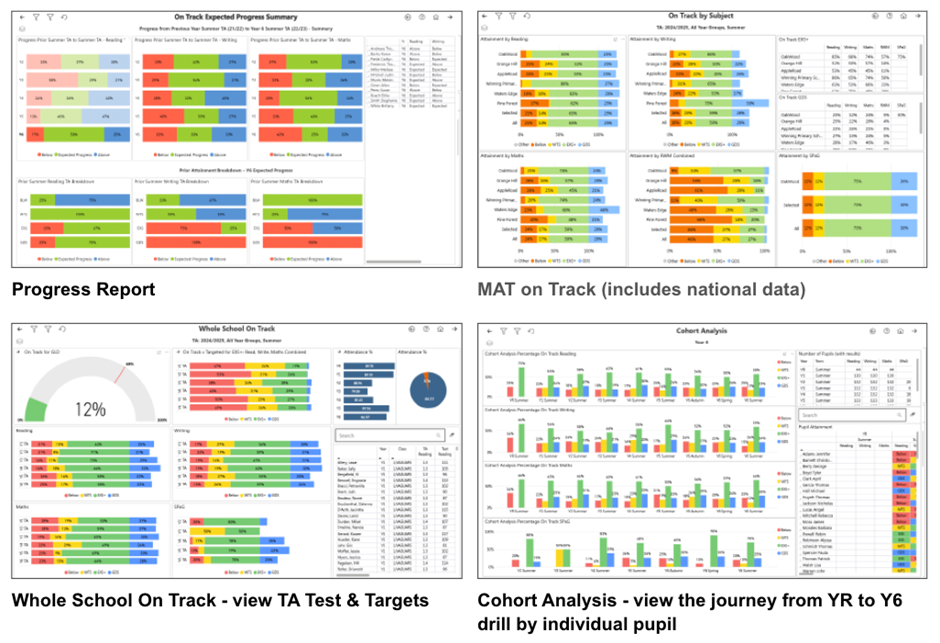
Our report portfolio includes:
- Whole School Analysis
- Trust View
- Group Analysis & Filtering
- Attainment and Progress
- Cohort Analysis
- Trend Analysis
- Attendance
- Statutory reports
- Pupil Profile
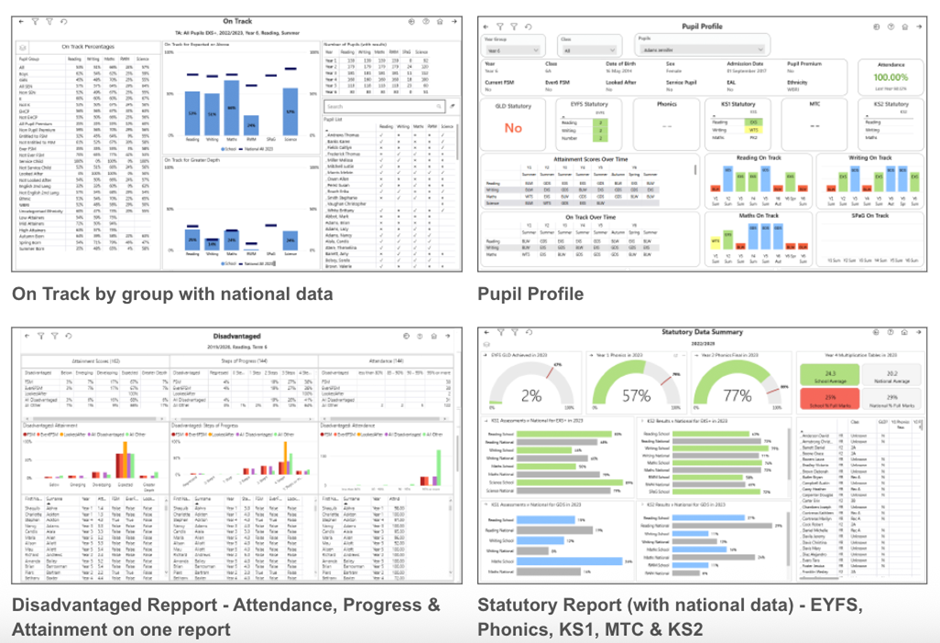
Combine the power of your MIS and helloData
We provide simple methods for entering data and utilising the MIS functionality found within Arbor, Integris, SIMS and Scholar Pack. We then automatically present the data back in a comprehensive set of ready-made dashboards using Power BI to visualise your data.

In-depth analytics and pupil data at a click of a button
Assessment data can often be seen as daunting and hard to decipher, it can also take the focus away from the individual learner. This is why we have made all helloData reports intuitive to use, interactive and, at a click of a button, view individual pupil data on one screen.
Accessible for all
School, Governor and Trust views are all provided, allowing leaders to choose how to visualise the data based on their own need.
We’d love to hear from you, Leave us a Message or Book a Live Demo here.

Click for the latest Arbor updates
Admin Access
Did you know that we can provide additional Arbor support at no additional cost as part of your existing MIS SLA?
What benefit does Arbor Admin functionality bring to you?
With your permission, School ICT can be granted Admin functionality on your Arbor MIS site. This access allows our experienced support team to quickly diagnose and resolve common issues including refreshing invoices, populating missing payment accounts and accessing audit logs for troubleshooting.
By enabling this functionality, you’ll benefit from faster resolutions without needing to escalate these tasks to Arbor Support—saving your team valuable time and ensuring smoother day-to-day operations.
If you haven’t had the email and feel you should have, please call School ICT on 0345 222 6802 or email helpdesk@schooolicts.co.uk.
New School Year Set Up
You can now start working of your New School Year set up in Arbor. Guidance can be found here:
- Managing Applicants and Admissions
- New School Year Setup guide
- New School year Setup Preparation Checklist
The following links can be used to help guide you through the set up: –
- Step 1 Academic Calendar: New School Year Setup Step 1 – Academic Calendar – Arbor Help Centre
- Step 2 Off Roll Leavers: New School Year Setup Step 2 – Off-Roll Leavers – Arbor Help Centre
- Step 3 Year Groups & Registration Forms: New School Year Setup Step 3 – Year Groups & Registration Forms – Arbor Help Centre
- Step 4 Custom Groups: New School Year Setup Step 4 – Custom Groups – Arbor Help Centre
- Step 5 Houses: New School Year Setup Step 5 – Houses – Arbor Help Centre
- Step 6 Registers:
- Step 7 Meals: New School Year Setup Step 7 – Meals – Arbor Help Centre
- Step 8 Interventions: New School Year Setup Step 8 – Interventions – Arbor Help Centre
- Step 9 Review the setup and other important tasks: New School Year Setup – Reviewing your setup and other important tasks – Arbor Help Centre
Why not join our free webinar: Top Tips for preparing the New Academic Year- Wednesday 11th June 2pm?
Book here: Top Tips for preparing the New Academic Year
DfE Statutory Assessment
DfE Statutory Assessment
Watch Arbor’s recent DfE Assessments 2025 webinar – Click to watch here.
In line with DfE guidance, End of Key Stage 1 (KS1) Teacher Assessments are no longer required to be collected or reported. There are no changes in the DfE Assessment area in Arbor. If you won’t be administering KS1 assessments, do not set them up. All other assessments (KS2, Phonics, MTS and EYFSP) continue to be statutory and required.
Please read Arbor’s full guide Introduction to DfE statutory assessments in Arbor and key dates for detailed information on how to set up, record and return your school’s DfE Statutory Assessments. The guide also includes details of the key dates in the process:
EYFS
Reception
- EYFS Collection opens Monday 2nd June
- Deadline for submitting data Friday 11th July 2025,
- Final date to correct any errors Thursday 31st July 2025
KS1
Phonics Year 1 & Year 2 Re-checks
- Phonics Testing – Monday 9th June – Friday 13th June (variation week 16th June – 20th June)
- Threshold Mark for Phonics Release – Monday 23rd June. In Arbor, student outcomes will automatically appear on the marksheet based on the raw scores you’ve already put in, and you’ll be able to analyse your data. Phonics Screening Check
- Phonics Deadline for schools to submit HDF to PAG– Monday 30th June
- Contact your LA for their Deadline for submission of the school’s data
- Deadline for LA to submit phonics screening check to Collect – Friday 18th July
Why not join our free webinar ‘Preparing the Phonics Return’ Tuesday 17th June 2025 2pm? Book your place here: Preparing the Phonics Return Webinar
Teacher Assessment Year 2
- Testing Period – Monday 1st – Wednesday 31st May
- Teacher Assessment Deadline – Tuesday 27th June
- View results online – Tuesday July 8th
Information about KS1 assessments & KS1 Phonics screening check
KS2
Multiplication Check Year 4
- Multiplication Check Testing Period – Monday 2nd June – Friday 13th June
- HDF deadline – Friday 21st June
- Multiplication Check Results – Monday 24th June
Information about KS2 assessments & Multiplication Tables Check (MTC)
- To import your results into Arbor: Generate a CTF file from the Primary Assessment Gateway to your computer
- Import the file – click here to find out how
- See MTC results on the Analysis pages.
Teacher Assessment Year 6
- Testing Period – Monday 12th May – Thursday 15th May
- Teacher Assessment Deadline – Friday 30th June
- Test Results available from Primary Assessment Gateway – Tuesday 9th July
New Features in Arbor
- You can now copy an existing Custom Report Card setup in just a few clicks, including its formatting and the linked Custom Report (if one is attached) with the new Copy Report Card button
- 2-Year-Old Funding Basis has been added to the Custom Report Writer, so you can now report on it alongside other funding fields
- First Language has been added as a field on the Parent Portal and Parent App, so parents and guardians can update their selection and send through to your school for approval
- A brand-new set of tables has been added to help you monitor and track suspensions across your schools, directly from your MAT MIS. Head to Analytics > Behaviour to see the headline suspension stats at-a-glance for each school and student, plus week-by-week trends and student suspensions across groups.
- New BI Connector Datasets which include:
- 3 new fields added to the Suspensions field
- A new Hydrated Exam Results view containing exam results plus discount codes, points values and rankings for EBacc calculations for better exam data analysis
- New Companies and URN datasets for more detailed analysis
Staff Paying for Items in Arbor
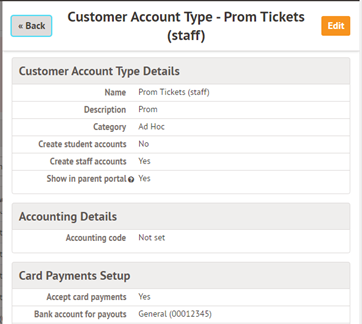
Whilst you can use school shop for students, staff can’t be linked to school shop items, but you can still charge staff for items purchased by creating an ad hoc Customer Account Type.
You can create a customer account type and then raise an invoice to create a debt against the account (in this case for something like a ticket). Staff can pay by going to My Items | My Payments. They can pay by card for the tickets. (This method will work for other items as well)
Please see the example below. Go to School > Payments > Setup > Customer Account Types
Staff can then be issued an invoice.
This can be done from their profile. Go to payments and select the account to invoice
Select Invoices | + Add
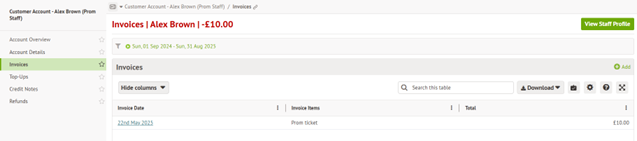
When staff log in they will be able to see the invoice and make payment via My Items| My payments
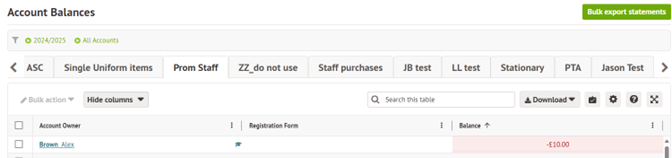
As an administrator you will be able to see the overview in School | Payment | Accounts | balances – select Prom Tickets in this case or go to school | payments | Accounts | Invoices.

Click for the latest Bromcom updates
Admin Access
With your permission School ICT Services can access your Bromcom site. This would mean that we would be able to diagnose and resolve a selection of common issues as well as investigating more complex issues before escalating on your behalf. This access can result in quicker support resolutions and prevents tying up your staff and their machine whilst we are remoted on. We have a form that can be sent out, please call School ICT on 0345 222 6802 or email on helpdesk@schooolicts.co.uk to request this be sent.
Raising Development Ideas
Whilst this is normally locked behind a Bromcom support account, if users click the I icon they can generate a one-time passcode and sign up to the ideas portal (development ideas option)
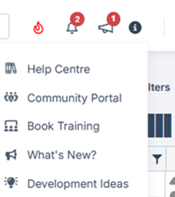
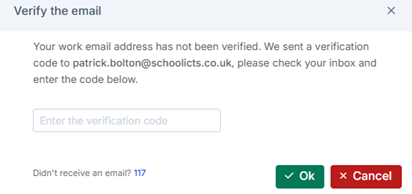
Clicking “development Ideas” will trigger an email with a passcode
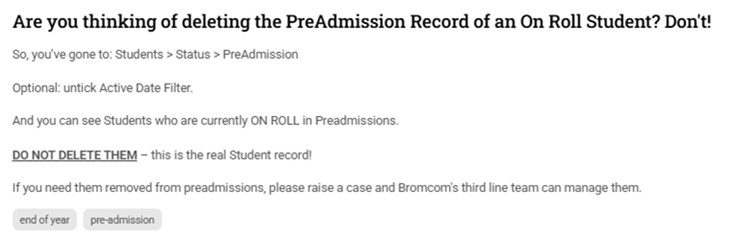
There are lots of good ideas being suggested which require 50 votes to be considered for implementation.
Latest Bromcom Roadmap
The Bromcom Roadmap provides details of upcoming changes. Dates can move, but it gives an indication of when updates are planned to be implemented.
Click here for the latest roadmap – https://crmapps.bromcomcloud.com/customer/productroadmap
End of Year Process
If you have not yet added next year’s academic year, this can be done by following the wizard that may be referenced within the guidance. If 25-26 is already set up, the wizard will look to set up 26-27 and so we advise to only use the wizard if you are yet to start the process .Users who have set up the Academic year already can still perform all the tasks and use the EOY dashboard to track progress (Home> drop down > select End of year dashboard – permissions required).. Get in touch if you need assistance.
EOY Dashboard
Below are some links to useful pages about how to prepare and carry out the end of year routines
- Main end of year page – Bromcom Help centre – Click Here
- Primary school guide- Click Here
- Secondary school guide – Click Here
Other useful links: –
DfE Statutory Assessments
In line with DfE guidance, End of Key Stage 1 (KS1) Teacher Assessments are no longer required to be collected or reported. All other assessments (KS2, Phonics, MTS and EYFSP) continue to be statutory and required.
Below are some links to existing Bromcom guidance: –
- https://docs.bromcom.com/primary-data-collections/
- https://docs.bromcom.com/knowledge-base/how-to-administer-the-key-stage-2-teacher-assessments/
- Early years assessment
- Phonics
EYFS
Reception
- EYFS Collection opens Monday 2nd June
- Deadline for submitting data Friday 11th July 2025,
- Final date to correct any errors Thursday 31st July 2025
KS1
Phonics Year 1 & Year 2 Re-checks
- Phonics Testing – Monday 9th June – Friday 13th June (variation week 16th June – 20th June)
- Threshold Mark for Phonics Release – Monday 23rd June.
- Phonics Deadline for schools to submit HDF to PAG– Monday 30th June
- Contact your LA for their Deadline for submission of the school’s data
- Deadline for LA to submit phonics screening check to Collect – Friday 18th July
Join our free webinar ‘Preparing the Phonics Return Webinar’ Wednesday 18th June 10am, book your place here: Preparing the phonics return
Teacher Assessment Year 2
- Testing Period – Monday 1st – Wednesday 31st May
- Teacher Assessment Deadline – Tuesday 27th June
- View results online – Tuesday July 8th
KS2
Multiplication Check Year 4
- Multiplication Check Testing Period – Monday 2nd June – Friday 13th June
- HDF deadline – Friday 21st June
- Multiplication Check Results – Monday 24th June
Teacher Assessment Year 6
- Testing Period – Monday 12th May – Thursday 15th May
- Teacher Assessment Deadline – Friday 30th June
- Test Results available from Primary Assessment Gateway – Tuesday 9th July
DfE Statutory Assessments
Upcoming updates to the MIS – Click Here for the latest dates and details of changes that have been approved for release.
Upcoming Updates to Bromcom
The Bromcom Roadmap provides details of upcoming changes. Dates can move, but it gives an indication of when updates are planned to be implemented.
Click here for the latest roadmap – https://crmapps.bromcomcloud.com/customer/productroadmap
Other Bromcom News
Google Pay and Apple Pay in MCAS – now available
We’re excited to let you know that Google Pay and Apple Pay are now supported as payment options within MyChildAtSchool (MCAS).
This means parents and guardians will be able to make payments more quickly and securely using the mobile wallets they already have on their phones.
Key details:
- Available for all payments made through the MCAS mobile app or mobile browser
- No action is needed from schools to enable this – it will be automatically available from the launch date
- Applies to payments for meals, clubs, trips, shop items and more
- The release occurred overnight on 16th May.
More info:
A full overview of the new functionality is available here:
https://docs.bromcom.com/knowledge-base/google-and-apple-pay/

Click for the latest Integris updates
*Important Update* The Future of Integris
Arbor Education: We have decided to discontinue Integris from 12th February 2026.
Before then, you can switch to Arbor Core at no extra cost. You’ll get all the same features, plus extras like student report cards, email, SMS and report scheduling.
What are my next steps?
- Join a demo to see Arbor in action
2. Book a call with the Arbor team to ask questions and discuss your switch
We’re looking forward to the next chapter with you. If you need anything, just get in touch.
Don’t forget School ICT are agnostic support providers, providing Arbor, Bromcom and SIMS support so you can continue to be supported by us, even if you change MIS.
Summer Census and Keystage Assessment help now available
The Summer Census help pages are now available for Integris.
You can access them from https://help.integris-education.com/welcome or starting at https://help.integris-education.com/school-census-overview.
We have also updated the Keystage Assessment returns information which is also available from https://help.integris-education.com/welcome or via
https://help.integris-education.com/ks_reporting-overview.
The year end process information was updated in May and we will update you again once this is ready.

Click for the latest ScholarPack updates
ScholarPack Documentation to Support with Year End
You cannot complete the year end processes until the last day of the summer term and after the PM register has been taken. However, there are aspects of the year end process that you can start before the last day of the summer term which this guide covers.
There are six essential Steps (1-6 listed below), which need to be completed and a 7th Step which is optional.
Guidance split up into the 7 steps
- Year End Step 1 – Introduction and Preparing for Year End
- Year End Step 2 – Archive Attendance
- Year End Step 3 – Produce CTFs for Leavers
- Year End Step 4 – Off Roll Leavers
- Year End Step 5 – Promote Students up a Year
- Year End Step 6 – Set Up the New Year
- Year End Step 7 – Complete Year End
The process is a linear function and each section needs to be carried out in the order indicated.
To start your Year End procedure go to Admin > Year End.
Please see the Year End Webinar using the below link. This will take 45-60 mins.
https://support.scholarpack.com/hc/en-gb/articles/6291694855965-Year-End-in-ScholarPack
End of Year Consultancy Service
We offer a chargeable service where we can complete the end of year processes in any MIS on behalf of the school, to save you time and stress. Please contact helpdesk@Schoolicts.co.uk or log a call via our portal https://my.www.schoolicts.co.uk/ for more information.
Customer Support
We will be available to take calls throughout the summer term so please do not hesitate to contact the help desk if you require support. Alternatively, please log into the customer portal and log a ticket, detailing what you would like assistance with. To help us resolve any issues as quickly as possible, please provide details of your issue/query when logging your ticket.

Click for the latest SIMS updates
Changes to Microsoft Support for SQL2012 and SQL2014
Following on from the recent email from Parent Pay Group regarding the highlighting changes to the Microsoft Support for SQL2012 and SQL2014 coming to an end in June 2025, (this change only impacts schools who have SIMS on premise), we have put together the below information which explains what this means for you and your school.
Please see the SIMS Technical roadmap Spring 2025 on our customer portal here for more information on what is and isn’t supported: https://halo.transforming-learning.co.uk/portal/kb?id=310
What is SQL Server?
Microsoft SQL Server is the database management software used to manage the SIMS Database on the school’s SIMS Server and is required to provide access to the SIMS Database.

How to check your SQL Server Version
If your school has had a new SIMS Server installed or upgraded by School ICT/Turn IT On within the past 2 or 3 years, then you are likely to be already on the last supported version of SQL Server.
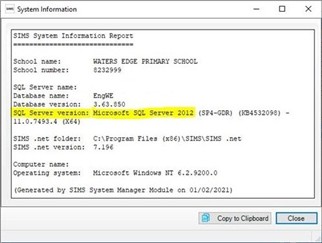
You can check your current SQL Server Version from within SIMS.
- Select “Help” from the top SIMS Menu
- Select “System Information”.
- The SQL version will be listed next to “SQL Server Version” and will show
How to upgrade to SQL Server
If you are using SQL Server 2012 or SQL Server 2014, then you will need to book in an ‘SQL Server Migration’. This is a process where a new SQL instance is installed onto the SIMS Server and your SIMS database migrated across onto the new SQL install.
This process will require some small changes to some SIMS workstations with an update to each local Connect.ini file. Third parties will also need updating with the new connection details used to connect to SIMS.
If you wish School ICT to carry out the SQL Server migration our experienced team can do this with minimal downtime. Due to the time this takes this is a chargeable service.
What happens if we do not upgrade SQL Server?
If the school is still running SQL 2012 or SQL 2014 after Summer of 2025, then there is no guarantee that future SIMS upgrades will work with these older versions of SQL Server.
Reach out today to ensure you can secure your spot via my.www.schoolicts.co.uk or helpdesk@schoolicts.co.uk
School Leavers
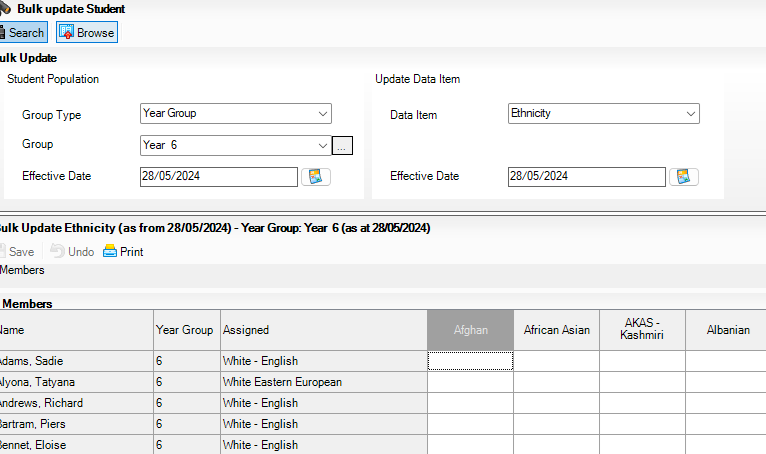
Y6/Yr11 Leavers – make sure they have ethnicity and first language info in their record before making them leave.
Do this via Routines/Pupil/Student/bulk update.
SIMS Housekeeping
With the end of the year looming, it’s a good time to be planning your Housekeeping routines within SIMS to keep your system as tidy and uncluttered as possible.
We have a FREE Distance Learning course that covers this, and you can access the course via this link:
https://learning.www.schoolicts.co.uk/p/housekeeping-short-course
We also have a range of other Distance Learning courses available here: https://learning.www.schoolicts.co.uk/ and we’re adding to this all the time. Simply click on the “Distance Learning Course Brochure” button to see them. They are all the same course content as our ‘live’ courses, and the price is the same too, but these courses give the flexibility to learn at your own pace, or can be useful for schools where freeing up a member of staff for the duration of a training course is difficult to do.
Configuring Alerts
Configuring Alerts
The Alerts page enables you to configure SOLUS3 email settings
Managing Email Settings
The ALERTS page enables Deployment Managers to set up SOLUS3 to send emails when certain SOLUS3 events occur. Such events are configurable in the Alert Settings tab.
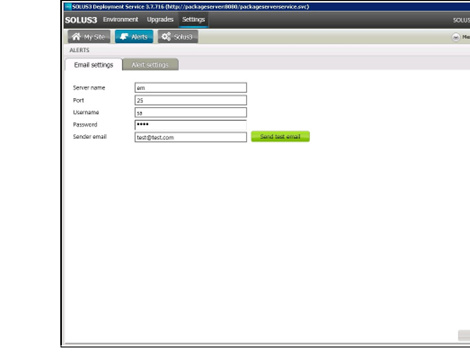
- Select Settings | Alerts to display the ALERTS
- Select the Email settings
- In the Server name field, enter the name of the SMTP server that will send out alert emails.
- In the Port field, enter port number of the SMTP server that will send out alert emails. The port number defaults to 25.
- In the User name field, enter the user name for the account that will be sending the alert notifications.
- In the Password field, enter password for the account that will be sending the alert notifications.
- In the Sender email field, enter the full email address for the account that will send alert notifications.
- Click the Send test email button to test your configuration. Failure generates the error message Failed to send test email to test@test.com. Success does not generate a message.
- Click the Save button to store your changes.
Managing Alert Settings
After entering the server and user details in the Email Settings tab, select which events should trigger an alert email. The subject line for each alert email will contain important information, such as the event type and the time of the event. Additional information, such as contact names and addresses, can be added to the email body. An Update task will trigger an email after an update has been authorised to the school and a Distributed Deployment Plan will trigger an email when a deployment has completed.
- Select Settings | Alerts to display the ALERTS
- Select the Alert settings tab to display a list of available alerts.
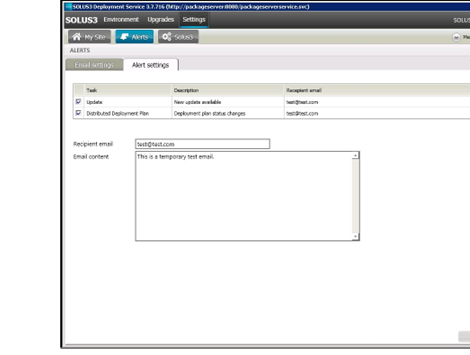
- To activate an alert, select its check box. To de-activate an alert, deselect it.
- To edit the Recipient email or the email content, highlight the required task in the table.
- Edit the Recipient email
- Edit the email content.
- Click the Save The message Distributed Deployment Plan alert successfully saved is displayed briefly.
SIMS Next Gen
Are you using SIMS Next Gen? Did you know all of these features are already available in SIMS Next Gen for you to use?
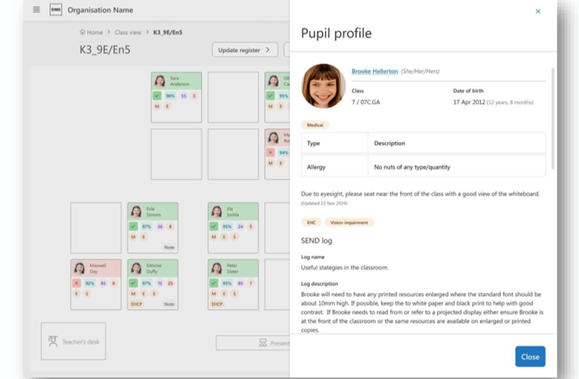
Class View
Class View streamlines classroom management by bringing key pupil information and essential tasks together in one place, helping you save time and eliminate unnecessary admin.
- Create seating plans to support collaboration and minimise distractions.
- Record and monitor positive and negative behaviour events to support student wellbeing.
- Track key student information like EAL, Pupil Premium, and SEND to deliver personalised teaching strategies.
- Record assessments to identify areas for improvement and plan interventions.
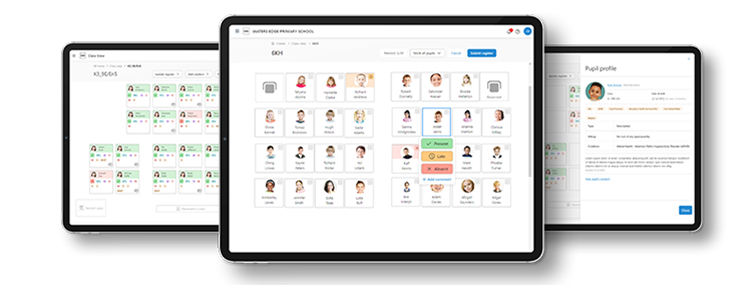
Seating Plans
Plan, organise, and edit seating arrangements. Design flexible, reusable room layouts and strategically arrange students based on abilities, personalities, and relationships to enhance learning outcomes.
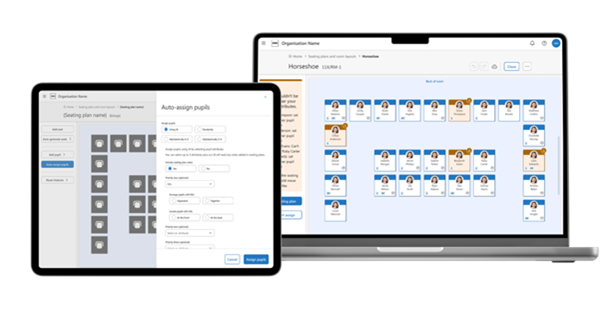
Fire Registers
Access real-time evacuation lists on your tablet or mobile device, with instant updates for late arrivals and early departures. This solution eliminates wasted paper and uncertainty, giving you complete confidence that every student is accounted for during emergencies.
Attendance Registers
Take attendance quickly and easily, anytime, anywhere. Add comments and track ‘minutes late’ in the same window, saving time and keeping records accurate.
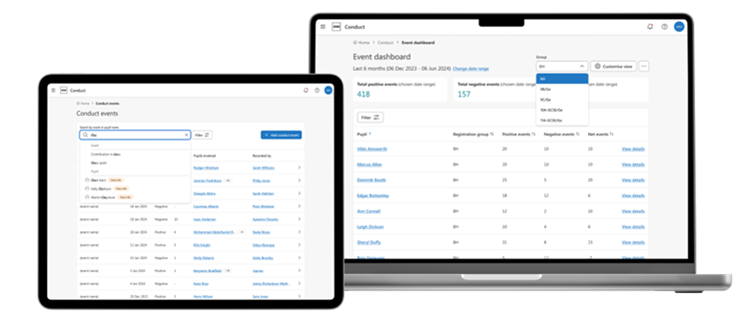
Conduct Management
We’ve redesigned Conduct Management from scratch to make it more flexible and user-friendly. Easily record positive and negative behaviour in class, spot trends early, and step in to support student wellbeing when it matters most.
My Markbook and Online Marksheets
My Markbook puts you in charge of your assessments, allowing you to create and manage them directly in SIMS Next Gen with just a few clicks—no setup or support from a Data Manager needed. Easily capture continuous assessments like homework and coursework, add notes, and filter pupils to monitor the progress of key groups such as SEND and Pupil Premium students.
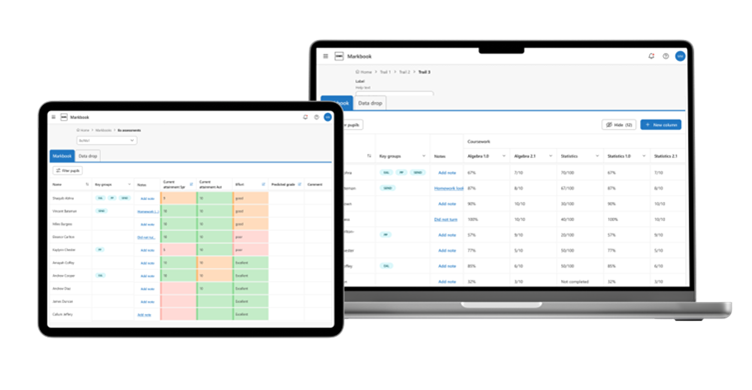
Alongside My Markbook you’ll also be able to access all of the assessments that have been set-up in SIMS 7 and record the results. This means that you have all of the information you need in one place to review pupil progress and provide evidence for assessment reports.
Custom Groups
Easily identify and manage the groups you supervise with advanced search, filter, and bulk editing capabilities.
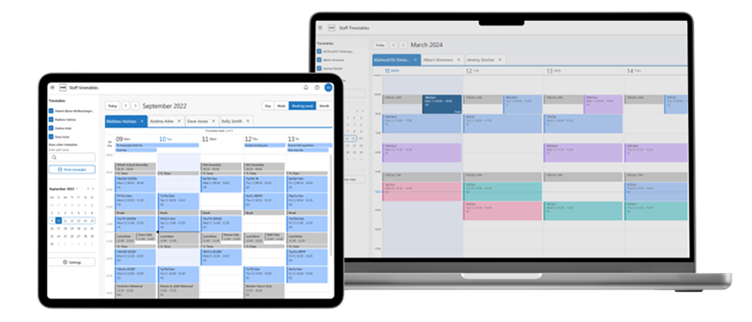
Staff Timetables Calendar
Access your timetable and other staff schedules in one easy-to-use view. Personalise your timetable with colour-coded lessons to stay organised and on track.
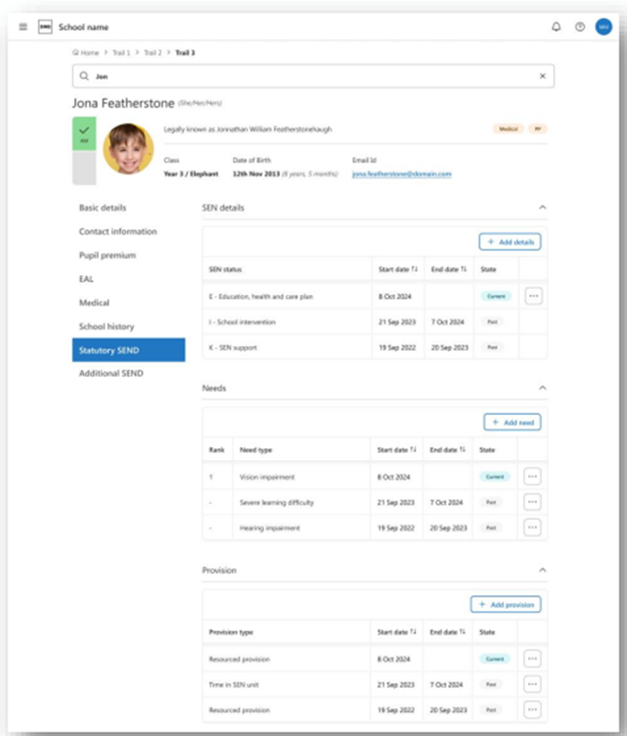
Statutory SEND/ALN:
Within SNG, there is now the ability to record the SEN/ALN Provision, the SEN/ALN Need and if a pupil has time in a SEN/ALN Unit or a Resourced Provision. All of this data is read from SIMS7 and any updates in SIMS Next Gen are also written back. This is to make sure the two systems maintain parity for statutory reporting purposes.
This screen shows SEND, but for schools in Wales, this will say ALN.
There is also the ability to add and edit the additional support areas from SIMS7.
With SNG there is a new section for the additional SEND/ALN information. This is in SNG only and allows the SENDCo to add many different items to the pupil’s profile. The pinned status allows the SENDCo to determine what note should be shown, in full in other areas of SNG, i.e. the Class View pupil profile.
- Pupil profile: from Class view
This is the pupil profile side panel that users will see when they click on a pupil’s card in class view. In this pupil profile, you can display additional SEND/ALN information that exists in the main pupil profile. The main aim of this being that the teacher will see right away anything of importance in relation to SEND/ALN as indicated by the SENDCo. If the teacher wishes to see more SEND/ALN information, then there will be a link to the additional SEND/ALN area in the main pupil profile.
Manage permission, view
You can now view all permission groups, including their associated permissions and the members assigned to each group.
For Admin Managers responsible for ensuring that permission groups align with appropriate permissions for their members.
Staff profile, classroom profile
Record all necessary details for classroom staff within their profile, including for supply staff and cover supervisors, allowing efficient operation of the Cover module.
Details include:
- Cover options (can the staff provide cover?)
- Subjects
- Sites (Tiers in SIMS7)
Staff profile, view & edit training
Create or update training courses in settings (Admin Console) and assign courses to staff members individually or in bulk. For HR managers and other office staff with personnel responsibilities to ensure appropriate training is scheduled for each staff member with ability to track completeness on the staff profile.
Staff absences, analytical overview on Staff profile
Key summary analytics on absences for staff member’s profile.
For Leaders and HR Manager to get a clear picture of the absence situation for each staff member and quickly identify areas of concern.
Summary analytics will include:
- Total absences
- Total working days lost
- Total working days lost per absence type
- Bradford factor
Bulk Leavers
It includes:
- Search for leavers
- Create leavers individually or in bulk
- Edit leavers
- Re-instate leavers (New to Next Gen)
- Customised workflows to support Primary, Secondary and Pupil Referral Units (PRUs)
Consents
This expands upon the Consents area of SIMS 7 with the addition of capturing the person who provided the consent, the date the consent was given and additional comments. It also includes the ‘pending’ and ‘no’ status to support tracking consents that have been requested.
Coming soon!
Attendance analysis reporting
Attendance overview – use the drop-down menus to select different year groups for example to drill down into different attendance information
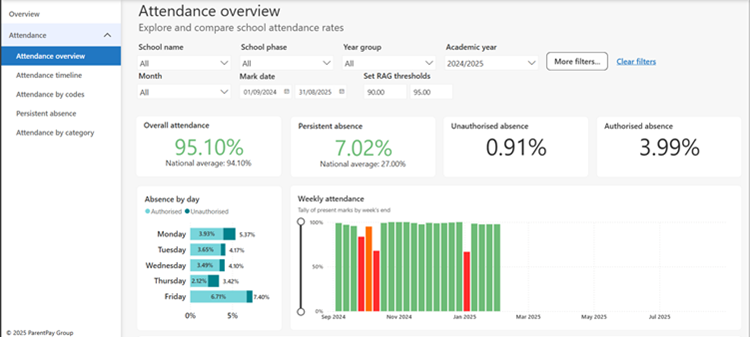
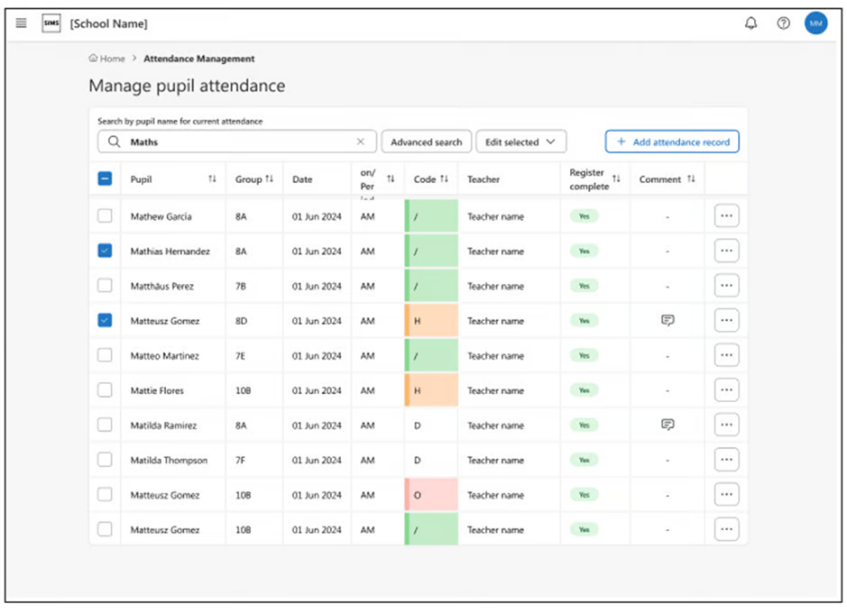
Manage pupil attendance
Attendance Management provides a single user friendly tool which, alongside the teacher’s attendance registers, allows the easy creation of all pupil attendance events. Management of daily attendance tasks, including missing registers, unreported pupil absence, and adding group wide attendance records are simple and quick, and ensure the pupil attendance records are always up to date and correct.
Employment details
View, record or amend staff employment high level details.
This includes:
- Employment dates (at the school)
- Continuous service and LA employment dates
- Inclusion into the Workforce Census (or not)
Note: this is independent of the actual contract, which will be in a separate section.
Click here to access the termly roadmap to see all the current features available in SNG and what’s coming next!
If you are not yet using SIMS Next Gen, please get in contact and we will be happy to go through setting up your SIMS system if needed, help onboarding staff and discuss any of these features!