

To navigate to the most relevant section, please click the appropriate link below: -

We hope you are all settling well into the new school year.
With the new academic year well underway and the Autumn census period upon us, our Help Desk has been exceptionally busy, with demand further increased by ongoing issues with SIMS Next Gen and third-party connectors. We know that some of you are waiting longer than you would usually expect to speak to us or receive a response, and we really appreciate your patience and understanding. If you are unable to get through quickly by phone, rather than waiting in the queue, please consider using one of our other methods to log your ticket. This will ensure your query is logged with the Help Desk without the need to remain on the phone. Please be assured that the team is working hard to respond to queries as quickly as possible, while making sure each issue receives the support and attention it needs.
MIS Support
We know everyone works differently, so we’ve made it easy for you to reach us in the way that suits you best. There are several flexible support options available, and you can simply choose the one that’s most convenient for you.
Customer contact options
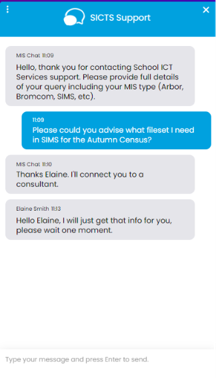
Live chat @ https://my.schoolicts.co.uk/
Customer Portal @ https://my.schoolicts.co.uk/
Our customer portals allow you to
- Log and track tickets
- Watch webinars
- Search the Knowledge base for information
- Latest news
Call: 0345 222 6802 Option 1 for MIS support *please leave a voicemail when lines are busy during peak periods. Leaving a voicemail automatically creates a ticket in our system.
Key Benefits of Our Live Chat:
- Instant Support: Get your questions answered in real-time by our knowledgeable support consultants.
- Expert Assistance: Our live chat is staffed by real people, ready to provide you with personalised support.
- Convenience: Access live assistance directly from our website, without the need for phone calls or emails.
- Efficiency: Resolve issues faster with immediate responses and quick solutions.
To start using Live Chat, simply visit our customer portal, log in and click on the chat icon at the bottom right corner. Our team is ready and eager to assist you with any enquiries or support you may need.
Customers can also log tickets via the customer portal here:
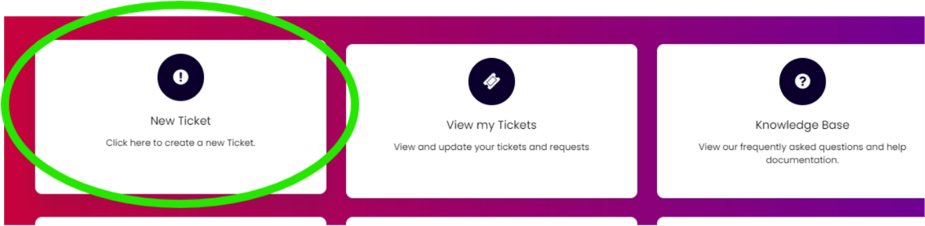
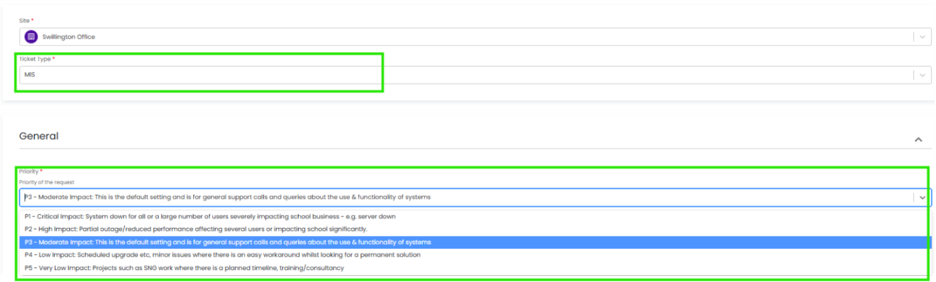
When you log a ticket via the customer portal, select the Ticket Type, either MIS or Technical, to ensure it gets to the right team. The Priority, if you have an urgent ticket, for example if your MIS is down, please select either P1/P2 all other tickets default to P3 or even P4 if not urgent.
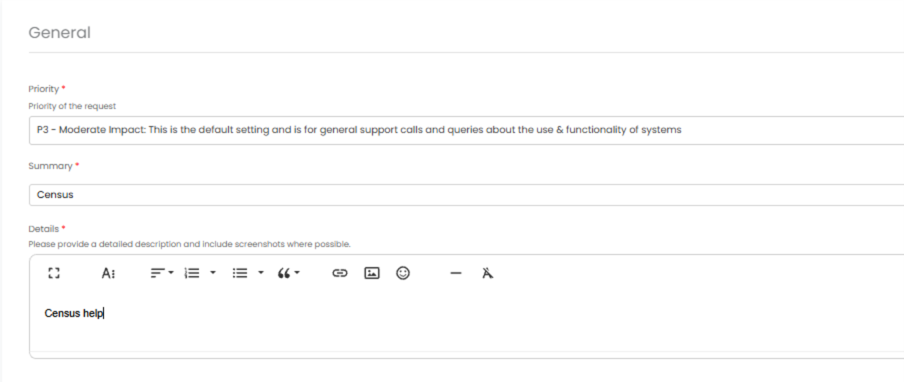
Once you’ve populated the Summary and Details box, you will see a pop-up box with suggested articles in the top-right hand corner:
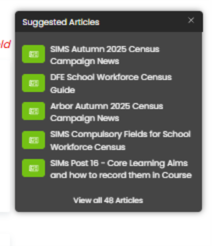
Clicking on the links in this pop-up may help you to resolve your issue without our input, so please also make use of this.
Remember to tell us which MIS and Module, but also really importantly if Ofsted are onsite, as this helps us prioritise your call through our Ofsted Watch service, and also your preferred contact method as we know sometimes an email reply is what you need during your busy period.
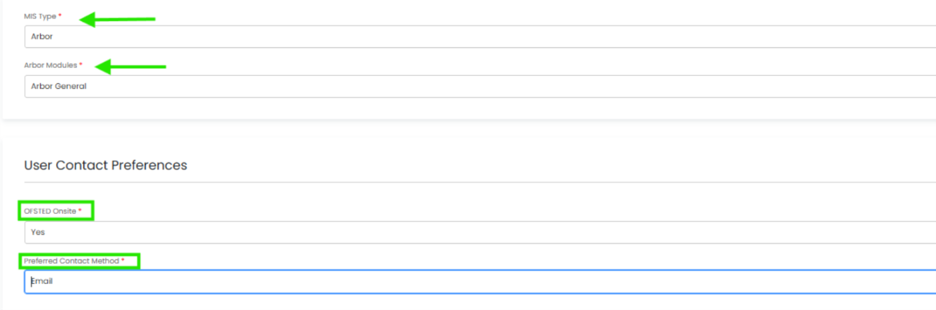
We know you like to speak to us (and we like to speak to you!) but in order to offer the best service to our customers, this is
often the quickest way to log a support request at busy times.
And lastly, as always, our experienced team is available to take your calls. Please contact us on 0345 222 6802 (option 1). If the lines are busy, you can save time by leaving a voicemail, which will automatically generate a ticket and allow the most appropriate person to call you back. PLEASE include your name, the name of the school, the best number to call you back on and a brief description of your query.
School Workforce Census
Key Dates
- Census Date: Thursday 5th November 2026
- Deadline for returning: Friday 4th December 2026*
- Contract data from 1st September 2025- 5th November 2026
- Absence data from 1st September 2025- 1st September 2026
- Snapshot data- 5th November 2026
*Check submission deadlines if you submit through the local authority
Exam Services - October already? Let the deadlines begin!
October has arrived, and the new academic year is now well underway. Timetables are settled, students have found their classrooms and exams officers are once again surrounded by deadlines, regulations and acronyms!
This month brings preparation for the November GCSE examination series, summer estimated entries and the release of important updated JCQ documentation. Here are the key updates and reminders to keep everything moving in the right direction.
November GCSE Examination Series
November GCSE entries should now be complete, with the final entry deadline falling on 4 October. Basedata is already available, so centres should ensure entries have been submitted and checked carefully.
The following JCQ dates should also be noted:
- 1 October – Final date to submit Form JCQ/CCA for GCSE English Language Spoken Language Endorsement centre consortium arrangements.
- 4 October – Final date for November GCSE entries.
- 4 October – Final date to request transferred candidate arrangements through the Centre Admin Portal.
- 1 November – Final date to process November GCSE access arrangement applications through Access Arrangements Online.
- 2 November – First examination on the common November timetable.
- 2 November – First date for submitting special consideration applications.
- 5 November – Final date to submit GCSE English Language Spoken Language Endorsement grades.
- 11 November – Final examination on the common November timetable.
- 18 November – Final date for submitting special consideration applications.
As always, please check individual awarding organisation requirements, as dates can vary depending on the qualification or specification. Nobody wants to discover a missed deadline at 4.59pm, particularly when the system has also decided that this is the perfect moment for a password reset!
Summer 2027 Estimated Entries
The deadline for submitting estimated entries for relevant June 2027 qualifications is 10 October.
Estimated entries are provisional and do not commit centres to final entries. However, they allow awarding organisations to plan for early examination materials and allocate visiting examiners or moderators where required.
Not every subject requires estimated entries, so centres should check the relevant awarding organisation guidance and submit information for the qualifications that apply to them.
It may feel early to be talking about summer 2027, but in the world of exams, summer preparation begins now!
The New JCQ ICE Booklet Is Now Available, you can access it here: https://www.jcq.org.uk/wp-content/uploads/sites/2/2026/09/JCQ-Instructions-for-conducting-examinations-2026_FINAL.pdf
The updated JCQ Instructions for Conducting Examinations (ICE) for 2026–27 is now available.
This is the definitive guidance for preparing for, conducting and completing examinations securely and consistently. Changes from the previous version are highlighted in yellow, making them easier to identify.
Most importantly, this document is not solely the responsibility of the exams officer. JCQ states that the:
- Head of centre
- Senior leaders
- Exams officer
must read all chapters of the ICE document.
Other staff involved in examination administration must also read and follow the sections relevant to their responsibilities. This includes invigilators and anyone supporting candidates through an access arrangement.
Exam officers may know the document inside out, but examination compliance is a whole-centre responsibility. The head of centre remains accountable for ensuring that staff follow JCQ regulations and awarding organisation requirements.
Centres should therefore:
- Download and circulate the updated ICE booklet.
- Ask the head of centre and relevant senior leaders to read all chapters.
- Record that the document has been shared and read.
- Review the highlighted changes for 2026–27.
- Update centre procedures, training materials and checklists where necessary.
- Ensure relevant information is included within invigilator training.
Updated Unauthorised Items Poster
The JCQ Unauthorised Items poster has been updated for 2026 and is effective from 1 September 2026.
The updated version now specifically includes:
- Mobile phones
- Smart glasses
- Watches
- Storage or web-enabled devices
Centres must download and print the new version, remove outdated posters and replace every old copy currently displayed.
The poster must be displayed prominently outside each examination room where candidates can clearly see it before entering. It may be displayed as a printed A3 poster, in black and white or colour, or projected onto a wall or screen.
This is a good opportunity to carry out a quick tour of all examination rooms and storage areas. Old posters have a habit of quietly surviving on walls and noticeboards long after everyone thought they had been replaced!
Is Your Centre Ready for the New Academic Year?
October is the ideal time to review your examination processes before the main summer preparations begin.
Our Exams Consultancy and Project Support services can help schools and trusts with:
- JCQ compliance reviews and readiness checks.
- Examination policy and procedure reviews.
- Secure storage and examination room checks.
- Standardisation of processes across multiple schools.
- Development of practical systems, templates and audit trails.
- Support with entries, seating plans and access arrangements.
- Short-term project support during staffing gaps or periods of increased workload.
Sometimes an experienced fresh pair of eyes can identify a risk before it becomes a problem, which is always preferable to meeting that problem during a JCQ inspection!
Supporting New Exams Officers
Our proven and successful Exams Mentoring Programme remains one of our most popular services. It supports new exams officers as they find their feet and develop into confident, knowledgeable and proactive professionals.
Those who know, know! There are multiple deadlines to manage, hundreds of regulations to understand and a significant amount of risk mitigation required throughout the examination cycle. Having an experienced expert to provide guidance and help lead the way is invaluable, particularly when everything is new and the acronyms appear to have their own language.
This carefully fine-tuned service covers every aspect of the exams officer role, providing practical guidance, reassurance and continued support throughout the year. No new exams officer should be expected to understand everything hidden within the regulations from day one.
Without the right support, this is where the pressure begins to build and overwhelm can arrive like a high-speed train. When a new recruit feels they have no option but to walk away, the impact is felt across the school affecting staff retention, operational stability and, most importantly, the students relying on a well-managed exams service.
We Are Here to Help
Whether your school requires a fully managed exams service, mentoring for a new exams officer, additional support during a staffing gap, invigilation support, a compliance review or help completing a specific exams project, our experienced team is here to help.
Please contact us to discuss your requirements and find out how our support can be tailored to your school or trust.
Until next month, keep checking those deadlines, replacing those posters and reminding senior leaders that the ICE booklet really is required reading!
Data Management Services
Did you know… we can provide short, medium and long term Data Management cover? If you’re experiencing staff off sick, on maternity leave or seconded elsewhere, we can ensure your data needs are covered.
Our Data Management Service provides schools, academies and Multi-Academy Trusts with access to experienced education data specialists who become a trusted extension of your team. Delivered remotely through secure access, the service offers comprehensive support across assessment, census, examinations, reporting and day-to-day data management, with expertise in statutory returns, compliance and funding-related processes.
More than simply completing tasks, our service gives schools confidence that critical data responsibilities are being managed accurately, efficiently and by professionals who understand the demands of the education sector. Whether you require long-term support to strengthen data management capacity or short-term cover for sickness absence, maternity leave, peak workload periods or unexpected staffing gaps, our team provides a flexible and dependable solution.
Customers value the reassurance of responsive, knowledgeable support, practical advice and sector best practice. Feedback consistently highlights the service as reliable, efficient and cost-effective, helping schools reduce pressure on internal teams while avoiding the time, expense and challenges associated with recruitment and training.
To find out more contact us today via info@schoolicts.co.uk, by calling 0345 222 6802 option 5 or read our case-study from St Richard Gwyn Catholic High School to find out why they couldn’t be without their remote Data Manager from School ICT.
- Please click here for further information.
Specialist Consultancy Services
Protect your Post-16 funding before you submit your Autumn census
Post-16 funding is too important to leave to chance. Yet the autumn census arrives at a time when teams are already balancing new starters, timetable changes, enrolments and the day-to-day demands of the new academic year. There’s still time after census day to review your Post 16 data before you submit your census return.
Our Post-16 Funding Scrutiny Service provides an independent review of the key data that underpins your post-16 funding, helping identify anomalies, compliance issues and potential funding risks before census submission. Whether you’re new to post-16 funding, have experienced staff shortages, or simply want additional reassurance, our specialists can help you validate funding-critical data and highlight areas that need attention.
Don’t wait until queries arise after submission. Gain confidence that your data is accurate, your funding is protected and your school is claiming what it’s entitled to.
Need extra capacity or specialist support with statutory returns this year?
Our Statutory Returns Service gives schools flexible access to experienced education data specialists when internal time, capacity or knowledge is limited. Support is delivered remotely and can be used for one return, several returns or as part of an agreed package across the academic year.
We can work alongside your team or manage agreed parts of the process on your behalf.
This includes preparing and checking data, identifying missing or incorrect information, resolving validation errors, reviewing funding and enrolment details, producing the required return file and supporting submission.
If your team has already completed the return, we can also provide an independent review before it is submitted to provide reassurance, accuracy and funding compliance.
The service can cover returns including the pupil census, School Workforce Census, key stage collections and Catholic Census.
The level of support is shaped around your school, the condition of the data and how much help your team needs.
Whether you are covering staff absence, managing a vacancy, supporting someone new to the process or simply want specialist reassurance, we can help reduce pressure, protect valuable staff time and give leaders confidence that returns are accurate, complete and submitted on time.
Get in touch to discuss the right support for your school: info@schoolicts.co.uk or call on: 0345 222 6802.

Autumn Term Arbor, Bromcom and SIMS Bespoke and Scheduled Training
With the new academic year now firmly underway, October is often the point where schools move beyond the September settling-in period and begin focusing on the key priorities for the year ahead. Whether you’re refining assessment processes, reviewing operational workflows, or preparing for statutory returns, investing time in training now can help ensure a smoother and more efficient year.
Our upcoming training programme covers a range of topics designed to help schools make the most of their MIS, improve efficiency, strengthen data quality, and ensure staff feel confident using the tools available to them.
Coming next month: Webinar Week!
Our ever-popular Webinar Week returns next month, with a packed programme of useful sessions. Keep an eye on your inbox for the full line-up and booking details.
Training Spotlight: Assessment
As the first half-term draws to a close, many schools are beginning to review progress, analyse attainment data, and prepare for autumn reporting. Making effective use of assessment tools can help ensure data is recorded accurately, analysed efficiently, and used to support informed decision-making across the school.
Our Assessment training sessions are designed to help users build confidence in managing assessment frameworks, recording outcomes, monitoring progress, and producing meaningful reports. Whether you’re new to assessment management or looking to refresh your skills, these sessions provide practical guidance to help you get the most from your MIS.
Arbor Secondary Assessment – Monday 9th, 16th & 23rd November – Arbor Secondary Assessment User – School ICT
Bromcom Secondary Assessment – Thursday 12th November – Bromcom Secondary Assessment – School ICT
Arbor CPD Sessions for Teaching Staff
We’re introducing a new range of Arbor CPD sessions designed specifically for teaching staff. These focused one-hour sessions help teachers make the most of Arbor’s classroom tools and the valuable information available within the system.
Topics include:
- Lesson Dashboard & My Classroom – making day-to-day classroom management easier
- Recording Behaviour – promoting consistency and making effective use of behaviour information
- Assessment & Assignments – recording, monitoring and using assessment data effectively
- Using Data Holistically to Drive Improvement – turning information into meaningful actions that support pupil progress and outcomes
Sessions can be delivered at a time that suits your school, making them an ideal option for staff meetings, INSET days or targeted professional development.
Interested in arranging a session for your staff? Contact helpdesk@schoolicts.co.uk to discuss your requirements.
Looking for training that’s not currently scheduled?
Whether your school uses Arbor, Bromcom or SIMS, our team can discuss additional training and consultancy support.
If you cannot find the course you need within our current schedule, please get in touch. We can discuss your requirements and explore a bespoke session tailored to your school or trust.
We’re constantly reviewing our training offer, so if there are any courses you’d like to see, please don’t hesitate to get in touch at helpdesk@schoolicts.co.uk.
Booking is now open please visit https://www.schoolicts.co.uk/online-training/
|
Course Title |
Date and Time |
Link to book |
| FMS New User – Bank Account Schools | Thursday 22nd October, 1-4pm | FMS New User – Bank Account Schools – School ICT |
| Arbor Clubs and Trips | Friday 23rd October, 9.30am-12.30pm | Arbor Clubs And Trips – School ICT |
| Arbor Secondary Assessment User (3 half day sessions) | Monday 9th November, 1-4pm | Arbor Secondary Assessment User – School ICT |
| Arbor Standard Reporting | Tuesday 10th November, 1-4pm | Arbor Standard Reporting – School ICT |
| SIMS Standard Reporting | Wednesday 11th November, 9.30am-3.30pm | SIMS Standard Reporting – School ICT |
| Arbor Attendance | Wednesday 11th November, 9.30am-12.30pm | Arbor Attendance – School ICT |
| NEW for 26/27 Arbor Behaviour | Wednesday 11th November, 1-4pm | Arbor Behaviour – School ICT |
| SIMS & Next Gen Monitoring Attendance | Thursday 12th November, 9.30am-12.30pm | SIMS Monitoring Attendance (Attendance Letters And Reporting) – School ICT |
| Bromcom Secondary Assessment | Thursday 12th November, 9.30am-3.30pm | Bromcom Secondary Assessment – School ICT |
| SIMS & Next Gen Primary Attendance | Friday 13th November, 9.30am-12.30pm | SIMS & SNG Primary Attendance – School ICT |
MIS Data Assurance Review
Unlock the full potential of your MIS
Your MIS is one of the most important systems in your school. Our Data Assurance Service helps you ensure your data is accurate, your processes are efficient and you’re making the most of the functionality available.
What’s included?
- Expert review of your MIS data and configuration.
- Identification of unused functionality and opportunities for improvement.
- Advice on the latest developments and best practice.
- Support with housekeeping and data retention requirements.
- A tailored report with clear recommendations and training opportunities.
- A server health check for on-premise systems.
The result? Greater confidence in your data, improved efficiency, and reassurance that your MIS is supporting your school as effectively as possible.
Could your MIS be working harder for your school? Speak to our team about our Data Assurance Service and uncover opportunities to improve efficiency, strengthen data quality and maximise the return on your MIS investment. Contact us at: helpdesk@schoolicts.co.uk to find out more.

FMS – The Future of Your School Finances!
ParentPay Group is continuing their exciting project to move all FMS6 schools across to FMS (Next Gen)!
This major programme will continue throughout 2026, with PPG contacting schools directly to support them through the migration process at a suitable time.
What happens next?
Step 1 – When your school receives the migration email, please complete the onboarding form as soon as possible.
Step 2 – Your school will then be invited to select a preferred migration time slot.
Step 3 – Your school will move from local FMS6 to FMS Connected – this is typically completed within 24 hours.
Step 4 – Later in the year, schools will transition from FMS Connected to the full FMS (Next Generation) platform.
Why this change matters
Moving to a single cloud-based platform allows us to provide schools with a more secure, reliable and continuously improving service, while reducing the technical burden on finance teams.
Please note: this is a mandatory migration, and all schools will need to move to FMS Connected before the end of the migration period. Schools that do not schedule their migration within the required timeline may have restricted access to local FMS6.
Important reminder
Please keep an eye out for communications from PPG regarding your migration window. Some schools may have already received emails relating to the migration programme, but these may have been overlooked or filtered into other inbox folders.
When it is time for your school to move, you will receive regular reminder emails asking you to complete the onboarding form and choose your preferred migration date. Once you have completed the migration questionnaire and have your migration date, please contact the Help Desk.
These emails do require action, so please do not ignore communications from ParentPay Group, as delays may impact your migration timeline and access to local FMS6.
Important note: If you are a user of FDS (Finance database selector), PPG will only migrate FMS databases that are actively in use. FMS databases that have not been used or were last active 8 years ago or more will not be migrated. Lowest open Year 19/20.
If you have any questions or require support, please contact the Help Desk on: 0345 222 6802 or e-mail: helpdesk@schoolicts.co.uk
FMS Connected and Personnel & links
If you have recently moved to FMS Connected and utilise the Personnel 7 links between SIMS.net and FMS 6, you may experience a sync issue between SIMS.net (server based) and FMS Connected.
PPG (ParentPay Group) state that the sync can take up to 2 – 4 hours for a change in SIMS Personnel to be reflected in Salary projections. In some cases, this may take longer, e.g. overnight. This may indicate a problem with the configuration.
There are some checks to carry out:
1 – When running Salary projections via – Focus – Personnel links – Salary projections. You should be presented with a small number of splash screens including “Recalculating commitments”. If this appears to load very quickly or no splash screens appear then this may be an issue with the MIS link.
2 – Tools – Define – Financial Years – Define salary periods – The current financial year should have periods defined e.g. 26/27.
3 – Tools – MS Settings.
- The tickbox should be Ticked.
- The username and password fields should be populated.
- A file path needs to exist in the last box.
If you experience any issues, we recommend that you check the above and log a support call via helpdesk@schoolicts.co.uk.

Click for the latest Arbor updates
Important Note on VAT Invoice Changes
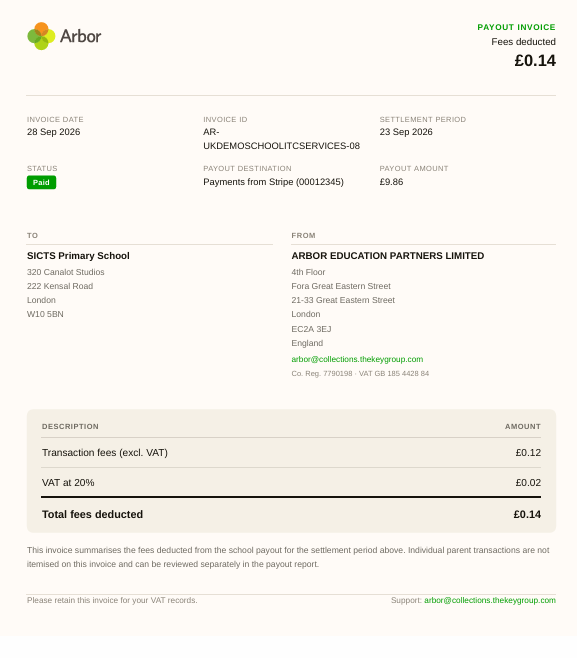
From 10 September 2026, these invoices have been moved and renamed Payout invoices, and have a new design and layout.
Payout Invoices (formerly VAT Invoices) will be migrated to the new location over time. If you cannot find Payout Invoices from before 10 September 2026, the invoice has not migrated yet and can be found in the old location while Arbor work on phasing this out.
To download your Payout Invoice (VAT Invoice), go to School | Payments | Reconciliation | Card Payments | Payouts Overview
Click into the payout it is related to, and on the top right side you’ll see a ‘Download Payout Invoice’ button.

Clicking this will download the Payout invoice as a PDF which will look something like this:
School Workforce Census
If you have yet to complete your autumn school census, you can find all the information and documentation you need on our customer portal Arbor Latest Census Guidance and Campaign News
What’s new in Arbor?
- Free School Meals (FSM) updates: A new Add New FSM Claim bulk action replaces Bulk Edit FSM Category. When you save, it closes the selected existing claim with an end date of the day before the new claim starts, moves it to the claim history and creates the new claim.
- Data Quality Dashboard: A new page flags students who have more than one guardian set to the same Priority Level, and you can fix the data directly from the page. See Resolving Guardians with Duplicate Emergency Priorities.
- Student and guardian calendars: Schools can now choose how staff names appear on student and guardian calendars. Live staff shows cover in real time and is the default. Assigned staff always shows the timetabled teacher. No staff hides staff names completely. There’s a separate setting for each of these: Parent Portal (Students > Parents & Guardians > App & Portal > Parent Portal Settings), Student Portal (Students > Student Portal > Student Portal Settings, Student Portal tab) and Student App (Students > Student Portal > Student Portal Settings, Student App tab). Staff calendars in the MIS aren’t affected.
- Trips: Staff with attendance admin permission can now select confirmed participants on a trip’s attendees table and use the new Create Planned Absences bulk action. This creates a planned absence covering the trip dates with the educational visit mark for your jurisdiction (for example, V in England). Students who aren’t confirmed are left out, and students with an overlapping planned absence are skipped, with a link to their existing absences. This is a one-off bulk create: absences won’t update if the trip dates change, and lessons aren’t automatically suspended. Open a trip | attendees table | select confirmed students | Create Planned Absences.
- Meals: If a staff member manually sets a student’s meal choice to Absent, it now stays in place when the student is later marked present. It only changes when someone manually picks a non-absent provision or uses Auto-fill based on attendance in Meals. Students who are marked absent and then present again still go back to their default meal choice automatically. This applies anywhere marks can be changed, including registers, bulk edit marks and marks by date.
- Exams: Room and seat allocations now stay assigned while a candidate withdrawal is pending. They’re only removed once the withdrawal is fully confirmed or an unsubmitted entry is deleted, so candidate timetables and calendars stay accurate throughout. Non-EDI entries update immediately, and the withdrawal screens now include in-app guidance explaining these rules.
- Scheduling Assignments: You can now set a future date and time for an assignment to become visible to students and guardians. If you leave it blank, the assignment publishes immediately as before.
- Security: Staff two-factor authentication is now stronger. Authenticator app (TOTP) codes can only be used once. After 5 incorrect codes in a row, further attempts on that account are paused for 2 minutes, and an on-screen message explains why. Normal logins with a fresh code aren’t affected.
- Communications: The “To” field in In-App Message compose now loads quickly for schools with a long enrolment history. Previously it could time out or load empty because it looked up every past guardian.
- Payments: Arbor now generates payout VAT invoices with an updated design. Historic invoices will move across in due course, and a banner on the VAT Invoices page explains this in the meantime.
- Arbor Workflows: The Workflows page has had a visual refresh to match the Arbor MIS. It’s now a single home for all your workflows, where you can see activity metrics, filter by collection, and go straight into a workflow’s activity or the builder.
- Arbor and SAMpeople integration improvements:
- per-school control over writing employees, contracts, salaries and absences back to Arbor
- clearer integration health and error information
- review steps for new starters and contracts
- email alerts when write-back fails
- Next of Kin and the Exclude from Census flag now written back
- a one-click sync of Arbor curriculum data for Workforce Census preparation
- a new MIS Usage Dashboard at school and trust level
- TimeTabler 6.615 and StaffCover 4.603 are available to download from the TimeTabler website:
- TimeTabler fixes several export issues: false Step 5 name errors with schedule-only staffing, labelling of teaching groups numbered 100 and above, and missing per-day period end times.
- StaffCover makes Check for Updates safer with an automatic backup before updating and fixes an issue where SC-Restore deleted the backup it was restoring from.
- Welsh schools: You can now use an Estyn inspection report as proof of school name and address when completing Stripe KYC (Know Your Customer) verification for Arbor Payments, the same way English schools can use an Ofsted report. This applies to both new payments setup and reverification. Go to School | Payments | Setup | Card Payments | Accounts for Card Payments | Verify school details.
- MAT MIS and Smartgrade integration: You can now connect directly to Smartgrade to pull standardised assessment data into MAT MIS and push it down to individual schools. Central teams can query calculated grades, raw scores, standardised scores and percentile ranks. Set it up in Administration > Assessment > Assessment Integrations.
- BI Connector: Five new national data sources are available through the National Data Connector: KS4 School Performance, KS4 School Subject Entries & Grades, Post-16 School Performance, Post-16 School Subject Entries & Grades, and Post-16 Qualification & Subject Value Added. The data comes straight from the Department for Education (DfE) API and updates automatically with each DfE release, so you can compare your outcomes against the national picture without any manual steps.
Re-enrolling a student who has returned to your school
If a student returns to your school after being unenrolled, you can either add a new enrolment, or extend their enrolment if there is no gap between attendance.
If the student needs to be reinstated after a break in their enrolment, a new enrolment should be created. To do this:
Go to the student’s Student Profile and go to the Enrolments section.
Click +Add in the top left of the School Enrolments section. In the slide over panel, select their re-enrolment date and their year group, registration form and house (where applicable). Then click Enrol student.
The student will then have two enrolments for their two separate periods of attendance.
Remember: If a student has left your school, you should never delete all records of them. This is so you can accurately report on your attendance figures for the School Census etc. You should also not remove their enrolment data if they were present for any classes.

Click for the latest Bromcom updates
Autumn School Census
If you have yet to complete your autumn school census, you will find all the information and documentation you need here:
School Workforce Census - Thursday 5th November 2026
For guidance on how to run your School Workforce Census in Bromcom, please refer to our SWC campaign
Known Issues for the October School Census
Current issues with School census known to Bromcom; if you experience any of these in your MIS please log a ticket with the helpdesk:
Error 2870 – Contains a special character within the error details.
Bromcom are aware of an issue affecting customers who are in their census return via Modules > Census > School > Select return > “View errors”. The error search facility is currently not working as expected and when pressing enter is returning customers to the main census returns page.
What’s new in Bromcom
- Administration – Manage duplicate Contacts during ATF/CTF Imports
Students | Student List | Actions | ATF Import and CTF Import
You can now review and resolve potential duplicate contacts during the ATF and CTF import process to prevent duplicate records.
Contacts in the import file are compared with existing MIS contacts to identify potential duplicates. Potential matches can be reviewed and resolved before completing the import, while existing MIS contact details can be updated using the information provided in the contact file.
Note: Contact matching is available when Student Contacts is selected at the start of the import.
- Census – England School Census: New Data Check Reports
Modules | Census | School
For schools in England, the Data Check Reports section has been expanded to include the following new reports in both On Roll and Leavers:
All schools (excluding Nursery schools)
- Summer Half Term 2 Attendance
Secondary, All-Through, and PRU schools
- Programme Aim
- Learning Aim
- Workplace Entity
- Learning Hours
- Prior Attainment
- Dinner – Dinner Menus: Separate Medical Conditions and Dietary Needs Fields
Config > Dinner > Dinner Menus
When adding or editing a menu in Dinner Menus, the Menu Details page has been updated to separate the existing Link Menu to Medical Conditions/Dietary Needs field into two distinct multi-select fields:
- Medical conditions
- Dietary needs
This enhancement makes it easier to manage medical conditions and dietary requirements independently when creating or updating a dinner menu.
- Curriculum – Apply Timetable Model Enhancements
Modules | Curriculum | Routines | Apply Timetable Model
The Apply Timetable Model page has been enhanced to give greater control over how arranged cover and non-contact codes (NCCs) are handled when applying a timetable model. It also allows schools to retain any classes created directly in Bromcom that are not in the timetable model.

Click for the latest SIMS updates
School Workforce Census
For guidance on how to run your School Workforce Census in SIMS, please refer to our SWC campaign
School Census – SIMS 7 Update
Good news for schools completing the Autumn Census in SIMS 7!
The latest fileset, 3405, has now been released and replaces the withdrawn Fileset 3404.
This is the required fileset for the Autumn Census and includes important fixes to help ensure a smoother census process.
What’s been fixed?
Queries 4061 and 4063
- These queries were incorrectly triggering where a valid Last Verified Date needed to be provided for each open period of FSM eligibility.
- The issue particularly affected single FSM periods where the verification date was blank but the FSM period had an end date.
Query 4063
- An additional fix has been applied to prevent this query from incorrectly triggering for single FSM periods with a blank verification date and an end date.
What do schools need to do?
The new fileset has already been released to all schools. Any school completing the Autumn Census in SIMS 7 should ensure that Fileset 3405 has been applied before continuing with their census return.
Applying the updated fileset should help reduce unnecessary validation errors and make the census preparation process that little bit easier.
As always, if you need any support with your census return, please get in touch with the MIS Support Team.
SIMS Next Generation Census Update: You Asked, PPG Listened!
We’re pleased to share some great news for schools preparing their next census return in SIMS Next Generation (SNG).
Universal Free School Meals Update
Following feedback from schools, enhancements have now been made to census meal reporting.
You asked, PPG listened! All pupils eligible for Universal Free School Meals (UFSM) will now be included in the census meals section regardless of their AM attendance mark. This means schools can confidently record meals for pupils who arrive later in the morning and still ensure they are accurately reflected in the census return.
This change should help provide a more accurate picture of meal uptake and reduce the need for manual checks during census preparation.
Attendance Issues Resolved
Alongside the UFSM enhancement, reported attendance-related issues have been fully investigated and a fix has now been applied.
Schools should find that any known attendance discrepancies previously affecting census data have now been resolved, making the census process smoother and more reliable.
What This Means for Schools
- UFSM pupils will now pull through correctly in the census meals section, even where the AM mark is not present.
- Meals can be recorded for pupils arriving later in the morning without impacting census reporting.
- Attendance-related census issues have been addressed and fixed.
- Less manual intervention and greater confidence in your census data.
As always, we love hearing your feedback, and it’s great to see school suggestions helping shape future improvements. Thank you to everyone who raised these points and helped make the system even better!
With these updates in place, schools can look forward to a smoother, more accurate census experience this term.
Just a reminder on how you finalise the census in SNG
Authorising the census return
After the Headteacher’s approval, the Returns Manager can authorise the census.

1 – From the census return overview page, click the Authorise census [1] button.
A message for confirmation of authorisation will be displayed. ‘This confirms that the Headteacher has checked and approved this census. The census file package will be exported automatically.’
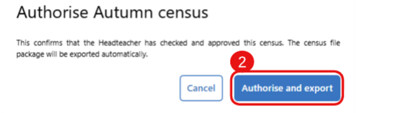
2 – Click the Authorise and export [2] button to create and automatically download the Summary report and XML file (for COLLECT submission) to your Downloads folder, or click Cancel to return to the overview page.
IMPORTANT: Move these files to a secure location in line with school policy, as they contain sensitive information.
This completes your census return.
NOTE: It is possible to make further changes to your return if necessary.
Making post-authorisation changes
- Update the relevant data in the MIS.
- Change the census back to Draft status.
- Refresh relevant sections and review.
- Move through the Ready for review and Authorised stages again. A new version of the census Summary report and XML will be generated with the latest set of changes.
Tracking status changes
It is possible to track status changes in the census lifecycle. This serves as an audit trail, allowing users to view the status history for the return.
From the census overview page, click the Status history [1] button.
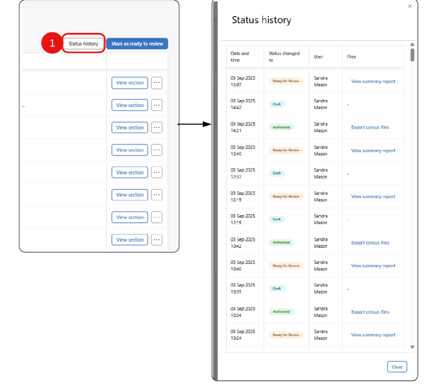
- A side panel opens, showing the status history of the return in a table.
- Date and time of the changes made.
- Status changed to. The statuses of “Draft”, “Ready for Review” and “Authorised” are identified with coloured pills.
- The User who made the changes.
- Files with a link to the files or reports generated for that change.
- Click Close to close the side panel and return to the census overview page.
For SIMS specific census information, please see our SIMS Latest Census Guidance and Campaign News
What’s new in SNG? Stage 3 Redirect Update
We wanted to share an update from the ParentPay group on the Stage 3 redirects and provide some additional context around the planned timings.
With an extremely busy September, the ParentPay Group has made the decision that the Stage 3 dates for the areas listed below will not come into force until the beginning of November. The ParentPay Group will share the confirmed dates in due course, but we wanted to give you early visibility.
Timetables – staff and pupil timetables
Attendance – take register (statutory AM and PM registers and lesson registers)
Conduct – positive and negative events, detentions, exclusions and suspensions, and report cards
The dates continue to be staggered and phased in, giving schools time to prepare before their Stage 3 date takes effect. Schools with the earliest Stage 3 dates will have had at least eight school weeks of their redirect being turned on, excluding school holidays, before the permanent stage 3 redirects come into force.
This approach is intended to provide a managed transition and reduce unnecessary disruption.
Now available in SIMS Next Gen
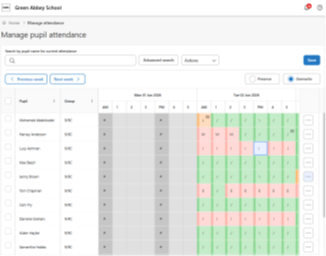
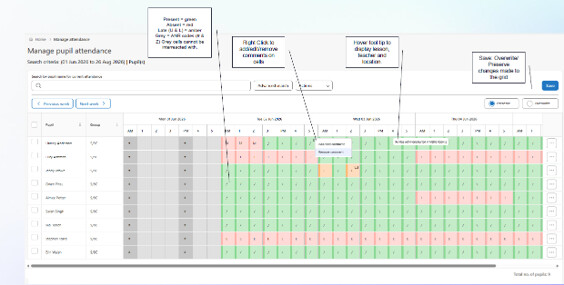
The Manage Attendance module is now live in SIMS Next Gen. The module introduces a redesigned attendance grid with inline editing, multi-cell selection, right-click actions, infinite scrolling, week navigation and enhanced attendance insights, providing schools with a faster and more intuitive way to manage attendance data. More information on managing attendance in SNG can be found here
Free Breakfast Club Attendance
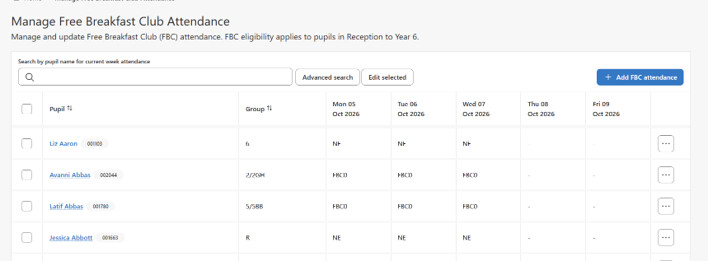
SIMS Next Gen provides the Free Breakfast Club feature to enable schools to record attendance for any schools participating in the DfE programme.
The Free Breakfast Club feature will include a register for the FBC supervisors to record pupils’ daily attendance, and the FBC administration pages to allow adding and editing of the recorded attendance.
Interventions
SIMS Next Gen makes it easier to create interventions, enrol pupils, and manage intervention activity through to completion. This supports consistent capture and greater transparency of targeted support across the school.
Key features:
- Create, edit, and delete intervention instances directly within the module. Link to an existing overview, add pupils, assign supervisors, set dates, number of sessions and capture costs.
- Organise and manage intervention overviews in the admin console, grouping interventions in line with school strategy and policy.
- Generate an internal / parental report for individual or multiple pupils within an intervention instance, capturing intervention details and progress made. The report includes configurable options to show or hide supervisors, notes, and costs by toggling on or off.
SIMS Next Gen how-to videos
To make things easier for customers, we’ve brought together a range of helpful SIMS Next Gen how-to videos. You can access them through our customer portal.
The videos include step-by-step guidance on taking registers, pupil profiles, attendance reporting, mark sheets and mark books, primary assessments, staff profiles, custom groups and staff timetables.
SIMS Next Gen whitelisting requirements
Recently, there have been changes made to the SNG whitelisting requirements.
Please see information below. This information can also be viewed on our customer portal SIMS Next Gen Whitelisting Requirements.
SIMS Next Gen requires access to various endpoints in order to successfully exchange data. The list below shows the current known URLs that may need to be accessed, and that therefore may need to be whitelisted through a school / site Firewall, Proxy, or Internet Service Provider (ISP).
The SIMS Next Gen config wizard will need the following URLs whitelisted to connect:
- Core URL: https://simsid-orgsel.sims.co.uk
- simsid_verifyurl = ‘https://simsid-live-rapapi.azurewebsites.net/api/v1/Onboarding/ValidateClient‘
- simsid_onboardingUrl = ‘https://simsid-live-rapapi.azurewebsites.net/api/v1/Onboarding‘
- simsid_selfregistrationUrl = ‘https://simsid-live-rapapi.azurewebsites.net/api/v1/Admin‘
- simsid_RetrieveUsersUrl = ‘https://simsid-live-rapapi.azurewebsites.net/api/v1/onboarding/ValidateOrganisation’
Other SIMS Next Gen URLs to be whitelisted
On port 443:
- *.sts.sims.co.uk
- *.sims.co.uk
- *.assess.sims.co.uk
- *.sas.sims.co.uk
- *.staff.sims.co.uk
- *.pupil.sims.co.uk
- *.learners.sims.co.uk
- *.interventions.sims.co.uk
- *.grouphub.sims.co.uk
- *.exams.sims.co.uk
- *.cnd.sims.co.uk
- *.census.sims.co.uk
- *.reporting.sims.co.uk
- *.schoolreporting.sims.co.uk
- *.olap.sims.co.uk
- *.financereporting.sims.co.uk
- *.timetablereports.sims.co.uk
- *.class.sims.co.uk
- *.cover.sims.co.uk
- *.customgroups.sims.co.uk
- *.school.sims.co.uk
- *.schooldetails.sims.co.uk
- *.pupiltimetable.sims.co.uk
- *.teacher.sims.co.uk
- *.attendancemanagement.sims.co.uk
- *.coursemanagement.sims.co.uk
- *.home.sims.co.uk
- *.auth.sims.co.uk
- *.photos.sims.co.uk
- *.live-mfe.sims.co.uk
- *.datatransfer.sims.co.uk
- *.platform.sims.co.uk