To navigate to the most relevant section, please click the appropriate link below: -

Welcome Back and Happy New Academic Year!
We hope you all had a restful Summer and are now wondering where the time went!
As we kick off a new academic year, we’ve taken a moment to reflect on the past year, especially the bustling summer term.
Over the Summer term and holidays, our amazing team has supported over 1,500 customers and tackled an incredible 11,520 support requests!
But that’s not all! Throughout the last academic year, we hosted 60 live webinars and delivered over 120 training courses, sharing valuable insights and knowledge with our schools and Trusts.
Our team has been working hard over the summer break to prepare for the term ahead. We’ve held internal training sessions, refreshed our customer portal resources, delivered lots of consultancies to customers, have planned webinars and training courses and have welcomed 4 new team members to the MIS Support team. Please join me in welcoming Amit, Amrit, Emma and Kaci to the team !
Ruth Rogers
Head of MIS
MIS Support
Please be aware that we are receiving an exceptionally high number of calls at the moment and we thank all of our customers for their patience when calling.
Customer contact options: –
- Live chat @ https://my.www.schoolicts.co.uk/
- Customer Portal @ https://my.www.schoolicts.co.uk/
Our customer portals allow you to: –
- Log and track tickets
- Watch webinars
- Search Knowledge base for information
- Latest news
Call: 0345 222 6802 Option 1 for MIS support *please leave voicemail where lines are busy during peak periods
Please remember that you can request support in various different ways, by requesting support via Live chat:

Key Benefits of Our Live Chat:
- Instant Support: Get your questions answered in real-time by our knowledgeable support consultants.
- Expert Assistance: Our live chat is staffed by real people, ready to provide you with personalised support.
- Convenience: Access live assistance directly from our website, without the need for phone calls or emails.
- Efficiency: Resolve issues faster with immediate responses and quick solutions.
To start using Live Chat, simply visit our customer portal, log in and click on the chat icon at the bottom right corner. Our team is ready and eager to assist you with any enquiries or support you may need.
Customers can also log tickets via the customer portal at our customer portal:

When you log a ticket via the customer portal, select the Ticket type either MIS or Technical to ensure if gets to the right team. The Priority, if you have an urgent ticket, MIS down for example please select either P1/P2 all other tickets default to P3 or even P4 if not urgent.


Once you enter the Subject and Details box, you will see a pop up box with suggested articles in the top right hand corner:
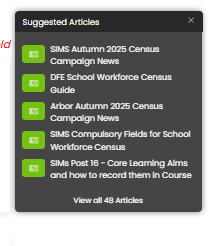
Clicking on the links in this pop-up may help you to resolve your issue without our input, so please also make use of this.
Remember to tell us which MIS and Module but also really importantly if OFSTED are onsite as this helps us prioritise your call through our OFSTED Watch service and also your preferred contact method as we know sometimes an email reply is what you need during your busy period.

We know you like to speak to us (and we like to speak to you!) but in order to offer the best service to our customers, this is often the quickest way to log a support request at busy times.
And lastly, as always, our experienced team are on hand to take your calls, so please reach out via 0345 222 6802 if the lines are busy and to save your precious time waiting you can leave a voicemail. This method will automatically generate a ticket and this means that the person who can help you best is the person who will call you back. If you do this, PLEASE leave your name, the name of the school, the best number to call back on and a brief description of why you’re ringing, as this means that the best person to help you is the one that will call back.
Changes to Free School Meals
Please Note: The DfE have recently changed their guidance regarding transition for Ever6 Free School Meals. Where previously they said that “existing claimants who no longer meet the eligibility criteria would continue to receive free school meals until the end of their current school phase (primary or secondary)” their newest guidance (June 2025) states that: Transitional protections will now apply from 1 April 2018, until the end of the 2025/26 school year.
Existing claimants and those who become eligible during the 2025/26 academic year, will continue to receive free meals until the end of the 2025/26 academic year regardless of any changes to their eligibility criteria.
From the start of the 2026/27 academic year, the DfE will extend entitlement to free school meals to include all children from households in receipt of Universal Credit. However, it is their intention that all protections will be discontinued. From this point, only households that currently meet the eligibility criteria will be entitled to free school meals. Schools and local authorities should recheck eligibility for all pupils in receipt of free meals, ahead of the October census. The Department does not expect rechecks of eligibility to be carried out more than once a year to prevent families from experiencing any sudden loss of entitlement during the school year
The DfE states that they will issue further guidance ahead of September 2026.
October Census
Key Dates: –
- Census Day: Thursday 2nd October 2025
- Deadline for submission for the DFE: Wednesday 29th October 2025
The following key dates apply for collection in this return: –
- Attendance: 21/04/25 – 31/07/25
- Suspensions and Permanent Exclusions: 01/01/25 – 31/07/25
- Free School Meals: 16/05/25 – 02/10/25
- Leavers with Attendance: 21/04/25 – 31/07/25
- FAM: 01/08/25 – 02/10/25
- Pupils with Alternative Provision: 15/05/25 – 02/10/25
- Leavers with Permanent Exclusion and Final Governor Review: 01/01/25 – 31/07/25
- Leavers with Suspensions: 01/01/25 – 31/07/25
- Leavers with Funding and Monitoring: 01/08/25 – 02/10/25
- Leavers with Alternative Provision: 15/05/25 – 02/10/25
Key Changes
Attendance Changes Reminder
The attendance code check is implemented for Autumn 2025 Census. Full details can be found here.
Working together to improve school attendance – GOV.UK (www.gov.uk)
Early Years
- Expanded hours has been amended to allow up to 30 hours to be claimed, following the policy change from September 2025.
- Funded hours, expanded, extended hours, and hours at setting.
- DfE guidance is as below: (full guidance can be obtained here)
- Funded Expanded hours.
- Funded Extended hours.
- 2-Year-Old basis for funding: The basis under which a 2-year-old has been funded whilst taking up a place in school will now be collected in each census and is not required for 2-year-olds taking up the expanded entitlement hours. This data is entered in Panel 3 of the census return.
SEN
This Census will also collect whether a pupil is a member of an SEN Unit or Resourced Provision. Schools and academies must only use this indicator where the resourced provision and SEN unit has been formally recognised as such by the local authority where the school is located. The school’s Get Information About Schools (GIAS) record should indicate if the school has resourced provision places.
Funding and Monitoring
Hours received will no longer be collected, just a list of pupils who have taken up this option.
Post 16 Census
New for Autumn 2025!
- Traineeships are no longer collected and have been removed from the xml.
- New Columns added on Prior Attainment screen to record if minimum planned hours (100 per qualification) are in place for studying GCSE Maths/English if not achieved (grade 4+).
- FAM Codes are populated in the xml and displayed in the detail reports.
The DfE had introduced two additional validation checks due to the number of schools returning inaccurate data, which has subsequently impacted the funding allocation. Please ensure that learning aims and programmes of study are checked carefully in your MIS, and that the Collect reports are also checked thoroughly once the return is submitted.
Available Resources
Please access our customer portal with the latest most up to date guidance – School ICT customer portal https://my.www.schoolicts.co.uk/
For your convenience we have broken down Census guides in MIS Specific knowledge articles, please select the relevant link below: –
Useful Links for further DfE guidance
Census Consultancy Services
Census Consultancy
Let us take the load off with our flexible, expert-led support for statutory returns – our Data Services package is a flexible, remote solution designed to support schools through key statutory returns and annual MIS procedures. Whether you need help with one return or all of them, we work alongside your team to ensure data is clean, complete, and submitted correctly saving valuable staff time and ensuring compliance.
Pupil Census (Autumn, Spring, Summer)
All consultancy is delivered remotely by a trained MIS expert.
- Preparation and validation
- On-hand support during census week
- Error resolution and validation support
- Guidance on funding, attendance, and enrolment data
- Collect upload and notes
Exam Managed Services - Don't get caught out this Autumn
Exams Support – Don’t Get Caught Out This Autumn
A-level, vocational, and GCSE results are in and hopefully there have been many happy faces up and down schools across the country. There’s still some work to be done with Enquiries about Results, which are already underway, and in many cases, a successful Review of Marking could mean the difference between a university place or meeting Level 3 entry requirements, as well as the P8 score!
The Autumn Term is also full of deadlines. Lots of preparation work will be underway for the Exams Team for Summer 2026 as well as November re-sits, vocational registrations and mock exams. If 2026 exam entries aren’t prepared and submitted correctly, schools risk losing tens of thousands of pounds, so it’s imperative that the groundwork starts now!
If your Exams Officer left over the summer and hasn’t been replaced, or you know a school in this position – we can help! Our Exams Managed Service can step in immediately, filling the gap or managing the entire exam process for you, alleviating any worries or concerns you may face.
With over 50 years’ combined experience, our team makes sure nothing is missed. We handle the admin, ensure compliance with JCQ rules, and give your staff the freedom to focus on teaching and learning.
“Having School ICT manage our exams has taken away the stress and pressure. We know everything is compliant and deadlines are met. It’s a huge weight off our team.” – Secondary Headteacher
Get in touch today – or pass our details on to a school that may need us so we can explain how our remote exams services are hugely beneficial to schools and is a proven success!
Data Management Services
Our Data Management service offers an excellent, cost effective, responsive, and efficient Data Management solution delivered remotely by a team of highly experienced school data experts. Their dependable advice and guidance empower schools, academies, and MATs to maximise their investment in their management information system (MIS) team. Whether it’s a long-term solution or short term for sickness cover or maternity please reach out.
Please click here for further information.
Cyber Security Webinar: 'Why is Education under attack: Building organisation-wide cyber resilience'
Cyber Security Webinar
Why is education under attack: Building organisation-wide cyber resilience
This year, turn IT on, one of our group companies, is focusing on raising awareness of the real threat to schools and trusts of cyber attacks,
and the services available to help schools and trusts to mitigate the risks.
This FREE webinar will cover the current landscape, how education in particular remains vulnerable to a cyber attack and the services Boxphish are able to offer to safeguard you against a potential attack.
Date and Time: Tuesday 21st October at 10am
Registration Link: BOOK HERE

Upcoming Online Training Courses - Book early to secure your place!
Training courses for the academic year 2025/2026 are now live! We have a comprehensive schedule of online ‘live’ training courses along with Distance Learning courses to help you develop your knowledge and get the most out of your MIS (Management Information System).
Booking is now open please visit https://www.schoolicts.co.uk/online-training/
Data Healthcheck Services
An MIS health check ensures you’re getting the most out of the investment in your MIS. The benefits of one of our comprehensive health checks include: –
- Raise awareness of functionality and any issues
- Keep you up to date with the latest developments in your MIS
- Housekeeping and tidying exercises
- Report with recommendations to ensure you’re fully maximising your MIS along with any training recommendations
- For on premise MIS a server health check is also included
Our health check service usually takes around half a day. Please contact us to find out more on: helpdesk@schoolicts.co.uk.
SIMS FMS
1 – Announcement
- Auto prompt for participation in FMS Satisfaction Survey
This applies to all users who have not completed within 50 days after the Summer Release. Users who fit this category will receive a prompt to complete the FMS Satisfaction Survey for the Summer 2025 release
2 – Balance Sheet Journals
- A new journal type has been provided that will allow a journal to be posted between Balance Sheet type ledger codes and Income or Expenditure ledger codes and their associated VAT codes.
- Balance Sheet ledger codes • AO: Assets. • CP: Capital. • LA: Liability. • PY: Payroll Control
Activating the Balance Sheet Journal
- The Balance Sheet Journal will need to be activated via Tools | Establishment Details | System Parameters, where a new panel “Journals” is provided.
NOTE Once this functionality has been activated, it cannot be deactivated
Accessing Balance Sheet journals
- Balance Sheet Journals are available via Focus | General Ledger | Manual Journal Processing and can be created via the amended Cash Book/Balance Sheet option.
- To create a Balance Sheet Journal, tick the Tick Box Balance Sheet adjacent to the Journal Field. The field will be relabelled to Balance Sheet, and the ledger codes of the four Balance Sheet ledger code types will be displayed. Select a Balance Sheet ledger code and add the appropriate other ledger and 3 VAT codes. The journal will automatically balance itself against the selected Balance Sheet ledger code. Post the journal and all screens, transactional and VAT reports will be updated.
NOTE A Balance Sheet Journal will be included in the VAT Reports based on the Posting Period and not the posting date of the journal.
3 – FMS User Access Report
- A new report has been included via Tools | Manage Users – Reports, which details a summary for all FMS6 Users and their current Access, including:
- Predefined Roles: No access, Read, Enter, Authorise, Enter and Authorise and Supervisor.
- Supervisor Defined Access.
- Restricted Access with Order Threshold value.
Additional Access reports are planned for a future release.
Moving to Arbor? helloData Assessment Migration Service


Moving to Arbor? – helloData assessment migration service
If you decide to move to Arbor, and are a helloData customer, we can set up your assessments in your new MIS, migrate your data and provide training, all for £95.

We’ve already helped a large number of schools switch to Arbor this term. The demand for this service is proving to be incredibly high so please let us know when you are moving as soon as possible by emailing admin@hello-data.co.uk.
Note: The new MIS will not setup your assessments or migrate your internal assessment data, only the statutory data is transferred.
If you are not yet using helloData, we can also support you with setting up the assessments in Arbor and assist with the data migration, email admin@hello-data.co.uk to find out more. Visit www.hello-data.co.uk to discover how our reporting tool connects with Arbor so that you can benefit for in depth assessment analysis at a click of a button.

Click for the latest Arbor updates
September Tasks
We have guidance on September tasks on our portal via this link here
It covers key items such as :

This is aimed at both primary and secondary schools, so please make sure you read it carefully as some of the tasks may not apply to your phase of education.
School Photographs
You can bulk upload photos of students and staff directly to Arbor from files located on your computer. If you have photographers come in to take your photos, you’ll need to ask them to name the files with one of the identifiers found here in this here This ensures the photos can be matched to the correct students.
Pupil Premium file from GIAP
Reminder! Download your Pupil Premium file for 2025-26 from Get Information About Pupils (GIAP) and import it into Arbor via Students| Demographics | Pupil Premium recipients. We have a help sheet on our customer portal to guide you through this process, which you can find here.
September housekeeping tasks - Data Quality Dashboard
September is a great time to carry out those last housekeeping tasks in preparation for the Autumn census and School workforce census and a great place to start is the Data Quality Dashboard.
Particularly the School Workforce census panel:

And checking Users & Security and the Data Retention section.

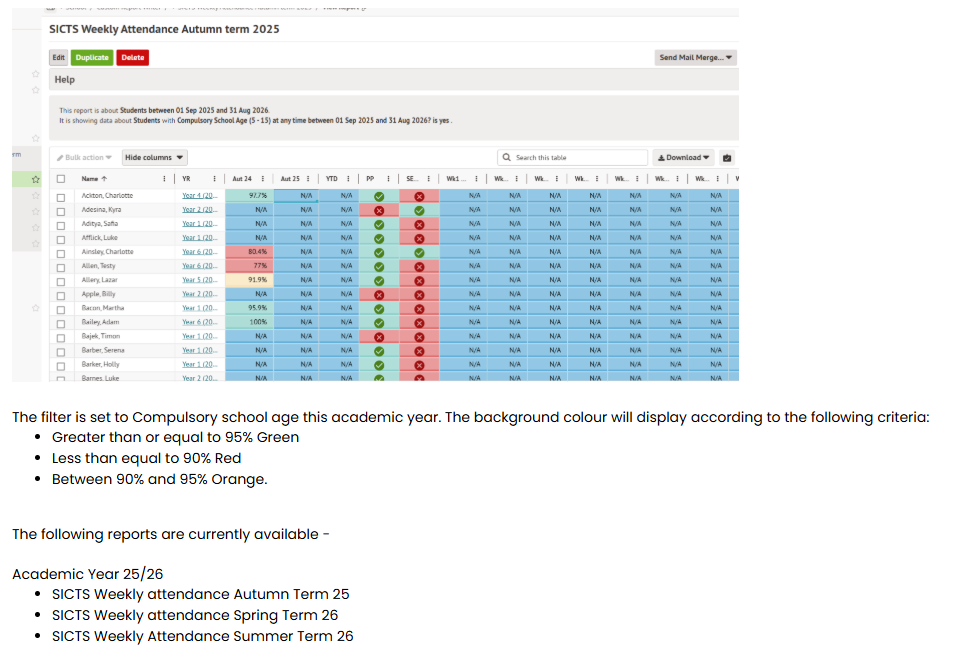
Attendance Analysis Reports
We’re very pleased to tell you that the Weekly Attendance Analysis Reports for the 2025/26 Academic year have been updated and are available for our customers who use Arbor to download from the portal.
As usual, you can download the file, as well as instructions on how to import it if you can’t remember by clicking here.
Arbor Admin Access
Did you know that we can provide additional Arbor support at no additional cost as part of your existing MIS SLA?
What benefit does Arbor Admin functionality bring to you?
With your permission, School ICT can be granted Admin functionality on your Arbor MIS site. This access allows our experienced support team to quickly diagnose and resolve common issues including refreshing invoices, populating missing payment accounts and accessing audit logs for troubleshooting.
By enabling this functionality, you’ll benefit from faster resolutions without needing to escalate these tasks to Arbor Support—saving your team valuable time and ensuring smoother day-to-day operations.
If you haven’t had the email and feel you should have, please call School ICT on 0345 222 6802 or email helpdesk@schooolicts.co.uk

Click for the latest Bromcom updates
September Tasks
We have guidance on September tasks on our portal via this link here
It covers key items such as :
- Bromcom Access
- Access to Registers
- Teacher can’t see the dashboard page
- User can’t see all menus they require
- Taking another user’s register.
- New students not showing on roll
- Deleting a student record who hasn’t started
- Adding a new student via CTF
- Timetable changes
- Student membership changes
- My child at school
- Cover, staff not showing as the correct role type
Start of Year Checks
There is a useful page with various links that can help with September, and ensuring all End of tear steps have been completed – Here
Most common issues may occur with either year group or tutor group promotion.
- If the year group has not been promoted, it can cause issues with booking meals, as the menus are linked to year groups
- It can cause issues with any clubs or trips set up against year groups.
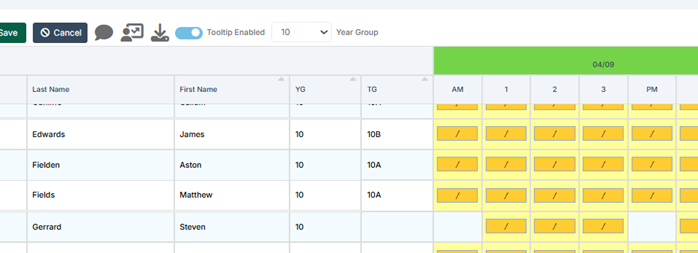
- If a student does not have a tutor group membership, it prevents being able to record attendance via the manage attendance page, as shown below.
Here is a link to our “common September issues file” which covers a variety of things that may crop up – here
Photographs - Staff and Students
It is the time of year when photographs are taken for new starters, and possibly a refresh for existing students and staff.
These can be uploaded in bulk, but any photos must be named with either the staff code, or a student’s Admission number / UPN to do so.
Individual photos can be uploaded via the staff or student record
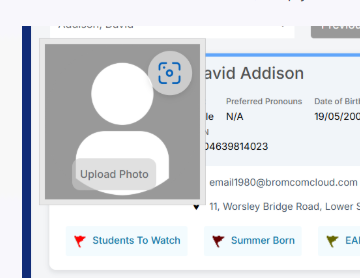
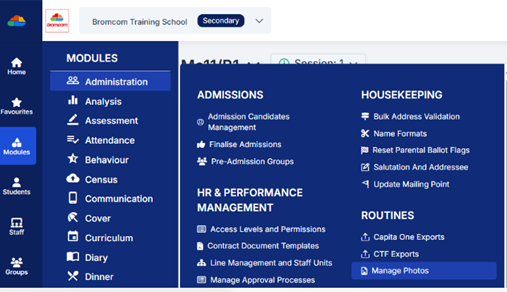
To upload in bulk, navigate to
- Modules > administration > Routines – Manage photos
Link to full guidance – here
Pupil Premium Status
IMPORTANT: Pupil Premium status can only be applied to Students who are of Statutory Age. (i.e. Students younger than 5 or older than 16 cannot be recorded as being in receipt of Pupil Premium)
The PP status in Bromcom is dynamic and is populated from the following areas
NOTE – the PP status may not appear immediately
- Any entry against Post Looked After Arrangements other than Not Declared, which can be found in the Student Record under Student Details (see Additional Details tab).
- Ever 6 = “Yes” (i.e. if the student has been eligible for FSM at any point in the last 6 years.
- FSM = “Yes” (i.e. currently eligible for FSM, this in turn triggers the Ever 6 flag).
- Member of Armed Forces marked against a Parental Contact.
- If the student is recorded as currently Looked After within the Safeguarding section of the Student Profile.
- Anything entered against Pupil Premium Type within the Funding & Allowance section of the Student Record. This section confirms the funding received for that Student from the government. You might use this section if for example, students arrive part way through the year.

The next section explains how to import the Pupil Premium funding data.
Pupil Premium File from GIAP
Reminder! Download your Pupil Premium file for 2025-26 from Get Information About Pupils and import it into Bromcom.
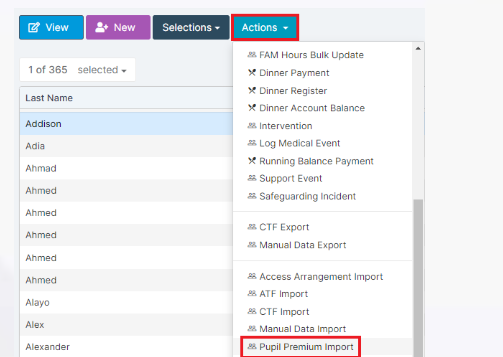
Student list > Actions > Pupil Premium Import
Bromcom Admin Access
What benefit does Bromcom Admin functionality bring to you?
With your permission, School ICT can be granted a Bromcom account on your MIS site. This access allows our experienced support team to quickly diagnose and resolve common issues without tying up your staff’s machine whilst we remote on.
By enabling this functionality, you’ll benefit from faster resolutions to your tickets!
If this is of interest, please call School ICT on 0345 222 6802 or email helpdesk@schoolicts.co.uk

Click for the latest Integris updates
School Census - October 2025
Integris are currently working on updating the Census wizard.
Integris has already been updated to support these Autumn Census changes (see release notes https://help.integris-education.com/4.32)
Expanded Hours now allow up to 30 hours to be claimed.
Post 16: English and Maths minimum hours. Confirmation is required that 16-19 year olds are studying a minimum of 100 hours for Maths and 100 hours for English to be eligible for funding.
Traineeship information will not be collected.

Click for the latest ScholarPack updates
Guidance for the New Term
As you start the new term remember that full guidance for any tasks required can be found by opening the help centre in the top right of your screen once in ScholarPack.
A link for the help centre is here:
https://support.scholarpack.com/hc/en-gb
The knowledge base contains many articles for migration/onboarding, admin, registers, students, attendance, reporting, staff, clubs and intervention, meals, assessment, comms and the parent app, census and year end. There is a full section on admissions and reasons for a whole host of issues relating to admissions which is very relevant at this time of year. A link is provided here:
https://support.scholarpack.com/hc/en-gb/categories/6079136622621-Students
For any issues relating to staff the guidance can be found here:
https://support.scholarpack.com/hc/en-gb/categories/9107422906141-Staff
For information regarding the forthcoming Autumn census the following link provides relevant help articles:
https://support.scholarpack.com/hc/en-gb/categories/6079131370013-Census
Census
This is a reminder that the deadline to return your census data to the Department for Education (DfE) is Wednesday 29th October 2025. Please check with your Local Authority as you may be required to submit the data earlier.
Customer support
Our help desk will be here to support you throughout the collection period. You can call us directly if you need immediate assistance or log a ticket via the customer portal with details of your query. To help us resolve your issue quickly, please include any relevant query or error numbers when submitting your request.
School ICT customer portal https://my.www.schoolicts.co.uk/
The DfE had introduced two additional validation checks due to the number of schools returning inaccurate data, which has subsequently impacted the funding allocation. Please ensure that learning aims and programmes of study are checked carefully in your MIS, and that the Collect reports are also checked thoroughly once the return is submitted.
We have uploaded the latest ScholarPack guidance to our customer portals. You can also access their full census guidance and book onto the ScholarPack training webinars here.
Please see the links below to access the latest information.
School ICT Links:
Known Issues
Hooray, there are no current known issues !
However, if there are any issues when you open the census screen in ScholarPack, a pop-up window will advise of any current known issues.

Click for the latest SIMS updates
September Tasks
We have guidance on September tasks on our portal via this link here
It covers key items such as :
- A teacher can’t see their timetable
- Users can’t see any staff in cover
- Teachers can’t see lessons in Take Register
- A student has a blank session on their time
- A whole group of students have a blank on their timetable
- Reception pupils not showing on registers
- Entering part-time attendance patterns for nursery pupils
- Entering part-time attendance patterns for nursery pupils
Another great document is the SIMS After the Academic Year has Started knowledge base article which can be found here
Census
Important
PPG has announced that all schools must complete the necessary steps to enable SIMS Next Gen. Failure to do so will result in being unable to run the SIMS summer upgrade and complete your Autumn Census.
Our expert consultant are on hand to support you with the transition to Sims Next Gen. The process is straightforward and explained in this article SIMS Next Gen Ready in 5 Steps. SIMS Next Gen FAQs
Schools are also being advised that the Summer Census 2025 was the last Summer Census to be completed in SIMS7. The next Census for Autumn 2025 and Spring 2026 will be the last time a census is completed in SIMS7. Summer 2026 census will be completed in SIMS Next Gen.
Please do reach out if you need further assistance.
Please note your SIMS.net must be on version 7.224 Summer upgrade (which is required to enable you to run your census), with the latest fileset in the 3100 series; this must be fileset 3101 or higher to submit your census.
Please note that PPG has advised this will not be available until w/c 23rd September. Without the latest fileset your Census will NOT be accurate. Please check the website for the latest news before starting your census.
NOTE: The Fileset ID is displayed in the browser header when opening via Routines | Statutory Returns.
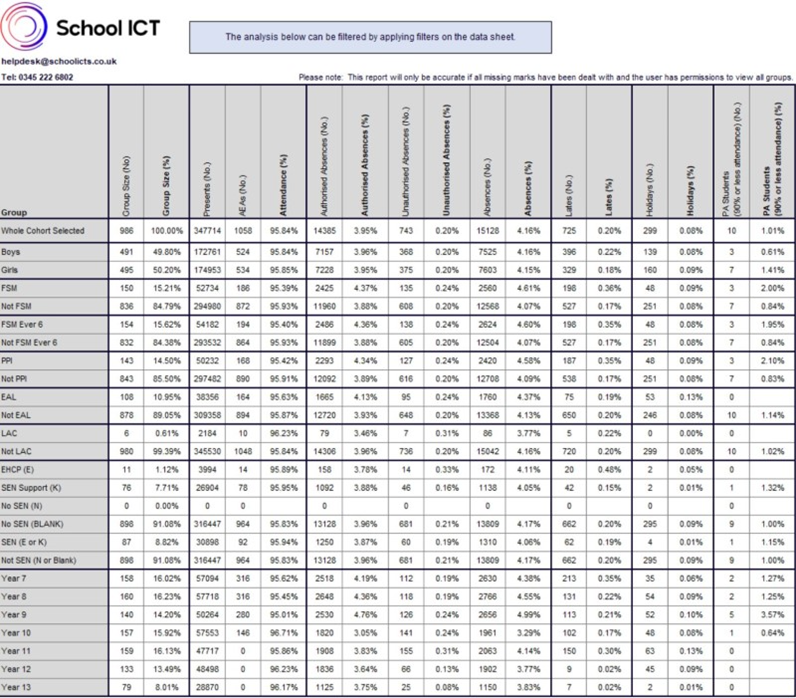
Attendance Analysis Reports
We’re very pleased to tell you that the Attendance Analysis Reports for the 2025/26 Academic year have been updated and are available for our customers who use SIMS to download from the portal.
As usual, you can download the file, as well as instructions on how to import it if you can’t remember by clicking here.
Importing Pupil Photographs into SIMS
You can bulk upload photos of students directly to SIMS from files located on your computer. Pupil/students may be issued with an individual bar code identifier by the photographer, which will link them with their photographic image. Alternatively, their admission numbers could be used to identify their images.
For a step by step guide please see our Help sheet here
Importing the Pupil Premium DfE file and updating PP indicators
Please see the our handy Help sheet here on how to update pupil premium information into SIMS by importing the DfE provided Pupil Premium Funding Spreadsheet.
It will advise you how to download the spread sheet from DfE Secure Access and how to import the spreadsheet to update the pupil premium indicator in individual records.
SIMS Next Gen
Are you SIMS Next Gen enabled? If not, you need to take action now!
You will have received an email from the Parent Pay Group advising you there are important steps you need to take before you run the SIMS 7 Summer Upgrade.
What you need to do
If your school has not already carried out the technical steps to connect data between SIMS7 and SIMS Next Gen, you must do this now. You will not be able to upgrade your SIMS system which will mean you will not be able to complete your Autumn census!
Please follow these quick and easy steps to be SNG ready. SIMS Next Gen Ready in 5 Steps. SIMS Next Gen FAQs
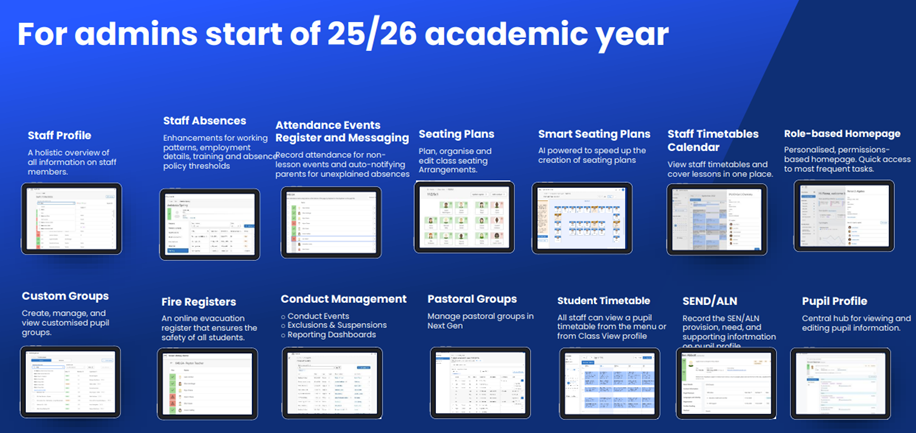
New Features in SIMS Next Gen coming this term
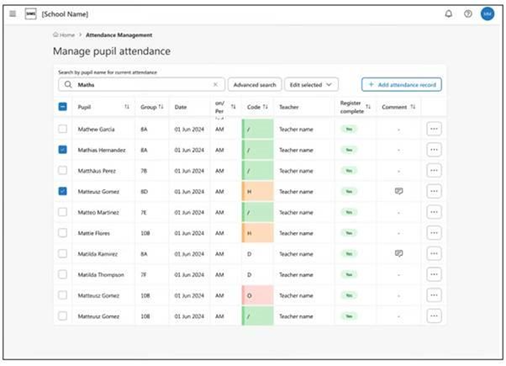
Attendance Management
The start of the academic year will see the release of attendance management, the new, all-in-one module designed to make attendance simpler, quicker, and far less stressful. Attendance officers can use this new, simplified attendance hub to do everything from creating and managing expected attendance patterns, including handling exceptional circumstances, or preparing for statutory returns efficiently with automated data collection saving vital admin time. Staff can also track a pupil’s location at any time instantly, ensuring they comply with safeguarding and attendance regulations efficiently.
Reporting
As of September 2025, a comprehensive set of 22 new reports will be available for school leaders covering key areas such as attendance, ALN / SEND, FSM and staff reporting. Leaders will be able to drill down into individual pupil or staff records for detailed insight. These reports will also be available to MAT level leaders via Group Hub.
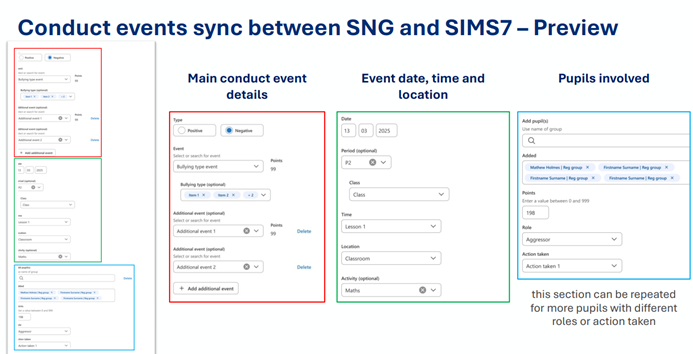
Conduct
From the Autumn term, conduct events with sync with SIMS 7. This includes detentions, report cards as well as behaviour.