Updating Pupil Premium in SIMS (funding) and DfE FSM Ever 6 Report Definitions for 2022-23
Just a reminder that the Pupil Premium and Free school meal tick boxes in SIMS are for reporting purposes only.
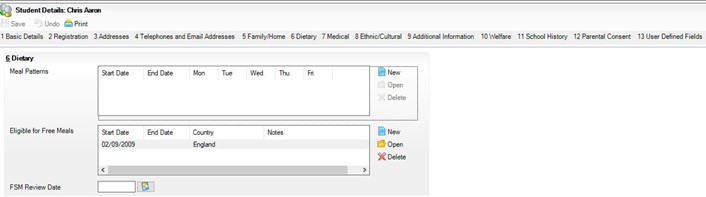
To attract the funding, you must ensure that Panel 6, Dietary, on the student details is populated with eligibility dates as this is where the census draws the funding information from.
In this example you can see that Panel 6 is completed correctly to ensure that you will get the correct funding:
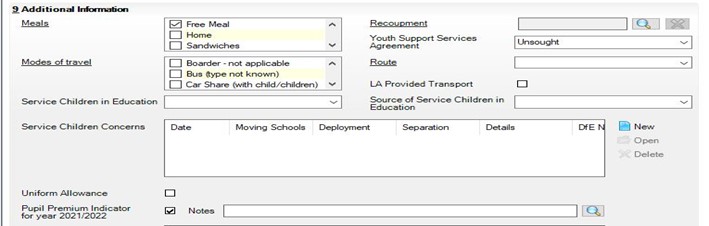
And in this example, we can see that the tick boxes are populated for Free Meal and Pupil Premium Indicator for year 2021/2022 to ensure that you can report on PP students, but this does NOT feed through to the Census for funding purposes:
DfE FSM Ever 6 reports and information:
On our Customer Portal, you can use the link here: https://my.www.schoolicts.co.uk/ we have some important information and a report available for you to download and import into SIMS, this can be found by logging in to the portal then clicking on Knowledgebase, then under ‘Most Recent’ you will see DfE FSM Ever 6 Report Definitions for 2022-23, click on the heading, you will then be able to see the information and download the required report under Files further down one is for Primary Schools and one is for Secondary schools. Alternatively, click on Knowledgebase, then Categories, then Report Downloads and the article and reports are also in there under DFE FSM Ever 6 Report Definitions for 2022-23
School Summer Census 19th May 2022
SIMS guidance notes are now available to download from the customer portal (my.www.schoolicts.co.uk). To run the census SIMS will require upgrading to Spring 2022 (7.204) which is currently being rolled out.
Arbor census will be available from 5th May 2022.
SIMS New feature for Summer 2022 Census
A new panel has been added to the Census called Census Communications, this can be located on the right hand side once you have clicked on Routines|Statutory Returns|School Census, this is to help you navigate much more easily to the ESS Newsfeed for Census, the DfE Errors & Resolutions spreadsheets and/or PDF print outs for each school phase, Handbooks related to the Census returns, DfE Guidance, and links to your own Support Unit.
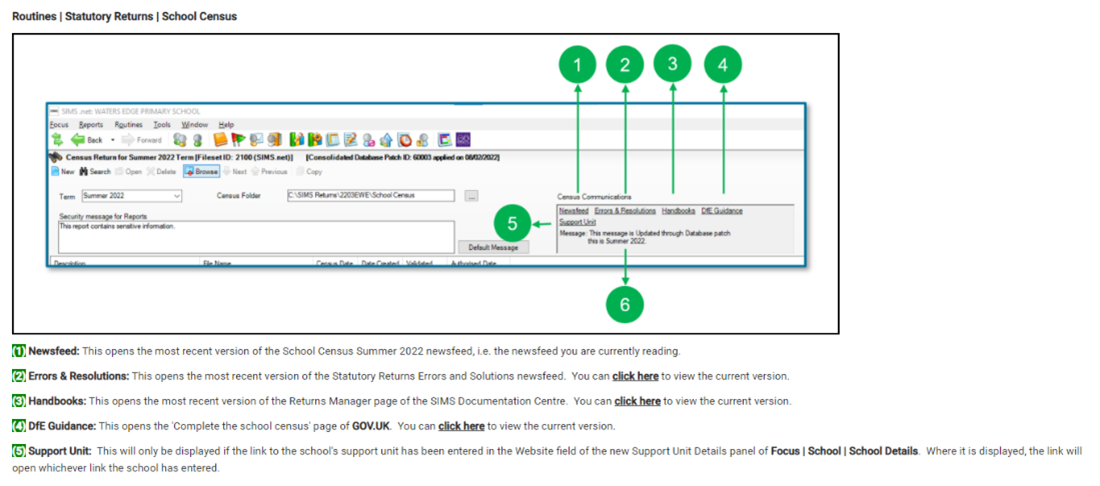
This will need to be set up first under Focus|School|School Details. Under tab 7 you can add the telephone number, main contact name, email address and website for your own Support Unit so that when you click on the new link in the Census, it takes you directly to this information.
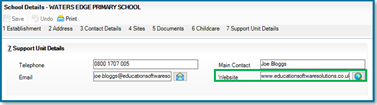
There is also a Message section which will show you which fileset and consolidated database patch, (where applicable), has been applied most recently.
New features in Arbor
Provision mapping for SEN students
Did you know Arbor’s Interventions area can be used for provision mapping and SEN monitoring?
Arbor also has a one-way integration with Edukey (ProvisionMap) via Wonde or Groupcall
Please note: Arbor’s process to connect to apps requires you to contact the app’s company directly before any integration can take place, regardless of whether the app is one of our current partners or not. For more information, see the following guide to managing third-party API integrations in Arbor.
How can we do provision mapping in Arbor?
In Arbor, intervention costs can be allocated to students and records of any intervention reviews can be stored.
Click https://support.arbor-education.com/hc/en-us/articles/115002137473-Interventions-in-Arbor for an overview of Interventions in Arbor.
To use provision mapping, you will first need to set up interventions.
A full guide to setting up interventions in Arbor can be found via https://support.arbor-education.com/hc/en-us/articles/115002138233-Setting-up-an-Intervention-editing-it-and-enrolling-students.
Permissions needed: –
- Manage interventions – either the School: Intervention: Administer permission or the Student Profile: SEN: Administer permission
- Manage intervention costs – either Finance: Administer or Intervention: Intervention Finance Administer
- Schedule or edit intervention sessions (timetables slots and staff) – School: Teaching: Administer
Accessing interventions from the dashboard
The Arbor Interventions module provides a comprehensive view of all interventions and allows SEN Coordinators and school leadership to monitor the allocation of resources and track trends over time. You can reach the Interventions Dashboard from Students > Interventions.
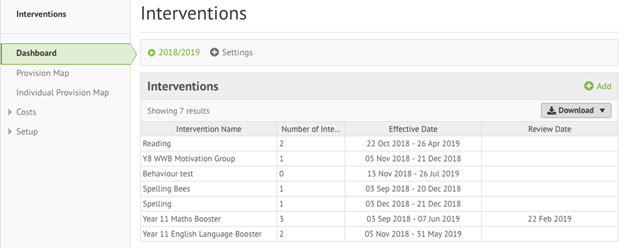
Once these have been set up you can use Arbor’s provision mapping tool to monitor the costings for your SEN children.
How can we log and measure progress?
Outcomes in the Intervention area work slightly differently to how they do for SEN event outcomes.
To track how SEN students are progressing in Interventions, you can set outcomes, for example ‘at the end of the year this student should reach a reading age of 7.0‘.
To set outcomes like this, you will need to set up assessments that will track students against whatever it is you want to measure. For the example above, you will need to set up a reading age assessment in Arbor and add your SEN students to it.
Permissions needed: –
- Set up an Ad Hoc assessment, or add User Defined Fields to marksheets – School: Assessments: Administer
- Set up User Defined Fields – General Admin: Administer
What else is new?
- New permissions to help you more easily manage who can see and edit staff absences: Changes to Staff Absence permissions
- Unsubscribe guardians from communications in bulk from Students > Parents & Guardians > Bulk Update > Contact Details.
- No need to go to each student’s profile to add funding. You can now do this in bulk from Students > All > Bulk Update > Student Funding Records – perfect for recording School led tutoring!
- Updated attendance KPIs on the MAT MIS to show more contextual data. Visit your homepage or Analytics > Attendance to drill down into your data. You can even click on a student to jump right to their profile on their school’s site.
- Standalone learning units are now shown by default on the Statement of Entry page on student profiles.
Arbor - Suspending classes and lessons
Please click on the link below to see this useful article which explains how you can suspend classes and lessons:
https://support.arbor-education.com/hc/en-us/articles/4710984669341-Suspending-classes-and-lessons
Arbor - Which events contribute towards statutory attendance?
Please click on the link below to see this useful article which explains which timetabled events you can take a register for:
ArborFest - Virtual Conference
Join Arbor for their virtual conference where you can have your say on various areas of Arbor including Assessment, MAT MIS, Payments and much more.
At ‘ArborFest: The New Features Edition’ Arbor will be shining a spotlight on the latest releases in their MIS, talking about where the system is headed next and hosting forums for you to share your views.
Please find the schedule link below:
https://sites.google.com/arbor-education.com/arborfest-may-2022/schedule
Reminder of JCQ Key dates for Exams - Summer 2022
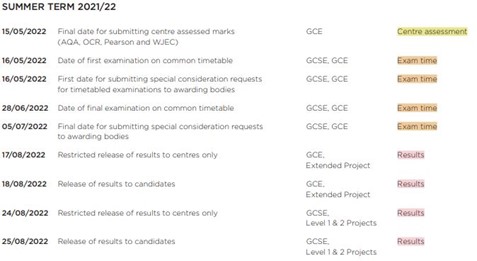
Please regularly check the JCQ website for any changes: https://www.jcq.org.uk/wp-content/uploads/2021/10/Key-Dates-2021-22-June-2022-series.pdf
(Dates correct at time of publication).
Training Courses - Online and NEW Distance Learning Courses available
All our available online training courses can be found via the School ICT website or by using the following link: https://www.schoolicts.co.uk/online-training/
The courses below are just a selection of the upcoming online courses we have available: –
- Exams Organiser – 27th and 28th April 2022, 2 days
- Assessment Essential Skills – 5th and 6th May 2022, 2 days
- Summer Census Primary – 9th May 2022, half day – morning
- Summer Census Secondary – 10th May 2022, half day – morning
- Secondary New Office User – 11th May 2022, full day
- Extended Reporting – 12th May 2022, full day
We also have a growing number of Distance Learning Courses available; including a NEW SIMS Mail Merge course and our first Arbor course which covers Standard Reporting. Please click on the link below to see our full offer: https://learning.www.schoolicts.co.uk/
Benefits of Distance Learning courses: –
- You can start a distance learning course without having to wait for a scheduled training date
- You’ll have full access to the course lessons and materials for a whole 12 months
- You can work through the course completely at your own pace
- All our Distance Learning courses are produced by the same trainers who run the scheduled training courses so you can be assured that you’re getting the same expert knowledge as you would from attending our online training courses
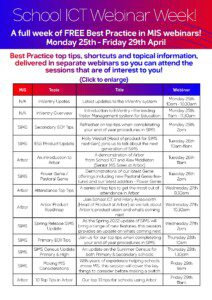
Don't miss out! Our Best practice webinar week is back....25th - 29th April!
Our popular FREE webinar week is back and running from Monday 25th – Friday 29th April!
Pick and choose whichever webinar sessions you’d like to attend to find out all the latest information on SIMS and Arbor, including Top Tips, InVentry visitor management systems and to hear from a number of exciting guest speakers.
Follow the below link to book as many free webinars as you’d like to attend: – https://www.schoolicts.co.uk/latest-events
For the full webinar schedule please click here.

School ICT Resourcing can fulfil all your temporary or permanent recruitment of non-teaching staff
School ICT Resourcing can source temporary or permanent non-teaching staff for your school. Whether short term or for a longer period, we can work with you to find a suitable placement.
If yourself or any colleagues are retiring soon, but would consider working on a temporary or ad-hoc basis, please contact Helen who would love the opportunity to speak with you about the potential of adding you to our candidate list.
For further information please call: 01132878020 or visit: https://www.schoolictresourcing.co.uk/