To navigate to the most relevant section, please click the appropriate link below: -

Wishing You a Great Summer from all the team at School ICT
As the summer break approaches, we’d like to take this opportunity to wish you all a relaxing and enjoyable holiday.
To our term-time colleagues – we hope you enjoy a well-deserved rest. And to those working through the summer – we hope the quieter pace gives you a chance to recharge, and hopefully enjoy some time off too.
Our teams will be available as usual throughout the summer, Monday to Friday, 8am to 5pm. We’re here to support you not only with any day-to-day queries, but also as you prepare for the new academic year – and of course, the all-important exam results days.
If you need anything at all, just get in touch – we’re here to help.
Support During Exams Results
With results days fast approaching, we’ve compiled everything you’ll need to help you feel prepared which you can access here.
Exam Services
Exam Services Update: Supporting You Through the Next Phase
As the Summer 2025 exam season draws to a close, we want to take a moment to thank all our partner schools, invigilators, and exam teams for their incredible efforts over the past few months. Your dedication and hard work have ensured another successful series, and we’re proud to have supported you every step of the way.
Now, our attention turns to the next key stages in the exam cycle:
Year 10 Mock Exams
We’re already underway with those schools running Year 10 mock exams. If you need invigilator support, exam timetable creation, or general exam administration help for these assessments, our team is ready to assist.
Special Consideration Applications
A reminder that deadlines for submitting special consideration applications are fast approaching. Please ensure you have processed all eligible cases before the following dates:
- AQA – Sunday 27 July 2025
- Pearson Edexcel – Wednesday 2 July 2025
- OCR – Wednesday 2 July 2025
- WJEC/Eduqas – Wednesday 2 July 2025
We are on hand to help with eligibility checks, form completion, and submission if you need an extra pair of hands.
Results Day Preparation
It’s never too early to begin thinking about results day. Tasks to plan for include:
- Ensuring your MIS system is set up for result imports
- Reviewing embargo policies and staff permissions
- Preparing result envelopes and distribution materials
- Organising the on-site or remote presence of an exams professional to manage the day
No Exam Officer? We’ve Got You Covered
If your school will be without an exam officer during the summer period, especially around results days in August, please get in touch as soon as possible. We can provide experienced exam consultants to support with result downloads, data checks, distribution, and even managing post-results services.
We understand how crucial this period is to both students and staff, and we’re here to ensure it runs smoothly.
Need support or have a question?
Don’t hesitate to reach out to your Exam Consultant or if you want to know more about our Exams Managed and Mentoring services, just reach out to our central sales team at Sales-Team@schoolicts.co.uk
Let us help you stay one step ahead as we move into the next phase of the exams calendar.
Data Management Services
Our Data Management service offers an excellent, cost effective, responsive, and efficient Data Management solution, delivered remotely by a team of highly experienced school data experts. Their dependable advice and guidance empowers schools, academies, and MATs to maximise their investment in their management information system (MIS) team. Whether it’s a long-term solution or short term for sickness cover or maternity please reach out to discuss your needs.
- Please click here for further information.
DfE and Ofsted Updates
Free School Meals
From the start of the 2026 school year, every pupil whose household is on Universal Credit will have a new entitlement to free school meals. See https://www.gov.uk/government/news/over-half-a-million-more-children-to-get-free-school-meals
DfE has issued “Guidance for schools and local authorities about providing school meals including information on free school meal eligibility.” See https://www.gov.uk/government/publications/free-school-meals-guidance-for-schools-and-local-authorities
Funding, assurance and resource management, for academies, local authorities and further education providers
For the latest DfE Update: 4 June 2025, see https://www.gov.uk/government/publications/dfe-update-4-june-2025 Latest information and actions from the Department for Education about funding, assurance and resource management, for academies, local authorities and further education providers.
School Characteristics
DfE has issued “Number and characteristics of schools and pupils in England as collected in the January 2025 school spring census returns.” See https://www.gov.uk/government/statistics/schools-pupils-and-their-characteristics-january-2025
Schools, pupils and their characteristics: January 2025 – GOV.UK
Ofsted Mental Health and Wellbeing
Ofsted has issued “Our approach to mental health and well-being in relation to inspections.” See https://www.gov.uk/government/speeches/our-approach-to-mental-health-and-well-being-updates
16-19 Funding
DfE has updated “16 to 19 funding: maths and English condition of funding.” See https://www.gov.uk/government/publications/16-to-19-funding-maths-and-english-condition-of-funding
FREE Best Practice Webinars - Summer Term Dates
|
Friday 4th July 10am | https://www.schoolicts.co.uk/events/assessment-for-the-new-academic-year/?occurrence=2025-07-04 |
|
Thursday 10th July 10am | https://www.schoolicts.co.uk/events/exam-results-2/?occurrence=2025-07-10 |
|
Friday 11th July 10am | https://www.schoolicts.co.uk/events/exam-results-3/?occurrence=2025-07-11 |
|
Monday 14th July 2pm | https://www.schoolicts.co.uk/events/assessment-for-the-new-academic-year-2/?occurrence=2025-07-14 |
|
Friday 18th July 10am | https://www.schoolicts.co.uk/events/assessment-for-the-new-academic-year-3/?occurrence=2025-07-18 |
Previous Webinars are available on the Customer Portals: –
- School ICT Portal: https://my.www.schoolicts.co.uk/
- turn IT on Portal: https://portal.turniton.co.uk
Contact Details
School ICT customers:
Contact: 0345 222 6802 Option 1, helpdesk@schoolicts.co.uk; Portal: https://my.www.schoolicts.co.uk/
turn IT on customers:
Contact: 01865 597620 Option 2, mis.support@turniton.co.uk; Portal: https://portal.turniton.co.uk
Our customer portals allow you to: –
- Log and track tickets
- Watch recordings of our range of webinars
- Search the Knowledge base for information, guidance and tips
- Keep up to date with the latest news
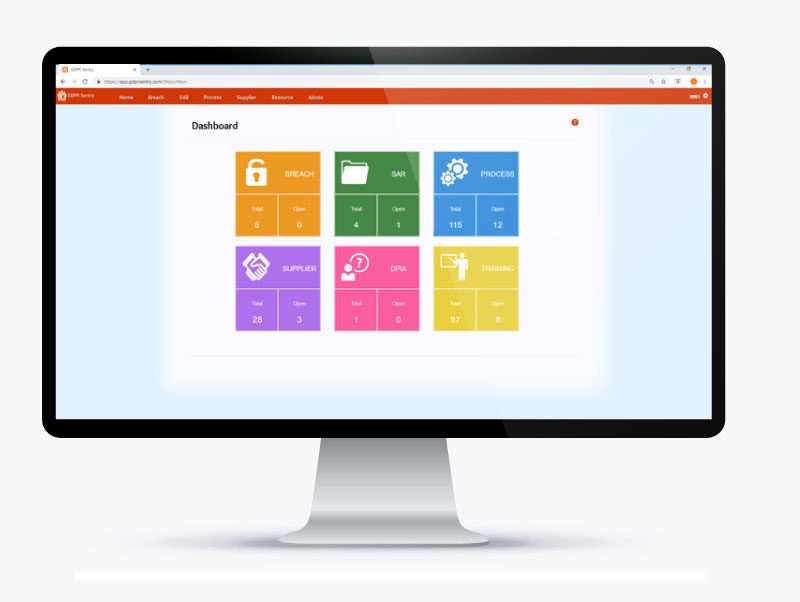
Introducing GDPR Sentry - Making GDPR Easier for Education

Online Training Courses and NEW Bitesize Training
Training courses for the remainder of the Summer Term are available to book now…please book early to avoid disappointment as places are limited and popular courses do book up early!
To book a course please visit https://www.schoolicts.co.uk/online-training/ or click on the hyperlinks below: –
ARBOR and SIMS BITESIZE TRAINING.
1:1, one hour training slots, tailored to suit your specific needs, designed to give you maximum impact in minimal time, delivered by our expert MIS team.
Check out our Bitesize Training Brochure for further information or call us on 0345 2226802 or e-mail: info@schoolicts.co.uk to find out more or book a place.
Data Healthcheck Services
An MIS health check ensures you’re getting the most out of the investment in your MIS. The benefits of one of our comprehensive health checks include: –
- Raise awareness of functionality and any issues
- Keep you up to date with the latest developments in your MIS
- Housekeeping and tidying exercises
- Report with recommendations to ensure you’re fully maximising your MIS along with any training recommendations
- For on premise MIS a server health check is also included
Our health check service usually takes around half a day. Please contact us to find out more on: helpdesk@schoolicts.co.uk.
FMS Financial Year End - Academies
Preparation can be started for the financial year end for academies.
The financial year end for academies in 2025 is August 31st. The Department for Education (DfE) published the Academies Accounts Direction (AAD) for the 2025-25 period, which applies to accounting periods ending on August 31st.
Ready made Power BI dashboards and reports for your MIS

Ready-made Power BI dashboards and reports for your MIS
We’re excited to introduce you to helloData’s short introduction and testimonial videos along with the ability to schedule an informal call to explore how helloData can save you time and money with detailed, ready-made dashboards that display interactive analytics and reports directly from Scholar Pack, Integris, SIMS and Arbor or a combination of these if you are a Trust.
Introducing helloData – watch our 3-minute video here
The helloData team brings years of expertise in teaching, assessment tracking, and software development.
We’re passionate about helping schools and trusts utilise their MIS for seamless data entry, while benefiting from our ready-made data analytics through the use of Power BI – with no license or previous experience required.
This means you can focus on discussing outcomes—not crunching numbers—all with a commitment to a no-pressure sales approach.
Video highlights include:
- Assessment data product overview
- School and trust level attainment and attendance reports
- Filter by key and custom groups
- View your way, use charts, tables and other views
- Track achievement over time
- Trend analysis, compare cohorts over time
- Save time, money and resources
If you’re thinking of migrating to a new MIS, talk to us about moving your assessment setup and data.
We look forward to being able to continue the conversation.
NEXT STEPS
School and Trust Testimonials and your questions answered
Watch our testimonial video – experience helloData through the eyes of one of our customers – the CEO of Rutland Learning Trust.

BOOK A DEMO
Schedule an informal chat
We’d welcome the opportunity to answer any further questions you may have about our products and would like to reassure you that we are not high-pressure salespeople.
Schedule an informal call online for a discussion on how helloData analytics and reports could save you time and add value to your school or trust’s MIS assessment data.

Click for the latest Arbor updates
New School Year Set Up
You can now start working of your New School Year set up in Arbor. Guidance can be found here:
- Managing Applicants and Admissions
- New School Year Setup guide
- New School year Setup Preparation Checklist
The following links can be used to help guide you through the set up:
- Step 1 Academic Calendar: New School Year Setup Step 1 – Academic Calendar – Arbor Help Centre
- Step 2 Off Roll Leavers: New School Year Setup Step 2 – Off-Roll Leavers – Arbor Help Centre
- Step 3 Year Groups & Registration Forms: New School Year Setup Step 3 – Year Groups & Registration Forms – Arbor Help Centre
- Step 4 Custom Groups: New School Year Setup Step 4 – Custom Groups – Arbor Help Centre
- Step 5 Houses: New School Year Setup Step 5 – Houses – Arbor Help Centre
- Step 6 Registers:
- Step 7 Meals: New School Year Setup Step 7 – Meals – Arbor Help Centre
- Step 8 Interventions: New School Year Setup Step 8 – Interventions – Arbor Help Centre
- Step 9 Review the setup and other important tasks: New School Year Setup – Reviewing your setup and other important tasks – Arbor Help Centre
Housekeeping
It is also a good time to carry out the following housekeeping tasks:
- Use the Data Quality Dashboard to start your year with clean quality data
- Check Current & Future Guardians
- Check Current & Future Students
- Check Current & Future Staff as well as the School Work force Census
- Resolve duplicate records
- Carrying out this house-keeping at the end of term or over the summer will save time in Autumn term and cut down on errors and queries in the Autumn and Work Force Census returns
Assessments – Copying over Assessments
If you used Arbor Assessments this year, you’ll need to copy over your setup to next year. Take a look here for how to copy over your assessments.
Data Collection Policies are linked to the Assessment policy. Because you need to select the assessments to create or copy over each year, you also need to define your Data Collection Policies each year if you use them at your school. You can see how to add Data Collections here.
Behaviour
If your currently using Behaviour in Arbor you will need to copy over your setup to next year. This means setting up your detentions and detention slots along with Internal exclusions, guidance can be found here.
Using behaviour for the first time?
Take a look here for how to:
- Set up your behaviour policies for the first time if this is your first year using Arbor
- Schedule your detention and internal exclusion sessions if you used behaviour in Arbor last year
Please see Arbor’s handy check list when completing your New schools year setup here.
Arbor Admin Access
Did you know that we can provide additional Arbor support at no additional cost as part of your existing MIS SLA?
What benefit does Arbor Admin functionality bring to you?
With your permission, School ICT can be granted Admin functionality on your Arbor MIS site. This access allows our experienced support team to quickly diagnose and resolve common issues including refreshing invoices, populating missing payment accounts and accessing audit logs for troubleshooting.
By enabling this functionality, you’ll benefit from faster resolutions without needing to escalate these tasks to Arbor Support—saving your team valuable time and ensuring smoother day-to-day operations.
If you haven’t had the email and feel you should have, please call School ICT on 0345 222 6802 or email helpdesk@schooolicts.co.uk.
New Features in Arbor!
- To avoid slowing down Exam Officers during busy periods, Arbor are now generating EDI files in the background to avoid timing-out
- Auto Absence saves you at least one hour every morning by giving you a ready-made list of everyone who’s not in school and why. Every voicemail is written up into Arbor for you – all you need to do is review and approve!
- The Report Library is a brand new home for all your Arbor reports. Now you can find any type of report from just one place, and search for your reports by type, date, and more. Plus, build new reports quickly and easily with the Template Library
- To make it easier to keep on top of and manage your communications, you now have a separate inbox and outbox. See which messages have been read, and filter your comms by date range, message type, or sender to find exactly what you’re looking for
- Arbor have added a new Staff Allowances report to help school leaders report on employment costs more holistically. This more detailed view of staff allowance payments helps to inform more strategic financial planning
- Arbor have improved the loading speed of the TimeTabler imports page
- Have you tried out Venn Diagrams in Arbor Labs? You can now print your venn diagrams to take your analysis offline or into meetings
- When exporting school data, you can now include the Globally Unique Student ID and Globally Unique Staff ID. This means you can match up student data from any source, without needing to depend on UPNs
- On the Attendance Fines page, Arbor have added a filter for academic year and student, as well as our standard bulk action options. The Absence Period column is also sortable by date
- Arbor have updated the way payscale salaries show for non-current dates. When adding a new salary, it will show the salary that is valid for the selected date range and the pay scale points that are valid for the selected date range
- For improved staff reporting, Arbor have added a new table in HR Admin > Contracts that shows staff contract information within a selected date range
- To make it easier to read and use, Arbor have updated the custom groups dashboard to display as a table
Summer Exams Results Days
- Ensure you have set the Embargo settings for who can view results on download days by going to Examinations/ Administration/ Results Embargo Settings (instructions)
- If you have students who will be certificating for BTEC qualifications, please request the 7B basedata from Edexcel Online. Once received, please upload via Students > Examinations > Administration > Pearson Basedata Upload. Please allow 24 hours for the basedata to finish uploading to your site. The qualifications can then be added to your Qualification Offering and the relevant entries should be made and sent to Pearson via an entry file (instructions).
- Import results via Students/Examinations/Results Administration/Results Import using these instructions.
- Set embargoes against any results file you have imported.
- Resolving any errors – link to guide.
Detailed guidance on how to import your exam result files this summer and other exam related essential tasks:
- Add or import exam results into Arbor
- Setting embargo dates for exams
- Creating and sharing statements of exam results
- Change or add a new Non-EDI Aspect Gradeset
- Changing exam results after a review of marking
- Exam results analysis in Arbor
- Exporting your examination results for analysis outside of Arbor

Click for the latest Bromcom updates
Bromcom Admin Access
With your permission School ICT Services are able to access the Bromcom site for your school. This would mean that we would be able to diagnose and resolve a selection of common issues as well as investigating more complex issues before escalating on your behalf. This access can result in quicker support resolutions and prevents tying up your staff and their machine whilst we are remoted on. We have a permission form that can be sent out, please call School ICT on 0345 222 6802 or email on helpdesk@schooolicts.co.uk to request this to be sent.
Raising Ideas with Bromcom
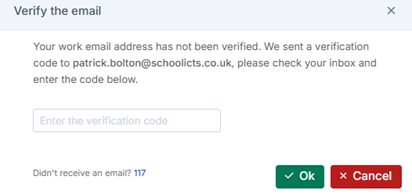
If users click the I icon they can generate a one-time passcode and sign up to the idea’s portal (development ideas option)
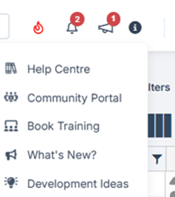
Clicking “development Ideas” will trigger an email with a passcode.
There are many innovative ideas being suggested which require 50 votes to be considered for implementation.
Bromcom Roadmap
https://crmapps.bromcomcloud.com/customer/productroadmap
This provides details of upcoming changes. Dates can move, but it gives an idea of when updates are planned to be implemented.
End of Year Procedures
If you have not yet added next year’s academic year, this can be done by following the wizard that may be referenced within the guidance. If 25-26 is already set up, the wizard will look to set up 26-27 and so we advise to only use the wizard if you are yet to start the process .Users who have set up the Academic year already can still perform all the tasks and use the EOY dashboard to track progress (Home> drop down > select End of year dashboard – permissions required).. Get in touch if you need assistance.
EOY Dashboard
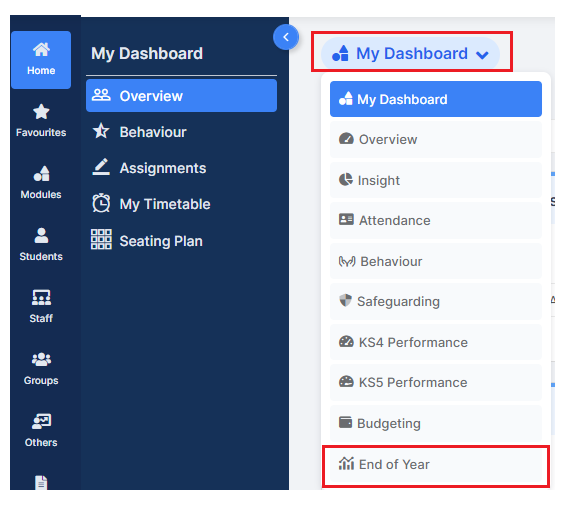
Below are some links to useful pages about how to prepare and carry out the end of year routines.
- Main end of year page – Bromcom Help centre – Click Here
- Primary school guide- Click Here
- Secondary school guide – Click Here
Other useful links
Updates Coming Soon to Bromcom
| Category | Feature | Planned Release Date |
| ADMIN | Staff Working Patterns: Improved visibility of saved working patterns. | TBC |
| ADMIN | Students Safeguarding: Ability to export Safeguarding Incidents in PDF format. | 27th June |
| ADMIN | Students SEN: New SEN Provision panel, new SEN reporting fields in Quick Reports, and improved SEN Details panel. | 27th June |
| ATTENDANCE | Add student flags to the Manage Attendance page with a toggle for visibility, supporting better-informed attendance decisions. | 27th June |
| ATTENDANCE | Add “% Attendance” column to Manage Attendance, showing YTD attendance with red highlights for students below 90%. | 27th June |
| BEHAVIOUR | Add ‘Cancelled’ Column to Student Exclusions Report. | 27th June |
| BROMCOM AI | AI Bot for Quick Reports will be implemented for Vision. | 27th June |
| BROMCOM AI | Automate creation of withdrawal groups for underperforming students via AI bot, grouping setup through a guided workflow wizard. | 27th June |
| CENSUS | Update Extra Time options to align with JCQ standards, adding clear distinctions for 25%, up to 50%, and over 50% with appropriate referral handling. | 27th June |
| DASHBOARDS | New Student Data Quality Dashboard to enable users to manage and resolve data quality issues, including duplicate contacts and personal information inconsistencies. | TBC |
| MCAS | Parent App: Wraparound Care – introduce a colour key. | 27th June |
| OPTIONS | Timetable Patterns: Ability to assign pupils to a specific class in the Pupil Review tab. | 27th June |
| OPTIONS | Timetable Patterns: Ability to remove ALL subjects/pupils from the/all block(s) in the Block Review tab. | 27th June |
| OPTIONS | Timetable Patterns: Ability to reallocate students using new Auto Allocate button, after making changes while viewing patterns. | 27th June |
| TIMETABLE | Scheduling: Ability to preserve manually scheduled blocks when running the Auto Schedule process. | 27th June |
| TIMETABLE | Ability to schedule an all day session. | 27th June |
| TIMETABLE | Enhancements to Non-Contact Codes in wTimetable, Cover and Curriculum pages. | 27th June |
| VISION | Statutory age calculations Update to match DfE guidance. New filter options and tooltip updates are also included. | 27th June |
| VISION | Real-time overview of exam board connections across schools with filters, alerts, and quick navigation. | 27th June |
| VISION | Update Vision Attendance Dashboard to align statutory age rules. | 27th June |
| FINANCE | Support for the HSBC BACS6 payment file formats for School Finance, for compliant BACS runs and remittance generation. | Released 18th June |
| FINANCE | Global configuration setting to enable central management of Accounts Receivable Invoiced Income, supporting fully centralised finance operations. | 27th June |
| FINANCE | Ensuring accurate opening balances, financial years can no longer be closed if any prior years remain open or not started. | 27th June |
| MAT FINANCE | Support for the HSBC BACS6 payment file formats for MAT Finance, for compliant BACS runs and remittance generation. | Released 18th June |
Other Bromcom News...
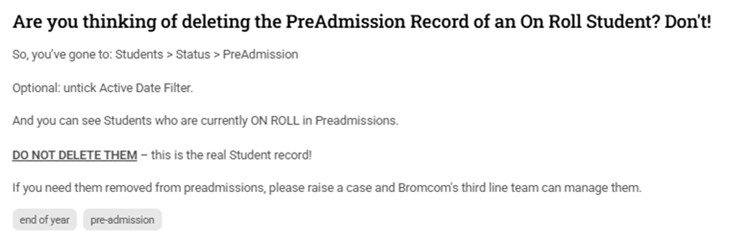
Parental Consent – Quick Report Enhancement Coming 23rd June
Applicable To:
Domains – Students and Student (Cross-Domain)
As part of Bromcom’s ongoing improvements to the parental consent functionality, they are pleased to announce an upcoming update scheduled for the evening of Monday 23rd June.
What’s Changing?
A new column called ‘Latest Consent Status’ will be added to the Student Parental Consent Quick Report. This enhancement provides a clearer, immediate view of each student’s most recent consent status—saving time by removing the need for additional filters.
Key Details:
- The ‘Granted Date’ and ‘Granted By’ fields will now appear blank for Revoked
- Combined parental consent will now be displayed separately when marked as Declined or Revoked.
- The ‘Parental Consent Revoked History’ section will not include the new ‘Latest Consent Status’ column.
Further Guidance:
If you have any questions or need support, our Bromcom Support Team is here to help.
Exam Results Day Guidance
This page contains guidance for the import of Examination results files in August.
- For JCQ regulations on the publication of Examination results see
- For Pearson guidance on receiving BTEC Results files by EDI ( Electronic Data Interchange) see
- For guidance on checking if you have the correct WJEC Base data see here.
- For guidance on importing Cambridge Technical overall qualification results see here.
For schools who have A2C already linked to SIMS and want to link to Bromcom as well please note advice is this is not recommended as this could potentially cause problems with files submissions and receipt.
Access: The minimum permissions required to access Examinations is found in the Examination Module of Config>Setup>Roles & Permissions.

Examinations Permissions
Important Dates
Restricted release of results to centres only.
- Wednesday 13 August 2025: GCE AS and A-level, FSMQ, Extended Project, Level 3 Vocational and Technical qualifications
- Wednesday 20 August 2025: GCSE, ELC, Foundation and Higher Projects
Level 1 and Level 2 Vocational and Technical qualifications
Release of results to candidates.
- 8:00am Thursday 14 August 2025: GCE AS and A-level, FSMQ, Extended Project, Level 3 Vocational and Technical qualifications
- 8:00am Thursday 21 August 2025: GCSE, ELC, Foundation and Higher Projects, Level 1 and Level 2 Vocational and Technical qualifications
Pearson BTEC: Wednesday 6 August 2025: BTEC Nationals partial release (please see Pearson website for guidance)
Bromcom Support Desk will be open from 7am on results import days, see Bromcom Support Desk Guide for guidance on contacting Support
Read the Exams Results Guide
Below is the Exam Results Day 2025 guide.
Exam Results Day Live Webinars
Click here to register for the upcoming 2025 Exam Results Live Webinars.
- Tuesday 1st July 1:30pm – 3:00pm
- Thursday 3rd July 9:30am – 11:00am
- Wednesday 9th July 9:30am – 11:00am
Note: If you are unable to attend the Live Webinars, the recordings of them will be available to watch under Webinar Recordings.
Webinar Recordings
Click on the link below for a recording of our 2024 Exam Results Live Webinar. You will be asked to confirm your details before watching the recording. Please check back in this area for the 2025 Live Webinar Recordings.
2024 Exam Results Live Webinar
Other Helpful Guides
Basedata
Results Embargo
Results
- Exam Results FAQ
- How to View, Edit and Add Exam Results
- How to Add Non EDI Exam Results
- How to Export Exam Results
- How to Send Candidate Results Reports by Email
- How to Report on Student Email Priority using a Matrix Report
Analysis
- How to use Exam Option Subjects
- KS4 Performance Guide
- How to add Exam Results to an Assessment Sheet
Teacher App – Introducing Assessment and Seating Plan Modules for Tablets
Teacher App > Assessment and Seating Plan Modules
Bromcom has released an updated version of the Teacher App for tablets, introducing two new modules: Assessment and Seating Plan.
- Assessment Module: Users can now enter assessment results while on the go. These results, along with classroom observations, are then reflected in the MIS. While entering data in the marksheet, users can also add additional student information—just as they can on the web.
- Seating Plan Module: Users can easily view, create, and edit seating plans directly from their device for greater flexibility in the classroom.
To access these new features, existing tablet users must update to the latest app version—unless auto-updates are enabled. New users can download the Teacher App from the Apple App Store or Google Play Store.
- Click here to access the Quick Guide with How To guides for the modules.
- Alternatively, go to the Help Centre to see the full How To
Note: Access to the modules in the guides will be dependent on the user permission and school configurations.

Click for the latest Integris updates
*Important Update* The Future of Integris
Important update: The future of Integris
We have decided to discontinue Integris from 12th February 2026. Before then, you can switch to Arbor Core at no extra cost. You’ll get all the same features, plus extras like student report cards, email, SMS and report scheduling. Find out more
What are my next steps?
- Join a demo to see Arbor in action
2. Book a call with our team to ask questions and discuss your switch
We’re looking forward to the next chapter with you. If you need anything, just get in touch.
Summer Census and Keystage Assessment help now available
The Summer Census help pages are now available for Integris. You can access them from https://help.integris-education.com/welcome or starting at https://help.integris-education.com/school-census-overview.
We have also updated the Keystage Assessment returns information which is also available from https://help.integris-education.com/welcome or via
https://help.integris-education.com/ks_reporting-overview.
We will be updating the year end process information in May and will update you again once this is ready.
Thanks,
Integris Support Team.

Click for the latest ScholarPack updates
ScholarPack Year End
You cannot complete the Year End process until the last day of the summer term and after the PM register has been taken. However, there are aspects of the Year End process that you can start before the last day of the summer term which this guide covers.
There are six essential Steps (1-6 listed below), which need to be completed and a 7th Step which is optional.
Guidance split up into the 7 steps: –
- Year End Step 1 – Introduction and Preparing for Year End
- Year End Step 2 – Archive Attendance
- Year End Step 3 – Produce CTFs for Leavers
- Year End Step 4 – Off Roll Leavers
- Year End Step 5 – Promote Students up a Year
- Year End Step 6 – Set Up the New Year
- Year End Step 7 – Complete Year End
The process is a linear function and each section needs to be carried out in the order indicated.
To start your Year End procedure go to Admin > Year End.
https://support.scholarpack.com/hc/en-gb/articles/6291694855965-Year-End-in-ScholarPack
Please see the Year End Webinar using the above link. This will take 45-60 mins.

Click for the latest SIMS updates
Exam Results
Please take some time to read our 2025 Exam Results Preparation guide on our knowledge base:
SIMS Next Gen
Are you using SIMS Next Gen? Did you know all of these features are already available in SIMS Next Gen for you to use?
Class View
Class View streamlines classroom management by bringing key pupil information and essential tasks together in one place, helping you save time and eliminate unnecessary admin.
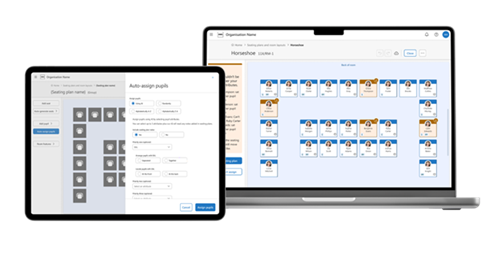
- Create seating plans to support collaboration and minimise distractions.
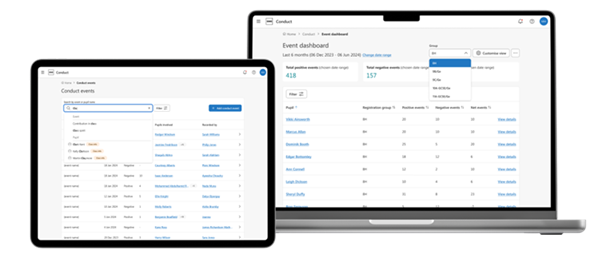
- Record and monitor positive and negative behaviour events to support student wellbeing.
- Track key student information like EAL, Pupil Premium, and SEND to deliver personalised teaching strategies.
- Record assessments to identify areas for improvement and plan interventions.
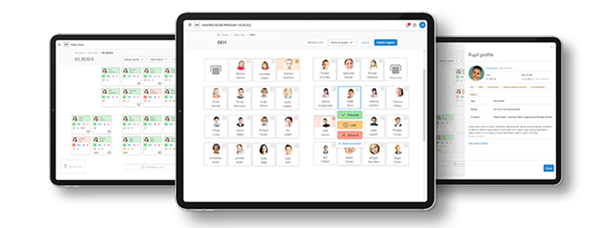
Seating Plans
Plan, organise, and edit seating arrangements. Design flexible, reusable room layouts and strategically arrange students based on abilities, personalities, and relationships to enhance learning outcomes.
Fire Registers
Access real-time evacuation lists on your tablet or mobile device, with instant updates for late arrivals and early departures. This solution eliminates wasted paper and uncertainty, giving you complete confidence that every student is accounted for during emergencies.
Attendance Registers
Take attendance quickly and easily, anytime, anywhere. Add comments and track ‘minutes late’ in the same window, saving time and keeping records accurate.
Conduct Management
We’ve redesigned Conduct Management from scratch to make it more flexible and user-friendly. Easily record positive and negative behaviour in class, spot trends early, and step in to support student wellbeing when it matters most.
My Markbook and Online Marksheets
My Markbook puts you in charge of your assessments, allowing you to create and manage them directly in SIMS Next Gen with just a few clicks—no setup or support from a Data Manager needed. Easily capture continuous assessments like homework and coursework, add notes, and filter pupils to monitor the progress of key groups such as SEND and Pupil Premium students.
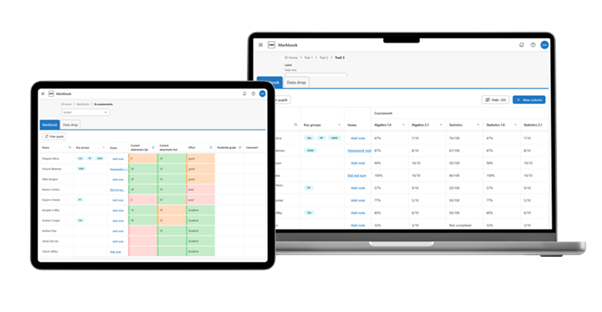
Alongside My Markbook you’ll also be able to access all of the assessments that have been set-up in SIMS 7 and record the results. This means that you have all of the information you need in one place to review pupil progress and provide evidence for assessment reports.
Custom Groups
Easily identify and manage the groups you supervise with advanced search, filter, and bulk editing capabilities.
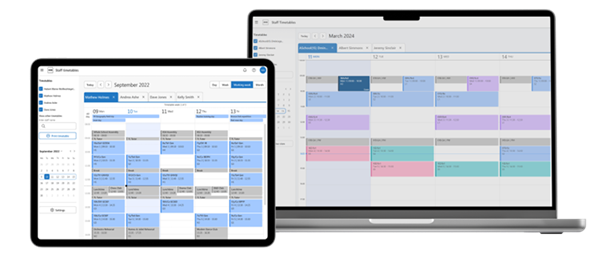
Staff Timetables Calendar
Access your timetable and other staff schedules in one easy-to-use view. Personalise your timetable with colour-coded lessons to stay organised and on track.
Statutory SEND/ALN:
Within SNG, there is now the ability to record the SEN/ALN Provision, the SEN/ALN Need and if a pupil has time in a SEN/ALN Unit or a Resourced Provision. All of this data is read from SIMS7 and any updates in SIMS Next Gen are also written back. This is to make sure the two systems maintain parity for statutory reporting purposes.
This screen shows SEND, but for schools in Wales, this will say ALN.
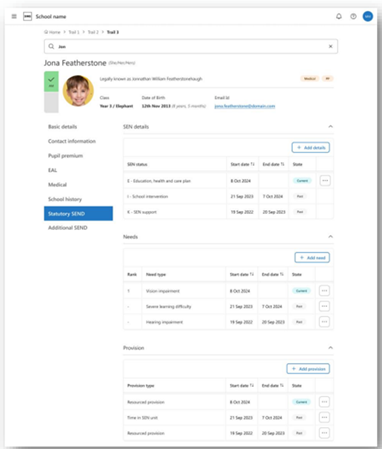
There is also the ability to add and edit the additional support areas from SIMS7.
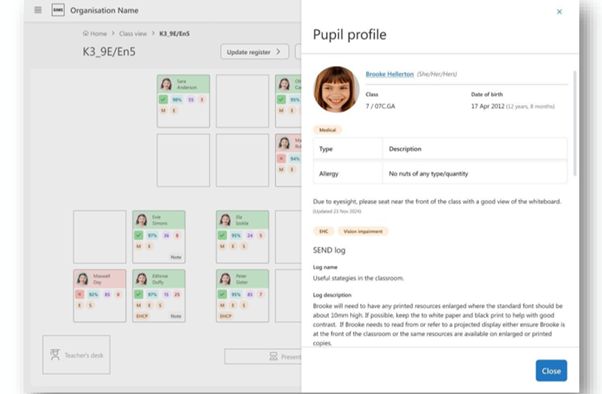
With SNG there is a new section for the additional SEND/ALN information. This is in SNG only and allows the SENDCo to add many different items to the pupil’s profile. The pinned status allows the SENDCo to determine what note should be shown, in full in other areas of SNG, i.e. the Class View pupil profile.
- Pupil profile: from Class view
This is the pupil profile side panel that users will see when they click on a pupil’s card in class view. In this pupil profile, you can display additional SEND/ALN information that exists in the main pupil profile. The main aim of this being that the teacher will see right away anything of importance in relation to SEND/ALN as indicated by the SENDCo. If the teacher wishes to see more SEND/ALN information, then there will be a link to the additional SEND/ALN area in the main pupil profile.
Manage permission, view
You can now view all permission groups, including their associated permissions and the members assigned to each group.
For Admin Managers responsible for ensuring that permission groups align with appropriate permissions for their members.
Staff profile, classroom profile
Record all necessary details for classroom staff within their profile, including for supply staff and cover supervisors, allowing efficient operation of the Cover module.
Details include:
- Cover options (can the staff provide cover?)
- Subjects
- Sites (Tiers in SIMS7)
Staff profile, view & edit training
Create or update training courses in settings (Admin Console) and assign courses to staff members individually or in bulk. For HR managers and other office staff with personnel responsibilities to ensure appropriate training is scheduled for each staff member with ability to track completeness on the staff profile.
Staff absences, analytical overview on Staff profile
Key summary analytics on absences for staff member’s profile.
For Leaders and HR Manager to get a clear picture of the absence situation for each staff member and quickly identify areas of concern.
Summary analytics will include:
- Total absences
- Total working days lost
- Total working days lost per absence type
- Bradford factor
Bulk Leavers
It includes:
- Search for leavers
- Create leavers individually or in bulk
- Edit leavers
- Re-instate leavers (New to Next Gen)
- Customised workflows to support Primary, Secondary and Pupil Referral Units (PRUs)
Consents
This expands upon the Consents area of SIMS 7 with the addition of capturing the person who provided the consent, the date the consent was given and additional comments. It also includes the ‘pending’ and ‘no’ status to support tracking consents that have been requested.
Coming soon!
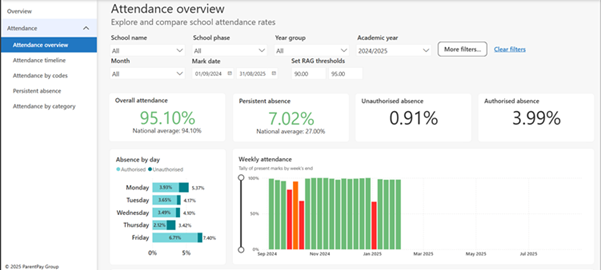
Attendance analysis reporting
Attendance overview – use the drop-down menus to select different year groups for example to drill down into different attendance information
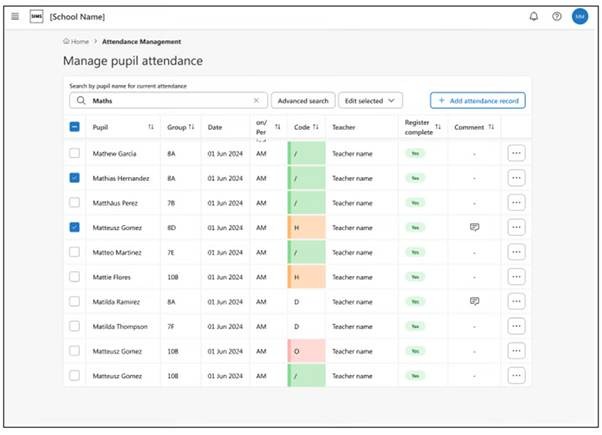
Manage pupil attendance
Attendance Management provides a single user friendly tool which, alongside the teacher’s attendance registers, allows the easy creation of all pupil attendance events. Management of daily attendance tasks, including missing registers, unreported pupil absence, and adding group wide attendance records are simple and quick, and ensure the pupil attendance records are always up to date and correct.
Employment details
View, record or amend staff employment high level details.
This includes:
- Employment dates (at the school)
- Continuous service and LA employment dates
- Inclusion into the Workforce Census (or not)
Note: this is independent of the actual contract, which will be in a separate section.
Click here to access the termly roadmap to see all the current features available in SNG and what’s coming next!
If you are not yet using SIMS Next Gen, please get in contact and we will be happy to go through setting up your SIMS system if needed and can help with onboarding staff or discussing any of these features!