To navigate to the most relevant section, please click the appropriate link below: -

How to contact us...
We know everyone works differently, so we’ve made it easy for you to reach us in the way that suits you best. There are several flexible support options available, and you can simply choose the one that’s most convenient for you: –
- Live chat @ https://my.schoolicts.co.uk/
- Customer Portal @ https://my.schoolicts.co.uk/ (you can log and also track tickets through the portal)
- Call: 0345 222 6802 Option 1 for MIS support *please leave voicemail where lines are busy during peak periods. Leaving a voicemail automatically creates a ticket for you.
- E-mail: helpdesk@schoolicts.co.uk
How to contact us – the quickest way to log a support ticket
Exam Services
Re-sits, summer planning and a little extra support!
Welcome back! We hope you managed to enjoy a well-earned break over half term.
November brings GCSE re-sits, mock exams and the start of preparations for summer 2027.
GCSE November re-sits: dates for your diary
The GCSE English Language and Mathematics re-sits are upon us. Key dates for AQA and Pearson Edexcel are:
| Date | Examination — morning session |
| Tuesday 3 November | English Language Paper 1 |
| Wednesday 4 November | Mathematics Paper 1 — non-calculator |
| Thursday 5 November | English Language Paper 2 |
| Friday 6 November | Mathematics Paper 2 — calculator |
| Monday 9 November | Mathematics Paper 3 — calculator |
Check your awarding body’s final timetable for the specifications your centre delivers, including paper durations. (aqa.org.uk, qualifications.pearson.com)
Good luck to all students taking their re-sits, and to the exams teams keeping everything running smoothly behind the scenes!
Other important November dates
- 1 November: Deadline for processing November GCSE access arrangement applications through Access Arrangements Online.
- 5 November: Deadline for submitting GCSE English Language Spoken Language Endorsement grades.
- 18 November: JCQ’s published deadline for November GCSE special consideration requests. Record issues promptly and check your awarding body’s submission requirements. (org.uk)
- 16 November – AQA: Submission of internally assessed marks and grades opens for the January 2027 series.
- 23 November – AQA: Deadline to request a partial refund of November GCSE entry fees on medical grounds. (org.uk)
Summer 2027: basedata is on its way
20 November is the published date for summer 2027 GCSE, GCE and Project qualification basedata to be available. Yes, we are talking about summer already! (jcq.org.uk)
Once available, download and import the relevant basedata in line with your MIS guidance. Work with subject leaders to confirm qualifications, specification codes, tiers and expected entries, and agree internal deadlines that allow time for checking.
A little preparation now can make the spring term much more manageable.
New Exams Officer? Give them a confident start
The Exams Officer role involves far more than learning a calendar of deadlines. Understanding regulations, managing systems and coordinating colleagues takes time, and having someone experienced to turn to can make all the difference.
Our two-year Exams Officer Mentoring Programme combines structured training with practical support throughout the examination cycle. We help new Exams Officers build their knowledge, confidence and independence through:
- Timely guidance on tasks and deadlines.
- Support with exam administration processes and MIS tasks.
- Help understanding and applying JCQ and awarding body requirements.
- Practical reassurance when an unfamiliar situation arises.
For school leaders, mentoring is an investment in staff development, continuity and a well-supported exams function.
A project that needs moving forward? We can help
Perhaps your processes need a refresh, your templates could work harder, or an outstanding piece of work keeps slipping down the list.
Our Exams Consultancy and Project Support provides focused expertise where your school or trust needs it most. This could include:
- Reviewing compliance, policies and procedures.
- Creating practical systems, templates and tracking tools.
- Standardising exam administration across a trust.
- Supporting defined tasks during an Exams Officer vacancy or absence.
- Reviewing workflows and preparing for a busy exam season.
Whether you need help with one specific project or wider support, we can work with you to agree a clear scope and practical outcomes.
Get in touch with the School ICT Services Exams Team to discuss mentoring, project support or our wider exams services.
Data Services - More than producing reports. Reliable data, expert capacity and clearer insight for better decisions.
Do you need Data Manager cover for sickness, maternity leave, a recruitment gap or just an extra pair of hands at key times of the academic year?
Our Data Management service offers an excellent, cost effective, responsive, and efficient Data Management solution delivered remotely by a team of highly experienced school data experts. Their dependable advice and guidance empower schools, academies, and MATs to maximise the investment in your management information system (MIS). Whether it’s a long-term solution or short term cover please reach out.
More than producing reports. Reliable data, expert capacity and clearer insight for better decisions.
- Please click here for further information.
School Workforce Census: key dates and guidance
- Census date: 05/11/2026
- Continuous contracts collected from 01/09/2025 to 05/11/2026
- Absences collected from 01/09/2025 to 31/08/2026
For schools that submit data to COLLECT, the deadline is Friday 4 December 2026. Local authority schools will need to check with their LA for their return deadlines.
DfE Guidance
We strongly advise downloading the DfE guidance for clarification on who should and who should not be included in the census: School workforce census 2026
See the Arbor, Bromcom and SIMS sections for more detailed information and campaigns.
Statutory Returns Service
Statutory returns without the stress
Managing census returns alongside the day-to-day demands of school life can be a challenge.
Our Statutory Returns Service provides specialist support to help schools manage key returns, from checking and validating data through to managing agreed returns and supporting submission.
Whether you’ve had a change of staff or MIS, have limited capacity or simply want the reassurance of an experienced pair of eyes, we’ll help you approach your return with greater confidence. The final review and sign-off remains with the school, ensuring you retain ownership of the data being submitted.
Let us take some of the pressure off your next statutory return, get in touch to see how we can help helpdesk@schoolicts.co.uk
Specialist Consultancy Services
Turn those “we really need to fix that….” jobs into action
Every school and trust has them. The report that needs to be created. The assessment setup that isn’t quite working. The process that could be much simpler. Or the MIS job that nobody quite has the time or expertise to tackle.
Our Specialist Consultancy Services are designed for exactly those situations. We can provide focussed consultancy around areas including reporting, assessment, behaviour, Arbor workflows, exams and bespoke MIS requirements.
Each piece of work is scoped around the outcome you need, so rather than buying a standard package, you get targeted support for the challenge you’re actually trying to solve.
If there’s something you’ve been meaning to get sorted, get in touch to see how we can help: helpdesk@schoolicts.co.uk

Key Stage 2 Remarks
Please ensure you have imported appealed marks into Arbor/SIMS (from the NCA Tools website) and check the changes appear in helloData (changes can take a few days to appear).
Setting up Assessments for the new academic year – Arbor
To enter data into the Autumn term, the assessments from last year need to be copied into this academic year. This will automatically copy the summer data into the baseline columns for this academic year for Y2 to Y6. Baselines will need to be entered for Y1 and either Nursery or Reception. Using the full marksheet is the quickest way to do this.
- During the setup, ensure that you have assigned Students and Linked Courses
- Check the assessment period names are the same as they were last year, this ensures the data pulls into helloData
We have produced step-by-step videos which are available in the help section of helloData, please ensure all videos are followed. We have also provided printable instructions, available in the help section. For £65+vat we can do the setup for you, email admin@hello-data.co.uk for more information.
Autumn User Group Meeting – Wednesday 9th December 10am, booking details to follow.
Each term we meet to discuss changes in assessment, MIS updates and recent updates to the helloData reports. This term we will be looking at new releases for measuring progress across the school, along with big changes to tracking disadvantaged pupils.
Not heard of helloData?
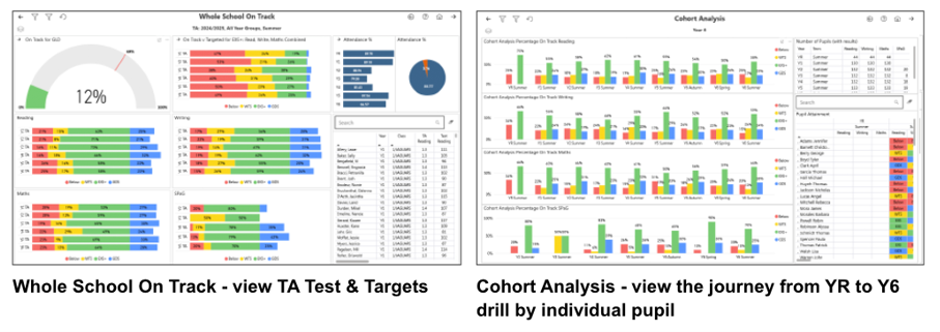
Integrating seamlessly with Arbor or SIMS, our reporting tool delivers comprehensive analysis of assessment, attendance, and demographic data across MAT, school, and cohort levels, contact admin@hello-data.co.uk or visit www.hello-data.co.uk to find out more.

Arbor, Bromcom and SIMS Bespoke and Scheduled Training
Webinar Week is back!
Full details can be accessed here with sessions from our MIS vendors plus some new additions for this year, including Working Smarter with AI in Arbor, exploring how AI can support the everyday tasks school staff already carry out, and Protecting your MIS Data: What Schools Need to Know, delivered in partnership with GDPR Sentry.
The full programme and booking links can be found here, or head to our website now Latest Industry Events And Webinars – School ICT
Don’t forget, SLA customers can find recordings of previous webinars on our Knowledge Base in the Customer Portal. Head to the Webinars & Events page to search for previous webinars by MIS, or other topics.
Training Spotlight: Exams: Build confidence now before the pressure builds
Exam administration come with immovable deadlines and little room for error, so having the right knowledge and confidence can make a real difference when things get busy.
Whether you’re new to exams, an experienced Exams Officer working in a new MIS, or simply looking to refresh your knowledge, our Exams training can help you understand how to manage key processes within your system.
Changing MIS doesn’t mean starting again. You already know what needs to be done, but learning where things are, how processes work and what looks different in your new system can make the first exam cycle much easier to manage.
Training Spotlight: Timetabling: Start planning early
Timetabling is one of those areas where experience really counts, but even an experienced timetabler can face a learning curve after an MIS change.
Whether you’re completely new to timetabling, developing your existing knowledge, or getting to grips with familiar processes using new software, starting early gives you time to build confidence before the timetable build gets underway.
Our training helps you understand the tools available within your software and prepare for the task ahead.
Need more than training?
Perhaps you know exactly how to build a timetable but simply don’t have the capacity to do it, or a recent MIS change means you’d value some extra support this year.
Alongside training, our Timetabling Services offer practical support for schools that need additional expertise or capacity. Whether you’re looking for help with the timetable build itself, support with curriculum planning or an expert review of your existing timetable, we can work alongside your school to provide the level of support you need.
If next year’s timetable is already on your mind, get in touch with us to see how we can help helpdesk@schoolicts.co.uk
Booking is now open please visit https://www.schoolicts.co.uk/online-training/
Looking for training that’s not currently scheduled?
Whether your school uses Arbor, Bromcom or SIMS, our team can discuss additional training and consultancy support.
If you can’t find the course you need within our current schedule, please get in touch. We can discuss your requirements and explore a bespoke session tailored to your school or trust.
We’re constantly reviewing our training offer, so if there are any courses you’d like to see, please don’t hesitate to get in touch at helpdesk@schoolicts.co.uk.
MIS Data Assurance Review
Unlock the full potential of your MIS
Your MIS is one of the most important systems in your school. Our Data Assurance Service helps you ensure your data is accurate, your processes are efficient and you’re making the most of the functionality available.
What’s included?
- Expert review of your MIS data and configuration.
- Identification of unused functionality and opportunities for improvement.
- Advice on the latest developments and best practice.
- Support with housekeeping and data retention requirements.
- A tailored report with clear recommendations and training opportunities.
- A server health check for on-premise systems.
The result? Greater confidence in your data, improved efficiency, and reassurance that your MIS is supporting your school as effectively as possible.
Could your MIS be working harder for your school? Speak to our team about our Data Assurance Service and uncover opportunities to improve efficiency, strengthen data quality and maximise the return on your MIS investment. Contact us helpdesk@schoolicts.co.uk to find out more.

URGENT ACTION REQUIRED – SIMS FMS6 MIGRATION
ParentPay Group (PPG) and ESS are continuing the mandatory migration of all SIMS FMS6 schools to the new FMS6 Connected platform throughout 2026.
All schools must take action and arrange their migration before the end of 2026.
If your school has received an email from PPG/ESS regarding migration, you must complete the onboarding questionnaire and select your preferred migration date as soon as possible. Please check all email folders, including junk and spam, for any communications that may have been missed.
The migration will initially move your school from local FMS6 to FMS Connected, typically within 24 hours. A further transition to the full FMS (Next Generation) platform will follow later.
Important PPG Message: Failure to respond to migration communications or arrange a migration within the required timeframe may result in restricted access to local FMS6 functionality. Continued failure to engage with the migration process could result in the software provider withdrawing or disabling access to certain software functionality, subject to the provider’s applicable terms and conditions.
If your school has already completed the migration questionnaire and confirmed a migration date, please contact the Helpdesk to advise us accordingly.
FDS (Finance Database Selector) users: Please note that only actively used FMS databases will be migrated. Databases that have not been used, or were last active eight years ago or more, will not be migrated. The lowest open financial year is 2019/20.
Action required: If applicable, complete the onboarding questionnaire and select a migration date.
If you have not yet received the migration email or require assistance, please contact the Helpdesk without delay.
Please treat this matter as urgent to avoid potential disruption to your school’s access to FMS6.

Click for the latest Arbor updates
School Workforce Census
For help and guidance on running your SWC please visit our knowledge base. In particular our Arbor School Workforce Census 2026 Campaign News, where you’ll find more information about what needs to be included, helpful guidance and a link to the webinar we ran earlier this year.
Check your data using the Data Quality Dashboard.
Within the Data Quality Dashboard you’ll find the key areas to help you check and prepare your data, which you should work through in this order:
1. Merge or delete any duplicate staff profiles in the Suspected Duplicates section.
2. Add and update basic details in the Staff section.
3. Add in key Census information in the School Workforce Census section. Just click a cell to add the data!
4. Pay Scales: In Arbor, when looking at Pay scales, all scales may display differently to your previous MIS. If you have migrated from another MIS, we advise you to ensure that these are updated and correct. You may wish to rename the scales to ensure you are awarding correctly e.g., NJC scale 1 or Teachers Upper scale 1 etc. Please use the link below for further guidance on how to amend, update, create and complete Pay scales in Arbor Arbor- Updating Payscales
Check your SENCo is set up; in Arbor they need a separate contract for the SENCo role, with the hours they work in that role. Detailed guidance on how to do this can be found here:- Arbor- Setting up your SENCo for SWC
Staff Absence data – Make sure staff absences have been recorded: Arbor- See and report on Staff Absence Statistics
Qualification data – Record Staff qualifications (Qualification codes, Subject Codes and Class of Degree) from the Qualifications & Checks area on staff member’s profiles.
Date of last pay review – Use the Staff section part of the Check Your Data using the Data Quality Dashboard. Alternatively, view and bulk update last pay review dates via the tab in the contracts area. School> All Staff> HR Admin> Contracts> Contracts.
Vacancies – On census day, you need to add in the vacancies that are currently open at your school.
Third-party support staff headcount – On census day, you need to add in headcount numbers for occasional teaching staff and third-party support staff are both required. You can see how to add this in the Workforce Census guide.
MAT MIS SWC
MAT MIS School workforce census PayScale management *(Available to MATs that have MAT MIS Plus or Enterprise tiers)
Reminder: From your central MAT MIS you can manage your schools’ pay scales without needing to log in to each individual school site. Arbor’s functionality means you can update your pay scales in MAT MIS, then push them down to your schools with the click of a button: Pay scale pushdown from the MAT MIS
Arbor Admin Access
Did you know that we can provide additional Arbor support at no extra cost, as part of your existing MIS SLA?
What benefit does Arbor Admin functionality bring to you?
With your permission, School ICT can be granted Admin functionality on your Arbor MIS site. This access allows our experienced support team to quickly diagnose and resolve common issues including refreshing invoices, populating missing payment accounts and accessing audit logs for troubleshooting.
By enabling this functionality, you’ll benefit from faster resolutions without needing to escalate these tasks to Arbor Support – saving your team valuable time and ensuring smoother day-to-day operations.
If you haven’t had the email and feel you should have, please call School ICT on 0345 222 6802 or email helpdesk@schoolicts.co.uk.
What’s new in Arbor?
Record free breakfast club attendance
Schools running the government-funded free breakfast programme can now record daily pupil attendance directly in the Clubs module using the DfE-specified codes.
The codes are built in and ready to use, so schools do not need to configure them manually before recording attendance.
Schedule when an assignment is published
Teachers can now choose a future date and time for an assignment to become visible to students and guardians. This means assignments can be prepared in advance and only appear when they’re needed. You can find it in Arbor by going to Students > Assignments or from the Lesson Dashboard.
Feedback on the new Assessments module
The rebuilt Assessments module is now available for schools and trusts to preview before its full release. You can customise marksheets, set validation rules for individual columns and track targets across year groups.
Trust teams can join the Early Adopter Programme through Administration > Assessments (EAP) to explore the module and share feedback with the product team.
Arbor Workflows is getting a new look
From 3rd November, Arbor Workflows will have a refreshed look and feel, with changes designed to make it easier to create, edit and test workflows. The update includes simpler navigation, clearer labelling and more intuitive features, including the ability to use the @ key to add dynamic data when building workflows.
Don’t worry if you’re already using Workflows, your existing workflows will continue to run as normal.
What’s new in MAT MIS
Behaviour Category Mapping
Behaviour Category Mapping is a new feature in Arbor MAT MIS that lets you group behaviour types together into standardised or custom categories. Grouping similar or duplicate behaviours together into categories helps you to compare behaviour incidents and trends more easily across every school in your trust, without additional manual work.
Suspensions and exclusions are now available under Analytics
Trust leaders can now view suspensions and exclusions data under the Analytics drop-down in MAT MIS. This brings behaviour and attendance information together, making it easier to identify patterns across your schools and report at trust level without exporting the data separately.
National KS4 and Post-16 data is now available in the BI Connector
The BI Connector now includes national benchmark data for KS4 and Post-16.
Trusts can compare their schools’ outcomes with national figures within their own reporting tools, without sourcing and joining external datasets manually.
Bring Smartgrade assessment data into your trust view
MAT MIS users can now connect directly with Smartgrade, bringing standardised assessment results into MAT MIS and making them available to individual school MIS sites.
Central teams can view calculated grades, raw scores, standardised scores, and percentile ranks without manually exporting and moving data between platforms. You can set this up via Administration > Assessment > Assessment Integrations.
Arbor Payments Improvements
Small changes, big time savers. Over the past few weeks Arbor have released a set of smaller improvements to Arbor Payments. Many of them come straight from your feedback, and together they cut down on admin, give finance teams more control, and make paying easier for parents.
Automatic email receipts for every card payment
- Every successful card payment made through Arbor now sends an email receipt to the person who paid. This covers payments in the MIS, the Parent Portal and the Parent App. Proof of payment is one of the most requested improvements in your feedback, so parents and staff now get immediate confirmation without the school office having to step in.
- Each receipt includes an Order ID, which now also appears in the Money Received table. This makes it quick to match a parent’s receipt to the payment when they get in touch.
Where: School > Payments > Reconciliation > Money Received (Order ID column)
Good to know: The new receipt replaces the old top-up confirmation template in Communication Templates. It’s a standard receipt, so its content can’t be edited and it can’t be switched off. Refund receipts and resending receipts aren’t included in this release.
What does the email receipt for card payments look like?
Payout invoices: all in one place, and fixable by you
- Payout invoices (previously called VAT invoices) now all live in Payouts Overview. Arbor have moved your full invoice history across, keeping the original invoice numbers, and retired the separate VAT Invoices page. Every invoice now sits alongside the payout it belongs to.
- If an invoice contains incorrect details, you can now regenerate it yourself instead of contacting support. The original invoice is cancelled, not deleted, and a copy marked “Cancelled” is kept for your records.
- Where: School > Payments > Reconciliation > Card Payments > Payouts Overview > select a payout
- Who: Users with Finance: View or Finance: Administer can download invoices. Only users with Finance: Administer, and system administrators, can regenerate them.
Reviewing Money Received, Payouts and Payout Invoices
Refresh trip invoices yourself
- If a trip’s price changes, staff with the Extra Curricular: Administer permission can now refresh the trip’s invoices themselves. Until now, this meant contacting us. A refresh recalculates invoices using the current trip prices. Payments already made aren’t affected, and each remaining balance adjusts to match the new total. You’ll get a notification when the refresh is finished.
- Where: School > Activities > Trips > select a trip > Trip Overview > Refresh Invoices
Change the trip price or Voluntary Contribution (see “Refreshing trip invoices”)
Create planned absences for trip participants in one step
- Instead of building custom groups and adding students one by one, staff with attendance admin permission can now create planned absences for a trip’s confirmed participants in a single bulk action. Although part of the Trips area, we know this was sometimes a blocker for rolling out trip payments.
- Where: Open a trip > attendees table > select confirmed students > Create Planned Absences
📖 Creating planned absences for trip participants · Read more on HQ
Apple Pay, Google Pay and saved cards
- In case you missed it, parents can pay with Apple Pay or Google Pay for all card payments in Arbor, and can save their card details for faster checkout next time. If parents at your school haven’t tried them yet, now’s a great time to let them know
Help shape the little things in Arbor
Arbor want to make the system that little bit easier to use, every day.
They know some of the things that make the biggest difference aren’t big new features. They’re the small niggles — the extra click, the awkward step, or the screen that could work a little better. So they are trying something new. Every two weeks, they will share five suggested ideas and ask you to vote for the ones you’d most like to see. They will build the top-voted ideas, then come back the following fortnight to show you what’s changed. You can place your vote on Arbor HQ. Take the poll

Click for the latest Bromcom updates
School Workforce Census
Our Bromcom School Workforce Census Campaign contains information to help you complete your return, including updates to the SWC for 2026. Bromcom School Workforce Census 2026
Improved admissions and data collections forms are here!
Admissions and keeping pupil information up to date should now be a little easier. The improved forms have been redesigned to be simpler and more intuitive for both schools and parents.
The new experience will be available this week, helping make admissions and keeping information up to date more straightforward.
A quicker way to get answers from your MIS
From 9th November, schools in England and Wales can try Analytics on Demand, a new AI-powered tool designed to make getting insights from your MIS quicker and simpler.
Rather than building a report, you can ask the AI bot a question about your data and receive an answer directly. Feedback during the testing period will help improve the tool.
It’s free to try during testing, although Analytics on Demand will become a paid feature when it reaches general release.

Click for the latest SIMS updates
School Workforce Census
For guidance on how to run your School Workforce Census in SIMS, please refer to our SWC campaign
What’s new in SNG
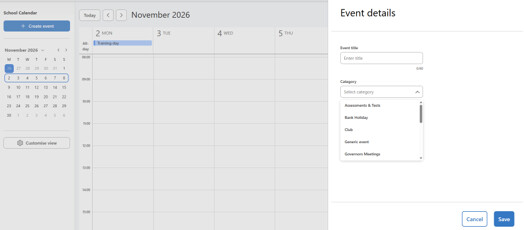
School Calendar
Full Release including Add / Edit events
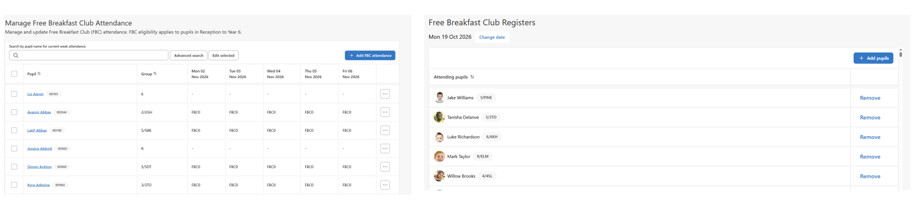
Free Breakfast Club manage attendance
There are 2 areas in SIMS Next Gen that breakfast club attendance can be added, either using the manage free breakfast club or the free breakfast club register
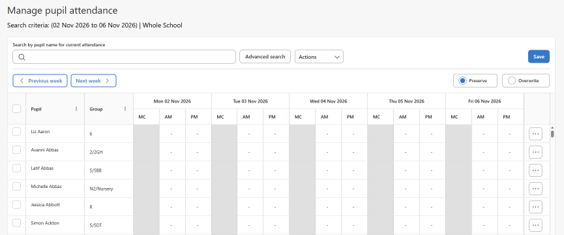
Manage Attendance
Attendance can now be managed in SIMS Next Gen
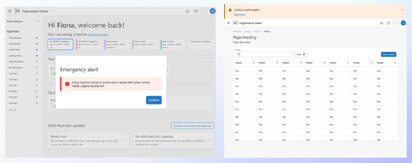
Coming soon: –
- Emergency Alerts and Notifications
- Historical Pupil Membership Details
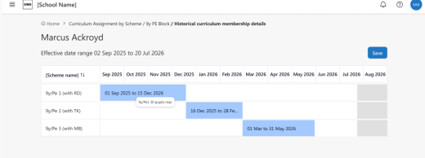
- Assessment
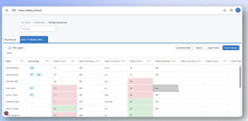
The assessment module is continuing to be developed, with marksheets being updated to include inline editing, lookups, conditional formatting and flood fill functionality
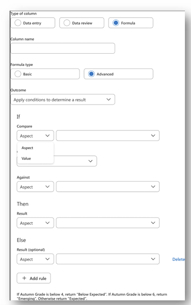
- Formulas for all types of user:
- Basic– select the outcome you wish to achieve, and the structure will automatically display.
- Advanced– use the existing formulas from SIMS 7 to build your query.
- Inline – added directly into marksheet
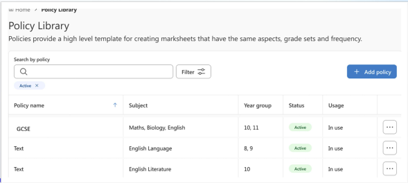
- Policy library
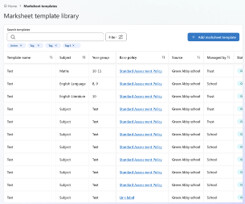
- Marksheet templates
SIMS Next Gen - How-to Videos
To make things easier for customers, we’ve brought together a range of helpful SIMS Next Gen how-to videos. You can access them through our customer portal.
The videos include step-by-step guidance on taking registers, pupil profiles, attendance reporting, mark sheets and mark books, primary assessments, staff profiles, custom groups and staff timetables.
SIMS Next Gen - Whitelisting Requirements
Recently, there have been changes made to the SNG whitelisting requirements, please see information below.
This information can also be viewed on our customer portal SIMS Next Gen Whitelisting Requirements.
SIMS Next Gen requires access to various endpoints in order to successfully exchange data. The list below shows the current known URLs that may need to be accessed, and that therefore may need to be whitelisted through a school / site Firewall, Proxy, or Internet Service Provider (ISP).
The SIMS Next Gen config wizard will need the following URLs whitelisted to connect:
- Core URL: https://simsid-orgsel.sims.co.uk
- simsid_verifyurl = ‘https://simsid-live-rapapi.azurewebsites.net/api/v1/Onboarding/ValidateClient’
- simsid_onboardingUrl = ‘https://simsid-live-rapapi.azurewebsites.net/api/v1/Onboarding’
- simsid_selfregistrationUrl = ‘https://simsid-live-rapapi.azurewebsites.net/api/v1/Admin’
- simsid_RetrieveUsersUrl = ‘https://simsid-live-rapapi.azurewebsites.net/api/v1/onboarding/ValidateOrganisation’
Other SIMS Next Gen URLs to be whitelisted
On port 443:
- *.sts.sims.co.uk
- *.sims.co.uk
- *.assess.sims.co.uk
- *.sas.sims.co.uk
- *.staff.sims.co.uk
- *.pupil.sims.co.uk
- *.learners.sims.co.uk
- *.interventions.sims.co.uk
- *.grouphub.sims.co.uk
- *.exams.sims.co.uk
- *.cnd.sims.co.uk
- *.census.sims.co.uk
- *.reporting.sims.co.uk
- *.schoolreporting.sims.co.uk
- *.olap.sims.co.uk
- *.financereporting.sims.co.uk
- *.timetablereports.sims.co.uk
- *.class.sims.co.uk
- *.cover.sims.co.uk
- *.customgroups.sims.co.uk
- *.school.sims.co.uk
- *.schooldetails.sims.co.uk
- *.pupiltimetable.sims.co.uk
- *.teacher.sims.co.uk
- *.attendancemanagement.sims.co.uk
- *.coursemanagement.sims.co.uk
- *.home.sims.co.uk
- *.auth.sims.co.uk
- *.photos.sims.co.uk
- *.live-mfe.sims.co.uk
- *.datatransfer.sims.co.uk
- *.platform.sims.co.uk