
Contents - to help you navigate to the most relevant section, please click the appropriate link below: -

Ransomware Attacks
We have been made aware that RANSOMWARE ATTACKS are targeting schools and so would like to advise that you ensure you have appropriate cyber security measures in place, but also it is CRITICAL that you have robust Remote/Cloud Backup in place for all your systems, including your MIS.
If you are unsure that you have the appropriate backup in place for your school, then please do the following immediately:
- If School ICT are your Technical and MIS Support provider, please speak to our technical team to confirm your backup provision
- If School ICT only support your MIS please speak to our technical team about SIMS Backup or please speak to your IT Provider about other systems’ backup
School ICT offer a fully managed cloud-based backup service. If you are unsure on any of the above, please do not hesitate to contact us.
Key Exam Dates
*UPDATED* Exam Key dates for all MIS from JCQ:
- June 2024 Key Dates: https://www.jcq.org.uk/wp-content/uploads/2023/06/Key_Dates_June2024_FINAL.pdf
- November 2023 Key Dates (including dates for results and appeals in January): https://www.jcq.org.uk/wp-content/uploads/2023/03/Key_Dates_Nov2023_FINAL.pdf
Best Practice in MIS Webinar Week is back!
Our FREE Autumn Term Best Practice MIS webinars are running from the 4th – 8th December.
We are pleased to announce that in addition to the webinars run by the support team here at School ICT and turn IT on, we will also have guest speakers from our Support Partners.
You can find the full webinar schedule HERE.
To book webinar places, please visit: https://www.schoolicts.co.uk/latest-events/
Coughs and Colds Season! Useful link "Is my child too ill for School?"
https://www.nhs.uk/live-well/is-my-child-too-ill-for-school/
And a link for schools to Guidance on ‘Mental Health Issues Affecting a Pupil’s Attendance’:
Exploring alternative MIS Solutions?
If you are interested in exploring alternative MIS solutions, our expert team can advise on the best solution for your school.
School ICT work closely with leading providers, namely Arbor, Bromcom, ScholarPack and SIMS. We can help guide you through the migration process and continue to provide ongoing support.
The link to our previously recorded webinar on moving MIS can be found below, along with a sheet to assist with assessing functionality and cost: –
https://my.www.schoolicts.co.uk/portal/kb?btn=46&text=moving%20MIS&entity=articles&id=338
If you would like to arrange a meeting to discuss this further, please do not hesitate to contact us on 0345 2226802 or via our portal my.www.schoolicts.co.uk
Customer Contact Information
School ICT customers:
- Telephone: 0345 222 6802 – option 1
- E-mail: helpdesk@schoolicts.co.uk
- Customer Portal: https://my.www.schoolicts.co.uk/
turn IT on customers:
- Telephone: 01865 597620 – option 2
- E-mail: mis.support@turniton.co.uk
- Customer Portal: https://portal.turniton.co.uk
Our customer portals allow you to: –
- Log and track support tickets
- Watch previously recorded webinars
- Search the Knowledge base for guidance and information
- Keep up to date with the latest MIS news and updates
- Access remote support
MIS Survey Winner!
We would like to say a big thank you to all of our customers that took the time to complete our recent MIS Survey. Your feedback is invaluable in helping us to ensure we’re providing the best possible services to our customers now and in the future.
We are delighted to announce that the lucky winner of a £50 Amazon Voucher is Donna Schofield, Business Manager at Crossgates Primary School.

School Workforce Census - Current Fileset 2506
We wanted to advise schools that the current Fileset for the school workforce census is Fileset 2506. There is also a Consolidated Database Patch requirement for this census. This is currently CDP 4 (CDP 5 is due out). Please note, there may be additional filesets and patches to be released in order to update the validation for the SWC, if you are unsure which version you need to be on, please contact the helpdesk.
We wanted to bring your attention to the following important update on the School Workforce Census. If the School Workforce Census is not your responsibility, then please forward this email to the relevant person in school.
All census documentation can be found via our customer portal links below:
- School ICT link: https://my.www.schoolicts.co.uk/portal/kb?id=12
- turn IT on link: https://portal.turniton.co.uk/
Key Dates for the School Workforce Census
- Census date: 02/11/2023
- Continuous contracts collected from 01/09/2022 to 02/11/2023
- Absences collected from 01/09/2022 to 31/08/2023
- For schools that submit data to COLLECT the deadline is 1st December 2023, local authority schools will need to check with their LA for their return deadlines.
- Updates to the School Workforce Census for 2022
School Business Professional
A new post of School Business Professional (SBP) has been added.
Three new values have been added to the Reason for Leaving to cover this new post and the Destination will be collected for the first time.
Qualifications data will be required for School Business Professionals and several new qualifications have been added to the code set, for the use of SBPs.
Disabilities
New guidance on submitting data on disabilities has been added.
To achieve complete data, employers need to accurately record a ‘yes’, ‘no’ or ‘prefer not to say’ response from all employees.
Known Issues
The following are known issues in the workforce census. Fileset 2506 will resolve these issues
- 4515
- 4540
Issue
We are aware that Error 4990 is now a known issue where it is incorrectly requesting the working days lost, when the absence is less than half a day. CDP 5 should resolve this issue. Please keep an eye on the portal for further details.
New Queries
There will be 4 new validation codes in relation to the School Business Professional Post. 4589 & 4605 are both errors and must be resolved within the staff’s contracts before submission.
6560 & 6657 are both queries and a note can be added if these are correct.
Common issues
We would also like to take the opportunity to list some of the common issues’ schools may encounter.
- 4100Q – Teacher with Teacher Number missing. Ensure that the Teacher Number is entered in the ‘Employment’ tab if they are selected as Teaching Staff.
- 4470Q – Qualified Status inconsistent with Pay Range type. Ensure that the QT/QTLS/YET Status box is selected in the ‘Professional’ Tab if the staff member is a Teacher.
- 6550Q – SENCO. The SENCO in school will need to have an additional role added to their contract, for example if a Classroom Teacher was the SENCO, their contract would contain 2 roles – one for Classroom Teacher and one for SENCO.
Note on Newly Qualified Teacher
From September 2021, statutory induction changed for new teachers and all early career teachers undergoing statutory induction starting from September 2021 are entitled to 2 years of high-quality professional support based on the ECF. State funded schools offering statutory induction will receive additional funding to deliver the new ECF.
Funding for the second year of induction will depend on data submitted in the SWC, so special care should be taken that data entered in this field is correct.
Note on staff working in multiple schools e.g., MATs
Teachers who work in multiple schools, even if the schools are part of a Multi Academy Trust, will need to be recorded separately in each of the schools.
Each school will need to record the name, teacher number, QTS, QTLS and EYTS of the staff and to separately record the hours worked by staff in each school. This data must be recorded for each
school to ensure that staff are not being double counted and to ensure that an accurate record is made of staffing and hours worked in each school.
DfE Guidance
We strongly advise downloading the DfE guidance for clarification on who should and who should not be included in the census. This can be downloaded from the below link.
Training: –
Personnel Course– to accurately record and update staff information.
- Alternatively, we have a Distance Learning course available which allows you to work through the course content at your own pace- https://learning.www.schoolicts.co.uk/p/sims-personnel-user
SIMS Technical Roadmap - Latest Version
The latest version of the SIMS Technical Roadmap can be found on our Customer Portal here: https://my.www.schoolicts.co.uk/portal/kb?id=310
This features the latest updates on versions of Servers, Windows and specs required for SIMS to run smoothly.
If you would like to check what your server is currently running or request more information on a migration, please contact the helpdesk
SIMS Autumn Upgrade - New Features
SIMS Autumn Upgrade (Version 7.214) of SIMS will have a few new and really useful feature additions:
- Bulk Deletion of Applications
- Bulk Update of Applicant Data (items added – Dietary and Paramedical Support)
- Manually added QN – validation on QN plus discount code
- New Certification Broadsheet Sort orders
- Application Bulk Delete Audit Report
- Student Bulk Update now allows Paramedical Support to be updated
- Modes of Travel lookups can be updated to make them more relevant to the school’s needs
- Import of User Defined Field Data via Spreadsheet
More information in the next newsletter, or you can see more details here.
Once the upgrade has been released, we will start the process of releasing to all school, we are expecting to start this process early December. However, if you would like the upgrade sooner, please let us know. We will firstly send out an email to all schools to let them know the upgrade is available, with a link to the release notes. If at any point you have a date you would like the upgrade to be run, please do let us know via the helpdesk and we can ensure this is put into the schedule for you.
We plan the upgrades depending on whether you have a preferred day or date first. Then following this, we work alphabetically, selecting a number of schools from the beginning and the end of the alphabet.
On the morning of your upgrade, we will create a ticket within our ticketing system. This will go to the main contact we have listed for the school, or if you have provided us with an Upgrade contact, this will be used instead. The title of the ticket and subject of the email will be ‘<date> SIMS Upgrade.’
Once the ticket has been created, we will send you an email with the details below: –
School ICT are planning on running the SIMS update out of hours tonight. If this is not convenient, please let us know ASAP so we can reschedule this at a more convenient time.
To ensure the upgrade runs smoothly, we advise you to ensure all users are logged out of SIMS but their PC has been left turned on. If any PCs are turned off, when they are next turned on, the upgrade will automatically apply.
This email will be sent by 12pm on the morning of your upgrade.
If you feel as though the date provided is unsuitable for any reason, please reply to the email and we will be happy to rearrange it for a more suitable date. We do ask, where possible, to please let us know by 3:30pm if you do NOT wish for your upgrade to go ahead. After 3:30pm the upgrade will be released and will run automatically on your system after 8pm.
If School ICT completes your SIMS upgrade, please fill in the form below. This allows us to ensure the correct people receive the email regarding the upgrade and if you can provide us with your preferred dates and any other details you feel are relevant, we can make the upgrade as smooth as possible for you. This is a good way if your IT technician is in on a Wednesday so you would like it to run on a Tuesday.
https://forms.office.com/e/fa943s6vXG
If turn IT on completes your SIMS upgrade, then these will be rolled over three nights, Tuesday 21st November, Thursday 23rd November and Thursday 28th November, we will work alphabetically selecting a number of schools from the beginning and the end of the alphabet. If you would prefer a particular date, then please contact the support desk: support@turniton.co.uk or telephone: 01869 597620 option 1
Did You Know....You can open multiple versions of SIMS at the same time?
You can open multiple instances of SIMS at the same time? Be very careful though – this is not something that it’s advisable for everyone to have!
SIMS can be opened multiple times at once which can be very handy and not many people are aware of this. This is done by editing the properties of the SIMS shortcut by right clicking on this and opening the properties. Give us a call if you need assistance.
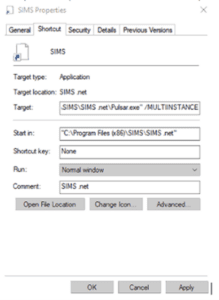
Where target= C:\Program Files (x86)\SIMS\SIMS .net\Pulsar.exe” /MULTIINSTANCE
SOLUS - New Version of SOLUS 3
We would like to advise you there is now a new version of Solus 3 which needs to be applied before you run the SIMS Autumn Update.
This will be rolling this out over the coming weeks, a further communication will be sent regarding this.
Some updates included in the update are:
Included in SOLUS 3.12.72:
- SQL 2019 compatibility support
- Fixed – Automated email alerts not sending
- Fixed – An error occurring when attempting to configure auto-download of updates via Command Line
- Fixed – SOLUS installation fails when Force Encryption is Enabled in SQL Server
- Email Alerts character limits have been increased
- Username – From 30 to 64
- Password – From 30 to 64
- Sender email – From 40 to 254
- Support for .NET Framework 4.7.2
- Upgrade all WIX installers for DS UI, DS Service, DS DB, Agent, PS, PS DB, PB, and SM to support .NET Framework 4.7.2
We will start this process from the 13th November. If School ICT or turn IT on complete your upgrades for SIMS, we will also be completing this update in the same process. If you complete this in school, this will be released to you unless otherwise requested on Monday 13th for you to complete this in house.
If you have any questions or would like to arrange a date for this to be completed, please contact the helpdesk:
School ICT customers:
Contact: 0345 222 6802 Option 1, helpdesk@schoolicts.co.uk
Portal: https://my.www.schoolicts.co.uk/
turn IT on customers:
Contact: 01865 597620 Option 1, mailto:support@turniton.co.uk
Portal: https://portal.turniton.co.uk

School Workforce Census - Documentation and DfE Guidance
Arbor Documentation is available from the links below.
- School ICT link: https://my.www.schoolicts.co.uk/portal/kb?id=17
- turn IT on link: https://portal.turniton.co.uk/
DfE Guidance
We strongly advise downloading the DfE guidance for clarification on who should and who should not be included in the census. This can be downloaded from the below link.
Check your data using the Data Quality Dashboard.
Before the Dry Run facility opens, you can start preparing for Census by heading over to your Data Quality Dashboard. You’ll find the key areas to help you check and prepare your data, which you should work through in this order: –
1. Merge or delete any duplicate staff profiles in the Suspected Duplicates section.
2. Add and update basic details in the Staff section.
3. Add in key Census information in the School Workforce Census section to add key Census information. Just click a cell to add the data!
4. Pay Scales: In Arbor, when looking at Pay scales, all scales may display differently to your previous MIS. If you have migrated from another MIS, it is advisory to ensure that these are updated and correct. You may wish to rename the scales to ensure you are awarding correctly e.g., NJC scale 1 or Teachers Upper scale 1 etc. Please use the link below for further guidance on how to amend, update, create and complete Pay scales in Arbor:
- School ICT link https://my.www.schoolicts.co.uk/portal/kb?id=15
- turn IT on link: https://portal.turniton.co.uk/
5. Check your SENCo is set up, in Arbor they need a separate contract for the SENCo role, with the hours they work in that role. Detailed guidance on how to do this can be found here:- https://support.arbor-education.com/hc/en-us/articles/360014107837-How-to-set-up-your-SENCo-for-the-Workforce-Census#step-2-check-your-senco-is-set-up-0-1
6. Staff Absence data – Make sure staff absences have been recorded: How can I see Staff Absence Statistics?
7. Qualification data – Record Staff qualifications (Qualification codes, Subject Codes and Class of Degree) from the Qualifications & Checks area on staff member’s profiles.
8. Date of last pay review – Use the Staff section part of the Check your data using the Data Quality Dashboard.
9. Vacancies – On census day, you need to add in the vacancies that are currently open at your school. All fields, including the Subject and Tenure fields, are being collected this year.
10. Third-party support staff headcount – On census day, you need to add in headcount numbers for occasional teaching staff and third-party support staff are both required. You can see how to add this in the Workforce Census guide.
Note on Newly Qualified Teacher
From September 2021, statutory induction changed for new teachers and all early career teachers undergoing statutory induction starting from September 2021 are entitled to 2 years of high-quality professional support based on the ECF. State funded schools offering statutory induction will receive additional funding to deliver the new ECF.
Funding for the second year of induction will depend on data submitted in the SWC, so special care should be taken that data entered in this field is correct.
Note on staff working in multiple schools
Teachers who work in multiple schools, even if the schools are part of a Multi Academy Trust, will need to be recorded separately in each of the schools.
Each school will need to record the name, teacher number, QTS, QTLS and EYTS of the staff and to separately record the hours worked by staff in each school. This data must be recorded for each school to ensure that staff are not being double counted and to ensure that an accurate record is made of staffing and hours worked in each school
Training
If you have never completed the school workforce census, we would highly recommend attending training to ensure the accurate return of data as the census is a legal requirement. We can put on additional dates if there is demand. Please email helpdesk@schoolicts.co.uk to place your interest in an additional training session.
MAT MIS School Workforce Census Pay Scale Management
MAT MIS School workforce census PayScale management *(Available MATs that have MAT MIS Plus or Enterprise tiers)
From your central MAT MIS you can now manage your schools’ pay scales without needing to log in to each individual school site. Arbor have updated the functionality meaning you can update your pay scales in MAT MIS, then push them down to your schools with the click of a button: Pay scale pushdown from the MAT MIS
MAT MIS - What's New?
What else is new in the MAT MIS?
- Documents: Administer permission has now been added to the MAT MIS. Assign this to staff for them to be able to see migrated documents.
- When reporting on UDFs on the MAT MIS, they will now show N/A if the UDF hasn’t been pushed down to a particular school.
- Tables on the MAT MIS are now paginated.
- Reminders added to the login page to say MAT users must log in through the MAT MIS, not into school sites directly. Reset password emails won’t be sent if you’re a MAT user trying to log into a school’s login page.
Post-16 School Census
- New Arbor census validation errors, designed to alert schools to issues with GCSE Prior Attainment records for students who left in the previous year: English/Maths grade at last census is lower than the current grade, not set, or set to ‘Not Recorded’
- No more double-counting of planned learning hours when a student transfers – Arbor now only includes programme enrolments between the start of the last year and the autumn census date.
- For students who joined after the previous year’s autumn census, you’ll need to set their total planned learning hours manually.
- Two new columns added to the Bulk Update Learning & EEP Hours page to show the Planned Learning Hours/Planned T-level Learning Hours as of the census day.
- Transfer students into Programmes of Study that take place the following year.

School Workforce Census - DfE Guidance
DfE Guidance
We strongly advise downloading the DfE guidance for clarification on who should and who should not be included in the census. This can be downloaded from the below link.
https://www.gov.uk/government/publications/school-workforce-census-guides
Full guidance on producing the SWC can be found here:
Validating your census File
Once you have ensured that all necessary information is complete, go to Admin > Census > Workforce Census> Calculate Full Census Return to validate your information. Any errors or queries will be displayed here.
Generating your census file
Once you have checked the validity of your data you will be able to generate a summary of the information in Admin > Census > Workforce > Generate Census Summary. Once you are happy with the summary of information you will need to click on Download Census File from the main census page.
This file will download to your computer, and you will be required to either send this information to your Local Authority or upload directly to the DfE Collect Portal. If you are unsure, we recommend you contact your Local Authority for more information.
Note on Newly Qualified Teacher
From September 2021, statutory induction changed for new teachers and all early career teachers undergoing statutory induction starting from September 2021 are entitled to 2 years of high-quality professional support based on the ECF. State funded schools offering statutory induction will receive additional funding to deliver the new ECF.
Funding for the second year of induction will depend on data submitted in the SWC, so special care should be taken that data entered in this field is correct
Note on staff working in multiple schools
Teachers who work in multiple schools, even if the schools are part of a Multi Academy Trust, will need to be recorded separately in each of the schools.
Each school will need to record the name, teacher number, QTS, QTLS and EYTS of the staff and to separately record the hours worked by staff in each school. This data must be recorded for each school to ensure that staff are not being double counted and to ensure that an accurate record is made of staffing and hours worked in each school.
Staff in ScholarPack - Reminder of where relevant details are
A reminder of where the relevant details are input for staff in Scholarpack. You can search for the staff member using the top right search box and select them to pull up their details.

Clicking on the cog to the right of their name in the top left of the screen allows you to input items such as their teacher number, NI number, QTS, QTS route, HLTA status, Gender, Ethncity and date of birth amongst others.
Clicking on the cog to the right of contract info in the centre section allows you to input details such as contract start/end date, post held, base salary, daily rate and FTE hours.
Absences can be viewed by academic year in the panel above the contracts by clicking into the relevant year.
Below the contract information panel there is also an extra details section where information such as qualifications and subjects taught can be stored. To open these sections, click on the cog to the right of the heading.
This link will take you to the Scholarpack help article on SWC: https://support.scholarpack.com/hc/en-gb/articles/7219873934621-Workforce-Census-2022#am-i-required-to-submit-a-workforce-census–0-0

School Workforce Census - DfE Guidance
DfE Guidance
We strongly advise downloading the DfE guidance for clarification on who should and who should not be included in the census. This can be downloaded from the below link.
https://www.gov.uk/government/publications/school-workforce-census-guides
Full guidance on producing the SWC can be found here:
Note on Newly Qualified Teacher
From September 2021, statutory induction changed for new teachers and all early career teachers undergoing statutory induction starting from September 2021 are entitled to 2 years of high-quality professional support based on the ECF. State funded schools offering statutory induction will receive additional funding to deliver the new ECF.
Funding for the second year of induction will depend on data submitted in the SWC, so special care should be taken that data entered in this field is correct
Note on staff working in multiple schools
Teachers who work in multiple schools, even if the schools are part of a Multi Academy Trust, will need to be recorded separately in each of the schools.
Each school will need to record the name, teacher number, QTS, QTLS and EYTS of the staff and to separately record the hours worked by staff in each school. This data must be recorded for each school to ensure that staff are not being double counted and to ensure that an accurate record is made of staffing and hours worked in each school.
Bromcom Documentation available from the link below. Please note the document references 2022 as Bromcom have not provided an up-to-date version this is still valid for the moment.
https://docs.bromcom.com/article-categories/school-workforce/
Bromcom Guidance on Completing the School Workforce Census
For guidance on completing the School Workforce Census on Bromcom, you can follow this link: https://docs.bromcom.com/knowledge-base/school-workforce-census-2023-guide/
This page contains the Bromcom guide, previous webinar recordings on completing the SWC and additional guidance on resolving particular errors/queries as well as help on adding staff/qualifications/contracts, etc., making staff leavers, merging staff records, recording staff absences and creating new base pay structures.

School Workforce Census - DfE Guidance
DfE Guidance
We strongly advise downloading the DfE guidance for clarification on who should and who should not be included in the census. This can be downloaded from the below link.
https://www.gov.uk/government/publications/school-workforce-census-guides
Full guidance on producing the SWC can be found here:
Integris Documentation available from the link below. Please note the document references 2022 as Integris have not provided an up-to-date version this is still valid for the moment
https://help.integris-education.com/hsearch/?search=school%20workforce%20censu
Note on Newly Qualified Teacher
From September 2021, statutory induction changed for new teachers and all early career teachers undergoing statutory induction starting from September 2021 are entitled to 2 years of high-quality professional support based on the ECF. State funded schools offering statutory induction will receive additional funding to deliver the new ECF.
Funding for the second year of induction will depend on data submitted in the SWC, so special care should be taken that data entered in this field is correct
Note on staff working in multiple schools
Teachers who work in multiple schools, even if the schools are part of a Multi Academy Trust, will need to be recorded separately in each of the schools.
Each school will need to record the name, teacher number, QTS, QTLS and EYTS of the staff and to separately record the hours worked by staff in each school. This data must be recorded for each school to ensure that staff are not being double counted and to ensure that an accurate record is made of staffing and hours worked in each school.
Note on Newly Qualified Teacher
From September 2021, statutory induction changed for new teachers and all early career teachers undergoing statutory induction starting from September 2021 are entitled to 2 years of high-quality professional support based on the ECF. State funded schools offering statutory induction will receive additional funding to deliver the new ECF.
Funding for the second year of induction will depend on data submitted in the SWC, so special care should be taken that data entered in this field is correct
Integris Overview and Tasks to Complete the Return
For help and guidance on completing the SWC in Integris, you can find the overview and tasks to complete the return via this link: https://help.integris-education.com/swf-census-overview
Other articles you may find useful with regard to the SWC are:
https://help.integris-education.com/school-workforce-census-recent-changes
https://help.integris-education.com/swf-census-faqs
https://help.integris-education.com/common-known-errors-and-queries

Upcoming Training Courses
|
Training courses for the academic year 2023/2024 are now live! We have a comprehensive schedule of online ‘live’ SIMS training courses along with Distance Learning courses to help you develop your knowledge of SIMS and get the most out of your MIS (Management Information System). Booking is now open. Please visit https://www.schoolicts.co.uk/online-training/ For Upcoming Courses please see below: |
|||
| Course Name | Date | More details via this link: | |
| Arbor Standard Reporting | Tuesday 7th November 2023 (Half Day) | https://www.schoolicts.co.uk/events/arbor-standard-reporting-half-day/ | |
| SIMS Attendance Primary | Wednesday 8th November 2023 (Half Day) | https://www.schoolicts.co.uk/events/attendance-primary-online/ | |
| Arbor Attendance |
Wednesday 8th November 2023 (Half Day)
|
https://www.schoolicts.co.uk/events/arbor-attendance/ | |
| SIMS Standard Reporting | Thursday 9th November 2023 (Full Day) | https://www.schoolicts.co.uk/events/standard-reporting-online/ | |
| FMS Advanced | Friday 10th November (Half Day) | https://www.schoolicts.co.uk/events/fms-advanced/ | |
| SIMS Administrator Intermediate Office User – Secondary | Friday 10th November 2023 (Half Day) | https://www.schoolicts.co.uk/events/new-office-user-primary-online-902/ | |
| SIMS Administrator Intermediate Office User –Primary | Monday 13th November 2023 (Half Day) | https://www.schoolicts.co.uk/events/new-office-user-primary-online-902-928/ | |
| SIMS Data Cleansing | Tuesday 14th November 2023 (One Hour) | https://www.schoolicts.co.uk/events/sims-data-cleansing/ | |
| SIMS Curriculum Management Using Nova T | 15th/16th, 22nd/23rd November 2023 (4 Full Days) | https://www.schoolicts.co.uk/events/nova-t-online/ | |
| SIMS Extended Reporting | Tuesday 21st November 2023 (Full Day) | https://www.schoolicts.co.uk/events/extended-reporting-online/ | |
| Arbor Examinations | Tuesday 21st November 2023 (Full Day) | https://www.schoolicts.co.uk/events/arbor-examinations/ | |
| SIMS Exams Organiser | 28th/29th November 2023 (2 Full Days) | https://www.schoolicts.co.uk/events/exams-organiser-online/ | |
| SIMS Monitoring Attendance | Thursday 30th November 2023 (Half Day) | https://www.schoolicts.co.uk/events/monitoring-attendance-primary-online/ | |
| SIMS Data Cleansing | Wednesday 13th December 2023 (One Hour) | https://www.schoolicts.co.uk/events/sims-data-cleansing/ | |
| SIMS – An administrators Guide to Nova | Thursday 14th December 2023 (Half Day) | https://www.schoolicts.co.uk/events/admin-guide-maintaining-the-timetable-online/ | |
| You can view all training (Online/Distance/Consultancy) here | |||

Come and say hello at the following Industry Events: -
We shall be exhibiting at the following events – if you’re there, please pop by our stand to say hello and to find out about the latest services, training, consultancy and support we can offer, and grab some of our event merchandise! : –
- East London School Business Leaders Conference, Stratford – 10th November
- MGL, Liverpool – 10th November
- Schools and Academies Show, Birmingham NEC – 22nd November
- MGL, Manchester – 23rd November

Are you in need of temporary or permanent non-teaching school staff?
Working alongside School ICT, School ICT Resourcing place both permanent and temporary specialist support staff into schools.
Candidates are available from a days placement through to a whole school year. All candidates have completed the safer school recruitment process, and have enhanced DBS clearance.
For further information please call: 0113 372 0039 or visit: www.schoolictresourcing.co.uk
As the end of the academic year approaches are you due to retire? If yourself or any colleagues are retiring soon, and would consider working on a temporary or ad-hoc basis, please contact Helen who would love the opportunity to speak with you about the potential of adding you to our candidate list.
Virtual Data Management Service - Data Genie

Data Genie – Virtual Data Management (VDM).
When maintaining your schools data is not possible, our Virtual Data Genie team enables you to maintain, enhance or completely outsource your schools data management, ensuring best practice and continuity of your schools data, at all times. Whether it be a one off to support with a particular time of year such as census or exams, for a short to medium term period like maternity or sickness cover, or if you’re perhaps struggling to recruit – to fully outsource your schools Data Management, we can provide a solution.
“School ICTs Virtual Data Management service has provided our school with high-quality day-to-day management of core school student data, support to staff and data analysis.
They have seamlessly completed our School census but have ensured that school admin staff understand their role in the maintenance of student data.
The SLT, teaching and support staff are so impressed with the service being delivered and the advanced level of knowledge and expertise that it brings.
Nothing is too much trouble and our VDM has sorted out many of the issues that we had in our MIS that no one else could previously resolve!
The knowledge that the VDM has of our MIS and all its functionality is seriously impressive along with their knowledge of DFE/ESFA rules, regulations and policy changes.
It is like having a Data Manager in the office next door but just online, they respond promptly to emails, request for reports/data and are happy to arrange phone calls or Teams meetings as required.
I can highly recommend the service – give it a try!“
For further information on this new service from School ICT, please visit: Data Genie or call: 0345 222 6802 – option 3 or e-mail: enquiries@schoolicts.co.uk.