
Welcome back to the new Academic Year!
Welcome Back and Happy New Academic Year!
As we kick off a new academic year, we’ve taken a moment to reflect on the past year, especially the bustling summer term. Over the past few months, our amazing team has supported over 1,600 customers and tackled an incredible 13,742 support requests!
But that’s not all! Throughout the academic year, we also hosted 34 live webinars and delivered 124 training courses, sharing valuable insights and knowledge with our schools and Trusts.
Our team has been working hard over the summer break to prepare for the term ahead. We’ve held internal training sessions, refreshed our customer portal resources, and are on our Arbor Finance Accreditation Journey! This makes us the first Arbor Finance support partner for Leeds Schools️.
We’re super proud of the hard work and dedication of our team and, as always, we are committed to serving excellence in the coming year.
Here’s to another fantastic year ahead!
Contents - to help you navigate to the most relevant section, please click the appropriate link below: -

Meet the Team

Hey, everyone!
I’m Jason Bromilow, the Training and Consultancy Team Leader here at School ICT Services, bringing over 25 years of hands-on experience in education—as a School Data Manager, Timetabler, and as a member of the School Leadership Team.
My mission is to supercharge your school’s success by empowering leaders, teachers, and support staff with the skills they need to fully leverage their MIS systems.
I’m driven by a passion for making a real impact, offering customised training and consultancy that’s tailored to your unique needs. Together, we can unlock the potential of your MIS, helping students thrive and reach their full potential.
Our top-notch training and consultancy, delivered by MIS experts with deep roots in the education sector, is just a click away. Book your session now at https://www.schoolicts.co.uk/online-training.
Prefer to learn at your own pace? We’ve got you covered with distance learning options, complete with all the resources you need. Whether it’s bespoke training, specialised consultancy, or our exciting new Bitesize course range, we’re here to support you.
Ready to take the next step? Give us a call at 03452 226802 or shoot an email to helpdesk@schoolicts.co.uk. Let’s collaborate and create something amazing together!
Logging Tickets
Please be aware that we are receiving an exceptionally high amount of calls at the moment and we thank all of our customers for their patience when calling. Please remember that you can also log tickets via the customer portal or by leaving a voicemail. Both methods automatically generate a ticket and this means that the person who can help you best is the person who will call you back. See below for guidance on how to do this:
Logging Tickets
The first few weeks of September are very busy in school, and also for us as a support unit. If you call and the phones are busy, you can leave a message which will automatically generate a ticket in our queue for someone to call you back. If you do this, PLEASE leave your name, the name of the school, the best number to call back on and a brief description of why you’re ringing, as this means that the best person to help you is the one that will call back.
Alternatively, you can send an email to helpdesk@schoolicts.co.uk and this will also automatically create a ticket or you can log your own ticket via the customer portal:
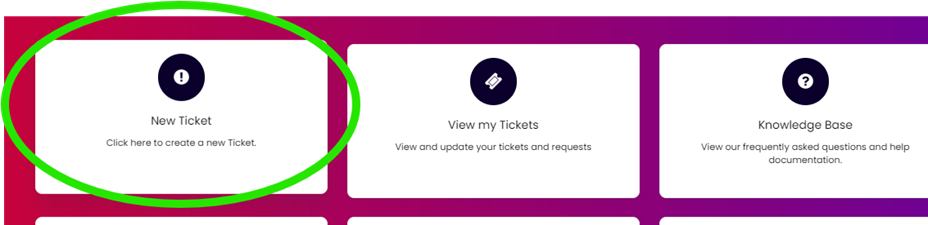
All of the tickets go into the same queue and don’t rely on someone picking them up and moving them over and in the first couple of weeks this can sometimes be quicker than holding on the phone.
When you log a ticket via the portal, you will get a little menu that may appear once you’ve added your reason to the Summary box:

Clicking on the links in this pop-up (or the bottom link to view further articles) may well help you to resolve your issue without our input, so please also make use of this.
We know you like to speak to us (and we like to speak to you!) but in order to offer the best service to our customers, this is sometimes the quickest way at busy times.
We're Recruiting
Due to continued growth within the company we have two exciting opportunities!
Senior MIS Consultant and MIS Consultant.
Are you familiar with the following MIS Packages: Arbor, Bromcom, Integris, ScholarPack or SIMS? Are you an experienced school user or work in a similar role and are looking for a new challenge? Would you like to join our amazing team?
School ICT is one of the largest, independent providers of MIS support in the country. We currently offer support and consultancy services to over 1600 schools on a national basis.
The roles involve providing remote MIS support, facilitating communications between schools and School ICT, staying up to date with the latest products, services and developments. You will also be responsible for delivering training and consultancy, supporting schools moving MIS platforms as well as updating key guidance documentation.
For full details of the vacancies and how to apply please visit: https://www.schoolicts.co.uk/vacancies/
New Attendance Codes
The new Attendance codes have now come into force. Please check your system and make sure that you can see them/are using them. This will be crucial for the January Census, as that census will be looking at the Autumn Term attendance and if you leave it until (October) Census day to run the upgrade, then ALL attendance up to that point will need to be re-input, even for the codes where it looks like there is no change, e.g., /, \, N, U, etc. as it is the coding behind these that has changed, so if you haven’t had your upgrade you will end up having to reinput EVERY code for EVERY child for EVERY session for EVERY day for the term up to the point that the upgrade is applied. Even though the codes will show, the coding behind them will be wrong, so they will have to be re-input, so if you’re not on version 7.218 of SIMS, then please chase this!
Reminder: New Attendance Codes Effective from August 2024
Attention Schools:
Starting August 19, 2024, new attendance codes and guidelines from the Department for Education (DfE) came into effect. Schools should check their systems to ensure these codes are visible and in use.
Please also remember that there have been changes around the issuing of penalty notices, with a ’10 in 10 threshold’:
“The threshold is 10 sessions of unauthorised absence in a rolling period of 10 school weeks. A school week means any week in which there is at least one school session. This can be met with any combination of unauthorised absence (e.g. 4 sessions of holiday taken in term time plus 6 sessions of arriving late after the register closes all within 10 school weeks). These sessions can be consecutive (e.g. 10 sessions of holiday in one week) or not (e.g. 6 sessions of unauthorised absence taken in 1 week and 1 per week for the next 4 weeks). The period of 10 school weeks can also span different terms or school years (e.g. 2 sessions of unauthorised absence in the Summer Term and a further 8 within the Autumn Term).”
For more details, please review the full guidance of Working together to improve school attendance here.
If your school has a staggered start, the DfE are requesting that the codes used should be:
- Reception children – code X for the sessions they do not attend
- Year 7 children – Y7 exceptional circumstance, with a comment in to explain, as this code requires a statutory explanation
New Training Course Schedule
As the new year begins, we know that a lot of schools will have new staff or staff who are changing their role within school. With this in mind please see the scheduled training courses for the first few weeks of the new academic year below, and don’t forget our Distance Learning courses too! You can access the full list of DL courses here and you have access to the DL course for 12 months from date of purchase, so if you need to check/re-check anything, you can just log back in and re-watch the video during that time. The course content and the price are the same as the ‘live’ courses, but you can work through each course at your own pace. They can also work well if releasing a staff member for the duration of a live course is difficult. If you’re not sure, why don’t you try our free ‘Try before you buy’ SIMS Housekeeping Course , or our free Arbor Business Roles & Permissions Course.
If you would like to book onto the training sessions below, you can do so by clicking on the link for the relevant course, or to see the full list of courses, you can click here.
| SIMS Administrator New Office User Primary | Monday 16th September (Half Day) | https://www.schoolicts.co.uk/events/new-office-user-primary-online/ |
| SIMS Administrator New Office User Secondary | Tuesday 17th September (Half Day) | https://www.schoolicts.co.uk/events/new-office-user-secondary-online/ |
| SIMS Preparing for P16 Autumn Census | Wednesday 18th September (Full Day) | https://www.schoolicts.co.uk/events/post16-census-online/ |
| Arbor New Office User |
Wednesday 18th September (Half Day)
|
https://www.schoolicts.co.uk/events/arbor-new-office-user-primary/ |
| SIMS Cover | Thursday 19th September (Full Day) | https://www.schoolicts.co.uk/events/cover-online/ |
| SIMS Primary – Autumn Census | Friday 20th September (Half Day) | https://www.schoolicts.co.uk/events/autumn-census-primary-online/ |
| SIMS Personnel & Personnel Reporting | Monday 23rd September (Full Day) | https://www.schoolicts.co.uk/events/personnel-online/ |
| Bromcom Census Combined (not P16 ) | Monday 23rd September (Half Day) | https://www.schoolicts.co.uk/events/bromcom-census-training-893/ |
| SIMS Secondary Autumn Census | Tuesday 24th September (Half Day) | https://www.schoolicts.co.uk/events/autumn-census-secondary-online/ |
| Arbor School Census Combined (Primary and Secondary) | Tuesday 24th September (Half Day) | https://www.schoolicts.co.uk/events/arbor-census-training/ |
| Arbor Personnel & Basic Analysis | Wednesday 25th September (Half Day) | https://www.schoolicts.co.uk/events/arbor-staff-and-basic-analysis/ |
| Arbor Preparing for P16 Census | Thursday 26th September (Half Day) | https://www.schoolicts.co.uk/events/arbor-preparing-for-post-16-census/ |
| Bromcom Preparing for P16 Census | Thursday 26th September (Half Day) | https://www.schoolicts.co.uk/events/bromcom-preparing-for-post-16-census-980/ |
| SIMS FMS New User – Central School (Non-Bank Account) . These are schools where the LA pay suppliers on the school’s behalf | Friday 27th September (Half Day) | https://www.schoolicts.co.uk/events/fms-basic-online-536/ |
| SIMS Primary – Autumn Census | Monday 30th September (Half Day) | https://www.schoolicts.co.uk/events/autumn-census-primary-online/ |
| SIMS Secondary – Autumn Census | Tuesday 1st October (Half Day) | https://www.schoolicts.co.uk/events/autumn-census-secondary-online/ |
| Arbor Examinations | Tuesday 8th October (Full Day) |
https://www.schoolicts.co.uk/events/arbor-examinations/
|
| SIMS Administrator Intermediate Office User – Primary | Tuesday 8th October (Half Day) | https://www.schoolicts.co.uk/events/new-office-user-primary-online-902-928/ |
| SIMS – An Administrators Guide to NOVA | Wednesday 9th October (Half Day) | https://www.schoolicts.co.uk/events/admin-guide-maintaining-the-timetable-online/ |
| SIMS FMS New User – Bank Account Schools (these are schools who pay their own bills/suppliers directly from their own bank account) | Wednesday 9th October (Half Day) | https://www.schoolicts.co.uk/events/fms-basic-online/ |
| Arbor Maintaining the Timetable and Course Structures | Thursday 10th October (Half Day) | https://www.schoolicts.co.uk/events/arbor-maintaining-the-timetable-and-course-structures-half-day/ |
| Bromcom School Workforce Census | Friday 11th October (Half Day) | https://www.schoolicts.co.uk/events/bromcom-school-workforce-census-half-day-941/ |
Webinars
Autumn Term MIS Webinars and Vendor Spotlight Series
Following on from customer feedback we have taken on a different format for our webinar series this year. Our MIS team are working on delivering webinars throughout the academic year starting with the Autumn term in place of our usual webinar week.
To complement our webinar series, we will also be hosting a Vendor Spotlight Series, with the first Vendor webinar taking place next week on the 19th September, we invite you to explore what leading MIS vendors have to offer. These sessions are designed to help schools make informed decisions by showcasing the latest features and capabilities of various School MIS systems.
In addition to our Vendor Spotlight series, we are also hosting our “Moving MIS Considerations” webinar, to ensure you understand the process and key considerations. The main themes we will cover in this session are:
- Motivations for Moving MIS
- Key Considerations
- Cost Considerations
- Training and Implementation
- How we can help schools with the process
Please find Webinar Dates and Sessions for the Autumn Term listed below, simply click on your desired session to register: –
- SIMS Pupil Premium – Thursday 12th September, 10am-11am
- SIMS Post 16 School Census Autumn Return – Thursday 12th September, 1.30pm-2pm
- SIMS Pupil Census – Friday 13th September, 10am-10.30am
- Arbor Finance and MIS Demonstration – Thursday 19th September, 10am-11am (Leeds schools only)
- Arbor Pupil Census (Primary and Secondary) – Thursday 19th September, 11am-11.30am
- Moving MIS Considerations – Friday 20th September, 2pm-3pm
- Bromcom MAT MIS Demonstration – Monday 23rd September, 10am-11am
- Bromcom Finance Demonstration – Monday 23rd September, 2pm-3pm
- Bromcom Primary School Demonstration – Tuesday 24th September, 10am-11am
- Bromcom Secondary School Demonstration – Tuesday 24th September, 2pm-3pm
- Arbor Demonstration for Primary and Secondary Schools – Wednesday 25th September, 10am-11am
- Arbor MAT MIS – Thursday 26th September, 10am-11am
- Arbor Finance Demonstration – Thursday 26th September, 2pm-3pm
- SIMS Next Gen Showcase – Friday 27th September, 10am-11am
- School Workforce Census Updates and Changes – Monday 30th September, 2pm-3pm (Generic session for all MIS types)
- Bromcom – Top Tips for New Users – Monday 7th October, 10am-11am
- SIMS Options Online – Wednesday 13th November, 2pm-3pm
Staff Records Tips
Do not link staff records to old pupil or contact records in your MIS. It’s easily done but invariably causes problems! Even though they are the same person in real life, they are different people on your system – you wouldn’t expect a parent to be able to access areas that a staff member can, or likewise a pupil wouldn’t access areas that staff can, so these roles must be kept separate.
September Tasks
There are a few housekeeping tasks that need to be completed regardless of which MIS you use:
- Updating Photos in your MIS
- Creating the CTF for your Reception Baseline Assessment
- Update Staff Details
- Update Pupil Details
- Downloading PP file from GIAP (see below for 2024-25 values)
Please see the relevant section for your particular MIS, where you can find guidance and useful links to common September issues.
Pupil Premium Files
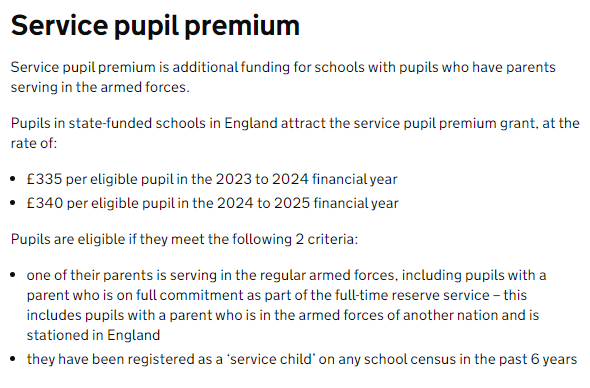
You should be able to download your Pupil Premium file for the 2024-25 year from Get Information About Pupils (GIAP) and import it into your MIS. Please see the relevant section for guidance on doing this. The values for 2024-25 are:
Curriculum Years for 2024-25
Curriculum Years for 2024-25 (the dates of birth that dictate each year group) are available on our customer portal here.
This doesn’t mean the year that the children are taught in if they are taught out of year – this is the year group they should be in according to their date of birth.
Send E-mails and Letters for Free!
GOV.UK provide a free service to Central Government, Local Authorities and the NHS, which allows texts, emails and letters to be sent for free, so this means that state-funded schools have access to the service and can send up to 10,000 texts for free along with unlimited emails!
You can read more about the service here: https://www.notifications.service.gov.uk/
And we’ve created a helpsheet for SICTS customers, which you can view via this link: https://my.www.schoolicts.co.uk/kb?btn=46&text=notify&entity=articles&id=806
For TIO customers, you can access via this link: https://portal.turniton.co.uk
Annual Increments
The new teacher pay awards will be made as of September. This is something that should be updated within your MIS as soon as you can to ensure they are up to date for the School Workforce Census (SWC). We have help on our portal for doing this.
Please visit our Customer Portal here for guidance on how to update your payscales within your specific MIS. If you do need any support on this matter, please contact the Helpdesk in the usual way and one of the MIS Support Team will be happy to help.
Exams 2024/5 Key Dates
Exams 2024/2025 Key Dates
The key dates for 2024/2025 are available from the JCQ website, as follows:
School Census Key Dates
Please see below the dates for the October Census: –
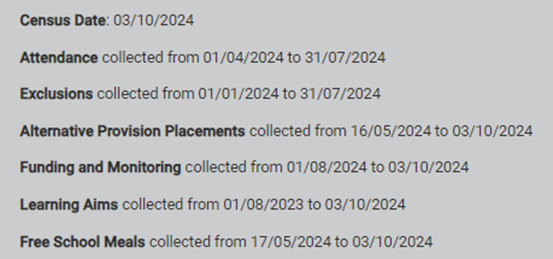
Census help and guidance here: https://www.gov.uk/guidance/complete-the-school-census#suspension-or-permanent-exclusion
And check your items here (this is a really useful document!!): https://www.gov.uk/guidance/complete-the-school-census/check-your-data
Check the training courses above for the Census courses. This is the biggest census in terms of generating funding for your school.
If the information in your system isn’t correct or isn’t in the right place, YOU WILL LOSE FUNDING and nobody wants that!!
Exploring a Different MIS Solution?
Thinking of exploring alternative MIS Solutions?
If you are interested in exploring alternative MIS solutions, our expert team can advise on the best solution for your school. School ICT work closely with leading providers, namely SIMS, Arbor, Bromcom, ScholarPack and Integris. We can help guide you through the migration process and continue to provide ongoing support.
The link below to our previously recorded webinar on moving MIS is below along with a sheet to assist with assessing functionality and cost:
https://halo.transforming-learning.co.uk/portal/kb?btn=46&id=805
If you would like to arrange a meeting to discuss this further, please do not hesitate to contact us on 0345 2226802 or via our portal my.www.schoolicts.co.uk
Cyber Security
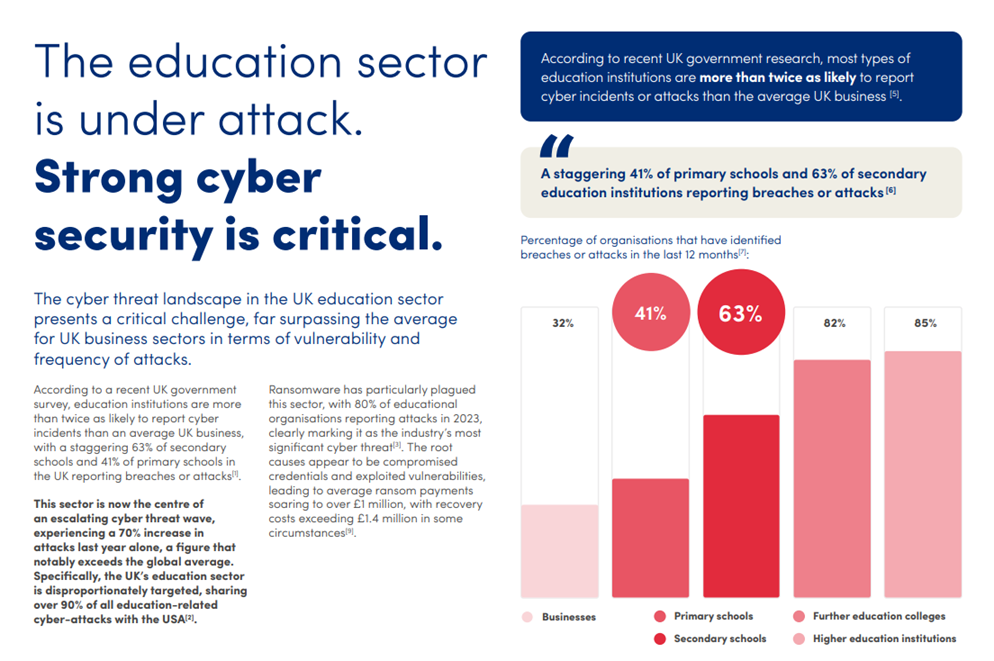
The cyber threat landscape in the UK education sector presents a critical challenge, far surpassing the average for UK business sectors in terms of vulnerability and frequency of attacks. The ParentPay Group have put together a white paper highlighting some of the statistics and how they’re helping customers protect their data. The full paper can be found here
School ICT and turn IT on Customer Contact Details
School ICT Customers:
Contact: 0345 222 6802 Option 1, helpdesk@schoolicts.co.uk
Portal: https://my.www.schoolicts.co.uk/
turn IT on customers:
Contact: 01865 597620 Option 2, mis.support@turniton.co.uk
Portal: https://portal.turniton.co.uk
Our customer portals allow you to: –
- Log and track tickets
- Watch webinars
- Search Knowledge base for information
- Keep Updated with the latest news

Reminder re. Attendance Codes
Reminder – Please check that you can see and are using the new attendance codes!!!
If you are still on the old ones, ALL attendance (NOT JUST THE NEW CODES!) will need to be updated when it comes to the January Census (this will mean every code for every pupil for every session for every day for the whole of the Autumn term, so it will be a MASSIVE task if left until January and you will have VERY, VERY upset Census staff), so please check NOW! They were included in the Summer Upgrade and there are some patches that should have been applied as well.
You can see the codes by going into Focus | Attendance | Edit Marks (or Take Register for the teachers), open a register and click on the ‘Codes’ button and you should see this (you might have to drag the bottom edge of the box down to see them all):
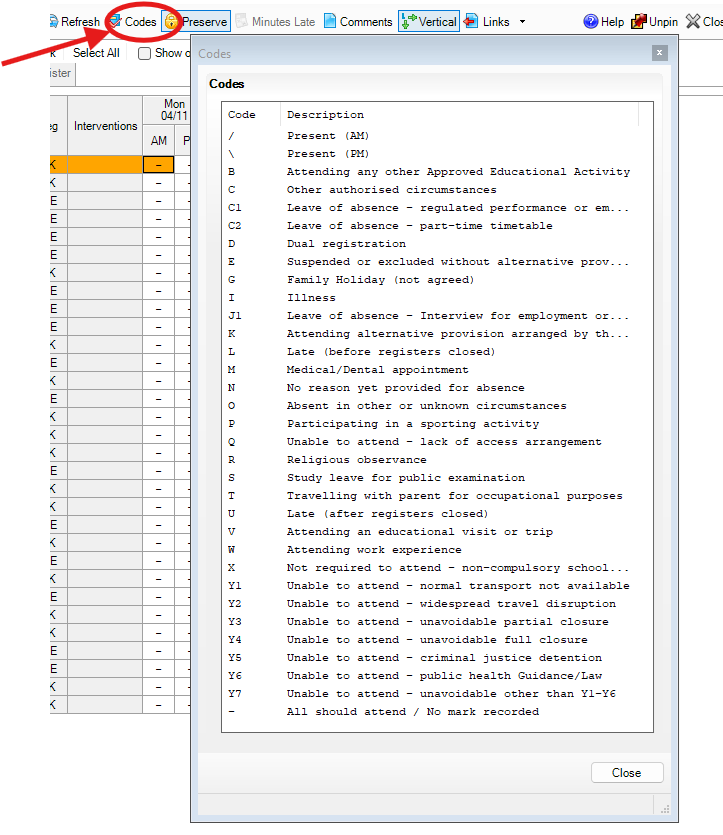
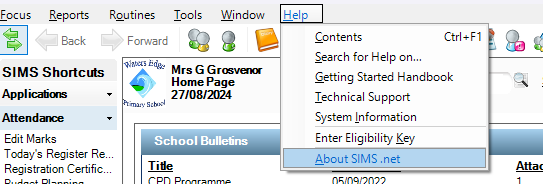
If you don’t see your codes displayed like this speak to whoever does your upgrades and double/triple check that the Summer Upgrade has been applied to your SIMS (if the codes aren’t showing like this, it HASN’T!!). You can also check the version of SIMS that you are on by clicking on Help | About SIMS.net:
When the window opens, check the Version:
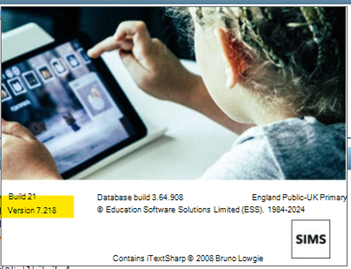
You should be on 7.218. If you aren’t on this version, then the Upgrade HASN’T been applied, and needs to be. You can close this window by clicking on it.
Talking of registers…
Did you know that you can show Accepted Applicants in your class registers in SIMS? If you didn’t, we have a Helpsheet to guide you through the process which you can find here. You will still have to Admit your children, but this process means that they can be seen on the register for the class teacher on the morning they are due to start (so before you’ve gone through the admission process).
We also have some guidance on September tasks on our portal via this link: https://halo.transforming-learning.co.uk/portal/article?id=505&showmenu=false
This is aimed at both primary and secondary schools, so please make sure you read it carefully as some of the tasks may not apply to your phase of education.
Attendance Analysis Reports
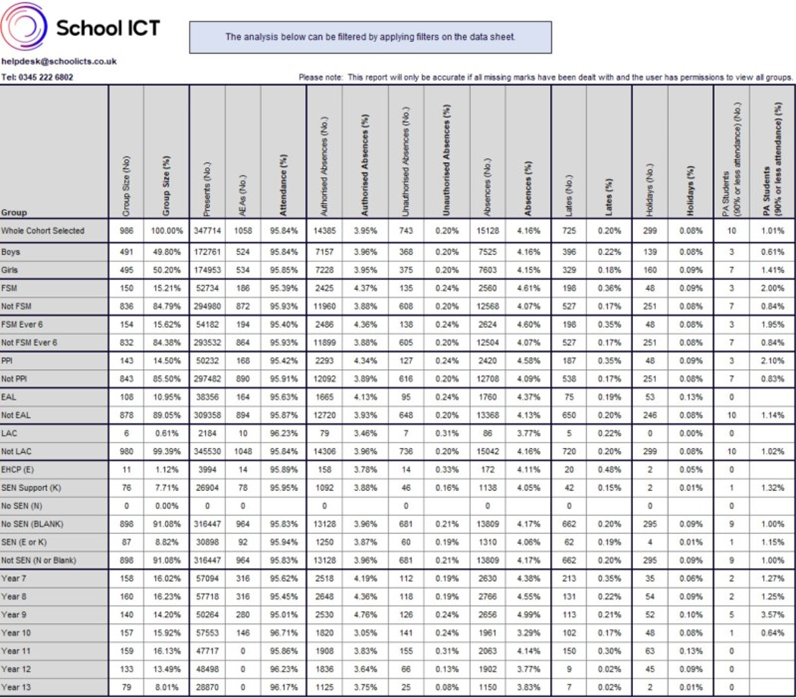
We’re very pleased to tell you that the Attendance Analysis Reports for the 2024/25 Academic year have been updated and are available for our customers who use SIMS to download from the portal. As usual, you can download the file, as well as instructions on how to import it if you can’t remember by clicking here.
Reception Baseline CTF
We have created resources to assist with generating the CTF to upload. There is a helpsheet and a short video to demonstrate the process. These are both available on the School ICTS customer portal here and for turn IT on customers please follow this link: https://portal.turniton.co.uk
CTF Matching Tool
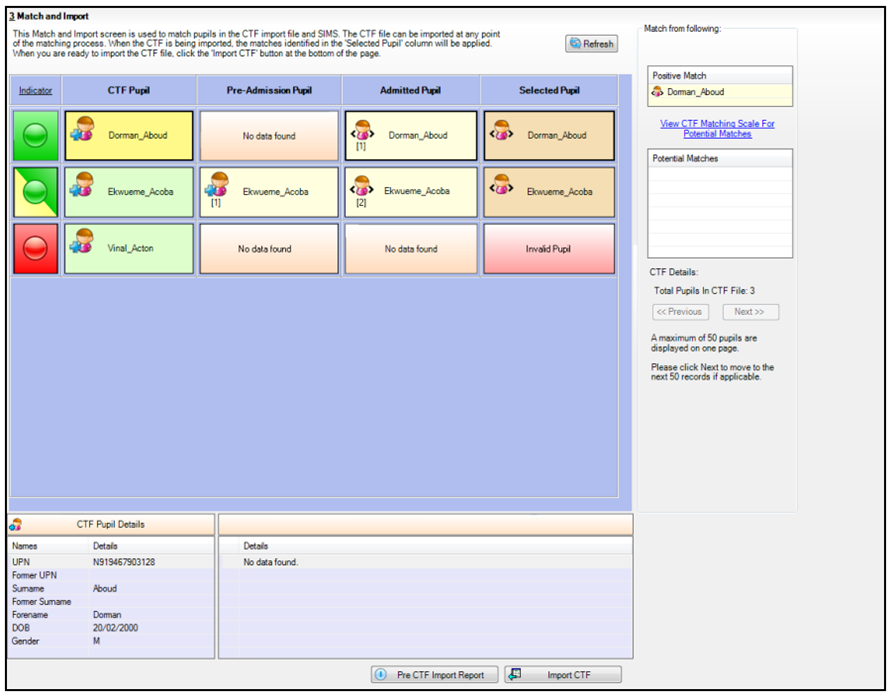
Did you know that there is a facility in SIMS to check the data within a CTF before you import? The CTF Matching Screen allows schools to compare the data in the CTF with existing data in SIMS, and this helps to identify and therefore resolve any discrepancies or conflicts before importing the data:
Updating Pay Awards in Bulk
We have a helpsheet and a video available on our Customer Portal to help with this task. You can update the pay awards in bulk, and this will update all contracts automatically. You can find them both here.
For schools who link FMS and SIMS for Salary Projections within FMS, these will need to be done in order for calculations to display correctly.
Census Dry Run
You can start these as soon as you like in SIMS. Make use of the bulk update tool to check and amend pupil data first. This is available under Routines | Pupil | Bulk Update. You can update lots of fields in here that the Census will pick up, which will save you lots of time later. We have a Helpsheet on the portal to help with this and you can access it here.
Consolidated Workstation Patch 3 - New Attendance Functionality
ESS have some new functionality for Unauthorised Absence Alerts that can be activated and customised within schools to identify when a learner hits a defined parameter of unauthorised absence over a set period of time.
This new functionality can be found and activated under Focus | Alerts | Setup Reminders | Unauthorised Absence Alerts. The functionality defaults to 10 occurrences of unauthorised absence over a 10 school week period but these parameters can be adjusted should a school want to do so.
Calculations
No of Unauthorised Absences
This is the calculated number of unauthorised absences in the AM / PM settings based on the statistical meaning of the attendance code.
No of Weeks
The calculation for the number of School weeks is defined as any period of seven days, beginning on a Monday, in which the school meets for at least one session.
The DfE’s 10 in 10 Unauthorised Absence Monitoring
Further to the introduction of the new regulations surrounding the monitoring of unauthorised absence and the issuing of penalty notices for schools in England, the new functionality has default values to trigger an alert when activated to identify when a learner has hit 10 unauthorised absences over a 10 school week period. As with other regions, schools can adjust these values to alert sooner than the 10 instances over 10 weeks to identify and act earlier.
Activating the new functionality
To activate the new Unauthorised Absence Alert functionality schools will need to apply the Summer 2024 Consolidated Workstation Patch 3. This CWSP3 has been been released to all of our schools.
Pupil Premium File from GIAP
We have a helpsheet on our customer portal to guide you through this process, which you can find here.
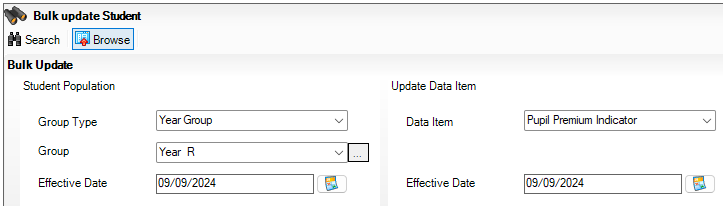
When importing, you can set this to put the tick in your ‘Pupil Premium Indicator’ box, but if you prefer to do this manually, or have received the updated list for your new Reception/Year 7 FSM entitlements, as confirmed by your Local Authority, you can bulk update the Pupil Premium Indicator for those children (as well as any Service children or Post Looked After children who are also confirmed) via Routines | Pupil | Bulk Update. Choose ‘Year Group’ from the Group Type, Year 7 (or Reception) from the Group and for the Data Item on the right, choose ‘Pupil Premium Indicator’ and then Search:
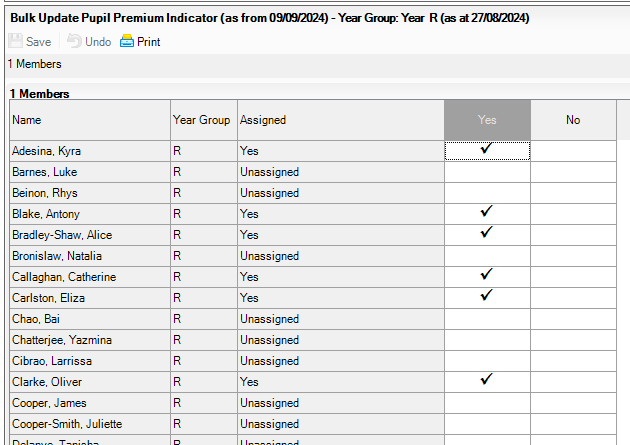
Tick the pupils who need it and then Save:
PLEASE BE AWARE THAT THE TICK IN THIS BOX DOES NOT GENERATE YOUR PUPIL PREMIUM GRANT VIA THE AUTUMN CENSUS – THIS TICK IS FOR REPORTING PURPOSES ONLY. IF YOU NEED MORE ASSISTANCE WITH THIS, PLEASE CALL US OR LOG A CALL.
SIMS Next Gen
SIMS Next Generation provides a collection of new browser-based modules that allow your staff to use SIMS on any capable device. Once your school is onboarded you can roll out each of the modules to your teams at your own pace, as well as review and adopt new modules as they are released. You can see what’s currently available, and what’s due imminently here.
If you like the look of this, ESS have put this guide together to help you through the initial setup (onboarding videos can also be found here). The onboarding process only needs to be completed once for the whole school and then you are ready to go!
The onboarding and data preparation tasks can be completed simultaneously and are managed by different audiences. Our colleagues here at School ICT are working with schools to carryout onboarding and data preparation tasks, so please get in touch via helpdesk@schoolicts.co.uk if you require support with this process.
SIMS Next Gen Showcase
Sims Next Gen – Now Live! If you’d like to see a Showcase of SIMS Next Gen, please join us on 27th Sept 2024 for a sneaky peak at what’s coming for early 2025. You can find more details and also register for the event on our website via this link: https://www.schoolicts.co.uk/events/sims-next-gen-999/?occurrence=2024-09-27
Developed for teachers
Statutory Attendance Register
Teachers can take session attendance registers anywhere, on any device, at any time. It’s quick and efficient and ensures pupil safety.
Lesson Attendance Register
Teachers can also complete their lesson registers anywhere. Save time, ensure the safety of pupils, and get back to teaching.
My Markbook
Make monitoring student progress easy with a single tool to record the outcomes of tests, observations, evaluations, or skill competencies in one location.
Fire Register
Ensure all students are evacuated safely in the event of a fire using our new online evacuation register.
Teacher Homepage
A personalised homepage for teachers, giving you direct access to the most frequent tasks like taking the register, looking up a class, and checking your timetable.
Online Marksheets
A quick and easy way to present data drop marksheets in SIMS Next Gen. Teachers can transfer ongoing data from their Markbooks to their Marksheets to report to parents.
Also coming soon:
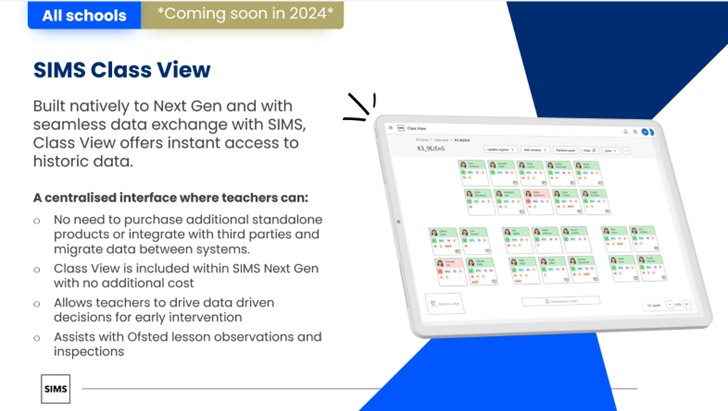
SIMS Class View
New FMS Newsfeed
When you log into FMS after the recent upgrade, you’ll notice that you now have a Newsfeed, like SIMS does:
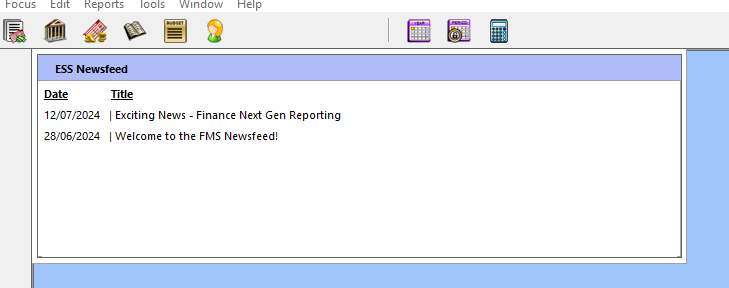
To read the article, simply double-click on the link and it will take you to the relevant feed on the ESS website. ESS will be updating it regularly, so you’ll see the very latest information on plans to redevelop the finance solution.
There will also be items which will help you broaden your knowledge of FMS.
Highlights:
– Key information on ESS’s plans to redevelop FMS6
– Latest updates to FMS6 including release notes
– Spotlight on the most useful areas of FMS6
It won’t affect anything else in FMS and you can continue to use the rest of it as usual.
Finance Next Gen
Finance Next Gen is coming!
You can see more about it by clicking on this link: https://www.ess-sims.co.uk/products/sims-financial-management-system-fms#find-out-more
FNG Reporting – view the available reports here – https://customer.support-ess.com/csm?sys_kb_id=254aefd283ba4214b20cc2c8beaad3ea&id=kb_article_view&sysparm_rank=6&sysparm_tsqueryId=544397d9fbc41e945a34ff40aeefdc0d
Did you know? How to Set a Reminder for Unauthorised Absences on SIMS Home Page
You can now set a reminder for Unauthorised Absences on the SIMS Homepage!
You should be on the Summer 2024 upgrade (7.218), and if you’ve applied Consolidated Workstation Patch 3, then this facility will be turned on. You can set it up via Focus | Alerts | Set Up Reminders.
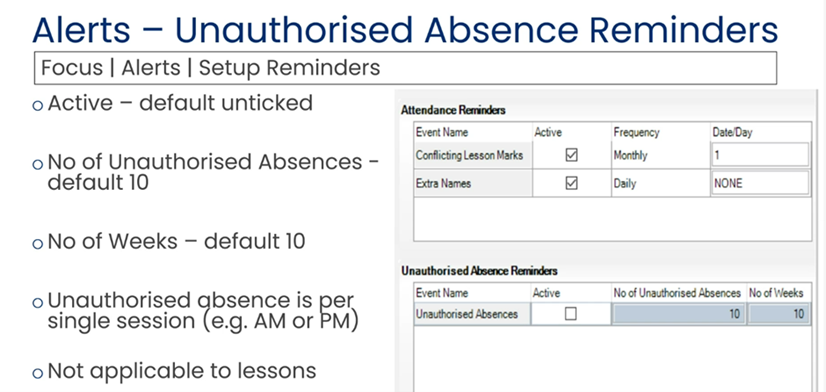
You will need to tick the ‘Active’ box but once set up this will display on your SIMS homepage:
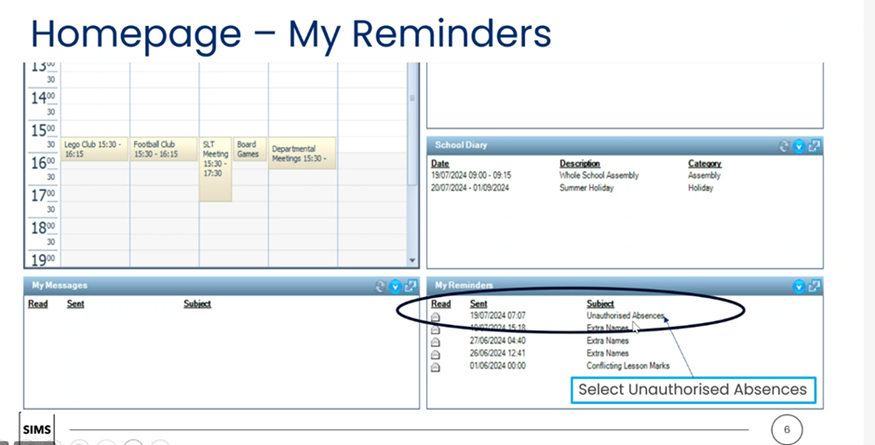
This isn’t in the reporting dictionary yet, but will be included in the Autumn Release.

New Attendance Codes
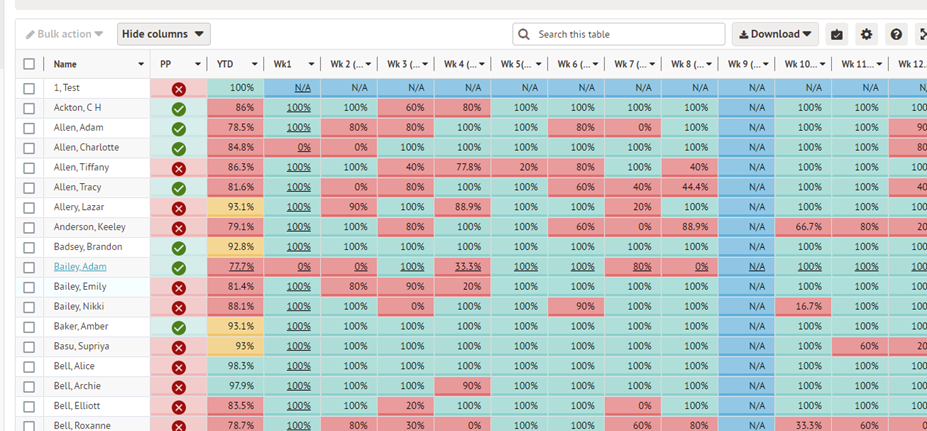
The new attendance codes have been set up in Arbor and should be showing for you. For the schools who like and use our Weekly Attendance Reports, you can find the updated versions on our customer portal here:
September Tasks
We have guidance on September tasks on our portal via this link: https://halo.transforming-learning.co.uk/portal/article?id=712&showmenu=false
This is aimed at both primary and secondary schools, so please make sure you read it carefully as some of the tasks may not apply to your phase of education.
School Photographs
You can bulk upload photos of students and staff directly to Arbor from files located on your computer. If you have photographers come in to take your photos, you’ll need to ask them to name the files with one of the identifiers found here in this article. This ensures the photos can be matched to the correct students. Full details can be found here.
Pupil Premium File from GIAP
Reminder! Download your Pupil Premium file for 2024-25 from Get Information About Pupils, and import it into Arbor via Students| Demographics | Pupil Premium recipients. We have a help sheet on our customer portal to guide you through this process, which you can find here.
Logging Absences on Parent Portal and Arbor App
Parents can now log same-day absences for their children using the Parent Portal and Arbor App. School staff will then approve or reject the absence. Once approved, it will be visible in the Attendance tab. Absence requests cannot be edited, only deleted and recreated if changes are needed, and approved absences cannot be deleted.
To allow access in the portal for reporting absences go to Students/Parents & Guardians/Parent Portal Settings.
In the Attendance section select Absences and select Yes, allow parents to log student absences.

This will then make this feature available in the portal.
How Parent Access this feature
When logged in as a parent/Guardian select Attendance from the Quick Actions menu

Select Log Absence from the top right hand corner.

Enter the start and end time and reason for absence

Select Log Absence.
Dealing with absences logged via the parent Portal
Any messages reporting absences on the day will populate in the planned absence area of Arbor. To view and deal with any messages submitted go to Students/Attendance/Absentees/Planned Absence.

Select the Pending Absence Records Tab.
All submitted absence records will be displayed. To update the record, select the absence to open the Absence Note Slide over.

Amend the Mark as required and the times submitted and Accept the Absence – any notes submitted can also be amended or added to, as necessary.
It is also possible to pin the absence to the top of the student’s profile which will remain there until the end of the absence.
The absence can also be rejected and the reason recorded.
Once accepted the absence will move into the Planned absence section and the marks will be updated.

For school staff looking to use this feature, see this Arbor article, and we have also created a Helpsheet for this which you can find here.
Housekeeping in Preparation for the Autumn Census
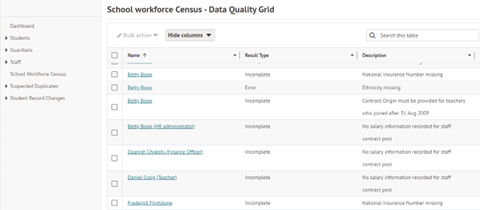
September is a great time to carry out those last housekeeping tasks in preparation for the Autumn census and School workforce census and a great place to start is the Data Quality Dashboard.
Particularly the School Workforce census panel: –
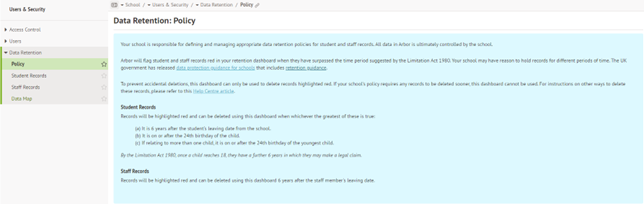
And checking Users & Security and the Data Retention section: –

Guidance for the New Term
As you start the new term remember that full guidance for any tasks required can be found by opening the help centre in the top right of your screen once in ScholarPack.
A link for the help centre is here:
https://support.scholarpack.com/hc/en-gb
The knowledge base contains many articles for migration/onboarding, admin, registers, students, attendance, reporting, staff, clubs and intervention, meals, assessment, comms and the parent app, census and year end. There is a full section on admissions and reasons for a whole host of issues relating to admissions which is very relevant at this time of year. A link is provided here:
https://support.scholarpack.com/hc/en-gb/categories/6079136622621-Students
For any issues relating to staff the guidance can be found here:
https://support.scholarpack.com/hc/en-gb/categories/9107422906141-Staff
For information regarding the forthcoming Autumn census the following link provides relevant help articles:
https://support.scholarpack.com/hc/en-gb/categories/6079131370013-Census

Known Issue
Known Issue – Manage Attendance only displaying one year group
Bromcom are currently experiencing an issue on the Manage Attendance page where only a single year group is displayed at a time, with no option to select a different year group.
This occurs when choosing Whole School under View By or when selecting Groups that include students from multiple year groups, such as (V) Boys. We are prioritising a fix for this problem.
As a workaround, please use the Groups option on the Manage Attendance page and select only those groups that consist of students from a single year group, such as specific Year Groups or Tutor Groups.
There is a separate issue where the search is also not functioning as expected, and this is also being looked at by Bromcom.
Update on Performance Issues
Update issued by Bromcom on Performance Issues on 02/09/2024
“Having worked together with Microsoft over the last 72 hours, Bromcom can now confirm full allocation of our Azure instances which completed around 01:45 this morning, and their DevOps team have also completed the necessary configuration work to add these to our platform.
The result of this work means they are at their required capacity to meet the forecast demand for Bromcom services as schools return fully this week. Bromcom have apologised for any impact to schools with interruptions to services during the first few days. They will continue to work with Microsoft to understand the reasons behind the UK Azure issues on Monday and the issues with assigning compute capacity on Tuesday”.
Daily Q&A Drop in Sessions
Bromcom will be hosting a daily drop -in session between 9-11am every day for the next 2 weeks.
Join the call via the link below:
Drop-In – Attendance Codes on 12th September 2pm
Microsoft Teams
Bromcom are hosting sessions relating to Attendance Code changes and
This session also repeats on Thursday 12th September 2pm.
Bromcom Back To School Drop-In Session – 3rd Party Integrations
Microsoft Teams
Bromcom are hosting a session relating to 3rd Party integration
This session also repeats on 13/09/2024 at 10am on the same link
Bromcom Back To School Drop-In Session – Seating Plans
Microsoft Teams
Bromcom are hosting a session around Seating Plans
This session also repeats 05/09/2024 & 12/09/2024 at 10am on the same link
Bromcom Back To School Drop-In – Clubs and Trips (Including Wrap-Around Care)
Microsoft Teams
Bromcom are hosting a session around Clubs and queries that ma have arisen since your return to school
This session is on 11/09/2024 at 10am
Updated Items in Bromcom
Attendance – CTF Export and CTF Attendance updated for 24/25 Attendance Codes/Subcodes
Students > Student List > Actions > CTF Export > Export type = Internal data transfer and General
The CTF Export has been updated to support the new Attendance Subcodes for 2024/2025.
The following changes have been implemented:
- The CTF Export version number has been updated to 24.0
- The CTF Export will now include the new 2 character Attendance Subcodes:
-
- C0, C1, C2 – Authorised Absent
-
- J1 – Authorised Absent
-
- Y1, Y2, Y3, Y4, Y5, Y6, Y7 – Cancelled
Students > Student Details > Enrolment > School History > CTF Attendance
The CTF Attendance has been updated to support the new attendance codes/subcodes for 2024/2025.
The following changes have been implemented:
- The CTF Attendance version number has been updated to 24.0
- The CTF Attendance popup will now include the new Attendance Codes and Subcodes and they will be represented in the following columns in the popup:
-
-
- C0, C1, C2, J1 = Possible and Authorised column
-
-
-
- K = Possible column
-
Attendance – Change to Attendance Code E description
Config > Attendance > Attendance Codes
For the Academic Year 24/25 onwards, as a result of an update to the England CBDS database, the Attendance Code E description has been amended to:
- Code E – Excluded (no alternative provision made)
Attendance codes not available on registers
After the recent update, some schools have noticed certain codes are no longer available via the registers. These can be amended to enable this function using the “enable / disable marks for Teacher registers”
https://docs.bromcom.com/knowledge-base/how-to-create-manage-attendance-codes-marks/
Autumn Census
Census – School Census for Autumn 2024
Modules > Census > School
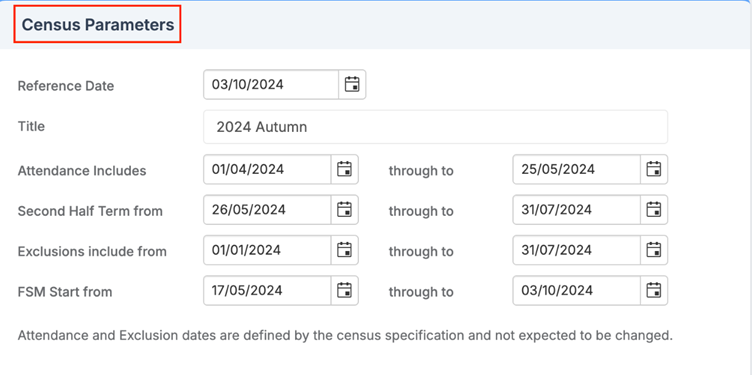
The School Census for Autumn 2024 has been updated in line with the DfE. When clicking New for the Autumn term for year 2024, the user will see the updated School Census page with the relevant dates.

Note: The dates in the Census Parameters panel have been reordered in response to customer feedback.
Timetable Scheduling
Timetable – Scheduling: Timetable Specifications enhancements
Modules > wTimetable > Scheduling > Timetable Specifications
The following updates have been made to the Timetable Specifications popup in the Blocks on days Rules to improve the balancing of the sessions:
- The Balance across the cycle (Week1 – Week2) rule has been replaced with Balance across the cycle so that users can balance the block across the cycle evenly whether it is one week or more.
- The One period day rule has been removed as a result of the above so that users have more flexibility when assigning multiple Periods for a Subject within a single day.
Note: For users who have previously configured using the One period per day rule, the system will delete those rules.

Web Wednesdays
Don’t forget to check out Web Wednesdays for top tips on a variety of topics.
Please go to the Bromcom Community website and sign in.

Completed Year End and Need to Start the New Academic Year?
This article covers the steps to complete the start of the new academic year
Starting the new academic year
The following actions needs to be taken. It is possible you completed some of these during or after you completed Year End but it is worth checking them.
Checking and updating the school diary – https://help.integris-education.com/updating-the-school-diary
Moving admission students to the current roll – https://help.integris-education.com/to_move_admissions_students_onto_the_current_roll
Adding new staff – https://help.integris-education.com/adding-a-staff-record
Checking the Attendance Settings – https://help.integris-education.com/updating-the-year-group-attendance-settings
Assigning staff to classes – https://help.integris-education.com/linking-or-removing-a-teacher-from-a-class
Updating Last Years Nursery Students
If a student has been in a Nursery class and has now moved to Reception you may need to change their FTE and Part Time Status and also remove the designated nursery class tick (used by census). For speed this can be done in Speed Edit.
- From the Modules menu choose Administration, Speed Edit.The Speed Edit screen is displayed.
- From the Area drop-down list selectFTE and Part Time Status.
- Click Find (top-right option). The ‘Student Find – General Search’ window is displayed.
- From theYear Group drop-down choose Reception. Click Find.
- Click Select and then Yes to retrieve all students in Reception onto the Speed Edit screen.
- Select all the students that will be attending school full-time, using the Ctrl key to select multiple students. It is expected that Reception students will attend full time but you may have individuals who may start out as Part Time.
- Type 0 in the New Value field and click Apply Changes.
- Click Save and then Yes to confirm.
- Remaining in the Speed Edit screen, select Student in Designated Nursery Class from the Area dropdown.
- Select all the students on the screen (regardless of whether they are full time or part time)
- Untick the New Value tick box and click Apply Changes.
- Click Save and then Yes to confirm.
- Click Exit to close the Speed Edit window
Pupil Census
The Autumn Census is on 3rd October 2024. Documentation will be made available to schools on the Customer Portal as soon as Integris is updated.
Requesting Information from New Parents and Carers
See our new Digital form information at Digital new student forms

New Training Course Schedule
As the new year begins, we know that a lot of schools will have new staff or staff who are changing their role within school. With this in mind please see the scheduled training courses for the first few weeks of the new academic year below, and don’t forget our Distance Learning courses too! You can access the full list of DL courses here and you have access to the DL course for 12 months from date of purchase, so if you need to check/re-check anything, you can just log back in and re-watch the video during that time. The course content and the price are the same as the ‘live’ courses, but you can work through each course at your own pace. They can also work well if releasing a staff member for the duration of a live course is difficult. If you’re not sure, why don’t you try our free ‘Try before you buy’ SIMS Housekeeping Course , or our free Arbor Business Roles & Permissions Course.
If you would like to book onto the training sessions below, you can do so by clicking on the link for the relevant course, or to see the full list of courses, you can click here.
| SIMS Administrator New Office User Primary | Monday 16th September (Half Day) | https://www.schoolicts.co.uk/events/new-office-user-primary-online/ |
| SIMS Administrator New Office User Secondary | Tuesday 17th September (Half Day) | https://www.schoolicts.co.uk/events/new-office-user-secondary-online/ |
| SIMS Preparing for P16 Autumn Census | Wednesday 18th September (Full Day) | https://www.schoolicts.co.uk/events/post16-census-online/ |
| Arbor New Office User |
Wednesday 18th September (Half Day)
|
https://www.schoolicts.co.uk/events/arbor-new-office-user-primary/ |
| SIMS Cover | Thursday 19th September (Full Day) | https://www.schoolicts.co.uk/events/cover-online/ |
| SIMS Primary – Autumn Census | Friday 20th September (Half Day) | https://www.schoolicts.co.uk/events/autumn-census-primary-online/ |
| SIMS Personnel & Personnel Reporting | Monday 23rd September (Full Day) | https://www.schoolicts.co.uk/events/personnel-online/ |
| Bromcom Census Combined (not P16 ) | Monday 23rd September (Half Day) | https://www.schoolicts.co.uk/events/bromcom-census-training-893/ |
| SIMS Secondary Autumn Census | Tuesday 24th September (Half Day) | https://www.schoolicts.co.uk/events/autumn-census-secondary-online/ |
| Arbor School Census Combined (Primary and Secondary) | Tuesday 24th September (Half Day) | https://www.schoolicts.co.uk/events/arbor-census-training/ |
| Arbor Personnel & Basic Analysis | Wednesday 25th September (Half Day) | https://www.schoolicts.co.uk/events/arbor-staff-and-basic-analysis/ |
| Arbor Preparing for P16 Census | Thursday 26th September (Half Day) | https://www.schoolicts.co.uk/events/arbor-preparing-for-post-16-census/ |
| Bromcom Preparing for P16 Census | Thursday 26th September (Half Day) | https://www.schoolicts.co.uk/events/bromcom-preparing-for-post-16-census-980/ |
| SIMS FMS New User – Central School (Non-Bank Account) . These are schools where the LA pay suppliers on the school’s behalf | Friday 27th September (Half Day) | https://www.schoolicts.co.uk/events/fms-basic-online-536/ |
| SIMS Primary – Autumn Census | Monday 30th September (Half Day) | https://www.schoolicts.co.uk/events/autumn-census-primary-online/ |
| SIMS Secondary – Autumn Census | Tuesday 1st October (Half Day) | https://www.schoolicts.co.uk/events/autumn-census-secondary-online/ |
| Arbor Examinations | Tuesday 8th October (Full Day) |
https://www.schoolicts.co.uk/events/arbor-examinations/
|
| SIMS Administrator Intermediate Office User – Primary | Tuesday 8th October (Half Day) | https://www.schoolicts.co.uk/events/new-office-user-primary-online-902-928/ |
| SIMS – An Administrators Guide to NOVA | Wednesday 9th October (Half Day) | https://www.schoolicts.co.uk/events/admin-guide-maintaining-the-timetable-online/ |
| SIMS FMS New User – Bank Account Schools (these are schools who pay their own bills/suppliers directly from their own bank account) | Wednesday 9th October (Half Day) | https://www.schoolicts.co.uk/events/fms-basic-online/ |
| Arbor Maintaining the Timetable and Course Structures | Thursday 10th October (Half Day) | https://www.schoolicts.co.uk/events/arbor-maintaining-the-timetable-and-course-structures-half-day/ |
| Bromcom School Workforce Census | Friday 11th October (Half Day) | https://www.schoolicts.co.uk/events/bromcom-school-workforce-census-half-day-941/ |

Analysing assessment data with helloData
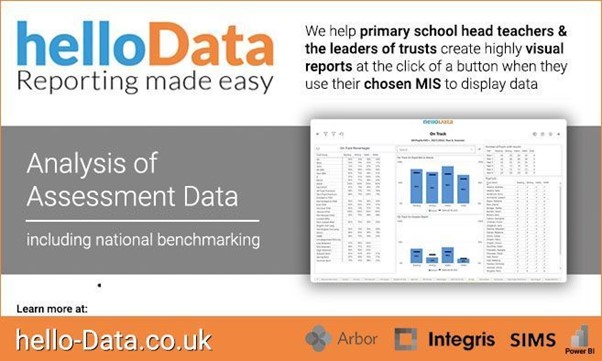
Release the power of your MIS with helloData analytics
Analysing assessment data is an essential part to improving pupil outcomes; it allows teachers and leaders to quickly respond to how individuals and groups are achieving.
Don’t let your data analysis be seen as a burden that takes your teachers and leaders away from other important aspects of running a school and teaching.
helloData transforms data analytics by addressing 4 key principles:
Fast time to data insights
- Ready-made analytics direct from the MIS
- Interactive display – drill down to pupil level data with one click
Accurate data
- Automatically extract data from your MIS without the need to transfer information from one system to the other
- Ensures that all the pupil groups, attendance and assessment data match the MIS
Flexibility and customisation of reports
- School-by-school comparison
- Whole school views by year and class
- Group analysis – choose which groups are on display
- Custom groups direct from the MIS
- Filter reports by key group, attendance, class, year and pupil
Access & reports for all stakeholders
- School view dashboard – with pupil level data
- Governor dashboard view – without pupil names
- Multi school dashboard – comparing schools and providing trust wide figures
- Your school / trust has full control over permissions and access for each person
Analysing data should never be a burden in terms of time, cost or most importantly understanding.
Our reports ensure that the visualisations are easy to understand, interactive, always up to date. Most importantly, they offer the ability to spot trends quickly, allowing more time for leaders and teachers to decide on next steps, whilst all the while utilising the MIS for data entry.
We’d love to hear from you, Leave us a Message or Book a Live Demo here.
Visit www.hello-data.co.uk for more information or contact us to arrange a personalised demonstration by emailing enquiries@hello-data.co.uk.
Did you know School ICT provide Data Management Services?
 Data Services from School ICT
Did you know School ICT provide Data Management Services?
- Struggling to recruit?
- Need additional support at key times e.g. Exams, End of Year, Census etc?
- Need cover for maternity or long term sick leave?
We received a fabulous testimonial from one of our Virtual Data Management customers recently, here’s what they had to say about this service: –
“We’ve been working with School ICT since January 2024, and they have been a revelation. The professionalism, quality and overall seamless communication has been there from the start. Andy, our Virtual Data Manager, is always on hand to support with all our data needs. From assessment point reports, target setting and the Census, this is just the tip of the iceberg, they can do everything. It’s like having someone in school as he responds so quickly and always finds solutions to what we need. The “Helpdesk Ticket System” creates a clear transparent pathway from the start of a request to the end and keep us informed of the progress of each request. Highly recommend School ICT.”
Paul Delaney – Assistant Headteacher, Deyes High School.
For further information on our Data Management services, or to discuss your requirements, please give us a call on: 0345 222 6802 or e-mail: enquiries@schoolicts.co.uk.

Are you in need of non-teaching staff ?
Working alongside School ICT, School ICT Resourcing place both permanent and temporary specialist support staff into schools.
Candidates are available from a days placement through to a whole school year. All candidates have completed the safer school recruitment process, and have enhanced DBS clearance.
For further information please call: 0113 372 0039 or visit: www.schoolictresourcing.co.uk
Are you due to retire? If yourself or any colleagues are retiring soon, and would consider working on a temporary or ad-hoc basis, please contact Helen who would love the opportunity to speak with you about the potential of adding you to our candidate list.